
CINE-201 · Lesson 9 of 12 · 25 min
In-camera processing: white balance, color, gamma and log
Between the sensor's raw numbers and the image on a monitor lies a sequence of processing steps that transform photon counts into pictures. These steps correct the sensor's quirks, interpret its color, balance it for the light source, and encode the huge range of brightness the sensor records into a form that can be stored efficiently and displayed attractively. Whether these steps happen in the camera before recording or later in post-production is one of the defining choices of a camera workflow. This lesson explains linear sensor data and why it must be encoded, white balance, color matrices and color spaces, display gamma and video encoding, logarithmic encoding, highlight roll-off, and the choice between raw, log and display-referred recording.
Linear light and why it must be encoded
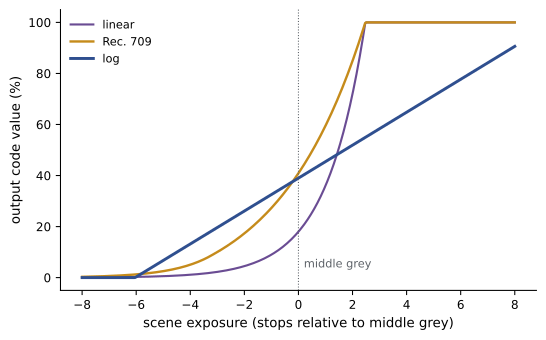
Sensor values are linear: twice as much light produces twice the value. Human perception is not; we perceive brightness roughly logarithmically, so each doubling of light looks like an equal step. In a linear encoding, half of all the available code values describe the brightest stop of the sensor's range, a quarter describe the next stop, and so on, leaving very few values for the shadows, where perception is most sensitive to steps. A 12-bit linear encoding with 4,096 levels spends 2,048 levels on the top stop and only a handful on the bottom stops. Storing linear data efficiently, without visible banding in the shadows, requires either many bits or a non-linear transfer function that allocates code values more evenly across the stops. This is the job of gamma and log curves.
Worked problem
Code values per stop
Compare how many code values describe each stop in (a) a 12-bit linear encoding of 12 stops and (b) a 10-bit log encoding that spreads 14 stops evenly.
Show solution
- (a) Linear, 4,096 levels: top stop 2,048 values, next 1,024, then 512, 256, 128 and so on; the 12th stop down has only 1 value.
- (b) Log, 1,024 levels over 14 stops: about 1,024 / 14 ≈ 73 values per stop throughout the range (ignoring the reserved ranges at each end).
- The log encoding uses fewer bits in total yet gives the shadows far more values than linear.
Answer: Linear wastes values on highlights and starves the shadows; log spreads about 73 values evenly across every stop.
White balance
Light sources differ in color: tungsten light is warm (orange), daylight is cooler (bluer), and many fluorescent and LED sources have green or magenta tints. Human vision adapts automatically so that white objects look white under most lighting; cameras must be told how to do the same. White balance scales the red, green and blue channels so that a neutral object, such as a gray card, produces equal values. Color temperature in kelvin (K) describes sources along the warm-to-cool axis: about 3200 K for tungsten studio lights, about 5600 K for daylight-balanced sources and daylight; a tint control adjusts along the green–magenta axis. Setting white balance to match the dominant source makes neutrals neutral; deliberately mismatching it creates warm or cool looks. In raw recording, white balance is metadata and can be changed later; in compressed recordings it is applied before encoding, and large corrections later degrade the image.
Color matrices and color spaces
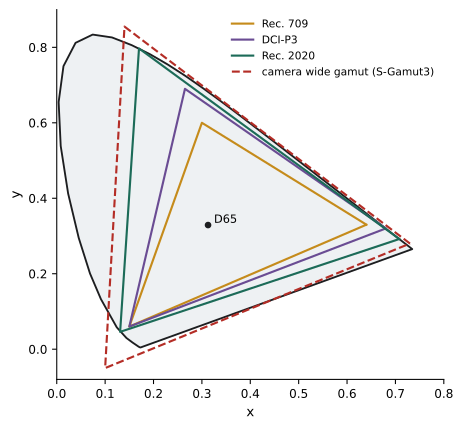
A sensor's red, green and blue channels do not correspond exactly to any standard color space, because its filters have their own spectral responses (Lesson 3). The camera applies a color matrix, a set of weights that mixes the channels, to transform sensor color into a defined color space. A color space is defined by its primaries, the most saturated red, green and blue it can represent, its white point and its transfer function. Common spaces include Rec. 709 (ITU-R BT.709), the HD television standard with a relatively small gamut; Rec. 2020 (BT.2020), the much wider gamut for UHD and HDR; DCI-P3, used in digital cinema projection; and camera manufacturers' wide-gamut spaces, such as ARRI Wide Gamut 4, Sony S-Gamut3, RED Wide Gamut RGB and Canon Cinema Gamut, which are designed to contain all the colors the camera can record. The Academy Color Encoding System (ACES) defines an even wider space used as a common working space across cameras (CINE-202 and CINE-310).
Display gamma and video encoding
Television standards encode images with a transfer function designed for display. Rec. 709 cameras apply an encoding curve, roughly a power function, that brightens the shadows and compresses the highlights, and displays apply a decoding gamma of about 2.4 (defined in ITU-R BT.1886), so that the overall result looks natural in a dim viewing environment. Images encoded this way are called display-referred: they are ready to view, with tonal decisions already made. Standard Rec. 709 encoding can hold only about six to seven stops before clipping highlights, far less than modern sensors capture, so cameras recording Rec. 709 either clip highlights or apply a "knee" that compresses the brightest stops. High dynamic range (HDR) standards, such as Perceptual Quantizer (PQ, SMPTE ST 2084) and Hybrid Log-Gamma (HLG, ARIB STD-B67), encode much wider brightness ranges for HDR displays (CINE-430).
Logarithmic encoding
Log encoding maps each stop of scene exposure to a roughly equal range of code values, as in the example above, so that a 10- or 12-bit file can carry the sensor's full dynamic range of 12 to 17 stops with fine gradation in every stop. Each manufacturer has its own log curves, matched to its sensors and gamuts: ARRI LogC (LogC3 and LogC4), Sony S-Log3, RED Log3G10, Canon Log 2 and Log 3, Panasonic V-Log and Blackmagic Film. Log footage looks flat, gray and desaturated on a normal monitor, because it is not designed for viewing; it is scene-referred, preserving information about scene light rather than making a finished picture. To view it normally, a transform or LUT converts it to a display space such as Rec. 709 or an HDR format. Log recording keeps creative decisions about contrast and color open for the colorist, at the cost of needing careful exposure and a managed color pipeline.
| Encoding | Referred to | Approximate stops held | Looks like on a normal monitor | Typical use |
|---|---|---|---|---|
| Linear raw | Sensor | Full sensor range | Very dark (needs processing) | Raw recording, VFX |
| Log (LogC, S-Log3, etc.) | Scene | 12–17 stops | Flat and gray | Cinema, drama, commercials |
| Rec. 709 with knee | Display | About 7–9 stops | Normal, contrasty | News, live, fast turnaround |
| HLG | Display (HDR) | Wide | Normal on SDR, enhanced on HDR | Live HDR broadcast |
| PQ | Display (HDR) | Very wide | Designed for HDR displays | HDR mastering and delivery |
Highlight roll-off
How a camera handles the brightest parts of an image, its highlight roll-off, strongly affects the perceived quality of an image. Film approached its maximum density gradually, so highlights faded softly into white with progressively less contrast and saturation, which many viewers find pleasing. Digital sensors clip abruptly when photosites reach full well, which can produce harsh edges around bright areas, color shifts as one channel clips before the others, and flat white patches with no texture. Camera processing, log curves and grading transforms shape the approach to clipping to imitate a gradual roll-off. Cameras known for graceful highlight handling are prized for faces near windows, sunsets, practical lamps and specular reflections, and testing how a camera handles overexposure is part of every serious camera test.
Raw, log or baked-in?
Productions choose among three broad recording approaches:
- Raw recording stores the sensor data before debayering, white balance and color transforms, typically with light compression. It gives the most flexibility in post-production and the best basis for visual effects, but produces large files and requires processing to view.
- Log recording stores debayered, color-matrixed images in a log curve and wide gamut, compressed with a codec such as ProRes. It preserves most of the sensor's range and color with smaller files and a simpler workflow than raw, with white balance and some other settings baked in.
- Display-referred recording, such as Rec. 709 with a look applied, produces finished-looking images straight from the camera, ideal for fast turnaround such as news, live events and some documentary, but with little latitude for correction.
Many productions record log or raw while monitoring through a LUT that shows the intended look, so that the director and crew see a representative image on set while the recording keeps maximum flexibility.
Looks and LUTs on set
A look-up table maps input values to output values and is the standard way of converting log images into a viewable picture on set. Technical LUTs perform standard conversions, such as from a camera's log and gamut to Rec. 709 or to an HDR format, while creative or show LUTs also apply a production's chosen look, such as particular contrast, color balance or film emulation. Show LUTs are usually designed in pre-production by the cinematographer and colorist, tested with the camera, and loaded into cameras, monitors and the DIT's system. Because the LUT affects what everyone sees but not what is recorded, the colorist can start from the same look in the final grade or refine it.
Matching white balance across cameras and lights
Color temperature settings are approximations, and different cameras interpret the same kelvin setting differently. Lights also vary: two LED fixtures labeled 5600 K may differ slightly in color, and daylight changes through the day. Camera teams use gray cards, color charts and color meters to measure and match lighting and cameras, and many productions choose a fixed white balance for the whole production, letting lighting and the grade create warmth or coolness, rather than balancing every shot automatically.
In-camera looks for fast turnaround
Some productions, such as live events, news, reality television and some commercials, need finished images directly from the camera. Cameras offer scene files or picture profiles that set gamma, knee, color matrix, detail and saturation, and some allow a creative LUT to be baked into the recording. These settings must be chosen carefully and tested, because there is little room for correction later. Broadcasters often provide standard camera settings so that cameras across a facility match.
Color management across a production
A production's color pipeline defines how footage moves from camera color spaces through editing, visual effects and grading to each deliverable. Common approaches include working directly in the camera's log and gamut with output transforms for each display; converting all cameras into a common wide-gamut working space, such as ACES or DaVinci Wide Gamut, which makes mixing cameras easier; or, for fast turnaround work, recording display-referred images. Choosing the pipeline early, documenting it, and testing it from camera to final deliverable, including HDR versions where required, prevents color mismatches and rework. The camera settings, LUTs and metadata decided in this course feed directly into that pipeline, and CINE-202 and CINE-310 develop it further.
Viewing environments
How images look depends on where they are viewed. A monitor in bright daylight on set makes images look darker and less contrasty than they are, while a dim grading suite reveals shadow detail and noise. Standards define reference viewing conditions for grading, such as specific ambient light levels and display brightness, so that decisions made in the suite translate to audiences' screens. On set, monitor hoods, dark tents and calibrated monitors help the camera team see images as they will appear in post-production.
Common mistakes
MistakeJudging exposure from flat log images by eye.
InsteadUse a monitoring LUT and exposure tools.
MistakeRelying on large white balance fixes in compressed footage.
InsteadSet white balance correctly at capture unless shooting raw.
MistakeRecording Rec. 709 for high-contrast drama.
InsteadUse log or raw to preserve dynamic range.
MistakeMixing log curves and gamuts without a color pipeline.
InsteadUse the correct transforms or ACES for each camera.
MistakeIgnoring highlight roll-off in camera tests.
InsteadTest overexposure on faces and practical lights.
Summary and key terms
- Sensor data is linear; perception is roughly logarithmic.
- Linear encoding wastes code values on highlights; gamma and log redistribute them.
- White balance scales channels so neutrals are neutral, set in kelvin and tint.
- Color matrices convert sensor color to defined color spaces such as Rec. 709 and wide gamuts.
- Rec. 709 is display-referred and holds limited dynamic range.
- Log is scene-referred, spreading 12–17 stops evenly; it looks flat until transformed.
- Raw, log and display-referred recording trade flexibility against simplicity.
- Linear encoding
- Values proportional to light.
- Transfer function
- Curve mapping light to code values.
- White balance
- Channel scaling to neutralize a light source.
- Color temperature
- Warm-to-cool color of light in kelvin.
- Color matrix
- Weights converting sensor color to a color space.
- Gamut
- Range of colors a space can represent.
- Rec. 709
- HD television color and encoding standard.
- Display-referred
- Encoded for a particular display.
- Scene-referred
- Encoded to represent scene light.
- Highlight roll-off
- Gradual approach of highlights to clipping.
Practice problems
Work each problem on paper first, then reveal the answer to check.
Why is linear encoding inefficient?
Show answer
Half the code values describe only the brightest stop.
Code values per stop for 12-bit log over 15 stops?
Show answer
About 273.
Color temperature of tungsten studio light?
Show answer
About 3200 K.
What does the tint control adjust?
Show answer
The green–magenta balance.
What does a color matrix do?
Show answer
Converts sensor RGB into a defined color space.
Which gamut is used for HD television?
Show answer
Rec. 709.
Roughly how many stops does Rec. 709 hold?
Show answer
About six to seven without a knee.
Why does log footage look flat?
Show answer
It is scene-referred and not intended for direct viewing.
What is highlight roll-off?
Show answer
The gradual approach of highlights to clipping.
Why monitor log through a LUT?
Show answer
To see a representative image while recording maximum range.
Lesson quiz · 5 questions
Score 60% or more to complete this lesson.
Create a free account to save your progress, take quizzes and earn a certificate.