
CINE-310 · Lesson 11 of 12 · 27 min
Conform, grading sessions and working with directors and cinematographers
Before a single shot is graded, the edited film must arrive in the grading system with the right media, at the right resolution, in the right order. This process, the conform, is technical and unforgiving; errors cost hours in the suite and can reach the final master. Once the film is conformed, grading proceeds through sessions with the cinematographer, director and others, each with its own rhythm, language and politics. This lesson covers timeline preparation and conform, handling VFX and versions, how grading sessions are planned and run, how to communicate about color, and how to manage notes, approvals and changes until the grade is locked.
From edit to grade
Editors usually cut with proxy media, smaller files with a dailies look baked in or applied as a LUT. When the picture is locked, or close to it, the editorial team exports a list describing every cut: an edit decision list (EDL), an XML or AAF file, or a project interchange format. The conform artist uses this list to rebuild the timeline in the grading system from the original camera files, often called OCF or camera originals, matching each event by reel name, source timecode and file name. The editorial team also provides a reference movie, an export of the offline edit, which is placed under the conformed timeline so that every shot can be compared with what the editor intended, catching wrong takes, missing frames and misplaced effects.
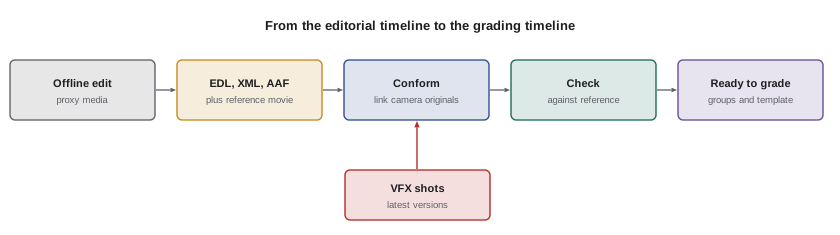
What the conform must get right
A correct conform reproduces every edit decision faithfully at full quality. Common problems include:
- Wrong source: a shot linked to the wrong take or file because reel names or timecode were duplicated.
- Timing errors: off-by-one-frame cuts, especially around frame-rate conversions, speed changes and dissolves.
- Repositions and resizes: the editor's scaling, cropping and stabilization may not translate correctly and must be rebuilt.
- Speed effects: time remaps and ramps may need to be recreated with optical flow or frame blending.
- Effects and titles: offline effects, temporary graphics and composites may need replacing with final elements.
- Missing media: shots from stock libraries, archive or other cameras that were not supplied.
Conform artists work through the timeline with the reference movie as a split-screen or difference overlay, which shows any mismatch as visible edges. Every event is checked before grading starts, because discovering a wrong take after it has been graded wastes the grade.
| Check | Method | Typical fix |
|---|---|---|
| Correct take | Compare with reference movie | Relink by timecode and file name |
| Frame accuracy | Difference overlay at each cut | Trim edit points |
| Reposition and scaling | Compare framing | Rebuild transforms at full resolution |
| Speed changes | Check motion and duration | Recreate retimes |
| VFX versions | Compare against VFX list | Import latest approved version |
| Missing shots | Search for offline media | Request from editorial or archive |
Frame counts and timecode
Conforming relies on timecode arithmetic. At 24 frames per second, one second is 24 frames and one minute 1,440 frames; at 23.976 frames per second, timecode still counts 24 frames per second, but real time runs about 0.1 % slower. A shot listed in an EDL with a source in point and out point has a duration equal to their difference in frames.
Here \(H\), \(M\), \(S\) and \(F\) are the hours, minutes, seconds and frames of the timecode and \(f\) is the timecode frame rate.
Worked problem
Checking a shot duration
An EDL lists a shot with source in 14:22:10:18 and source out 14:22:16:03 at 24 fps (non-drop). The conformed shot in the grading system lasts 133 frames. Is the conform correct?
Show solution
- Convert the seconds and frames, since hours and minutes are equal: in = 10 × 24 + 18 = 258; out = 16 × 24 + 3 = 387.
- Duration = 387 − 258 = 129 frames (the out point is exclusive in standard EDLs).
- The conformed shot is 133 frames, 4 frames too long.
Answer: No: the shot should be 129 frames. The conform is 4 frames long, probably because of a handle or a mis-set edit point, and must be trimmed.
VFX, versions and handles
Modern films contain hundreds or thousands of VFX shots, which arrive in stages: temporary versions for editorial, then successive versions for review, then finals. The grading timeline must be kept up to date with the latest approved version of each shot, typically EXR or DPX image sequences in a scene-linear or log encoding agreed with the VFX vendors. Colorists often grade plates before VFX work begins and send grades as CDLs or LUTs to vendors so that composites match the intended look, then regrade finals in context. Handles, extra frames before and after each shot, typically 8 to 24 frames, allow small trims and dissolves without re-requesting media. Version control is essential: a spreadsheet or production tracking system such as ShotGrid or ftrack records which version of each shot is in the grade.
Planning the grade
Grading schedules vary widely. A feature might have three to six weeks in the suite, a television episode a few days, a commercial one or two days. The schedule is typically divided into prep and conform; a first pass by the colorist alone or with the cinematographer; supervised sessions with the cinematographer; sessions with the director; studio or network review; HDR and SDR trims and deliverable passes; and final checks. Planning must allow for VFX finals arriving late, for changes in the edit after the grade has started, and for review sessions that generate notes requiring time to address.
Worked problem
Estimating grading time
A series has eight episodes of 45 minutes, each with about 700 shots. The colorist estimates 2.5 minutes per shot for the first pass, plus a supervised day per episode and half a day for trims. How many working days of 10 hours are needed?
Show solution
- First pass per episode: 700 × 2.5 = 1,750 minutes ≈ 29.2 hours ≈ 2.9 days.
- Plus supervised day and half-day trims: 2.9 + 1 + 0.5 = 4.4 days per episode.
- Eight episodes: 8 × 4.4 ≈ 35 days.
Answer: About 35 ten-hour days, before allowing for VFX changes, re-edits and review notes.
Sessions with the cinematographer
The cinematographer is usually the colorist's closest collaborator. Many cinematographers have contracts or agreements that give them the right to supervise the grade, and many productions build their schedule around the DP's availability. In sessions, the colorist and DP work through scenes, setting the look, balancing, and refining. Good sessions depend on trust: the colorist proposes and executes quickly, the DP responds, and both discuss options with reference to stills and tests. The colorist should know the footage before the session, having done a first pass, so that time with the DP is spent on decisions, not technical setup. Colorists also protect the DP's work: when other stakeholders later ask for changes, the colorist explains the original intent and, where possible, involves the DP.
Sessions with the director and others
The director usually has final creative say on the grade, subject to the producer and studio. Directors often speak in emotional or narrative terms rather than technical ones: "it should feel lonelier here", "I want her to look tired, not ill". The colorist translates these into adjustments and shows options. Producers, studios and networks may add notes about brightness, skin, brand colors or legibility, and VFX supervisors and editors may join for specific scenes. Managing the room, keeping sessions focused, recording decisions and handling disagreement diplomatically are part of the colorist's craft. When notes conflict, the colorist and producer clarify who has authority and avoid quietly reversing earlier approvals.
| Request | Possible technical meaning |
|---|---|
| "Make it feel warmer and safer" | Warmer highlights, softer contrast, gentle saturation |
| "More dramatic" | Deeper blacks, more contrast, darker edges |
| "She looks ill" | Skin toward yellow-green; move toward the skin line |
| "It feels too digital" | Harsh highlights, clean noise floor; add roll-off and texture |
| "Can we see more?" | Lift shadow detail or reduce vignette |
Notes, approvals and locking
Every session produces notes. A good system records notes by timecode or shot number, who gave them, what was changed and whether they are approved. Many facilities use review platforms such as Frame.io or Moxion, where notes are attached to frames, or simple shared spreadsheets. After each review, the colorist addresses notes, exports a new review file, and marks changes. The grade is locked when the director, DP and producer approve; changes after lock should be rare, documented and controlled, because they ripple into every deliverable. Saving project backups, exporting stills of approved scenes and keeping a record of LUTs, CDLs and versions protect the work if a project needs to be revisited for a remaster years later.
Re-edits and change lists
Edits often change after grading has begun. When the editor exports a new EDL or XML, the conform artist compares it with the current timeline and produces a change list: shots added, removed, trimmed or replaced. Grading systems can apply change lists automatically, preserving grades on unchanged shots and flagging new ones. New shots must then be graded and matched to their neighbors. Late changes are a major source of errors, so every change should be checked against a new reference movie, and the colorist should review affected scenes in sequence.
Preparing a project for the grade
Before the first supervised session, the colorist or assistant prepares the project so that time in the room is used for creative work. Preparation includes setting the project resolution, frame rate and color management; importing and conforming the timeline; checking the conform against the reference movie; organizing shots into groups by scene and camera; applying the show LUT or template; importing VFX plates and finals; and doing a first balance pass. It also includes simple checks that are often forgotten: whether all media are online, whether any shots are missing, whether the reference movie has burned-in timecode that matches the timeline, and whether the project is backed up. A well-prepared project lets the colorist start the first session by playing a balanced scene rather than relinking media.
Remote and distributed collaboration
Many productions now grade with collaborators in different cities or countries. The director may review remotely, the cinematographer may be shooting another film, and VFX vendors may be on another continent. Colorists rely on calibrated remote review streams, shared review platforms with frame-accurate notes, and clear version naming so that everyone is looking at the same thing. Time zones and network quality affect scheduling; a session with a director eight hours ahead may need to start early in the morning. Written summaries after each remote session are especially important, because the informal conversations that would happen in a shared room are lost.
Professional conduct in the suite
The grading suite is an intimate working space where directors and cinematographers make decisions about work they care deeply about. Colorists are expected to be discreet about unreleased material, respectful of everyone's ideas, calm under pressure and honest about technical limits. They should never criticize the photography to the director behind the cinematographer's back, nor promise results the footage cannot deliver. Confidentiality agreements often cover the content of a film until release, and security requirements from studios may restrict internet access, phones and personal devices in the suite.
| Session stage | Colorist focus |
|---|---|
| Before the session | Prepared, balanced scenes; notes reviewed |
| Opening | Agree goals and scenes for the day |
| During | Fast execution, options, clear language |
| Disagreement | Show alternatives; clarify authority |
| Closing | Summarize decisions and outstanding notes |
| After | Save, back up, export stills and send summary |
Common conform pitfalls with mixed frame rates
Projects increasingly mix frame rates: 23.976 fps drama footage, 29.97 fps archive or phone footage, 50 fps material from Europe, and high-frame-rate cameras used for slow motion. Each must be conformed at the correct speed and with the correct cadence. Footage shot at 59.94 fps for slow motion and played back at 23.976 fps will run at 40 % of real speed, which is intended; the same footage accidentally conformed with frame dropping will play at normal speed with judder. Interlaced archive footage needs deinterlacing, and pulldown cadences from old telecine transfers must be removed. Conform artists document every speed change and check motion against the reference movie, because these errors are easy to miss on still frames.
Common mistakes
MistakeStarting to grade before the conform is verified.
InsteadCheck every event against the reference movie.
MistakeLosing track of VFX versions.
InsteadUse a tracking sheet or system for every shot.
MistakeSpending supervised time on technical setup.
InsteadDo a first pass before the DP arrives.
MistakeQuietly reversing approved choices.
InsteadClarify authority and involve the DP.
MistakeUndocumented changes after lock.
InsteadRecord notes, approvals and versions.
Summary and key terms
- The conform rebuilds the edit from camera originals using EDL, XML or AAF.
- A reference movie checks every event for take, timing and framing.
- Timecode arithmetic verifies durations and edits.
- VFX versions, handles and tracking keep the timeline current.
- Grading schedules include passes, supervised sessions and trims.
- Colorists translate creative language into technical changes.
- Notes, approvals, locking and change lists keep the grade under control.
- Conform
- Rebuilding the edit in the grading system with original media.
- EDL
- Edit decision list describing cuts by timecode.
- Reference movie
- Export of the offline edit used for checking.
- Camera originals
- Original camera files (OCF).
- Handles
- Extra frames beyond each edit point.
- Change list
- List of differences between edit versions.
- Picture lock
- Point at which the edit is final.
- First pass
- Initial balance and match of the whole project.
- Supervised session
- Grading session attended by DP or director.
- Grade lock
- Approval of the final grade.
Practice problems
Work each problem on paper first, then reveal the answer to check.
What does the conform use to rebuild the edit?
Show answer
EDL, XML or AAF with camera originals.
What is the reference movie for?
Show answer
Checking every shot against the offline edit.
How many frames in one minute at 24 fps?
Show answer
1,440.
In 10:00:05:00, out 10:00:07:12 at 24 fps: duration?
Show answer
60 frames.
Why include handles?
Show answer
To allow trims and dissolves.
What format do VFX shots often use?
Show answer
EXR or DPX sequences.
Why do a first pass before the DP session?
Show answer
To spend supervised time on decisions.
What does "she looks ill" usually mean?
Show answer
Skin too yellow-green.
What is a change list?
Show answer
Differences between edit versions.
Name a review platform.
Show answer
Frame.io.
Lesson quiz · 5 questions
Score 60% or more to complete this lesson.
Create a free account to save your progress, take quizzes and earn a certificate.