
CMPUT-201 · Lesson 10 of 12 · 30 min
Files, the standard library and error handling
A program that cannot read and write files, or that falls over when a file is missing or contains bad data, is not much use. C's standard library provides a small, portable set of functions for input and output through streams, and a convention for reporting errors through return values and the variable errno. Unlike Python, C has no exceptions: every function that can fail tells you so through its return value, and if you do not check, the failure is silently ignored and the program carries on with garbage. This lesson covers the standard streams, opening, reading, writing and closing files, reading lines safely, converting text to numbers with full error checking, binary input and output, buffering, errno and perror, exit statuses, and the cleanup pattern that keeps error handling from leaking resources. CMPUT-174 lesson 10 covered files in Python; here the same ideas are done the C way.
Streams and the standard streams
The standard library represents an open file as a stream, accessed through a FILE * pointer, an opaque type of the kind lesson 9 described. Every program starts with three streams already open: stdin, standard input, normally the keyboard; stdout, standard output, normally the terminal; and stderr, standard error, also the terminal. The shell can redirect any of them: ./prog < in.txt reads stdin from a file, ./prog > out.txt sends stdout to a file, and ./prog 2> errors.txt sends stderr elsewhere. Writing normal results to stdout and messages about problems to stderr is an important Unix convention, because when output is piped into another program or saved to a file, error messages still reach the person at the terminal instead of corrupting the data.
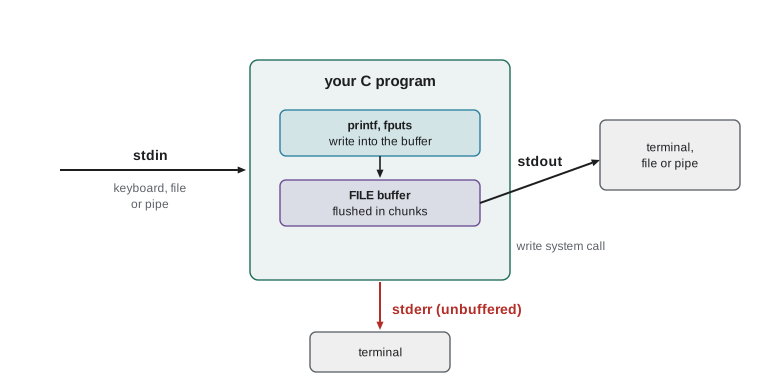
printf writes to stdout; fprintf(stream, ...) writes to any stream, so error messages are written with fprintf(stderr, ...). Similarly, fputs and fputc write strings and characters, and fgets and fgetc read them. getchar and putchar are shorthands for reading stdin and writing stdout a character at a time; note that fgetc returns an int, not a char, because it must be able to return every possible byte value plus the special value EOF, which signals end of file or an error.
Opening, reading and closing files
fopen(path, mode) opens a file and returns a FILE *, or NULL if it fails, for example because the file does not exist or permission is denied. The mode is a string: "r" to read, "w" to write (creating the file or truncating it to empty), "a" to append, and with a + to read and write; adding "b" requests binary mode, which matters on Windows but is harmless on Unix. Always check for NULL, and report the reason, which is available through errno, as the next section explains. When you have finished, fclose(fp) flushes any buffered output and releases the stream; the operating system limits how many files a process can have open, so long-running programs must close what they open.
The safe way to read text is a line at a time with fgets into a fixed buffer, which lesson 6 introduced. fgets returns NULL at end of file or on error, so the loop while (fgets(line, sizeof line, fp) != NULL) reads every line. Each line keeps its newline character if it fitted, so a common first step is to remove it with line[strcspn(line, "\n")] = '\0';, which finds the first newline (or the terminator) and cuts the string there. If a line is longer than the buffer, fgets returns it in pieces; robust programs detect this by checking whether the newline was found, and either reject the line or read the rest. POSIX systems also provide getline, which allocates a buffer as large as the line needs.
#include <stdio.h>
#include <string.h>
#include <errno.h>

int main(int argc, char *argv[]) {
    if (argc != 2) {
        fprintf(stderr, "usage: %s FILE\n", argv[0]);
        return 1;
    }
    FILE *fp = fopen(argv[1], "r");
    if (fp == NULL) {
        fprintf(stderr, "%s: cannot open %s: %s\n", argv[0], argv[1], strerror(errno));
        return 1;
    }
    char line[256];
    int lineno = 0;
    while (fgets(line, sizeof line, fp) != NULL) {
        lineno++;
        line[strcspn(line, "\n")] = '\0';            /* remove the newline */
        printf("%2d: [%s] (%zu chars)\n", lineno, line, strlen(line));
    }
    if (ferror(fp)) {
        fprintf(stderr, "read error on %s\n", argv[1]);
    }
    fclose(fp);
    return 0;
}$ gcc -std=c17 -Wall -Wextra lines.c -o prog $ ./prog marks.csv 1: [id,name,mark] (12 chars) 2: [1001,Amara,87] (13 chars) 3: [1002,Ben,91] (11 chars) 4: [1003,Chen,abc] (13 chars) 5: [1004,Dana,] (10 chars) 6: [1005,Eli,74] (11 chars)
#include <stdio.h>
#include <string.h>
#include <errno.h>

int main(void) {
    const char *path = "no-such-file.txt";
    FILE *fp = fopen(path, "r");
    if (fp == NULL) {
        fprintf(stderr, "cannot open %s: %s (errno %d)\n", path, strerror(errno), errno);
        perror(path);                       /* the same idea, shorter */
        return 1;
    }
    fclose(fp);
    return 0;
}cannot open no-such-file.txt: No such file or directory (errno 2) no-such-file.txt: No such file or directory (exit status 1)
errno, perror and strerror
When a library function fails, it usually returns a special value, such as NULL or -1 or EOF, and stores an error code in the global variable errno, declared in errno.h. The codes have names such as ENOENT (no such file or directory), EACCES (permission denied) and ERANGE (result out of range). strerror(errno) converts the code to a readable message, and perror(prefix) prints the prefix, a colon and the message to stderr. Two rules apply. First, errno is meaningful only immediately after a function has reported failure through its return value; successful calls may leave it with any value, so never test errno alone. Second, other calls, including printf, may change it, so save it in a local variable at once if you need it later.
Converting text to numbers safely
Text read from files, the keyboard or argv must be converted to numbers, and this is where many programs go wrong. The old atoi function returns 0 for "abc", for "0" and for an empty string, with no way to tell them apart, and its behavior on out-of-range values is undefined. Use strtol for integers and strtod for floating-point numbers instead. strtol(text, &end, 10) converts as much of text as forms a base-10 number and stores in end a pointer to the first character it did not use. If end equals text, there were no digits at all; if *end is not the terminator, there was trailing junk; and if errno was set to ERANGE, the value did not fit in a long. Checking all three takes a few lines, so it belongs in a small function.
#include <stdio.h>
#include <stdlib.h>
#include <errno.h>
#include <limits.h>
#include <stdbool.h>

/* Parse a whole string as an int in [lo, hi]. Returns true on success. */
static bool parse_int(const char *text, int lo, int hi, int *out) {
    char *end;
    errno = 0;
    long v = strtol(text, &end, 10);
    if (end == text) return false;               /* no digits */
    while (*end == ' ' || *end == '\t') end++;   /* allow trailing spaces */
    if (*end != '\0') return false;              /* trailing junk */
    if (errno == ERANGE || v < lo || v > hi) return false;
    *out = (int)v;
    return true;
}

int main(void) {
    const char *inputs[] = {"87", "-5", "  42 ", "12abc", "", "99999999999", "101"};
    for (size_t i = 0; i < sizeof inputs / sizeof inputs[0]; i++) {
        int mark;
        if (parse_int(inputs[i], 0, 100, &mark)) {
            printf("%-14s -> %d\n", inputs[i], mark);
        } else {
            printf("%-14s -> rejected\n", inputs[i]);
        }
    }
    printf("atoi gives %d, %d and %d for \"0\", \"abc\" and \"12abc\"\n",
           atoi("0"), atoi("abc"), atoi("12abc"));
    return 0;
}87 -> 87
-5 -> rejected
42 -> 42
12abc -> rejected
-> rejected
99999999999 -> rejected
101 -> rejected
atoi gives 0, 0 and 12 for "0", "abc" and "12abc"The last line shows why atoi is unsuitable for input: it returns 0 both for a genuine zero and for text with no digits, and silently ignores trailing junk, so a program using it cannot tell good input from bad. On a value too large for an int its behavior is undefined. scanf has similar problems: it returns the number of items successfully converted, which you must check, it leaves unconverted input in the stream, and %d on huge input is undefined. Reading a line with fgets and then parsing it with strtol is the robust pattern.
Putting it together: processing a CSV file
The next program reads the marks file from earlier, skips the header, parses each line into an ID, a name and a mark, rejects lines with missing or invalid fields while reporting them on stderr, and prints statistics for the valid records. It uses strtok to split a line on commas. strtok modifies the string it is given and keeps hidden state between calls, so it cannot be used on two strings at once or from two threads; POSIX's strtok_r and simple hand-written parsing avoid those problems, and it does not handle quoted fields that contain commas, which real CSV libraries do. For this simple, controlled format it is adequate.
#include <stdio.h>
#include <stdlib.h>
#include <string.h>
#include <errno.h>
#include <stdbool.h>

static bool parse_int(const char *text, long lo, long hi, long *out) {
    char *end;
    errno = 0;
    long v = strtol(text, &end, 10);
    if (end == text || *end != '\0' || errno == ERANGE || v < lo || v > hi) return false;
    *out = v;
    return true;
}

int main(void) {
    FILE *fp = fopen("marks.csv", "r");
    if (fp == NULL) { perror("marks.csv"); return EXIT_FAILURE; }
    char line[256];
    int lineno = 0, valid = 0, rejected = 0;
    long total = 0, best = -1;
    char best_name[64] = "";
    while (fgets(line, sizeof line, fp)) {
        lineno++;
        line[strcspn(line, "\r\n")] = '\0';
        if (lineno == 1) continue;                    /* header */
        char *id = strtok(line, ",");
        char *name = strtok(NULL, ",");
        char *mark = strtok(NULL, ",");
        long idv, markv;
        if (!id || !name || !mark || !parse_int(id, 1, 999999, &idv) || !parse_int(mark, 0, 100, &markv)) {
            fprintf(stderr, "line %d rejected\n", lineno);
            rejected++;
            continue;
        }
        valid++;
        total += markv;
        if (markv > best) {
            best = markv;
            snprintf(best_name, sizeof best_name, "%s", name);
        }
    }
    fclose(fp);
    if (valid == 0) { fprintf(stderr, "no valid records\n"); return EXIT_FAILURE; }
    printf("valid %d, rejected %d\n", valid, rejected);
    printf("average %.1f, best %ld (%s)\n", (double)total / valid, best, best_name);
    return EXIT_SUCCESS;
}valid 3, rejected 2 average 84.0, best 91 (Ben) line 4 rejected line 5 rejected
The listing shows what was written to standard output followed by what was written to standard error. At a terminal the two would be interleaved as the program ran; running ./marks 2> rejects.txt would leave only the summary on screen and put the two rejection messages in a file. The program returns EXIT_FAILURE, from stdlib.h, if nothing valid was found, so a shell script or Makefile calling it can detect the problem through its exit status, as lesson 12 shows.
Writing files and binary input and output
Writing text is printf's twin: fprintf(fp, ...) to a stream opened with "w" or "a". The check that is most often forgotten is on fclose: because output is buffered, a full disk or a network file system error may only be discovered when the buffer is finally written during fclose, which then returns EOF. A program that ignores fclose's result can report success after losing the data. For binary data, fwrite(ptr, size, count, fp) writes count items of size bytes each and returns how many it wrote, and fread is its mirror. Binary files are compact and fast, but, as lesson 8 explained, writing structs directly ties the file to one compiler's layout and byte order.
#include <stdio.h>
#include <stdint.h>
#include <stdlib.h>

int main(void) {
    int32_t readings[5] = {120, -45, 3000, 7, 0};
    FILE *out = fopen("readings.bin", "wb");
    if (out == NULL) { perror("readings.bin"); return EXIT_FAILURE; }
    size_t written = fwrite(readings, sizeof readings[0], 5, out);
    if (written != 5 || fclose(out) == EOF) {
        fprintf(stderr, "write failed\n");
        return EXIT_FAILURE;
    }

    int32_t back[5];
    FILE *in = fopen("readings.bin", "rb");
    if (in == NULL) { perror("readings.bin"); return EXIT_FAILURE; }
    size_t got = fread(back, sizeof back[0], 5, in);
    fclose(in);
    printf("wrote %zu and read back %zu values (%zu bytes):", written, got, got * sizeof back[0]);
    for (size_t i = 0; i < got; i++) printf(" %d", (int)back[i]);
    printf("\n");
    return EXIT_SUCCESS;
}wrote 5 and read back 5 values (20 bytes): 120 -45 3000 7 0
Buffering
Calling the operating system for every character would be very slow, so streams are buffered: output is collected in memory and written in chunks. stdout is line-buffered when it goes to a terminal, so each newline flushes it, but fully buffered when redirected to a file or pipe, so output may appear only when the buffer fills or the program exits normally. stderr is unbuffered, so messages appear at once. This explains a classic puzzle: a program that prints "starting" without a newline and then crashes may never show the message, because it was still in the buffer. fflush(stdout) forces buffered output to be written, which is why earlier lessons' crash demonstrations called it before the faulty line.
Cleaning up on errors
A function that opens files and allocates memory must release all of them on every path out, including every error path. Writing the cleanup at each return quickly becomes repetitive and error-prone. The widely accepted C solution, used throughout the Linux kernel, is a single exit point: on error, jump with goto to a cleanup label at the end of the function, where resources are released in reverse order of acquisition. Because free(NULL) does nothing and the code can check each FILE * before closing it, initializing every resource to NULL at the top makes the cleanup correct whichever step failed.
/* Copy the lines of src that contain needle into dst. Returns 0 on success, -1 on error. */
int filter_file(const char *src, const char *dst, const char *needle) {
    int status = -1;
    FILE *in = NULL, *out = NULL;
    char *line = NULL;

    in = fopen(src, "r");
    if (in == NULL) goto cleanup;
    out = fopen(dst, "w");
    if (out == NULL) goto cleanup;
    line = malloc(4096);
    if (line == NULL) goto cleanup;

    while (fgets(line, 4096, in) != NULL) {
        if (strstr(line, needle) != NULL && fputs(line, out) == EOF) goto cleanup;
    }
    if (ferror(in)) goto cleanup;
    status = 0;                       /* every step succeeded */

cleanup:
    free(line);
    if (out != NULL && fclose(out) == EOF) status = -1;
    if (in != NULL) fclose(in);
    return status;
}
Worked problem
Detecting a line that is too long
A program reads lines with char buf[16]; fgets(buf, sizeof buf, fp). One line in the file is "The quick brown fox\n" (19 characters plus the newline). What does the first fgets call store, how can the program tell the line was cut, and what should it do?
Show solution
- fgets reads at most sizeof buf - 1 = 15 characters and adds a terminator: buf holds "The quick brown".
- No newline was stored, and the file has not ended, so strchr(buf, '\n') == NULL and !feof(fp) shows the line was truncated.
- The next fgets call would return " fox\n", the rest of the same line, which a careless program would treat as a separate record.
- The program should either discard characters up to and including the next newline and report the long line as an error, or use a larger buffer or POSIX getline, which grows its buffer as needed.
Answer: It stores the first 15 characters; the missing newline reveals truncation, and the program should reject or fully read the rest of the line.
Common mistakes
MistakeNot checking whether fopen returned NULL.
InsteadCheck every fopen and report the file name and strerror(errno) on stderr.
MistakeUsing atoi to convert user input.
InsteadUse strtol with an end pointer and errno checks, and range-check the result.
MistakeStoring fgetc's result in a char and comparing it with EOF.
InsteadStore it in an int, so EOF can be distinguished from every byte value.
MistakeTesting errno without first checking the function's return value.
Insteaderrno is meaningful only after a function has reported failure.
MistakeIgnoring the return value of fclose on a file you wrote.
InsteadCheck it; a buffered write error may surface only then.
MistakeWriting error messages to stdout.
InsteadWrite them to stderr so they are not mixed into redirected output.
Summary and key terms
- Streams are accessed through FILE *; stdin, stdout and stderr are open at start and can be redirected by the shell.
- fopen returns NULL on failure; check it, report strerror(errno), and fclose every file you open.
- Read text with fgets into a sized buffer, strip the newline with strcspn, and detect over-long lines.
- Library functions report failure through return values, with details in errno, which is meaningful only after a failure.
- Convert text to numbers with strtol or strtod, checking for no digits, trailing junk and ERANGE.
- fread and fwrite move binary data and return item counts; fclose can reveal write errors.
- Output is buffered; use fflush when needed, and release resources on every path with the goto cleanup pattern.
- Stream
- A source or destination of data accessed through a FILE * pointer.
- Standard error
- The stream stderr, used for error messages and unbuffered by default.
- Redirection
- Connecting a program's standard streams to files using <, > and 2> in the shell.
- EOF
- A negative int constant returned to signal end of file or an error.
- errno
- A variable set by library functions to a code describing the most recent error.
- perror
- A function that prints a prefix and the message for the current errno to stderr.
- strtol
- A function that converts text to a long and reports where conversion stopped.
- Buffering
- Collecting input or output in memory to reduce the number of system calls.
- Exit status
- The integer a program returns to its parent process; 0 means success.
- Cleanup label
- A label at the end of a function where all resources are released on every path.
Practice problems
Work each problem on paper first, then reveal the answer to check.
Open data.txt for reading and report a failure properly.
Show answer
FILE *fp = fopen("data.txt", "r"); if (!fp) { perror("data.txt"); return EXIT_FAILURE; }
What is the difference between modes "w" and "a"?
Show answer
"w" truncates or creates the file; "a" appends to the end, creating it if necessary.
Remove a trailing newline from line in one statement.
Show answer
line[strcspn(line, "\n")] = '\0';
List the three checks needed after strtol(s, &end, 10).
Show answer
end == s means no digits; *end != '\0' means trailing junk; errno == ERANGE means out of range.
Why should error messages go to stderr?
Show answer
So they reach the user even when stdout is redirected or piped, and do not corrupt the output data.
A program prints "saving..." with no newline and then crashes. Why might the message not appear?
Show answer
It was still in stdout's buffer; add a newline or call fflush(stdout).
What does fread return, and how do you detect a short read?
Show answer
The number of items read; compare it with the number requested.
When is errno meaningful?
Show answer
Only immediately after a function has reported failure through its return value.
Why initialize all resources to NULL in a function that uses goto cleanup?
Show answer
So the cleanup code can safely free or close only what was actually acquired.
What exit status should a program return when its input file cannot be opened?
Show answer
A non-zero value such as EXIT_FAILURE.
Lesson quiz · 5 questions
Score 60% or more to complete this lesson.
Create a free account to save your progress, take quizzes and earn a certificate.