
CON-335 · Lesson 5 of 12 · 22 min
Look-ahead schedules in practice
The look-ahead schedule is the superintendent's main planning tool. It sits between the master schedule, which says what must be done by when, and the weekly work plan, which says what each crew will do next week. CON-410 described the look-ahead's place in the Last Planner System and the make-ready process it drives. This lesson is about the practical craft: how Dana's team actually builds the Larkspur Commons look-ahead each week, what level of detail it holds, how it is kept consistent with the master schedule and the takt plan, how it is shared and how it is used to make decisions.
What a look-ahead contains
A look-ahead is a list or bar chart of the tasks planned for the next several weeks, grouped by area and trade, with the constraints that must be removed before each task can start. It is more detailed than the master schedule and less detailed than the daily plan. On Larkspur Commons it covers six weeks, updated every week, so that each task is seen at least six times before it starts.
| Column | Content on the Larkspur Commons look-ahead |
|---|---|
| Task | Work described by trade and location, for example "Board level 4 west, suites 401 to 414 and corridor" |
| Zone or location | Zone code, such as L4W, or a named area such as "Stair 2" or "Retail unit C" |
| Trade and foreman | Subcontractor and the responsible foreman |
| Planned start and finish | Dates or week numbers, consistent with the takt plan and master schedule |
| Crew size | Number of workers the trade has agreed to provide |
| Constraints | Open items that must be cleared before the start, linked to the constraint log |
| Status | Ready, constrained, in progress, complete |
| Master schedule link | The master schedule activity the task belongs to, so progress can be rolled up |
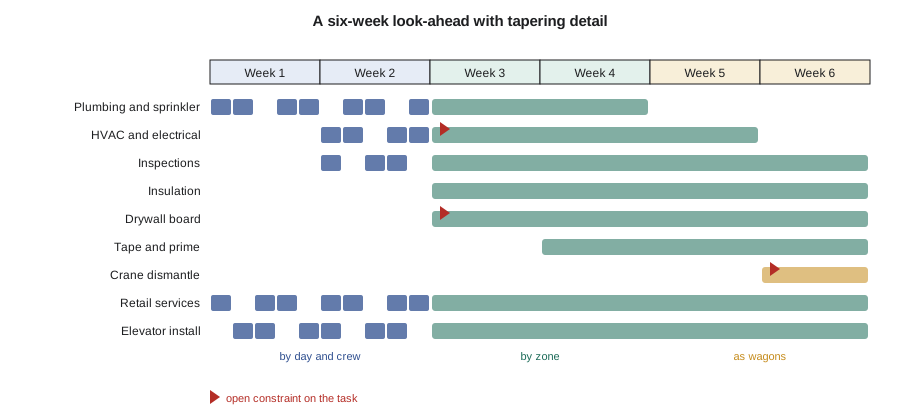
The detail decreases across the six weeks. Weeks one and two show every task by zone, crew and day where it matters. Weeks three and four show tasks by zone and trade. Weeks five and six may show only the wagons and the major one-off tasks, such as an elevator inspection or a crane dismantle. This tapering detail saves effort without losing visibility: the near weeks need precise plans, the far weeks need only enough to expose constraints.
Building the look-ahead each week
Omar prepares a draft look-ahead each Monday before the Tuesday coordination meeting. He follows the same steps every week, which keeps the process quick and consistent.
- Roll the window forward. Drop the week just finished, add a new week six and mark completed tasks.
- Pull new tasks from the takt plan and master schedule. Every wagon entering a new zone in the coming six weeks and every master schedule activity starting in the window appears as a task.
- Break tasks down. Tasks entering weeks one and two are broken down into the steps and locations the crews will actually work.
- Link constraints. Each task is checked against the constraint log, and new constraints are added (Lesson 6).
- Check consistency. The look-ahead's forecast finishes are compared with the master schedule and the takt plan; any slip is flagged.
- Issue the draft. The draft goes to the foremen a day before the meeting so they can mark changes.
At the Tuesday meeting, the foremen correct the draft: crew sizes they can actually provide, tasks that need to move, constraints the office did not know about. The corrected look-ahead is reissued that afternoon, dated, and posted on the plan board in the site office and at each floor's hoist landing.
Generating the look-ahead from the takt plan
Because the interiors follow a takt plan, most of the look-ahead can be generated automatically. Omar keeps a short script that reads the takt plan and lists, for any given week, the wagons that will be in each zone over the next six weeks. He then adds the one-off tasks by hand.
# Generate the interior part of the six-week look-ahead from the takt plan (illustrative)
zones = ["L3W", "L3E", "L4W", "L4E", "L5W", "L5E", "L6W", "L6E"]
wagons = ["Touch-up", "Plumb+spr", "HVAC+elec", "Insp+insul", "Board",
          "Tape+prime", "Cabinets", "Floor+tile", "Finish MEP", "Paint+clean"]
start_week = 3                     # the current week of the interior plan
for w in range(start_week, start_week + 6):
    tasks = []
    for zi, z in enumerate(zones):
        k = (w - 1) - zi           # wagon index in zone z during week w
        if 0 <= k < len(wagons):
            tasks.append(f"{wagons[k]} {z}")
    detail = "by day and crew" if w < start_week + 2 else ("by zone" if w < start_week + 4 else "as wagons")
    print(f"Week {w} ({detail}): " + "; ".join(tasks))
first_l6e = len(zones)               # the last zone receives its first wagon in week 8
print(f"Zone L6E first receives a wagon in week {first_l6e}: inside this window? {start_week <= first_l6e < start_week + 6}")Week 3 (by day and crew): HVAC+elec L3W; Plumb+spr L3E; Touch-up L4W Week 4 (by day and crew): Insp+insul L3W; HVAC+elec L3E; Plumb+spr L4W; Touch-up L4E Week 5 (by zone): Board L3W; Insp+insul L3E; HVAC+elec L4W; Plumb+spr L4E; Touch-up L5W Week 6 (by zone): Tape+prime L3W; Board L3E; Insp+insul L4W; HVAC+elec L4E; Plumb+spr L5W; Touch-up L5E Week 7 (as wagons): Cabinets L3W; Tape+prime L3E; Board L4W; Insp+insul L4E; HVAC+elec L5W; Plumb+spr L5E; Touch-up L6W Week 8 (as wagons): Floor+tile L3W; Cabinets L3E; Tape+prime L4W; Board L4E; Insp+insul L5W; HVAC+elec L5E; Plumb+spr L6W; Touch-up L6E Zone L6E first receives a wagon in week 8: inside this window? True
The script reproduces the takt plan's diagonal pattern as a weekly list. Omar pastes it into the look-ahead and adds what the takt plan does not show: the crane dismantle in week 6, the corridor ceiling ductwork that runs across both zones of a floor, the elevator installer's progress in the shafts and the retail unit services. Automating the repetitive part leaves more time for the thinking that cannot be automated.
The right level of detail
A common question is how detailed the near weeks should be. Too little detail and the look-ahead hides problems; too much and it becomes a document nobody reads or maintains. Dana's guideline is that a task in weeks one and two should be small enough that one crew can complete it in a week or less, specific enough that a foreman can tell whether it is finished, and located precisely enough that two trades can tell whether they will be in each other's way.
| Too vague | About right for weeks one and two | Too detailed for the look-ahead |
|---|---|---|
| Level 4 rough-in | Plumbing rough-in L4W, suites 401 to 407, Monday to Wednesday | Install P-trap in suite 403 bathroom |
| Drywall | Board L3E suites 415 to 428 and corridor ceiling, crew of 8 | Hang sheet 37 on the bedroom wall of suite 416 |
| Inspections | Rough-in inspection L4W booked Thursday a.m.; pre-inspection Wednesday p.m. | Inspector arrives 8:15 and starts in suite 401 |
The most detailed level, individual installation steps, belongs in the foreman's own daily plan or in an installation work package (Lesson 7), not in the general contractor's look-ahead.
Keeping the look-ahead consistent with the master schedule
Every week, Omar compares the look-ahead's forecast with the master schedule's milestones. If the look-ahead shows that level 3 will be ready for turnover two days later than the master schedule's milestone, that is a signal to act now, while there are still options. The comparison is quick if each look-ahead task is linked to a master schedule activity, as the last column of the look-ahead allows.
# Compare look-ahead forecasts with master schedule milestones (working days, illustrative)
milestones = {  # milestone: (master schedule date, look-ahead forecast)
    "Roof dried in":               (247, 249),
    "Tower crane removed":         (272, 272),
    "Level 3 rough-in inspected":  (262, 263),
    "Level 3 drywall complete":    (282, 286),
    "Elevator 1 in service":       (302, 302),
    "Level 3 turnover":            (330, 333),
}
for name, (master, fc) in milestones.items():
    slip = fc - master
    status = "on time" if slip <= 0 else (f"{slip} day(s) late - recover or update" if slip > 2 else f"{slip} day(s) late - watch")
    print(f"{name:<28} master {master}  forecast {fc}  {status}")
worst = max(milestones.items(), key=lambda kv: kv[1][1] - kv[1][0])
print(f"Largest slip: {worst[0]} ({worst[1][1] - worst[1][0]} days)")Roof dried in master 247 forecast 249 2 day(s) late - watch Tower crane removed master 272 forecast 272 on time Level 3 rough-in inspected master 262 forecast 263 1 day(s) late - watch Level 3 drywall complete master 282 forecast 286 4 day(s) late - recover or update Elevator 1 in service master 302 forecast 302 on time Level 3 turnover master 330 forecast 333 3 day(s) late - recover or update Largest slip: Level 3 drywall complete (4 days)
The comparison shows that the drywall on level 3 is forecast four days late, which would push the level 3 turnover by three days. Dana does not wait for the monthly schedule update to deal with it. At the next coordination meeting she asks the drywall subcontractor for an extra crew for two weeks, and asks Mei to clear the remaining ceiling questions that are slowing the corridor board. Lesson 11 covers schedule recovery in depth; the point here is that the look-ahead's weekly comparison gives early warning.
Sharing the look-ahead
A look-ahead only works if the people who need it can see it. On Larkspur Commons, the look-ahead is shared in four ways. A large printed copy hangs on the plan board in the site office, where the morning huddle happens. A smaller copy for each floor is posted at the hoist landing, showing only the tasks on that floor. The full file is sent to every subcontractor's foreman and project manager each Tuesday. And the zone-by-week summary is projected at the coordination meeting so the foremen can discuss it together.
Software can help. Many contractors use cloud scheduling and field management tools, such as Primavera P6 or Microsoft Project for the master schedule and tools such as Touchplan, vPlanner or Procore for collaborative look-aheads and weekly plans. These tools make updates easier, link tasks to constraints and drawings, and let foremen update progress from a phone. They do not replace the conversation. Dana has seen sites with sophisticated software and unreliable plans, and sites with sticky notes on a wall and very reliable ones. The difference was whether the foremen were involved in building the plan and held to their commitments.
Using the look-ahead to make decisions
The look-ahead is not only a communication tool. It is how the superintendent makes many day-to-day decisions.
- Deliveries. The look-ahead tells Omar when each material must be on site, which he uses to book hoist time and unloading slots (CON-325).
- Labor requests. When the look-ahead shows a wagon needing more crew in week three, the subcontractor is asked now, while there is time to find workers.
- Inspections. The look-ahead shows when each zone will be ready for inspection, so requests can be placed ahead.
- Equipment. Scissor lifts, the hoist, temporary heat and dehumidifiers are allocated to zones based on the look-ahead.
- Information. The field engineer uses the look-ahead to decide which questions and submittals are most urgent.
- Owner decisions. Items the owner must decide, such as finish selections or the order of floor turnover, are flagged when the look-ahead shows they will soon be needed.
In each case, the look-ahead converts the general question 'what is coming?' into specific actions with dates. That is its real value.
Common look-ahead failures
Look-aheads fail in predictable ways. The most common is the look-ahead that is simply a filtered copy of the master schedule, printed for the next six weeks without being broken down or checked for readiness. It looks like planning but adds nothing. Another is the look-ahead that is updated once and then left on the wall for a month. A third is the look-ahead that the superintendent builds alone, which the foremen ignore because it does not reflect their real crews and constraints. A fourth is the look-ahead that shows every task as ready because nobody has checked the constraints. Each failure has the same remedy: involve the foremen, update weekly, break tasks down and check readiness.
Common mistakes
MistakePrinting six weeks of the master schedule and calling it a look-ahead.
InsteadBreak tasks down, link constraints, check readiness and build it with the foremen.
MistakePlanning all six weeks in the same fine detail.
InsteadTaper detail: day and crew in weeks one and two, zone and trade in three and four, wagons in five and six.
MistakeUpdating the look-ahead only when it is obviously wrong.
InsteadRoll it forward and reissue it every week on a fixed day.
MistakeIgnoring a small slip against a master milestone.
InsteadCompare forecasts with milestones weekly and act while there are still options.
MistakeRelying on software to create reliable plans.
InsteadUse software to support, not replace, the weekly conversation and commitments with the foremen.
Summary and key terms
- The look-ahead connects the master schedule to the weekly work plan, covering three to six weeks in more detail than the master schedule.
- Its columns include task, zone, trade, dates, crew, constraints, status and the master schedule link.
- Detail should taper from day and crew in the near weeks to wagons in the far weeks.
- The look-ahead is rolled forward, broken down, linked to constraints, checked and reissued every week.
- Repetitive parts can be generated from the takt plan, leaving time for one-off tasks and judgment.
- Near-week tasks should be small enough for one crew in a week and specific enough to judge completion and interference.
- Weekly comparison of forecasts with master milestones gives early warning of slips.
- The look-ahead drives deliveries, labor, inspections, equipment, information and owner decisions.
- Look-ahead window
- The period covered by the look-ahead, typically three to six weeks from the current date.
- Rolling the window
- Dropping the completed week and adding a new week at the far end of the look-ahead.
- Task breakdown
- Dividing a schedule activity into smaller tasks by step, crew and location.
- Tapering detail
- Planning near weeks in more detail than distant weeks.
- Forecast finish
- The date by which a task or milestone is now expected to finish, based on current progress.
- Plan board
- The board in the site office where the look-ahead and weekly plan are posted and discussed.
- Milestone
- A key date in the master schedule, such as a floor turnover.
- Make-ready
- The process of removing constraints so that planned tasks are ready to start.
Practice problems
Work each problem on paper first, then reveal the answer to check.
How many weeks does the Larkspur Commons look-ahead cover, and how often is it updated?
Show answer
Six weeks, updated every week.
What detail should tasks have in weeks five and six?
Show answer
Wagons and major one-off tasks, enough to expose constraints.
List the six steps Omar follows to build the draft look-ahead.
Show answer
Roll the window forward, pull new tasks, break tasks down, link constraints, check consistency, issue the draft.
Which milestone had the largest slip in the comparison, and by how much?
Show answer
Level 3 drywall complete, forecast four days late.
What did Dana do about the level 3 drywall slip?
Show answer
Asked for an extra drywall crew for two weeks and asked Mei to clear the remaining ceiling questions.
Rewrite 'Drywall' as a near-week look-ahead task.
Show answer
For example: Board L3E suites 415 to 428 and corridor ceiling, crew of 8, Monday to Friday.
Name four decisions the look-ahead drives.
Show answer
Any four of: deliveries, labor requests, inspections, equipment allocation, information priorities, owner decisions.
What is the most common look-ahead failure?
Show answer
A filtered copy of the master schedule that is not broken down or checked for readiness.
Lesson quiz · 5 questions
Score 60% or more to complete this lesson.
Create a free account to save your progress, take quizzes and earn a certificate.