
CINE-430 · Lesson 4 of 12 · 34 min
The HDR colour pipeline from set to post
A colour pipeline is the chain of transforms, files and displays that carries the camera image from the sensor to the final master. On a streaming production with HDR delivery, the pipeline has to work in two directions at once: it must show the director and producers an accurate preview of the final look on set and in editorial, and it must keep the original camera data untouched so finishing has the full range to work with. A broken pipeline is one of the most common causes of surprises in the grade, such as dailies that looked good but a master that looks different, or HDR highlights that nobody saw until finishing. This lesson explains how productions design an HDR pipeline, what role ACES and other colour-management systems play, how monitoring works on set and how looks travel from the DIT to the colourist.
Scene-referred and display-referred thinking
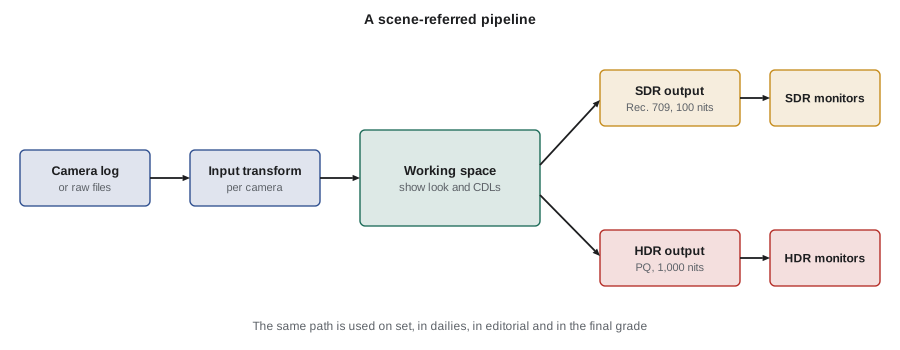
A useful way to think about a pipeline is to separate the scene from the display. Camera log and raw files are scene-referred: their values relate to light in the scene. A display needs display-referred values: brightness and colour for a particular kind of screen, such as SDR Rec. 709 at 100 nits or PQ HDR at 1,000 nits. The pipeline converts between them with transforms.
- Input transform: converts each camera's log or raw encoding into a common working space.
- Look: the creative adjustment, such as a show LUT or a set of grading decisions, applied in the working space.
- Output transform: converts the working space to a specific display, such as SDR Rec. 709 or HDR PQ at 1,000 nits in P3-D65.
When the look lives in the working space and output transforms are applied last, one creative look can drive both HDR and SDR monitoring. This is the key idea behind most modern HDR pipelines.
ACES and other colour-management systems
The Academy Color Encoding System (ACES) is an open framework, maintained by the Academy of Motion Picture Arts and Sciences, that defines working spaces, file formats and transforms for this kind of pipeline. Input transforms convert camera data into ACES, and output transforms render ACES to specific displays. ACES 2.0, released in 2025, introduced a new set of output transforms designed to handle HDR and SDR more consistently and to reduce problems with very saturated colours. Some productions use ACES; others use a camera manufacturer's wide-gamut working space or a grading application's own colour management, such as a wide-gamut intermediate in DaVinci Resolve. All of these follow the same scene-referred idea.
| Approach | Working space | Strengths | Points to check |
|---|---|---|---|
| ACES (1.x or 2.0) | ACEScct for grading, ACES2065-1 for exchange | Open standard, well documented, used for VFX exchange | Which ACES version and output transforms all vendors use |
| Camera-native wide gamut | Manufacturer log and gamut | Matches the camera's own tools and LUTs | Converting multiple camera brands into one space |
| Grading-system colour management | A wide-gamut intermediate in the grading software | Flexible, easy for the colourist | Documenting settings so dailies and VFX match |
Whatever the choice, document it. Write down the working space, the input transforms for each camera, the look, the output transforms and the version numbers, and share the document with the DIT, dailies, editorial, VFX and the finishing facility.
Worked problem
Matching versions across vendors
Dailies use ACES 1.3 output transforms, but the finishing facility plans to grade with ACES 2.0. The director has watched dailies for 12 weeks. What problem might appear, and how should it be handled?
Show solution
- Different output transforms can render highlights and saturated colours differently.
- The director's memory of the look comes from the dailies transform.
- Options: test the change early with shots from dailies; build a look adjustment to match key scenes; or keep the same transform version throughout.
Answer: The final grade may look different from dailies, especially in highlights and saturated lights. The pipeline should choose the version in prep and keep it, or test and approve the change before the grade begins.
The show LUT and the CDL
Most productions build a show LUT during camera tests: a transform, often designed by the DIT or colourist with the DP, that gives the intended starting look. On set, the DIT can make per-scene adjustments using an ASC Color Decision List (CDL), a simple and widely supported set of values: slope, offset and power for each channel, plus saturation.
Because CDL values are just numbers, they travel easily from the DIT's system into dailies, editorial and finishing. The colourist can load them as a starting point and see what the DP intended on set. For HDR, the CDL and the show look should be applied in the scene-referred working space, before the output transform, so they work for both HDR and SDR displays.
Worked problem
Applying a CDL to one channel
A DIT sets the red channel to slope 1.10, offset −0.02 and power 0.95. What is the output for an input value of 0.40 in the working space?
Show solution
- Slope and offset: \( 0.40 \times 1.10 - 0.02 = 0.42 \).
- Power: \( 0.42^{0.95} \approx 0.439 \).
Answer: About 0.44. The same numbers can be sent to dailies and finishing, so everyone starts from the same adjustment.
Monitoring HDR on set
Monitoring HDR on set is harder than in a grading suite. Sets are bright, monitors are often battery powered and far from the camera, and many people watch at once. Common approaches include:
- SDR monitoring for most of the crew, using the SDR output transform, with HDR monitoring for the DP, DIT and director at the DIT station.
- A calibrated HDR monitor in a shaded DIT tent or video village, able to reach at least the planned mastering peak for critical checks.
- HDR false colour or nit readouts on the DIT's scopes, so the DP can see where highlights and skin tones sit in nits.
- Regular checks of practical lights, windows, skies and specular highlights, which can look fine in SDR but jump out in HDR.
Many DPs light and expose mainly by SDR monitoring and waveforms, and use HDR checks to catch problems such as clipped practicals, distracting bright edges and noise in deep shadows. The goal is not to grade on set but to make sure the image will grade well.
Worked problem
Where diffuse white and grey sit in HDR
ITU-R BT.2408 suggests about 203 nits for diffuse white in PQ HDR and about 26 nits for an 18 % grey card. How many stops of headroom remain above diffuse white on a 1,000-nit master, and how far is grey below white?
Show solution
- Headroom: \( \log_2(1000 \div 203) \approx \log_2(4.93) \approx 2.3 \) stops.
- Grey to white: \( \log_2(203 \div 26) \approx \log_2(7.8) \approx 3.0 \) stops.
Answer: About 2.3 stops of headroom for highlights and about 3 stops between grey and diffuse white. Specular highlights, practicals and sun glints can use that headroom, but the main picture sits well below the peak.
Reference displays and viewing conditions
The final HDR grade is done on a reference display that can show the full mastering range accurately, such as a 1,000-nit P3-D65 monitor, in a room with controlled lighting. BT.2100 describes a reference viewing environment with a dim surround of about 5 nits. Streamers' mastering guidelines often require a display that reaches at least the mastering peak with a specified black level and calibration accuracy, and some list approved reference monitors. On set and in editorial, monitors are rarely that accurate, so the pipeline should account for differences:
- Calibrate all critical monitors regularly with a probe and record the results.
- Keep surround lighting dim and neutral when judging HDR, even on set.
- Avoid judging final colour on consumer televisions with motion smoothing, dynamic contrast or vivid modes turned on.
- Use the same output transforms on every critical monitor.
Colour accuracy is often described using delta E (ΔE). A common calibration target for reference monitors is an average ΔE well below 2 across test patches, because differences of about 1 to 2 are near the threshold of visibility. CINE-310 covered calibration in the grading suite.
Worked problem
Brightness on a dim set monitor
A battery-powered field monitor in HDR mode reaches only 600 nits, while the show will master at 1,000 nits. A practical lamp in a scene sits at 900 nits in the HDR signal. What will the DP see on the field monitor, and what is the risk?
Show solution
- The field monitor cannot show 900 nits; it will clip or tone-map the lamp to about 600 nits.
- The DP may not see detail or colour in the lamp, or may misjudge how bright it feels.
Answer: The lamp will look compressed or clipped. The DP should check such highlights on a monitor that can reach the mastering peak, or use nit readouts on scopes, before relying on the field monitor.
Dailies and editorial
Dailies must carry the look reliably to producers, editors and the service. The DIT or lab applies the input transform, show look and CDLs, renders SDR viewing files for most people and HDR files where the service or director wants them, and keeps the original camera files untouched. Editorial works with proxy files that use the same look, so the director and editor get used to the intended image. Important habits:
- Embed or link CDL values to each clip in metadata, using standard formats.
- Keep metadata such as reel names, timecode, lens data and frame lines intact.
- Send the service's dailies team the formats it asks for, sometimes including HDR viewing copies.
- Report and log problems such as clipped highlights, flicker and dead pixels early, so they can be fixed or reshot.
When dailies, editorial and finishing all use the same documented pipeline, the colourist's first pass in the final grade looks like the dailies, and the session can focus on refinement rather than reconstruction.
Visual effects in the pipeline
Visual effects vendors need scene-referred plates and clear instructions about colour. Most productions send VFX plates in a linear or log working space such as ACES2065-1 in OpenEXR files, with the show LUT and CDLs as reference only. Finished shots come back in the same space, so the colourist can grade them like camera footage. Problems arise when a vendor bakes a look into a shot or uses a different transform version. A VFX colour document, shared at the start, prevents this.
Worked problem
Storage for VFX plates
A series sends 400 VFX shots, averaging 6 seconds at 24 fps, as 16-bit half-float OpenEXR frames at 4,096 × 2,160 with three channels and light compression averaging 30 MB per frame. How much storage do the plates need?
Show solution
- Frames: \( 400 \times 6 \times 24 = 57\,600 \).
- Size: \( 57\,600 \times 30 \text{ MB} = 1\,728\,000 \text{ MB} \approx 1.73 \text{ TB} \).
Answer: About 1.7 TB for one version of the plates, before handles, returns and versions. VFX data often grows to many times this, so the pipeline plan should budget storage and transfer time.
The cinematographer's pipeline checklist
A short checklist helps the DP keep the pipeline under control.
- Choose and document the working space, transforms and versions with the DIT and colourist during prep.
- Build and test a show look for both SDR and HDR outputs, using footage from every camera and lens.
- Agree how HDR will be checked on set, who has the HDR monitor and how highlights will be measured.
- Make sure dailies, editorial and VFX use the same look and transforms.
- Review dailies in HDR periodically, not only in SDR.
- Carry the CDLs and look into the final grade and attend the grade where possible.
Common mistakes
MistakeApplying a display LUT in camera is the same as setting the look.
InsteadThe look should live in a scene-referred working space; display transforms come last so HDR and SDR both work.
MistakeAny monitor in HDR mode shows the master accurately.
InsteadMany field monitors cannot reach the mastering peak; check highlights on a capable, calibrated display or with nit readouts.
MistakeACES versions do not matter once a show uses ACES.
InsteadDifferent output transform versions can render highlights and colours differently; choose and keep one, or test changes.
MistakeVFX vendors can work from the dailies files.
InsteadVFX needs scene-referred plates with documented colour, not files with a look baked in.
MistakeDiffuse white should sit near the HDR peak.
InsteadDiffuse white usually sits around 200 nits, leaving headroom for highlights.
Summary and key terms
- Pipelines convert scene-referred camera data through a look into display-referred outputs.
- Applying the look in a working space lets one look drive HDR and SDR displays.
- ACES, camera-native and grading-system colour management all follow the same idea; document the choice and versions.
- CDL values carry DIT adjustments simply and reliably to dailies and finishing.
- On-set HDR monitoring checks highlights and shadows, often alongside SDR monitoring for most of the crew.
- Reference displays and dim, controlled viewing conditions are needed to judge HDR accurately.
- Dailies, editorial and VFX should use the same documented pipeline so the final grade starts close to the intended look.
- Colour pipeline
- The chain of transforms, files and displays from capture to master.
- Scene-referred
- Values that represent light in the scene, as in camera log or raw data.
- Display-referred
- Values prepared for a particular display's brightness and gamut.
- Input transform
- A conversion from a camera encoding into the working space.
- Output transform
- A conversion from the working space to a specific display format.
- ACES
- The Academy Color Encoding System, an open colour-management framework.
- Show LUT
- A look-up table that applies the production's intended starting look.
- ASC CDL
- A simple list of slope, offset, power and saturation values used to share colour adjustments.
- Diffuse white
- The brightness of a white surface in the scene, about 203 nits in BT.2408 guidance.
- Delta E
- A measure of colour difference used in display calibration.
Practice problems
Work each problem on paper first, then reveal the answer to check.
What are the three main stages of a scene-referred pipeline?
Show answer
Input transform, look in the working space, output transform.
Apply slope 1.2, offset 0 and power 1.0 to an input of 0.3.
Show answer
0.3 × 1.2 = 0.36.
How many stops are there from 203 nits to 1,000 nits?
Show answer
About 2.3 stops.
Why keep the same output transform version from dailies to finishing?
Show answer
Different versions can render highlights and colours differently, changing the approved look.
What surround luminance does BT.2100 suggest for reference HDR viewing?
Show answer
About 5 nits.
Name two habits that keep dailies reliable.
Show answer
Any two of linking CDLs to clips, keeping metadata intact, delivering requested formats and reporting problems early.
A field monitor peaks at 500 nits. What happens to a 900-nit practical?
Show answer
It is clipped or tone-mapped and its detail may be hidden.
What format do VFX plates often use?
Show answer
Scene-referred OpenEXR files, often in ACES2065-1.
200 shots average 5 seconds at 24 fps at 25 MB per frame. How much storage?
Show answer
200 × 5 × 24 × 25 MB = 600,000 MB ≈ 0.6 TB.
Why avoid vivid mode on a television when judging colour?
Show answer
It changes contrast and colour, so the picture no longer matches the master.
Lesson quiz · 5 questions
Score 60% or more to complete this lesson.
Create a free account to save your progress, take quizzes and earn a certificate.