
CISSP-114 · Lesson 5 of 12 · 28 min
Single sign-on, directories and Kerberos
A typical employee uses dozens of applications a day. If each demanded its own password, users would reuse one weak password everywhere or write them all down, help desks would drown in reset requests and leavers would keep accounts in systems nobody remembered. Single sign-on, SSO, lets a user authenticate once and then reach many systems without re-entering credentials. It improves usability and security together, but it concentrates risk: whoever controls the SSO session controls everything behind it. This lesson covers directory services, the different forms of SSO, and Kerberos, the ticket-based protocol at the heart of Windows domains and many Unix environments. Lesson 6 covers federated SSO across organizations with SAML and OpenID Connect.
Directory services
A directory is a specialized database of identities and their attributes, optimized for frequent reads. It holds user accounts, groups, devices, service accounts and policies, and answers questions such as whether a user exists, which groups they belong to and what their email address is. The X.500 standards defined the hierarchical naming model most directories use, in which every entry has a distinguished name built from its position in a tree, for example cn=Priya Singh,ou=Payroll,dc=example,dc=ca. The Lightweight Directory Access Protocol, LDAP, is the standard way applications query and update directories; it runs on TCP port 389, and LDAPS or StartTLS should be used so that bind passwords are not sent in clear text.
Microsoft Active Directory Domain Services, the most widely deployed enterprise directory, combines an LDAP directory, Kerberos authentication, DNS integration and Group Policy for configuring computers. Its security boundary is the forest, its administrative units are domains and organizational units, and its most sensitive accounts, such as members of Domain Admins and Enterprise Admins, can control every joined computer. Cloud identity providers such as Microsoft Entra ID, Okta and Google Cloud Identity play the same role for cloud applications and are often synchronized with an on-premises directory, which makes the synchronization server itself a highly privileged system.
| Component | Purpose | Security notes |
|---|---|---|
| Directory (LDAP, Active Directory, cloud IdP) | Stores identities, groups and attributes | Protect administrative groups; require encrypted LDAP; monitor changes |
| Authentication service (Kerberos KDC, IdP) | Verifies credentials and issues tickets or tokens | Tier 0 asset: compromise gives control of everything |
| Synchronization or provisioning service | Keeps directories and applications aligned | Holds powerful credentials; treat as Tier 0 |
| Policy and configuration (Group Policy, device management) | Pushes settings to devices | Abuse can push malware everywhere |
Because directory and authentication services can grant access to everything, many organizations use a tiered administration model. Tier 0 contains the identity infrastructure itself: domain controllers, identity providers, synchronization servers and the accounts that administer them. Tier 1 contains servers and applications; Tier 2 contains user workstations. Administrators use separate accounts for each tier and never sign in to a lower-tier machine with a higher-tier account, so that malware on a workstation cannot capture domain administrator credentials. Lesson 8 extends this with privileged access management.
Forms of single sign-on
SSO takes several forms. Enterprise or desktop SSO, typical of a Windows domain, uses the user's sign-in to the workstation to obtain Kerberos tickets that authenticate them to file servers, intranet sites and email without further prompts. Web SSO uses an identity provider and browser redirects: the user signs in to the identity provider once, and each web application accepts a signed assertion or token from it, which lesson 6 covers. Password vaulting or form-filling SSO, sometimes called legacy SSO, stores each application's password and types it in for the user; it improves convenience but leaves separate passwords in place. Reduced sign-on is the realistic goal in most organizations: as few authentications as possible, each one strong.
SSO's security trade-off must be managed explicitly. The benefits are fewer passwords to reuse or forget, one place to enforce strong and phishing-resistant authentication, one place to see every sign-in and, crucially, one place to revoke access when a person leaves. The risks are that a stolen SSO session or credential opens every connected application, and that an outage of the identity provider stops work everywhere. The answers are strong authentication at the identity provider, short session lifetimes with step-up for sensitive actions, protection of session tokens, high availability for identity services and a documented break-glass procedure for when they fail.
Worked problem
Weighing SSO for a clinic network
A network of 30 clinics has 25 applications, each with its own password. Staff share passwords on sticky notes, and two former employees were found still able to log in to the scheduling system. Make the case for SSO and name the conditions for doing it safely.
Show solution
- Benefits: one strong credential per person removes the incentive to write down 25 passwords; the identity provider becomes a single revocation point that would have stopped the former employees.
- Conditions: phishing-resistant multifactor authentication at the identity provider, because one compromise now reaches all 25 applications.
- Availability: deploy the identity provider with redundancy and test a break-glass process so clinics can treat patients during an outage.
- Coverage: connect applications that support federation first, use password vaulting for legacy systems temporarily and include all applications in the leaver process.
Answer: SSO is a net security gain when it is paired with strong authentication, resilience and complete coverage. Without strong authentication it simply makes one password more valuable.
How Kerberos works
Kerberos, developed at MIT and specified in RFC 4120, provides mutual authentication over an untrusted network without sending passwords across it. It relies on a trusted third party, the key distribution centre, KDC, which shares a long-term secret key with every principal, meaning every user and service, in its realm. The KDC has two logical parts: the authentication service, AS, which verifies users and issues ticket-granting tickets, and the ticket-granting service, TGS, which issues tickets for specific services. In Active Directory, every domain controller runs a KDC.
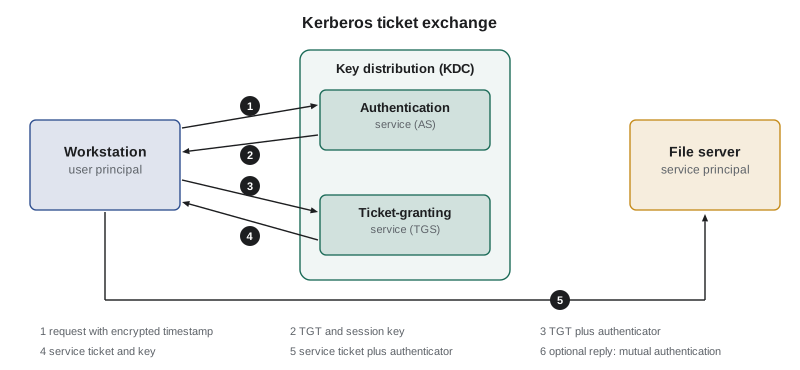
The exchange runs as follows. First, the user's workstation sends the AS a request; with pre-authentication, the request includes a timestamp encrypted with a key derived from the user's password, proving the user knows it without sending it. Second, the AS returns a ticket-granting ticket, TGT, encrypted with the key of the special krbtgt account so the user cannot read or alter it, together with a session key encrypted with the user's key. Third, when the user wants a service, the workstation sends the TGT and an authenticator, a timestamp encrypted with the session key, to the TGS. Fourth, the TGS returns a service ticket encrypted with that service's long-term key, plus a new session key for talking to the service. Fifth, the workstation presents the service ticket and a fresh authenticator to the service, which decrypts the ticket with its own key, finds the session key inside and checks the authenticator. Optionally, sixth, the service replies with proof that it too knew the session key, giving mutual authentication.
Several properties follow. The password is used only at the start, to derive a key; afterwards the user holds tickets with limited lifetimes, typically ten hours for a TGT, renewable up to a maximum such as seven days. Authenticators contain timestamps, so all parties need synchronized clocks, and requests outside the allowed skew, five minutes by default, are rejected to stop replay. Services never contact the KDC to validate a ticket, which makes Kerberos scale, but also means a stolen ticket works until it expires. Group memberships travel inside the ticket in Windows as the privilege attribute certificate, PAC, which services use for authorization.
import hmac, hashlib, json
# Toy model: a 'sealed' blob is data plus an HMAC under a key the KDC and service share.
# Real Kerberos uses encryption (AES), not just integrity, but the trust logic is the same.
def seal(key, data):
    body = json.dumps(data, sort_keys=True).encode()
    return body, hmac.new(key, body, hashlib.sha256).hexdigest()
def open_sealed(key, sealed):
    body, tag = sealed
    if not hmac.compare_digest(tag, hmac.new(key, body, hashlib.sha256).hexdigest()):
        raise ValueError('ticket integrity check failed')
    return json.loads(body)
file_server_key = b'long-term key shared by KDC and file server'
ticket = seal(file_server_key, {'client': 'priya@EXAMPLE.CA', 'service': 'cifs/files01', 'session_key': 'k-7f3a', 'start': 1767254400, 'end': 1767254400 + 10 * 3600})
SKEW = 300
def service_accepts(sealed, now, authenticator_time):
    t = open_sealed(file_server_key, sealed)
    if not (t['start'] <= now <= t['end']):
        return 'reject: ticket expired or not yet valid'
    if abs(now - authenticator_time) > SKEW:
        return 'reject: clock skew exceeds 5 minutes'
    return 'accept ' + t['client']
print(service_accepts(ticket, 1767258000, 1767258030))
print(service_accepts(ticket, 1767258000, 1767257400))
print(service_accepts(ticket, 1767254400 + 11 * 3600, 1767254400 + 11 * 3600))
tampered = (ticket[0].replace(b'priya', b'admin'), ticket[1])
try:
    service_accepts(tampered, 1767258000, 1767258000)
except ValueError as e:
print('reject:', e)accept priya@EXAMPLE.CA reject: clock skew exceeds 5 minutes reject: ticket expired or not yet valid reject: ticket integrity check failed
Kerberos weaknesses and defences
Kerberos is robust, but its design creates well-known attack paths, all of which depend on obtaining keys or tickets after an initial compromise. The krbtgt key signs every TGT, so an attacker who steals it can forge TGTs for any user with any group membership, a so-called golden ticket; the defence is protecting domain controllers as Tier 0 assets and resetting the krbtgt password twice, with replication between resets, after any suspected compromise. A service account's key encrypts its service tickets, so an attacker who obtains that key can forge service tickets for that service, a silver ticket. Any authenticated user can request a service ticket for an account with a service principal name and then try to guess the service account's password offline, an attack known as Kerberoasting; long, random, managed passwords for service accounts and AES-only encryption make it impractical. Accounts that do not require pre-authentication expose material for offline guessing too. Lesson 10 discusses pass-the-ticket and related attacks.
| Weakness | What the attacker needs | Defences |
|---|---|---|
| Golden ticket (forged TGT) | The krbtgt account key, from a domain controller | Tier 0 protection of domain controllers; double krbtgt reset after compromise; monitoring for anomalous tickets |
| Silver ticket (forged service ticket) | A service account key | Managed service accounts with automatic rotation; PAC validation |
| Kerberoasting | Any domain account; weak service account password | Long random or group-managed service account passwords; AES only; alert on unusual ticket requests |
| Pre-authentication disabled | Network access | Require pre-authentication for every account |
| Clock manipulation | Control of time sources | Authenticated, redundant time synchronization |
| KDC unavailable | Denial of service against domain controllers | Multiple domain controllers per site; monitoring |
Older Windows authentication, NTLM, uses a challenge-response based on a hash of the user's password. It does not support mutual authentication well, is vulnerable to relay and pass-the-hash attacks and is being phased out by Microsoft in favour of Kerberos. Organizations should audit NTLM use, block it where possible and require signing and channel binding where it remains.
Worked problem
Responding to a compromised domain controller
Incident responders find that an attacker had administrator access to a domain controller for three days and may have copied the directory database. What identity steps should the recovery plan include?
Show solution
- Assume all password-derived keys in the database are exposed, including the krbtgt key and every service account key.
- Reset the krbtgt password twice, allowing replication between resets, so that forged and existing TGTs become invalid.
- Reset passwords for all privileged and service accounts, prioritising Tier 0, and force user password resets or move users to passwordless authentication.
- Rebuild or verify the integrity of domain controllers, review changes to privileged groups and Group Policy, and increase monitoring for forged tickets.
Answer: A domain controller compromise is a compromise of every identity in the domain. Recovery must invalidate tickets and keys, not just remove malware.
Thinking like a manager
SSO and Kerberos questions test whether you see identity infrastructure as the most critical asset. The best answers protect the identity provider and domain controllers as Tier 0, require strong authentication at the point of single sign-on, keep sessions and tickets short-lived, plan for identity outages and manage service account secrets carefully. Remember the Kerberos vocabulary, KDC, AS, TGS, TGT, service ticket, authenticator, realm, and that Kerberos depends on synchronized time and on keeping long-term keys secret.
Common mistakes
MistakeRolling out SSO without strengthening authentication at the identity provider.
InsteadPair SSO with phishing-resistant multifactor authentication and short sessions.
MistakeTreating the directory synchronization server as an ordinary server.
InsteadTreat identity infrastructure, including sync servers, as Tier 0.
MistakeGiving service accounts short, never-changed passwords.
InsteadUse managed service accounts with long random passwords and automatic rotation.
MistakeIgnoring time synchronization.
InsteadProvide authenticated, redundant time sources, since Kerberos rejects clock skew beyond five minutes by default.
MistakeLeaving NTLM enabled everywhere for compatibility.
InsteadAudit and restrict NTLM, requiring signing where it must remain.
Summary and key terms
- Directories store identities and attributes; LDAP queries them and should be encrypted.
- Identity infrastructure is Tier 0: its compromise gives control of everything.
- SSO reduces passwords and centralizes revocation but concentrates risk.
- Kerberos uses a KDC with an authentication service and a ticket-granting service to issue time-limited tickets.
- Kerberos needs synchronized clocks; the default skew limit is five minutes.
- Golden tickets, silver tickets and Kerberoasting exploit stolen or weak keys.
- NTLM is legacy and vulnerable to relay and pass-the-hash; restrict it.
- Single sign-on
- Authenticating once to access many systems.
- LDAP
- The Lightweight Directory Access Protocol for querying and updating directories.
- Distinguished name
- The unique hierarchical name of a directory entry.
- KDC
- Key distribution centre, Kerberos's trusted third party.
- Ticket-granting ticket
- A Kerberos ticket used to request service tickets without the password.
- Authenticator
- A timestamp encrypted with a session key, proving fresh possession of the key.
- Realm
- The administrative domain served by a Kerberos KDC.
- krbtgt
- The account whose key encrypts and signs all ticket-granting tickets in a domain.
- Kerberoasting
- Requesting service tickets to guess service account passwords offline.
- Tier 0
- The identity infrastructure and accounts whose compromise gives control of the whole environment.
Practice problems
Work each problem on paper first, then reveal the answer to check.
Which Kerberos component issues ticket-granting tickets?
Show answer
The authentication service of the KDC.
Why does Kerberos need synchronized clocks?
Show answer
Authenticators carry timestamps used to prevent replay.
What can an attacker do with the krbtgt key?
Show answer
Forge ticket-granting tickets for any user, a golden ticket.
How should krbtgt be reset after compromise?
Show answer
Twice, allowing replication between resets.
What makes Kerberoasting impractical?
Show answer
Long random service account passwords, ideally managed and rotated, and AES-only encryption.
Which port does LDAP use, and how should it be protected?
Show answer
TCP 389, protected with LDAPS or StartTLS.
What is the main risk of SSO?
Show answer
A compromised SSO credential or session reaches every connected application.
Does a service contact the KDC to validate each ticket?
Show answer
No; it decrypts the ticket with its own key.
Name one weakness of NTLM.
Show answer
It is vulnerable to relay and pass-the-hash attacks.
What is password-vaulting SSO?
Show answer
A tool that stores and types each application's separate password for the user.
Lesson quiz · 5 questions
Score 60% or more to complete this lesson.
Create a free account to save your progress, take quizzes and earn a certificate.