
CINE-202 · Lesson 12 of 12 · 25 min
The DIT, the on-set pipeline and capstone
Everything in this course comes together on set and in the hours after each shooting day. Footage must be recorded at the right settings, monitored accurately, copied safely, checked for problems, given its intended look, and delivered to editorial and the studio, often overnight. The digital imaging technician (DIT) is the camera department member responsible for much of this work, bridging the cinematographer, camera crew, post-production and the image pipeline. This final lesson covers the DIT's role, on-set monitoring and look management, data management and verification, quality control, dailies, camera reports and metadata, camera tests, the pipeline document, working with post-production, and the capstone project: designing and documenting a complete exposure and image pipeline for a production.
The role of the DIT
The DIT works closely with the cinematographer to ensure that the images being recorded are technically sound and look as intended. Responsibilities vary by production but typically include configuring camera settings and monitoring in agreement with the cinematographer; managing LUTs, CDLs and live grading on set; checking exposure, focus, noise and artifacts on calibrated monitors and scopes; advising on exposure and technical issues; managing the monitoring chain to video village; overseeing data management or supervising a data wrangler who copies and verifies footage; generating or supervising dailies; and communicating with the post-production supervisor, editor, colorist and visual effects teams. On smaller productions, a DIT may combine these roles with that of a data wrangler or camera assistant; on large productions, there may be a DIT, a data wrangler, a dailies colorist and a dedicated near-set lab.
In the United States, DITs on union productions are generally members of the International Cinematographers Guild, IATSE Local 600, under collective agreements that define the classification, rates and working conditions.
On-set monitoring and look management
The DIT station, often a cart with calibrated reference monitors, scopes, a live grading system and data management computers, is the most accurate place to view the image on set. The DIT receives camera feeds, applies the show LUT and scene-by-scene CDL adjustments, and sends graded feeds to video village and other monitors through LUT boxes or routers. Working with the cinematographer, the DIT may adjust the look for each setup, matching cameras in multi-camera shoots and keeping consistency across the day. These adjustments, saved as CDLs or AMFs, travel with the footage to dailies. The DIT also monitors for technical problems that may not be visible on small monitors, such as soft focus, flicker, noise, moiré, dead pixels, dirty sensors or filters, and timecode errors, and reports them promptly so that takes can be repeated if necessary.
Data management
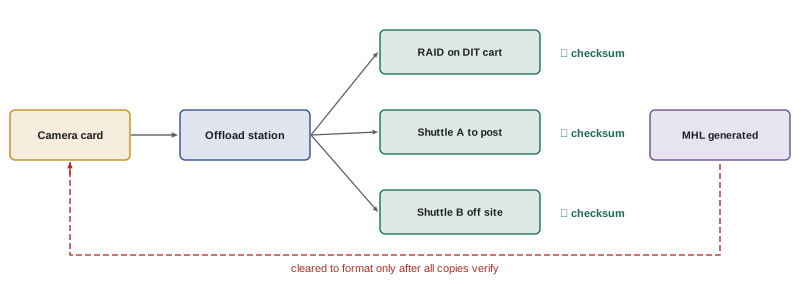
Camera media hold the only copy of footage until it is backed up, so data management is one of the highest-responsibility jobs on set. Best practice includes:
- Copying each camera card or SSD to at least two, and usually three, separate destinations, such as RAID arrays and shuttle drives, before the media are returned for reuse.
- Verifying every copy with checksums, such as xxHash or MD5, calculated from the source and compared with each copy, using software designed for media offload; simple drag-and-drop copying is not acceptable.
- Generating media hash lists (MHL files), for example in the ASC MHL format, which record checksums and allow later verification that files remain intact.
- Following a clear labeling and handoff protocol: cards are marked as not yet offloaded, offloaded and verified, and ready to format, with only the camera assistant formatting cards after confirmation.
- Keeping logs of every card, roll name, clip range and destination, and reporting any errors immediately.
- Shipping or uploading copies to post-production and keeping copies in separate physical locations, following the 3-2-1 principle.
Worked problem
Planning data for a shooting day
A production shoots with two cameras, each recording ARRIRAW at about 2.2 TB per hour of footage, about 4.4 TB per hour combined. The cameras record about 2.5 hours of footage in a typical day. How much storage is needed per day for three copies, and how long would offload take at 1,000 MB/s per copy if copies are made simultaneously?
Show solution
- Footage per day: 2.5 h × 4.4 TB/h = 11 TB.
- Three copies: 33 TB per day.
- At 1,000 MB/s (about 3.6 TB per hour) with simultaneous copies, offloading 11 TB takes about 3 hours, plus verification time, which can roughly double it unless verified during copy.
Answer: About 11 TB per day, 33 TB with three copies, and around 3 to 6 hours of offload and verification, which must be planned with enough card stock and fast storage.
Quality control
The DIT or data wrangler performs quality control on footage as it is offloaded: checking that clips play, that metadata such as timecode, reel names and camera settings are correct, that there are no corrupted frames, and that images are free of technical problems. Problems discovered on the day can be corrected by reshooting; problems discovered weeks later in post-production can be very costly or impossible to fix. Common issues to watch for include wrong project frame rate or resolution, mismatched timecode between cameras or sound, incorrect EI or white balance, recording in the wrong format, flicker from lights, dropped frames, and focus problems.
Dailies
Dailies are copies of each day's footage prepared for viewing by the director, producers and studio, and for editorial. They usually include the show LUT and on-set CDL grades, synchronized sound, burn-in information such as timecode and clip names, and are encoded in formats suited to editing systems, such as Avid DNxHD or DNxHR, or ProRes, and to secure online review platforms. Dailies may be produced on set by the DIT, near set by a dailies team, or at a post-production facility overnight. Accurate dailies give the director and editor a reliable view of the footage and the intended look; inaccurate dailies, with the wrong LUT or poor sync, can cause wrong creative decisions. Editorial proxies must carry metadata, such as clip names, reel names and timecode, that allows the final conform to link back to the original camera files.
Camera reports and metadata
Camera reports, traditionally on paper and now often digital, record for each take the scene, shot and take numbers, camera, lens, focal length, T-stop, focus distance, filters, EI, white balance, frame rate, shutter angle and notes. Much of this information is also embedded in camera metadata, and lens data systems, such as ARRI LDS or Cooke /i, record focus, iris and zoom frame by frame, valuable for visual effects. The DIT ensures that metadata is preserved through the pipeline, and that clip and reel naming conventions are followed, so that footage can be found and conformed correctly. Accurate metadata also supports the colorist, who can see the EI and white balance each clip was shot with, and visual effects, who need lens and camera data to match computer-generated elements.
Camera tests
Before production, camera tests confirm that the chosen cameras, lenses, filters, formats and pipeline produce the intended results. Typical tests include exposure latitude tests (Lesson 5); skin tone tests with the cast or stand-ins under representative lighting; lens tests for sharpness, flare, breathing and character; filter tests, including ND for infrared contamination, which can turn black fabrics reddish-brown when strong ND is used without IR protection; frame rate and shutter tests for flicker under production lighting; tests of the full pipeline from camera through dailies, editorial and grading to final delivery formats, including HDR; and tests for visual effects requirements. Results are reviewed on calibrated displays with the director, colorist and post-production supervisor, and they guide decisions about EI, LUTs and workflows.
The pipeline document
A pipeline document, sometimes called a workflow document or color pipeline specification, records every technical decision about the image so that all departments work consistently. It typically includes:
- Cameras, recording formats, resolutions, frame rates, codecs and EI.
- Log curves, gamuts and input transforms, and the color management system and version (for example ACES 2.0 or manufacturer pipelines).
- Show LUTs and looks, with names, versions and intended inputs and outputs, and how CDLs are applied.
- Monitoring configuration for each device on set.
- Data management procedures, number of copies, checksums and storage locations.
- Naming conventions for clips, reels and files.
- Dailies and editorial formats, sync and metadata requirements.
- Visual effects plate formats and color spaces.
- Grading and mastering specifications and deliverables.
The document is prepared in pre-production by the cinematographer, DIT and post-production supervisor, updated during production, and distributed to camera, editorial, VFX vendors and the grading facility.
Working with post-production
The cinematographer's involvement does not end on the last shooting day. Communicating intentions to the colorist, through the show LUT, CDLs, reference stills and conversations, helps preserve the look. Attending the grade, or reviewing it remotely, allows the cinematographer to guide final decisions, including HDR and SDR versions. Feedback from editorial and VFX about footage problems helps improve practices on future productions. A strong relationship among the cinematographer, DIT, post-production supervisor and colorist is one of the most valuable assets for ensuring that the images seen by audiences reflect what was intended on set.
Capstone: an exposure and image pipeline plan
The capstone asks you to design the image pipeline for a short film or series episode of your choice, with either real or hypothetical cameras. Your submission should include:
- A description of the project, its look and its deliverables, including SDR and HDR requirements.
- Camera, format, frame rate and EI choices, justified with reference to latitude, noise and data requirements.
- An exposure plan for three representative scenes, such as a day exterior, an interior with windows and a night exterior, describing lighting ratios, ND, metering, target values on scopes or false color, and how highlights and skin will be handled.
- A color pipeline diagram from camera through monitoring, dailies, editorial, VFX and grading to each deliverable, naming color spaces, transforms, LUTs and CDL usage.
- A data management plan with storage estimates per day and for the whole shoot, verification method and backup locations.
- If possible, a practical test: shoot a short latitude or skin tone test, grade it through your proposed pipeline, and present the results with scopes.
Present the plan as a pipeline document that a real crew and post-production team could follow.
Near-set and cloud workflows
Many productions now send footage from set to post-production through the cloud rather than by shuttle drive. Camera-to-cloud systems upload proxy files directly from cameras or on-set devices to online platforms within minutes of each take, allowing editors to begin cutting while the crew is still shooting, and allowing remote producers and studio executives to review material quickly. Original camera files are usually still copied and verified on set, then uploaded over high-speed connections or shipped, depending on data volume and available bandwidth. Cloud workflows require careful attention to security, naming, metadata and bandwidth, and the DIT or data team often manages the connection between set and cloud.
Security and confidentiality
Footage from unreleased productions is valuable and confidential. Data management procedures typically include encrypted drives, restricted access to storage and review platforms, watermarking of dailies with the viewer's name, secure transfer methods, and logging of who has accessed which files. Studios and streaming services set security requirements that productions must follow, and breaches can have serious consequences. DITs and data wranglers must follow these procedures carefully, including keeping drives physically secure on set and in transit.
Common mistakes
MistakeCopying footage without checksum verification.
InsteadUse offload software with checksums and MHL files.
MistakeFormatting cards before all copies are verified.
InsteadFollow a strict clearance protocol.
MistakeDailies with the wrong LUT or missing metadata.
InsteadApply approved transforms and preserve metadata.
MistakeSkipping camera and pipeline tests.
InsteadTest cameras, lenses, filters and the full pipeline.
MistakeNo written pipeline document.
InsteadDocument and distribute every technical decision.
Summary and key terms
- The DIT bridges cinematography, camera crew and post-production.
- DITs manage monitoring, looks, CDLs and technical checks on set.
- Data management requires multiple verified copies before media are cleared.
- Quality control on the day prevents costly problems later.
- Dailies carry the intended look, sync and metadata to editorial.
- Camera reports, lens data and naming conventions support post-production.
- Tests and a pipeline document keep the whole production consistent.
- DIT
- Digital imaging technician.
- Data wrangler
- Crew member who copies and verifies footage.
- Checksum
- Value used to verify a file copy is identical.
- MHL
- Media hash list recording checksums.
- Shuttle drive
- Drive carrying footage to post-production.
- Dailies
- Prepared copies of each day's footage for review and editing.
- Burn-in
- Information overlaid on dailies, such as timecode.
- Camera report
- Record of settings for each take.
- Lens metadata
- Frame-by-frame lens data such as focus and iris.
- Pipeline document
- Specification of all image workflow decisions.
Practice problems
Work each problem on paper first, then reveal the answer to check.
Name three DIT responsibilities.
Show answer
Monitoring, looks and CDLs, technical checks, data, dailies, communication.
How many copies are usually made before clearing cards?
Show answer
At least two, usually three.
Name two checksum methods.
Show answer
xxHash and MD5.
What is an MHL file?
Show answer
A media hash list of checksums.
Who formats camera cards?
Show answer
The camera assistant after confirmation.
Daily footage at 3 TB/h for 3 h with three copies?
Show answer
27 TB.
What do dailies include?
Show answer
LUT and CDL look, synced sound, burn-ins, editorial formats.
What do lens data systems record?
Show answer
Focus, iris and zoom frame by frame.
Why test ND filters?
Show answer
For infrared contamination and color shifts.
Name four parts of a pipeline document.
Show answer
Formats, color pipeline, LUTs, monitoring, data, naming, dailies, VFX, deliverables.
Lesson quiz · 5 questions
Score 60% or more to complete this lesson.
Create a free account to save your progress, take quizzes and earn a certificate.