
CINE-202 · Lesson 9 of 12 · 25 min
Color spaces, transfer functions and color management
An image file contains numbers, not colors. Whether a pixel value of 0.5 means a mid-gray, a bright highlight or something else depends on how the numbers were encoded and how they are interpreted. Color management is the discipline of keeping track of these encodings through every stage of the pipeline, converting correctly between them, and ensuring that the final image appears as intended on each display. This lesson introduces color spaces and their components: primaries, white points and transfer functions; the main display standards Rec.709, DCI-P3 and Rec.2020; camera wide gamuts; scene-referred working spaces; display-referred and scene-referred pipelines; color-managed grading in common software; and the problems that arise when color management fails.
Components of a color space
A color space used in video and cinema is defined by three components:
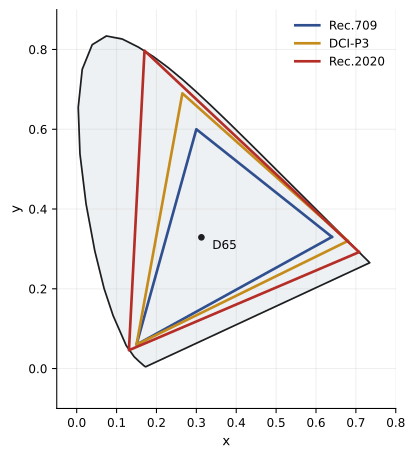
- Primaries: the exact colors of the red, green and blue components, usually specified as chromaticity coordinates on the CIE 1931 diagram. The triangle formed by the primaries defines the gamut, the range of colors that can be represented.
- White point: the color that equal amounts of red, green and blue produce, such as D65, a daylight white of about 6,500 K used for television and most displays, or the slightly greener DCI white used in digital cinema projection.
- Transfer function: the relationship between code values and light, such as a gamma curve for displays or a log curve for cameras.
Two color spaces may share primaries but differ in transfer function, such as Rec.709 primaries with a gamma 2.4 display encoding versus the same primaries with a linear encoding; they are different color spaces for practical purposes, and confusing them produces wrong images.
Display standards
The main display color spaces in film and television are:
- Rec.709 (ITU-R BT.709): the standard for HD television, with primaries similar to sRGB, a D65 white point and, for mastering, the BT.1886 display transfer function, effectively a gamma of 2.4 in a dim viewing environment at a reference white of 100 nits. Most SDR online video and broadcast is Rec.709.
- DCI-P3: the gamut of digital cinema projection, wider than Rec.709 especially in reds and greens, with a DCI white point and gamma 2.6 at 48 nits for theatrical mastering. P3-D65, the same primaries with a D65 white, is widely used for HDR mastering and in consumer displays, often called Display P3 in computers and phones with an sRGB-like transfer function.
- Rec.2020 (ITU-R BT.2020): a very wide gamut defined for ultra-high-definition television, with primaries on the spectral locus. Few displays can show the full gamut, so HDR content is usually mastered within P3 and delivered in a Rec.2020 container.
- HDR transfer functions: PQ (SMPTE ST 2084), an absolute encoding of luminance up to 10,000 nits, and HLG (Hybrid Log-Gamma), a relative encoding designed for broadcast compatibility, both defined in ITU-R BT.2100 (Lesson 11).
| Standard | Gamut | White point | Transfer function | Typical use |
|---|---|---|---|---|
| Rec.709 | Rec.709 | D65 | BT.1886 (gamma 2.4), 100 nits | SDR television, online |
| sRGB | Rec.709 | D65 | sRGB curve (about gamma 2.2) | Computers, web |
| DCI-P3 | P3 | DCI | Gamma 2.6, 48 nits | Cinema projection |
| P3-D65 PQ | P3 | D65 | PQ, up to 1,000+ nits | HDR mastering |
| Rec.2020 PQ / HLG | Rec.2020 | D65 | PQ or HLG | HDR delivery container |
Camera gamuts and working spaces
Cameras capture colors beyond what Rec.709 or even P3 can display, and their log encodings are paired with wide native gamuts such as ARRI Wide Gamut 4, S-Gamut3, REDWideGamutRGB and V-Gamut, some of which extend beyond the spectral locus to accommodate the camera's color response. For grading and visual effects, footage from different cameras is converted into a common working space: a scene-referred, wide-gamut space in which operations behave consistently. Examples include ACEScct and ACEScg (Lesson 10), DaVinci Wide Gamut with DaVinci Intermediate, and camera-specific spaces when all footage comes from one manufacturer. The working space should be wide enough to hold all colors from the cameras and visual effects without clipping, and its transfer function should suit the operations: log-like spaces for grading, because grading controls feel natural in log, and linear spaces for compositing and rendering, because light adds linearly.
Display-referred and scene-referred pipelines
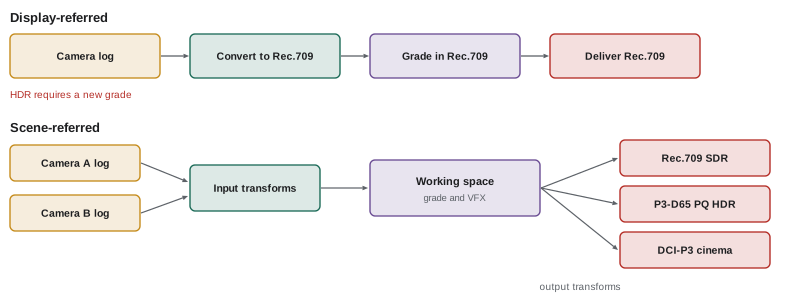
In a display-referred pipeline, footage is converted to the display color space, such as Rec.709, early in the process, and all grading happens in that space. This is simple and was standard in the era of HD video, but it limits grading to the display's range, clips highlights early, and requires regrading for each new display format. In a scene-referred pipeline, footage remains in a wide-gamut, scene-referred working space throughout grading and visual effects, and a display transform, sometimes called an output transform or display rendering transform, converts the final image for each display at the end. Scene-referred pipelines preserve the camera's full range, allow the same grade to produce SDR and HDR versions with appropriate trims, and make it easier to combine footage from different cameras and with computer-generated imagery. Most high-end productions now use scene-referred pipelines.
Color-managed grading in practice
Grading software offers several ways to manage color. DaVinci Resolve can operate in a display-referred mode, where the user applies LUTs or conversions manually, or in DaVinci Wide Gamut color management, which automatically converts each clip from its camera encoding into a working space and applies an output transform to the display. Resolve and other systems such as Baselight, Nuke and many editing applications also support ACES. Baselight uses a scene-referred color management system with input and display rendering transforms. In each case, the colorist sets the input color space for each clip, usually from metadata in the file, the working space, and the output color space for the display and deliverables. Correctly tagging clips at ingest is critical; a clip tagged with the wrong input space will look wrong and grade badly.
Worked problem
Setting up color management for mixed cameras
A documentary combines footage from an ARRI ALEXA 35 in LogC4, a Sony FX6 in S-Log3/S-Gamut3.Cine and an iPhone recording Apple Log. The colorist will deliver SDR Rec.709 for broadcast and HDR P3-D65 PQ for streaming. How should the project be set up?
Show solution
- Choose a scene-referred working space, such as DaVinci Wide Gamut/Intermediate or ACEScct.
- Set the input transform for each clip according to its camera encoding: LogC4/AWG4, S-Log3/S-Gamut3.Cine, Apple Log/Rec.2020.
- Grade in the working space, matching cameras with charts filmed on location.
- Set the output transform to Rec.709 (BT.1886, 100 nits) for the SDR master and P3-D65 PQ at 1,000 nits for HDR, with trims as needed.
Answer: A scene-referred working space with correct input transforms for each camera and separate output transforms for SDR and HDR deliverables.
Range, levels and metadata
Beyond color spaces, pipelines must handle signal range and metadata correctly. Video files may be encoded in legal (video) range, with black at 64 and white at 940 in 10-bit, or full (data) range, from 0 to 1023 (Lesson 3). If a legal-range file is interpreted as full range, blacks appear lifted and whites dull; if a full-range file is interpreted as legal, blacks crush and whites clip. Files also carry metadata tags describing their color primaries, transfer function and matrix coefficients; some players and platforms rely on these tags, and missing or incorrect tags cause the same footage to look different in different applications, a frequent problem with QuickTime files, web browsers and some televisions. Careful setting of export options and testing deliverables in the target players prevent these problems.
Monitors and calibration
Color management depends on accurate displays. Grading and on-set reference monitors must be calibrated to the standard they display, such as Rec.709 at 100 nits with BT.1886, or P3-D65 PQ at 1,000 nits, using a colorimeter or spectroradiometer and calibration software, and checked regularly. Consumer displays, laptops and phones vary widely and often apply their own processing, so they are useful for checking how audiences might see the image but not for critical decisions. The viewing environment also matters: a dim, neutral grading suite with controlled ambient light is the reference for Rec.709 and HDR mastering, while bright on-set conditions make monitors appear darker and less saturated. Hoods and dark tents help on set.
When color management fails
Common symptoms of color management problems include footage that looks washed out (often log interpreted as Rec.709, or legal range treated as full), footage that looks too contrasty and saturated (Rec.709 treated as log, or a LUT applied twice), color shifts between applications (missing or incorrect metadata tags), gamma shifts between QuickTime and other players, clipped highlights after conversion (a display-referred LUT applied to scene-referred data), and visual effects shots that do not match the surrounding plates (VFX working in a different space or with the wrong transforms). Diagnosing these problems starts with asking at each stage: what encoding is this data in, what does this application think it is, and what is it being converted to? A written pipeline document answers these questions for everyone on the production (Lesson 12).
Chromaticity diagrams and gamuts
The CIE 1931 chromaticity diagram, a horseshoe-shaped plot of all colors visible to the average human observer, is the standard way to compare gamuts. Each point on the diagram represents a hue and saturation without regard to brightness, and the curved boundary, called the spectral locus, represents pure spectral colors from violet to red. A display's gamut appears as a triangle joining its three primaries; colors inside the triangle can be shown by that display, while colors outside cannot. Rec.709 covers roughly a third of the visible colors on the diagram, P3 noticeably more, and Rec.2020 most of the colors found in real-world surfaces. Gamut size is not everything, however: how a display renders colors within its gamut, and how out-of-gamut colors are mapped into it, matters just as much.
Gamut mapping
When images contain colors outside the target display's gamut, the pipeline must map them inside. Simple clipping moves each out-of-gamut color to the nearest point on the gamut boundary, which can cause hue shifts, posterization and flat areas in saturated lights, flowers or neon signs. Gamut compression algorithms instead progressively reduce the saturation of colors approaching the boundary, preserving gradations and hue. Modern color management systems, including ACES 2.0 and many grading applications, include gamut compression tools. On set, very saturated LED lighting is a common source of out-of-gamut colors, especially with blue and violet LEDs, which camera sensors may record outside even wide gamuts; cinematographers should test saturated LED colors before relying on them.
Matrices and color conversion
Converting between color spaces with different primaries uses a 3 × 3 matrix applied to linear RGB values, which mixes the channels to express each color in the new primaries. Converting between transfer functions uses the appropriate curves, linearizing the source and applying the target encoding. A full conversion from a camera's log and gamut to Rec.709, for example, involves linearizing the log signal, applying a matrix from the camera gamut to Rec.709 primaries, applying a tone mapping curve to compress the scene range for display, and encoding with the display transfer function. Color management systems perform these steps automatically, but understanding them helps diagnose problems.
White balance and chromatic adaptation
White balance changes how the pipeline interprets neutral colors. In raw workflows, white balance is applied during debayering as metadata; in log workflows, the camera applies its white balance before encoding, and further correction happens in grading. When converting between color spaces with different white points, such as from D60 in ACES to D65 for displays, a chromatic adaptation transform adjusts colors so that whites appear neutral in the new environment, similar to how human vision adapts to different light. Standard methods include the Bradford and CAT02 transforms, which color management systems apply automatically.
Common mistakes
MistakeTreating numbers as colors without knowing the encoding.
InsteadTrack primaries, white point and transfer function throughout.
MistakeGrading in Rec.709 when HDR is also required.
InsteadUse a scene-referred pipeline with multiple outputs.
MistakeTagging clips with the wrong input space.
InsteadVerify camera encodings at ingest.
MistakeMixing legal and full range.
InsteadSet and test range at every conversion.
MistakeGrading on uncalibrated displays.
InsteadCalibrate reference monitors to the target standard.
Summary and key terms
- A color space combines primaries, white point and transfer function.
- Rec.709, DCI-P3 and Rec.2020 are the main display gamuts.
- Cameras record wide native gamuts with their log curves.
- Working spaces hold all footage in a common scene-referred space.
- Scene-referred pipelines allow multiple outputs from one grade.
- Range and metadata tags must be handled correctly.
- Calibrated monitors and pipeline documents prevent color errors.
- Color space
- Defined primaries, white point and transfer function.
- Gamut
- Range of colors a color space can represent.
- Primaries
- Chromaticities of the red, green and blue components.
- White point
- Color of equal RGB values, such as D65.
- Transfer function
- Relationship between code values and light.
- Rec.709
- HD television color standard.
- DCI-P3
- Digital cinema projection gamut.
- Rec.2020
- Wide gamut for UHD and HDR delivery.
- Working space
- Common space for grading and VFX.
- Output transform
- Conversion from working space to a display.
Practice problems
Work each problem on paper first, then reveal the answer to check.
Name the three components of a color space.
Show answer
Primaries, white point, transfer function.
What is D65?
Show answer
A daylight white point of about 6,500 K.
Reference white for Rec.709 mastering?
Show answer
100 nits.
Cinema projection reference?
Show answer
DCI-P3, gamma 2.6, 48 nits.
Why is HDR delivered in a Rec.2020 container?
Show answer
It can hold wide gamut content, usually mastered in P3.
Why grade in a log-like working space?
Show answer
Grading controls behave naturally.
Why composite in linear?
Show answer
Light adds linearly.
Main advantage of scene-referred pipelines?
Show answer
Full range preserved and multiple outputs from one grade.
Symptom of log interpreted as Rec.709?
Show answer
Washed-out image.
What causes color shifts between players?
Show answer
Missing or incorrect metadata tags.
Lesson quiz · 5 questions
Score 60% or more to complete this lesson.
Create a free account to save your progress, take quizzes and earn a certificate.