
CINE-430 · Lesson 8 of 12 · 30 min
Subtitles, captions, audio description and accessibility
A streaming title reaches viewers in dozens of languages and serves people who are Deaf or hard of hearing, blind or partially sighted, or who simply prefer to watch with text on screen. Subtitles, captions and audio description are therefore core deliverables, not extras. They have their own technical formats, style guides and legal requirements, and they interact with the cinematographer's work in ways that are easy to overlook: where text sits in the frame, how long shots last, how much visual information needs to be described and whether burned-in text can be removed. This lesson covers the main types of timed text, how they are formatted and timed, how audio description works and the accessibility rules that apply in Canada and the United States.
Types of timed text
Several kinds of text appear on screen during playback, and services usually ask for each one separately.
- Subtitles: translations of dialogue for viewers who hear the audio but do not understand the language.
- Subtitles for the Deaf and hard of hearing (SDH) or closed captions: a transcription of dialogue plus important sound information, such as speaker identification, music and sound effects, for viewers who cannot hear the audio. Closed captions can be turned on or off.
- Forced narratives (sometimes called forced subtitles): text that appears for all viewers in a given language, such as translations of on-screen signs or of a scene spoken in another language.
- Open captions or burned-in text: text that is part of the picture and cannot be turned off, such as titles and location cards.
Services generally prefer that dialogue translations and forced narratives be delivered as separate timed-text files rather than burned in, so that they can be localized and switched on as needed. Burned-in text in the picture should have a textless version available (Lesson 6).
Timed-text formats
Timed-text files contain the words, their start and end times and formatting such as position, italics and line breaks. Common delivery formats include:
- IMSC 1.1 (a W3C profile of TTML), widely used by streaming services and supported in IMF packages.
- Other TTML-based profiles requested by specific services.
- SCC (Scenarist Closed Caption), a legacy format still used for North American broadcast captions.
- SRT and WebVTT, simple text-based formats used for some platforms and reviews, but usually not for premium delivery.
Each service publishes timed-text style guides for each language, covering reading speed, line length, punctuation, italics and positioning. Translators and captioners follow these guides; post supervisors check that the right files are delivered with the right frame rate and timecode.
Reading speed and line length
Viewers need time to read text and still watch the picture. Style guides limit how much text can appear and for how long.
- Characters per line: often about 42 characters for Latin-script languages such as English and French.
- Lines per subtitle: usually no more than two.
- Reading speed: expressed in characters per second (cps). For example, Netflix's English style guides have described limits around 20 cps for adult programs and about 17 cps for children's programs; other services use similar values.
- Duration: minimum durations of about 5/6 second (about 20 frames at 24 fps) and maximum durations of about 7 seconds are common.
- Gaps: a short minimum gap, often two frames, between consecutive subtitles so viewers notice the change.
Worked problem
Checking reading speed
A subtitle reads "I told you we should have left before the storm." It contains 48 characters including spaces and punctuation, and is on screen for 2.0 seconds. Does it meet a 20 cps limit, and what could fix it?
Show solution
- Reading speed: \( 48 \div 2.0 = 24 \) cps.
- Compare: 24 is above 20 cps.
- Options: extend the duration to at least \( 48 \div 20 = 2.4 \) seconds if the scene allows, or condense the text, such as "I said we should leave before the storm." (40 characters, 20 cps at 2.0 seconds).
Answer: It fails at 24 cps. Lengthening the subtitle to 2.4 seconds or condensing it to about 40 characters brings it within the limit.
Worked problem
Minimum duration in frames
A style guide sets a minimum subtitle duration of 5/6 of a second. How many frames is that at 23.976 fps and at 25 fps?
Show solution
- At 23.976 fps: \( 0.8333 \times 23.976 \approx 19.98 \), so 20 frames.
- At 25 fps: \( 0.8333 \times 25 \approx 20.8 \), so 21 frames when rounded up.
Answer: About 20 frames at 23.976 fps and 21 frames at 25 fps. Timed-text files must be made for the delivery frame rate; converted versions need retimed subtitles.
Positioning and the picture
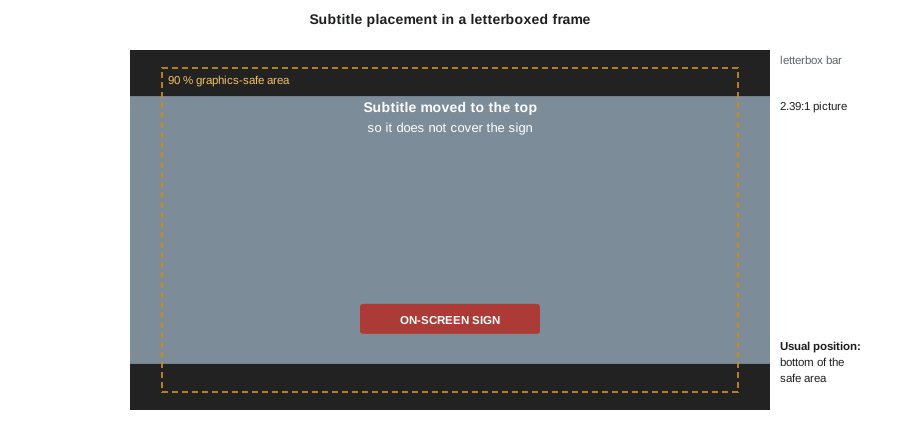
Subtitles and captions usually sit at the bottom of the frame, inside the graphics-safe area, but they move to the top when they would cover important on-screen text or action, such as a burned-in location card or a character's mouth in an extreme close-up. For the cinematographer, this has practical consequences:
- Leave some room in the lower part of the frame in dialogue-heavy scenes, or accept that subtitles will occasionally cover parts of the image.
- Avoid placing important on-screen text, such as phone screens or signs the audience must read, at the very bottom of the frame where subtitles normally sit.
- In 2.39:1 or 2.00:1 frames inside a 16:9 container, subtitles may sit inside the picture or in the black bars, depending on the service's rules; check the style guide.
- Very bright HDR areas behind white subtitles can reduce legibility; style guides often specify subtitle brightness in HDR to avoid glaring white text.
Worked problem
Subtitle brightness in HDR
An HDR style guide asks for white subtitles at about 203 nits rather than at the 1,000-nit peak. In PQ, what full-range 10-bit code is that, and why not use the peak?
Show solution
- From Lesson 3, 203 nits is about PQ 0.581, or full-range code 594.
- At 1,000 nits (code 769), white text would be very bright in a dark room and could cause discomfort or blooming on some televisions.
Answer: About code 594. Keeping text near diffuse white makes it readable without glare and keeps it consistent with the scene's brightness.
Audio description
Audio description (also called described video in Canada) is an additional narration that describes key visual elements, such as actions, settings, facial expressions and on-screen text, during natural pauses in dialogue. It is delivered as a separate mix or as a narration stem plus mixing instructions. Good description depends on the picture:
- Describers need gaps in dialogue to fit narration. Dense dialogue scenes may leave little room.
- Visual storytelling, such as a silent glance or an object in frame, must be described for the story to make sense.
- Text on screen, such as phone messages, must be read aloud or described.
Some productions involve describers early, giving them scripts and cuts, so they can plan. Extended description, which pauses the program to allow longer descriptions, is used in some online contexts.
Worked problem
Room for description
A 50-minute episode has dialogue occupying 36 minutes, including short pauses under 1.5 seconds that are too brief for narration. Usable gaps total about 8 minutes. A describer estimates needing about 9 minutes of narration to cover essential visual information. What are the options?
Show solution
- Shortfall: \( 9 - 8 = 1 \) minute.
- Options: shorten descriptions and prioritize essential information; describe some elements during music or effects passages; or, where allowed, use extended description.
Answer: The describer must condense about a minute of narration or use other strategies. Knowing this early helps editorial and the DP understand that silent visual moments carry weight for blind and partially sighted viewers.
Accessibility law and regulation
Accessibility requirements come from regulators, laws and the services' own policies. The rules differ between countries and are changing as streaming grows.
Accessibility rules in the US
- The FCC requires closed captioning on most television programming, with caption quality standards for accuracy, synchronicity, completeness and placement.
- The Twenty-First Century Communications and Video Accessibility Act (CVAA, 2010) requires that programming shown on television with captions keep those captions when delivered online, and the FCC applies audio description obligations to certain broadcasters and networks.
- The Americans with Disabilities Act (ADA) has been the basis of lawsuits over online video accessibility, including a well-known 2012 settlement in which Netflix agreed to caption its streaming library.
- In April 2024 the Department of Justice adopted a rule under ADA Title II requiring state and local government websites and online content, including video, to meet WCAG 2.1 Level AA. In 2026 the department extended the compliance dates by one year; check the current deadlines if you produce video for public bodies.
- Many services and studios also have their own policies requiring SDH and audio description on originals.
Quality and review
Accessible deliverables must be accurate as well as present. QC checks timed text for spelling, timing, sync, reading speed, positioning and correct language codes, and checks audio description for clarity and mix levels. Common problems include captions that drift out of sync after a frame-rate conversion, missing forced narratives for foreign-language scenes and burned-in text without textless backgrounds. The cinematographer can help by flagging shots with important on-screen text early, keeping frame lines and safe areas in mind and reviewing a sample of the final version with subtitles on.
Working with localization teams
Localization vendors create subtitles, dubbed audio and translated graphics for each territory. They work from the locked picture, scripts, dialogue lists and the M&E. The cinematographer rarely meets them, but decisions in production and finishing make their work easier or harder.
- Burned-in text that is planned and documented early can be supplied as textless backgrounds and translated cleanly.
- Shots that hold on important written material, such as a letter or a phone screen, give translators time to subtitle it.
- Consistent framing and safe areas reduce the number of subtitles that must be repositioned shot by shot.
- Clear notes on creative intent, such as deliberately unsubtitled foreign-language passages, prevent localization teams from adding text the director did not want.
Localization also has a schedule. Translators need the locked picture weeks before launch, so late picture changes force retiming of every language. Protecting picture lock is one of the most useful things a production can do for accessible and localized delivery.
Common mistakes
MistakeForced narratives are the same as full subtitles.
InsteadForced narratives translate only on-screen text or foreign-language passages and appear for all viewers in that language.
MistakeSDH contains only dialogue.
InsteadSDH and closed captions include speaker identification, music and important sound effects.
MistakeSubtitle timing is the same at every frame rate.
InsteadTimed text must be made or retimed for each delivery frame rate.
MistakeSubtitles should be as bright as the HDR peak.
InsteadStyle guides usually set subtitle brightness near diffuse white to avoid glare.
MistakeAccessibility rules are identical in Canada and the US.
InsteadEach country has its own regulators, laws and timelines; check the current rules.
Summary and key terms
- Timed text includes subtitles, SDH or closed captions, forced narratives and burned-in text.
- Services usually want timed text as separate files, often in IMSC 1.1, following language style guides.
- Style guides limit characters per line, lines, reading speed in characters per second and durations.
- Subtitles move away from important on-screen text and should not glare in HDR.
- Audio description fits narration into dialogue gaps and depends on visual storytelling.
- Canada uses CRTC rules, the Accessible Canada Act and the Online Streaming Act; the US uses FCC rules, the CVAA and the ADA.
- QC checks accuracy, sync, reading speed, placement and language codes for accessible deliverables.
- Subtitles
- Translated dialogue text for viewers who hear the audio.
- SDH
- Subtitles for the Deaf and hard of hearing, including sound information and speaker labels.
- Closed captions
- Captions that viewers can turn on or off, including dialogue and sound information.
- Forced narrative
- Text shown for all viewers in a language, such as translated signs.
- IMSC 1.1
- A W3C timed-text profile of TTML widely used for streaming delivery.
- Characters per second (cps)
- A measure of subtitle reading speed.
- Audio description
- Narration describing key visual information for blind and partially sighted viewers.
- Described video
- The Canadian term for audio description.
- CVAA
- The US Twenty-First Century Communications and Video Accessibility Act of 2010.
- Accessible Canada Act
- Canada's 2019 federal accessibility law, which applies to federally regulated entities.
Practice problems
Work each problem on paper first, then reveal the answer to check.
A 36-character subtitle is on screen for 1.5 seconds. What is the reading speed?
Show answer
36 ÷ 1.5 = 24 cps.
How long must a 50-character subtitle stay on screen at 20 cps?
Show answer
At least 2.5 seconds.
How many frames is 7 seconds at 23.976 fps?
Show answer
About 168 frames.
When should a subtitle move to the top of the frame?
Show answer
When it would cover important on-screen text or action at the bottom.
What is the difference between subtitles and SDH?
Show answer
SDH includes speaker labels and important sounds for viewers who cannot hear the audio.
Why do describers need gaps in dialogue?
Show answer
Narration must fit between lines so it does not cover speech.
Name the Canadian law that brought streamers under the Broadcasting Act.
Show answer
The Online Streaming Act (2023).
What does the CVAA require for captioned television programs delivered online?
Show answer
They must keep their captions online.
Why should HDR subtitles sit near diffuse white?
Show answer
To stay readable without glare or discomfort.
What timed-text problem often appears after frame-rate conversion?
Show answer
Captions drift out of sync unless retimed.
Lesson quiz · 5 questions
Score 60% or more to complete this lesson.
Create a free account to save your progress, take quizzes and earn a certificate.