
CINE-430 · Lesson 9 of 12 · 32 min
Quality control: automated and manual QC
Quality control is the gate every streaming delivery must pass. Before a title goes live, the service or an approved vendor checks the picture, sound, timed text and metadata against the specification. Some problems are found by software in minutes; others need trained operators watching the whole program on reference monitors. A failed QC report can mean redelivery, extra costs and a missed launch date. Many of the most common picture faults trace back to the shoot: dead pixels on a sensor, flickering lights, banding from weak capture, focus problems and unnoticed boom shadows. This lesson explains how QC works, which problems it looks for, how reports are written and what the cinematographer can do to prevent failures.
Who does QC and when
QC happens at several stages.
- On set and in dailies: the DIT and dailies lab check every clip for technical problems, such as dead pixels, flicker, focus and exposure issues, and report them quickly so they can be fixed or reshot.
- In finishing: the post facility runs internal QC on the master before delivery, using automated tools and manual review.
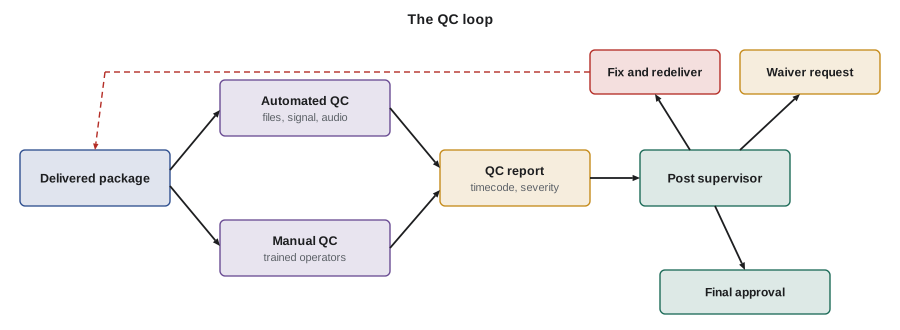
- At delivery: the service or its QC vendor checks the delivered package, often with both automated and full manual passes.
- After launch: viewer reports and the service's own monitoring can reveal problems that were missed.
The earlier a fault is found, the cheaper it is to fix. A dead pixel noticed in dailies costs minutes to address; the same fault found in final QC may need fixes across hundreds of shots.
Automated QC
Automated QC software decodes the files and checks them against rules. It is fast and consistent, and it catches problems people might miss.
- File and package checks: correct formats, frame rate, resolution, timecode, IMF structure, hashes and metadata.
- Signal checks: video levels outside legal or full range, out-of-gamut colors, peaks above the mastering display's limit and incorrect HDR metadata.
- Picture artifacts: black frames, frozen frames, digital dropouts, compression blockiness and some kinds of flicker.
- Audio checks: loudness, true peak, phase problems, silence, clipping and channel layout.
- Timed text checks: timing, overlaps, reading speed and formatting rules.
Automated tools can produce false positives, such as a creative black frame or an intentionally clipped highlight. Operators review flagged items and decide whether they are real faults.
Manual QC
Manual QC means a trained operator watches the full program, often in real time, on a calibrated reference display with good audio monitoring. Some services require separate manual passes for HDR and SDR. Operators look for problems software finds hard to judge:
- Focus and softness that is not intentional.
- Boom microphones, crew, equipment or reflections in frame.
- Dead, stuck or hot pixels, sensor spots and dust.
- Banding, posterization and noise that looks wrong.
- Visual effects errors, such as missing objects, edges and tracking slips.
- Continuity and editorial errors, such as flash frames or wrong shots.
- Sync problems between picture and sound.
- Subtitle, caption and forced narrative errors.
Operators log each issue with a timecode, a description, a severity and sometimes a still frame.
Severity levels and reports
QC reports usually classify each issue by severity. Names vary, but a common pattern is:
| Severity | Meaning | Typical action |
|---|---|---|
| Critical or fail | Breaks the specification or seriously affects viewing | Must be fixed and redelivered |
| Major | Clearly visible or audible problem | Usually fixed; waiver possible in rare cases |
| Minor | Small issue, noticeable to trained eyes | Fixed if practical, otherwise noted |
| Creative or note | Intentional choice or for information | Confirmed with the creative team, no fix required |
A report typically lists the title, episode, version, file names, QC date, tool versions, operator, monitoring setup and each issue with timecode, description, severity and status. When the creative team believes a flagged item is intentional, such as grain, lens flare or a deliberately soft dream sequence, the post supervisor asks for it to be marked as creative intent. Some services ask productions to declare such choices in advance.
Worked problem
Reading a QC report
A QC report for a 52-minute episode lists 14 issues: 1 critical (a two-frame black flash at 00:31:12:05), 3 major (boom shadow, dead pixel in four shots, out-of-gamut neon sign), 7 minor and 3 creative notes. What must happen before redelivery?
Show solution
- Critical: fix the black flash, usually an editorial or conform error.
- Majors: paint out the boom shadow, fix the dead pixel in all four shots and bring the neon sign inside the mastering gamut.
- Minors: fix where practical or document why not.
- Creative notes: confirm with the DP and director that they are intentional.
Answer: At least the critical and major issues must be fixed and the episode redelivered, with a response for each minor and creative item. The DP should review the neon fix to make sure the look is preserved.
Common picture faults and their causes
Many picture QC failures have predictable causes.
| Fault | Common cause | Prevention |
|---|---|---|
| Dead, stuck or hot pixels | Sensor defects, heat, long exposures | Black balance or pixel calibration, dailies checks |
| Flicker | Lights with pulsing drivers or mains frequency clashing with shutter | Flicker-free fixtures, matched shutter and frame rate, tests |
| Banding | Low bit depth, heavy compression, strong grading of smooth gradients | 10-bit or better capture, careful grading, grain or dither |
| Out-of-gamut colors | Saturated LEDs, neon or VFX colors beyond the mastering gamut | Gamut monitoring, softer saturation in the grade |
| Highlights above peak | Practicals, sun or specular highlights pushed beyond the mastering display | Highlight roll-off, metadata checks |
| Softness | Missed focus, lens problems or poor upscales | Focus monitoring, lens tests, approved capture |
| Compression artifacts | Low-bitrate capture or intermediate files | Approved formats, high-quality intermediates |
| Moiré and aliasing | Fine patterns in costumes or sets | Wardrobe tests, filtration, changing distance |
Worked problem
Why some lights flicker on camera
A practical lamp's driver pulses at 120 Hz. The camera shoots at 23.976 fps with a 180° shutter, so each exposure lasts about 1/48 second. How many light pulses fall in each exposure, and why could this produce visible flicker?
Show solution
- Exposure time: \( 1 \div 47.95 \approx 0.0209 \) s.
- Pulses per exposure: \( 120 \times 0.0209 \approx 2.5 \).
- Because 2.5 is not a whole number, some frames capture two pulses and some capture three, so brightness varies from frame to frame.
Answer: About 2.5 pulses per frame, which can make the lamp flicker. A shutter of 1/60 or 1/120 second (an exposure that holds a whole number of pulses), a flicker-free fixture or a different practical prevents the problem. CINE-320 and CINE-330 covered flicker with mains-powered lights.
Worked problem
How much of a frame is out of gamut?
An automated tool reports that 0.8 % of the pixels in a 3,840 × 2,160 frame fall outside P3-D65. How many pixels is that, and should it be fixed?
Show solution
- Pixels in frame: \( 3\,840 \times 2\,160 = 8\,294\,400 \).
- Out of gamut: \( 8\,294\,400 \times 0.008 \approx 66\,355 \) pixels.
Answer: About 66,000 pixels, roughly a small neon sign. Whether it fails depends on the specification and how visible it is; many services flag any noticeable excursion. The colorist can bring the color inside the gamut while keeping its saturated look as much as possible.
Photosensitive content
Rapid flashing lights and certain patterns can trigger seizures in people with photosensitive epilepsy. Broadcasters in some countries must test content against guidelines such as ITU-R BT.1702, which limits flashes and regular patterns, commonly to no more than three harmful flashes in any one-second period. Many streaming services and QC vendors run automated photosensitivity tests and either flag sequences, ask for changes or add warnings to the title page. Sequences with strobe effects, lightning, gunfire muzzle flashes, club lighting or flashing police lights deserve attention in the grade and edit.
Worked problem
Counting flashes
In a club scene, a strobe flashes at 6 times per second across most of the frame for 4 seconds. If a guideline allows no more than 3 harmful flashes in any one second, does the sequence comply?
Show solution
- Flash rate: 6 per second, which is above 3.
Answer: It would fail. Options include slowing the strobe, reducing its brightness change or area, or editing the sequence, in addition to any warning the service uses.
What the cinematographer can do
Most picture QC failures can be prevented on set and in the grade.
- Test cameras for dead pixels and run pixel calibration routines before and during the shoot.
- Test practical lights and LED fixtures for flicker at the planned frame rate and shutter.
- Watch HDR highlights, saturated lights and fine patterns on set and in dailies.
- Shoot clean plates and keep notes for paint-outs of rigs and reflections.
- Ask dailies and the DIT to report technical issues every day.
- Declare intentional choices, such as heavy grain or flares, early with the post supervisor.
- Review the QC report and approve fixes that affect the look.
Worked problem
Cost of a late fix
A dead pixel appears in 120 shots across a season. Fixing it in dailies by remapping the sensor would have taken 10 minutes once. Fixing it in finishing costs an illustrative 30 dollars per shot for paint-out plus 4 hours of QC re-check at 150 dollars per hour. What is the finishing cost?
Show solution
- Paint-out: \( 120 \times 30 = 3\,600 \) dollars.
- Re-check: \( 4 \times 150 = 600 \) dollars.
- Total: 4,200 dollars, plus schedule risk.
Answer: About 4,200 dollars, compared with a few minutes on set. Daily technical checks pay for themselves quickly.
Waivers and redelivery
Sometimes a flagged issue cannot be fixed, or fixing it would harm the creative intent. In that case the post supervisor may ask the service for a waiver, a documented acceptance of the issue. A good waiver request explains what the issue is, why it occurs, why it cannot be fixed or why fixing it would change the intended look, and includes stills or clips. Services grant waivers sparingly, and some issues, such as file structure errors or incorrect metadata, are never waived. When fixes are needed, the facility usually redelivers only the affected material, often as an IMF supplemental package, and the service re-checks those parts. Keeping a clear log of every issue, its fix and its approval protects the production if questions come up later.
Common mistakes
MistakeAutomated QC replaces manual review.
InsteadSoftware catches many faults quickly, but trained operators are still needed for focus, booms, VFX errors and judgment calls.
MistakeEvery QC flag is a real fault.
InsteadSome flags are false positives or intentional choices that the creative team confirms.
MistakeFlicker is always the light's fault.
InsteadFlicker often comes from a clash between the light's pulse rate and the camera's shutter and frame rate.
MistakeOut-of-gamut colors do not matter if they look good.
InsteadColors outside the mastering gamut were not seen accurately on the reference display and are often flagged.
MistakeQC problems cannot be prevented on set.
InsteadMany faults, such as dead pixels, flicker and booms, can be caught in prep and dailies.
Summary and key terms
- QC happens on set, in dailies, in finishing, at delivery and after launch; earlier is cheaper.
- Automated QC checks files, signals, artifacts, audio and timed text against rules.
- Manual QC uses trained operators on reference displays to catch focus, booms, VFX and sync errors.
- Reports list issues with timecodes and severity levels, from critical to creative notes.
- Common faults include dead pixels, flicker, banding, gamut excursions, highlights above peak and moiré.
- Photosensitivity guidelines limit harmful flashing, commonly to three flashes per second.
- Testing, daily technical checks and early declarations of creative intent prevent many failures.
- Quality control (QC)
- Checking files and content against a specification before release.
- Automated QC
- Software checks of files, signals, artifacts, audio and text.
- Manual QC
- Full review by trained operators on calibrated equipment.
- Severity level
- A classification of a QC issue, such as critical, major, minor or creative note.
- Waiver
- A documented acceptance of an issue that would otherwise require a fix.
- Dead pixel
- A sensor photosite that records no signal or the wrong value.
- Flicker
- Frame-to-frame brightness variation, often from pulsing light sources.
- Banding
- Visible steps in smooth gradients.
- Out of gamut
- Colors outside the mastering gamut.
- Photosensitive epilepsy testing
- Checking for flashes and patterns that could trigger seizures.
Practice problems
Work each problem on paper first, then reveal the answer to check.
A light pulses at 100 Hz and the exposure is 1/48 s. How many pulses per exposure?
Show answer
100 ÷ 48 ≈ 2.08, so frames may vary slightly.
What exposure time holds exactly two pulses of a 120 Hz light?
Show answer
1/60 second.
How many pixels is 1 % of a 3,840 × 2,160 frame?
Show answer
About 82,944 pixels.
Name three things manual QC finds better than software.
Show answer
Any three of focus, booms and crew in frame, VFX errors, continuity errors and judgment of creative intent.
What does a critical QC issue usually require?
Show answer
A fix and redelivery.
A strobe flashes 2 times per second. Is that within a 3-flash limit?
Show answer
Yes.
Why declare intentional grain early?
Show answer
So QC marks it as creative intent rather than a fault.
Fixing a fault costs 25 dollars per shot in 80 shots plus 300 dollars of re-check. What is the total?
Show answer
2,000 + 300 = 2,300 dollars.
What prevents moiré on set?
Show answer
Wardrobe tests, filtration or changing camera distance and lens.
What information goes with each QC issue?
Show answer
Timecode, description, severity and status, sometimes with a still.
Lesson quiz · 5 questions
Score 60% or more to complete this lesson.
Create a free account to save your progress, take quizzes and earn a certificate.