
CISSP-115 · Lesson 3 of 12 · 29 min
Vulnerability management and scanning
Every organization runs software with known flaws. Thousands of new vulnerabilities are published each year; the public Common Vulnerabilities and Exposures (CVE) list has added more than 30,000 entries a year recently, and attackers routinely exploit some of them within days of disclosure. Vulnerability management is the continuous program that finds these weaknesses in your environment, decides which matter, fixes or mitigates them, and proves that the fixes worked. Vulnerability scanning is one tool within that program. Confusing the two is a common mistake: a scanner produces a list, but only a managed process reduces risk.
This lesson covers the life cycle, the kinds of scans, how to make scans accurate, and how to measure scanner quality. Lesson 4 covers how to score and prioritize what scans find.
The vulnerability management life cycle
Vulnerability management is usually drawn as a cycle with six stages. Discover: build and maintain an inventory of assets, because you cannot scan what you do not know exists. Assess: scan and otherwise identify vulnerabilities on those assets. Prioritize: rank findings by risk, combining severity, exploitation evidence and asset importance. Remediate: patch, reconfigure, replace or apply compensating controls, within agreed timelines. Verify: rescan or test to confirm the fix worked. Report and improve: track metrics, report to owners and management, and refine the process. The cycle then repeats, continuously for internet-facing assets and on a schedule elsewhere.
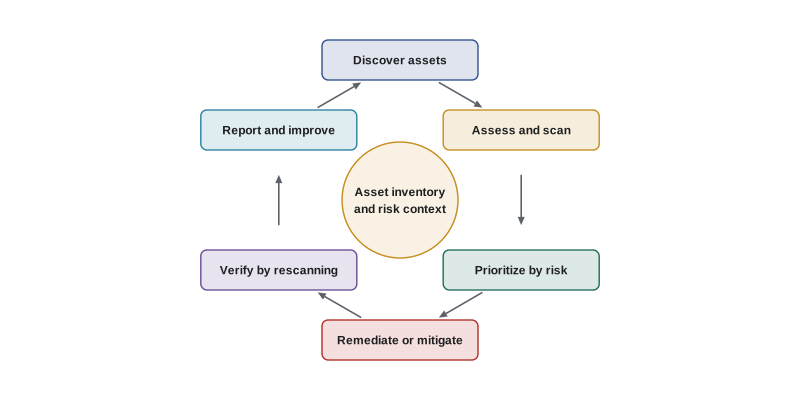
Asset discovery deserves emphasis because it is where many programs quietly fail. Discovery combines several sources: network sweeps, cloud provider inventories pulled through their APIs, endpoint management and EDR agents, configuration management databases, certificate transparency logs and external attack surface management services that find internet-facing assets registered to your domains. Each source misses something, so mature programs reconcile them and investigate assets that appear in one source but not another. The CIS Critical Security Controls put enterprise asset inventory first and vulnerability management seventh, which reflects this dependency.
Kinds of vulnerability scans
Scans differ by vantage point, credentials and target. An external scan runs from the internet against public-facing addresses and shows what any attacker can see. An internal scan runs from inside the network and shows what an attacker who has gained a foothold, or a malicious insider, could reach. Network scans probe hosts and services; web application scanners crawl and test web applications; container and image scanners examine software packages inside images in registries; cloud configuration scanners (often called cloud security posture management) compare cloud settings against benchmarks; and code and dependency scanners, covered in lesson 8, examine software before it ships.
The most important accuracy decision is whether a scan is authenticated. An unauthenticated (non-credentialed) scan sees only what services reveal on the network: open ports, banners and responses. It often has to guess software versions, which causes both false positives and false negatives. An authenticated (credentialed) scan logs into each host with a dedicated low-privilege or read-only account, or uses an installed agent, and reads installed package versions, registry keys and configuration directly. Authenticated scans find far more missing patches and misconfigurations with far fewer false alarms. Their credentials must be protected like any privileged account: unique to the scanner, vaulted, monitored and rotated.
| Scan type | What it sees | Accuracy | Typical use |
|---|---|---|---|
| External, unauthenticated | Internet-exposed services | Moderate; banner-based guesses | Attack surface monitoring, PCI DSS ASV scans |
| Internal, unauthenticated | Services reachable on internal networks | Moderate | Discovering unknown hosts and services |
| Internal, authenticated | Installed software, patches, configuration | High | Patch and configuration compliance |
| Agent-based | Same as authenticated, even off-network | High | Laptops and cloud workloads |
| Web application (DAST) | Behavior of running web apps | Varies; needs tuning | Injection, authentication, session flaws |
| Cloud posture | Cloud service settings | High for settings | Public storage, open security groups, logging gaps |
Scanners identify issues by matching what they observe against vulnerability databases and checks. The common naming standards come from the Security Content Automation Protocol (SCAP) family: CVE identifiers name specific vulnerabilities, Common Platform Enumeration (CPE) names products and versions, the Common Weakness Enumeration (CWE) names underlying weakness types such as SQL injection, and the Common Configuration Enumeration and XCCDF/OVAL formats express configuration checks. Benchmarks such as the CIS Benchmarks and the United States Defense Information Systems Agency's Security Technical Implementation Guides define secure configurations to check against.
In the United States, the Cybersecurity and Infrastructure Security Agency (CISA) maintains the Known Exploited Vulnerabilities (KEV) catalog, discussed in lesson 4, and Binding Operational Directive 22-01 requires federal civilian agencies to remediate listed vulnerabilities within set deadlines. Directive 23-01 requires those agencies to perform automated asset discovery every 7 days and vulnerability enumeration every 14 days. Private organizations are not bound by these directives, but many adopt the catalog and timelines as a benchmark.
Remediation, exceptions and timelines
Remediation options include applying a vendor patch, upgrading to a supported version, changing a configuration, removing an unneeded service or package, and replacing an end-of-life system. When a fix is not possible in time, the organization can mitigate with compensating controls, such as restricting network access to the vulnerable service, adding a web application firewall rule, disabling a vulnerable feature or increasing monitoring, and document the decision. A formal exception (risk acceptance) records who accepted the risk, why, what compensating controls apply and when the exception expires. Exceptions without expiry dates become permanent by default.
Most organizations set remediation service level agreements (SLAs) by severity and exposure, for example critical internet-facing vulnerabilities within 7 to 15 days, high within 30 days, medium within 90 days and low at the next maintenance cycle. Known-exploited vulnerabilities often get the fastest track regardless of their base score. These timelines should be agreed with system owners in advance, so that when a finding arrives the deadline is already known and escalation is automatic.
from datetime import date, timedelta
SLA = {'Critical': 15, 'High': 30, 'Medium': 90, 'Low': 180}
findings = [
    ('CVE-A', 'Critical', date(2026, 9, 1), date(2026, 9, 10)),
    ('CVE-B', 'High', date(2026, 8, 1), None),
    ('CVE-C', 'Medium', date(2026, 6, 15), date(2026, 9, 30)),
    ('CVE-D', 'Critical', date(2026, 10, 2), None),
    ('CVE-E', 'Low', date(2026, 3, 1), date(2026, 7, 1)),
]
today = date(2026, 10, 20)
met = total_closed = 0
for fid, sev, found, fixed in findings:
    due = found + timedelta(days=SLA[sev])
    if fixed:
        total_closed += 1
        ok = fixed <= due
        met += ok
        state = f'closed {fixed}, ' + ('within SLA' if ok else f'late by {(fixed - due).days} d')
    else:
        state = f'OPEN, due {due}, ' + ('OVERDUE by %d d' % (today - due).days if today > due else f'{(due - today).days} d left')
    print(f'{fid} {sev:8s} {state}')
print(f'SLA compliance for closed findings: {met}/{total_closed} = {met/total_closed:.0%}')CVE-A Critical closed 2026-09-10, within SLA CVE-B High OPEN, due 2026-08-31, OVERDUE by 50 d CVE-C Medium closed 2026-09-30, late by 17 d CVE-D Critical OPEN, due 2026-10-17, OVERDUE by 3 d CVE-E Low closed 2026-07-01, within SLA SLA compliance for closed findings: 2/3 = 67%
The output shows a pattern auditors look for: one high-severity finding is overdue by weeks, and one closed medium finding missed its deadline. SLA compliance is a useful headline metric, but the overdue list is what managers act on. Lesson 11 returns to how such data is reported.
Scanner accuracy: false positives and false negatives
No scanner is perfect. A false positive is a reported vulnerability that is not actually present, for example a version-based check that misses a vendor's back-ported fix. A false negative is a real vulnerability the scanner fails to report, perhaps because the scan was unauthenticated, the check did not exist yet, or a firewall blocked the probe. False positives waste remediation effort and erode trust in the program; false negatives are more dangerous because they create false confidence. Tuning, authenticated scanning, current plug-ins and periodic validation by manual testing reduce both.
Scanner quality can be measured like any classifier. Precision is the share of reported findings that are real; recall (also called sensitivity or detection rate) is the share of real vulnerabilities that the scanner reports. A scanner that reports everything has high recall and poor precision; one that reports only certain matches has high precision but misses things. Comparing scanners on a test environment with known, seeded vulnerabilities is a common way to evaluate products before purchase.
import random
random.seed(115)
# A lab with 200 seeded real vulnerabilities; compare two scanner configurations
real = set(range(200))
def run(detect_rate, fp_count):
    found = {v for v in real if random.random() < detect_rate}
    fps = {1000 + i for i in range(fp_count)}
    return found | fps
for name, rate, fps in (('unauthenticated', 0.55, 40), ('authenticated', 0.92, 8)):
    rep = run(rate, fps)
    tp = len(rep & real); fp = len(rep - real); fn = len(real - rep)
    print(f'{name:16s} reported {len(rep):3d}  TP {tp:3d}  FP {fp:2d}  FN {fn:3d}  '
f'precision {tp/(tp+fp):.2f} recall {tp/(tp+fn):.2f}')unauthenticated reported 127 TP 87 FP 40 FN 113 precision 0.69 recall 0.43 authenticated reported 193 TP 185 FP 8 FN 15 precision 0.96 recall 0.93
In this illustrative lab the authenticated configuration finds most of the seeded vulnerabilities with few false alarms, while the unauthenticated one misses more than half. The exact numbers are invented, but the direction matches practical experience and is the main reason auditors ask whether internal scans are credentialed.
Worked problem
Investigating a disputed finding
A system owner says a critical OpenSSL finding on a Linux server is a false positive because the distribution back-ported the fix. How should the security team respond?
Show solution
- Check the vendor's security advisory for the package version installed; back-ported fixes are common in enterprise Linux distributions.
- Confirm with an authenticated check that reads the package changelog or the vendor's advisory identifiers rather than the upstream version number.
- If the fix is present, mark the finding as a false positive with evidence and tune the scanner check or policy.
- If not, the SLA stands. Either way, record the decision so the same dispute does not recur next month.
Answer: Verify against the vendor advisory with an authenticated check, then either document a false positive with evidence or proceed with remediation.
Worked problem
Choosing scan credentials
The infrastructure team proposes giving the scanner a domain administrator account so it can read everything. Evaluate the proposal.
Show solution
- A domain administrator account is far more privilege than scanning needs and would be a prime target if the scanner were compromised.
- Most authenticated checks need only local read access, or a dedicated account in a scanning group with specific rights.
- The credential should be unique, stored in a vault, restricted to scanner source addresses and monitored for use elsewhere.
- Where possible, use agents that avoid a shared network credential altogether.
Answer: Reject the domain administrator account; use least-privilege, vaulted, monitored scan credentials or agents.
Worked problem
An end-of-life system
A laboratory instrument runs an operating system that no longer receives patches and cannot be upgraded until the instrument is replaced in 18 months. What should be done?
Show solution
- Record a time-limited exception approved by the business owner and the security function.
- Isolate the instrument on its own network segment with only the connections it needs.
- Disable unneeded services, restrict removable media and increase monitoring.
- Track the replacement as a funded project with a date, and review the exception regularly.
Answer: Accept the risk formally with an expiry date, apply compensating controls, and fund replacement.
Common mistakes
MistakeEquating vulnerability management with running a scanner.
InsteadRun a life cycle: discover, assess, prioritize, remediate, verify, report.
MistakeScanning only the assets on the official inventory.
InsteadReconcile several discovery sources, including cloud APIs and external attack surface tools.
MistakeRelying on unauthenticated internal scans.
InsteadUse authenticated scans or agents for accurate patch and configuration data.
MistakeGiving scanners highly privileged shared credentials.
InsteadUse least-privilege, vaulted, monitored scan accounts.
MistakeApproving exceptions with no end date.
InsteadTime-limit exceptions and record compensating controls and owners.
MistakeClosing findings when a ticket is marked done.
InsteadVerify fixes by rescanning or testing.
Summary and key terms
- Vulnerability management is a continuous life cycle built on an accurate asset inventory.
- External scans show the attacker view; internal scans show the insider or foothold view.
- Authenticated scans and agents are far more accurate than unauthenticated scans.
- SCAP standards such as CVE, CPE and CWE name vulnerabilities, products and weakness types.
- Remediation timelines should be agreed in advance by severity and exposure.
- Exceptions need owners, compensating controls and expiry dates.
- Precision and recall measure scanner quality; false negatives create false confidence.
- Vulnerability
- A weakness in a system that could be exploited to cause harm.
- CVE
- Common Vulnerabilities and Exposures, the public list of named vulnerabilities.
- CWE
- Common Weakness Enumeration, a catalog of software and hardware weakness types.
- Authenticated scan
- A scan that logs into hosts to read installed software and configuration.
- Unauthenticated scan
- A scan that sees only what services reveal over the network.
- False positive
- A reported vulnerability that is not actually present.
- False negative
- A real vulnerability that the scanner fails to report.
- Compensating control
- An alternative control that reduces risk when the primary fix cannot be applied.
- Risk acceptance
- A documented, time-limited decision by an owner to tolerate a known risk.
- Attack surface management
- Continuous discovery and monitoring of internet-facing assets.
Practice problems
Work each problem on paper first, then reveal the answer to check.
List the six stages of the vulnerability management life cycle.
Show answer
Discover, assess, prioritize, remediate, verify, report and improve.
Why are authenticated scans more accurate?
Show answer
They read installed versions and settings directly instead of guessing from network responses.
What is the danger of false negatives?
Show answer
They create false confidence that a system is safe.
A scanner reports 120 findings, of which 90 are real; 30 real vulnerabilities were missed. Compute precision and recall.
Show answer
Precision 90/120 = 0.75; recall 90/120 = 0.75 (90 of 120 real).
What should every risk acceptance include?
Show answer
An owner, a reason, compensating controls and an expiry date.
Name two sources for asset discovery.
Show answer
Any two of network sweeps, cloud APIs, endpoint agents, CMDB, certificate transparency, attack surface services.
What does a cloud posture scanner check?
Show answer
Cloud service settings against benchmarks, such as public storage or open security groups.
Why verify remediation by rescanning?
Show answer
Tickets can be closed without the fix actually taking effect.
What is CPE used for?
Show answer
Naming products and versions so vulnerabilities can be matched to them.
Why time-limit exceptions?
Show answer
Otherwise temporary risk acceptance becomes permanent by default.
Lesson quiz · 5 questions
Score 60% or more to complete this lesson.
Create a free account to save your progress, take quizzes and earn a certificate.