
CRE-101 · Lesson 6 of 12 · 29 min
Content craft: ideas, formats and production
Platforms, algorithms and income models matter, but audiences ultimately respond to the work itself. This lesson turns to the craft of making content: finding and testing ideas, choosing formats that suit the idea and the platform, structuring a piece so it holds attention, packaging it with titles and thumbnails, producing it well on a small budget, and building a workflow that lets a creator publish consistently without burning out. The principles apply across video, audio and written content; later courses in the creator and media programs develop each in depth (VIS-101 covers visual composition).
Where ideas come from
Creators who last are rarely short of ideas because they collect them systematically rather than waiting for inspiration. Productive sources include:
- Audience questions: comments, messages, community discussions and live chat show what people want to know (Lesson 2).
- Search demand: what people search for in your topic, which signals ongoing interest (Lesson 4).
- Your own experience: problems you solved, mistakes you made, projects you are working on, and opinions you hold strongly.
- Gaps: questions answered badly or not at all by existing content, or topics covered only in another language or format.
- Trends and news in your niche, approached with your own perspective rather than simply repeating them.
- Remixing your own successful content: follow-ups, deeper dives, updates and different formats of what already worked.
Keep an idea bank, a simple list or spreadsheet, and score ideas before investing in them. A quick scoring method asks: Is there demand (do people search for or ask about this)? Is there an angle (what will make mine different or better)? Can I do it well with my skills and resources? Does it fit my channel's promise to its audience?
Worked problem
Scoring ideas
A cooking creator scores ideas from 1 to 5 on demand, angle, feasibility and fit. "Weeknight dinners under $10" scores 5, 3, 5, 5. "Recreating a famous chef's tasting menu" scores 3, 5, 2, 3. "Air fryer basics" scores 5, 2, 5, 4. Which should come first, and how could the weaker ideas improve?
Show solution
- Totals: weeknight dinners 18, tasting menu 13, air fryer 16.
- Weeknight dinners comes first: strong demand and a clear fit.
- Air fryer basics has demand but no angle: crowded topic. An angle such as "five air fryer mistakes I made" or a Canadian-ingredients version could raise it.
Answer: Start with weeknight dinners. The tasting menu is a great occasional "tentpole" piece once the channel has an audience, but its low feasibility makes it risky as an early video. Scoring forces honest thinking about why an idea will work.
Choosing formats
A format is a repeatable structure for content: a tutorial, a review, a list ("top five"), a story, a challenge, an interview, a reaction or commentary, a day-in-the-life vlog, a documentary deep dive, a live stream, a short sketch. Formats matter because audiences come to expect them and because a repeatable format makes production faster. Good formats have a clear promise (what the viewer will get), a recognizable structure, and room for variety within it. Match formats to platforms and contexts:
| Format | Best suited to | Typical length |
|---|---|---|
| Short vertical clip | quick tips, humor, trends, previews of longer work | 15 to 90 seconds |
| Tutorial or explainer | search-driven video, YouTube, blogs | 5 to 20 minutes |
| Deep dive or documentary | YouTube, podcasts, newsletters | 20 to 60+ minutes |
| Interview or conversation | podcasts, YouTube, live | 30 to 120 minutes |
| Live stream | gaming, Q&A, community events | 1 to several hours |
| Carousel or image post | Instagram, LinkedIn, educational summaries | 5 to 10 slides |
| Newsletter or article | email, Substack, blogs | 500 to 3,000 words |
Many creators combine a "hero" long-form format, which builds depth and relationship, with short clips that bring in new viewers, and a newsletter or community that keeps the most engaged people close (Lesson 3 discussed repurposing).
Structure: holding attention
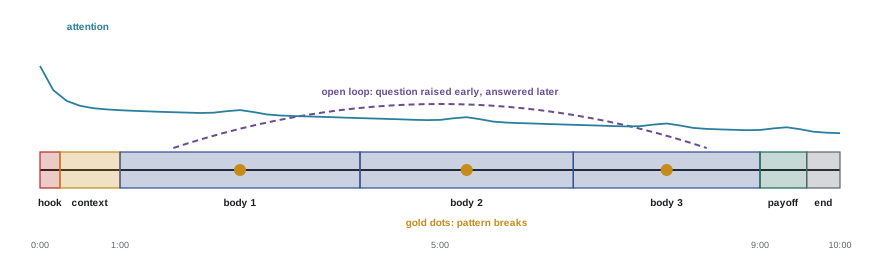
Whatever the format, content that holds attention usually follows a structure:
- Hook (first seconds): state the payoff, pose a question, show the most striking moment, or create curiosity. Avoid long introductions, logos and "before we start, please subscribe".
- Context: quickly set up why this matters and what the viewer will get, fulfilling the promise of the title.
- Body: deliver the value in a logical sequence, with progression (each part builds on the last) and pattern breaks every so often (a change of shot, an example, a moment of humor, a visual) to reset attention.
- Open loops: introduce questions that will be answered later ("the third mistake is the one that ruined my first batch") to keep viewers through the middle.
- Payoff: deliver the result or answer clearly.
- Ending: finish promptly after the payoff, with a single call to action that points somewhere useful, such as a related video or the newsletter, rather than a long outro that viewers skip.
Storytelling techniques help even in educational content. A story has a character with a goal, an obstacle and a change; framing a tutorial as "I tried to do X, this went wrong, here is what fixed it" is often more engaging than a list of steps, because viewers want to know how it ends.
Scripting and planning
Some creators script every word; others work from bullet-point outlines; live and conversational formats rely on preparation rather than scripts. For most educational and narrative content, at least an outline helps: it keeps the piece focused, cuts rambling (which harms retention), and makes editing faster. A useful workflow is to write the title and thumbnail concept first, so the content is built to fulfill a clear promise, then the hook, then the outline, and only then the full script if needed. Reading the script aloud reveals sentences that are too long or unnatural. Speaking to one imagined viewer, rather than an audience, makes delivery more personal.
Packaging: titles and thumbnails
Titles and thumbnails, or the cover image and first line of a post, are the packaging that persuades someone to start. On YouTube, they often matter as much as the content in determining reach (Lesson 4). Effective packaging:
- Makes a clear, specific promise that the content keeps.
- Creates curiosity or emotion without misleading.
- Works at small size: thumbnails are seen at a few centimeters wide on phones, so they need one clear subject, high contrast and at most a few large words (VIS-101 discusses composition for small screens).
- Complements rather than repeats: the thumbnail shows what the title does not say.
- Is consistent enough across a channel that returning viewers recognize it.
Many platforms let creators test several thumbnails or titles and choose the best performer automatically; even without such tools, creators can change a thumbnail after a few days if click-through is poor and compare results (Lesson 10).
Production on a budget
Audiences forgive modest video quality far more readily than poor sound or poor content. Priorities for a new creator, roughly in order:
- Audio: a clip-on (lavalier) or USB microphone close to the speaker, in a room with soft furnishings to reduce echo, is the most valuable first purchase.
- Light: a window facing the subject, or one or two inexpensive LED panels, makes far more difference than a better camera; avoid strong overhead light and bright windows behind the subject.
- Camera: a recent phone records excellent video; use the rear camera, lock focus and exposure, and keep the lens clean. A dedicated camera can come later.
- Stability and framing: a tripod and attention to composition, eye level and background (VIS-101).
- Editing: free or low-cost editors are capable; learn to cut pauses and mistakes, add captions, and adjust audio levels.
Worked problem
A starter budget
A new creator has $400 for gear and already owns a recent phone and a laptop. How should it be spent?
Show solution
- Microphone: a wireless clip-on pair for phones, about $150 to $200.
- Lighting: one LED panel with a stand and diffuser, about $80 to $120.
- Tripod with phone mount: about $40.
- Remaining: editing software subscription or music license, or saved for later needs.
Answer: Spending most of the budget on sound and light, not a camera, gives the biggest improvement in perceived quality. Upgrades should follow specific needs revealed by making content, not marketing for gear.
Editing and pacing
Editing shapes pacing, which strongly affects retention. Common practices in creator video include cutting pauses, filler words and repeated takes ("jump cuts"), adding B-roll (supporting footage) to illustrate points and hide cuts, using on-screen text and graphics for key information, adding captions (many viewers watch without sound, and captions help accessibility), and choosing music that supports mood without overpowering speech. Pacing should suit the content: fast cuts suit energetic entertainment, while calm, longer shots suit craft, nature and relaxation content. Watching your own retention graphs (Lesson 10) shows exactly where viewers lose interest and teaches more about pacing than any rule.
Workflow and consistency
Consistency builds audience expectations and gives recommendation systems material to work with, but an unsustainable schedule leads to burnout (Lesson 7). A workflow that separates stages and batches similar work helps:
- Plan ideas and titles for several pieces in one session.
- Script or outline in batches.
- Record several pieces in one setup.
- Edit, package and schedule.
- Repurpose into clips, posts and newsletter content.
Templates for scripts, thumbnails and descriptions, a content calendar, and checklists for publishing (title, description, chapters, captions, end screens, disclosure where needed) reduce errors and save time. As a channel grows, many creators hire editors or thumbnail designers first, because those tasks take the most time and are easiest to delegate.
Worked problem
Time per video
A creator spends 3 hours on research and scripting, 2 hours filming, 6 hours editing and 1 hour on packaging and publishing for each 10-minute video. With 15 hours a week available, how many videos can they publish per month, and what changes would allow weekly uploads?
Show solution
- Time per video: \(3 + 2 + 6 + 1 = 12\) hours.
- Monthly hours: about \(15 \times 4.3 = 65\) hours, so 5 videos a month at most, if no time is spent on anything else.
- Batching filming (saving about 1 hour per video) and using templates and a simpler editing style (saving 2 hours) gives 9 hours per video, comfortably fitting one per week with time for community and clips.
Answer: About 5 videos a month now, with no slack. Workflow improvements make weekly uploads sustainable, which matters more over a year than a burst of daily posts followed by burnout.
Reviewing your own work
Craft improves fastest when you review finished work on a schedule rather than only when something flops. A simple routine is to watch or read each piece again one week after publishing, when you are less attached to it, and answer three questions in writing: where would a new viewer have been confused, where did the energy drop, and what would you cut if the piece had to be 30 percent shorter? Then compare your answers with the retention graph or scroll-depth data from Lesson 10. When your instinct and the data agree, you have found a reliable signal; when they disagree, the data is usually telling you something about the audience that you cannot see from the inside.
Feedback from other people helps too, but choose it carefully. A small group of peers who make similar work and will tell you the truth is worth more than general praise. Ask specific questions (Was the opening clear? Did the example in the middle work?) rather than whether they liked it. Keep a running file of lessons learned, and before each new piece read the last few entries. Over months this turns scattered experience into a personal style guide.
Common mistakes
MistakeWaiting for inspiration instead of collecting ideas.
InsteadKeep an idea bank and score ideas for demand, angle, feasibility and fit.
MistakeOpening with long introductions and requests.
InsteadHook with the payoff or a question in the first seconds.
MistakeBuying an expensive camera first.
InsteadInvest first in audio and lighting.
MistakeMaking thumbnails and titles that overpromise.
InsteadPackage compellingly but honestly, then deliver the promise.
MistakeAdopting a schedule you cannot sustain.
InsteadBuild a batched workflow and a pace you can keep for a year.
Summary and key terms
- Ideas come from audience questions, search demand, experience, gaps and trends; score them before investing.
- Formats give repeatable structures; combine long-form depth, short-form reach and direct channels.
- Hold attention with a hook, quick context, a body with progression and pattern breaks, open loops, a payoff and a short ending.
- Outlines or scripts focus content; write the title and hook first.
- Titles and thumbnails must make a clear, honest promise and work at small size.
- Audio and light matter more than cameras; editing and captions shape pacing and accessibility.
- Batched workflows, templates and realistic schedules make consistency sustainable.
- Idea bank
- A running list of content ideas.
- Format
- A repeatable structure for content.
- Hook
- The opening that captures attention.
- Pattern break
- A change that resets attention during content.
- Open loop
- A question raised early and answered later.
- Payoff
- The delivery of the promised result or answer.
- Packaging
- The title, thumbnail or cover that persuades people to start.
- B-roll
- Supporting footage illustrating what is being said.
- Jump cut
- An edit removing pauses or mistakes within a shot.
- Batching
- Doing similar tasks together for efficiency.
Practice problems
Work each problem on paper first, then reveal the answer to check.
Name four sources of content ideas.
Show answer
Audience questions, search demand, experience, gaps, trends, remixing past successes.
What four questions score an idea?
Show answer
Demand, angle, feasibility, fit.
What makes a good format?
Show answer
A clear promise, recognizable structure and room for variety.
What should the first seconds of a video do?
Show answer
Hook the viewer with the payoff, a question or a striking moment.
What is an open loop?
Show answer
A question introduced early and answered later.
Why write the title before the script?
Show answer
So the content is built to fulfill a clear promise.
What is the most valuable first gear purchase?
Show answer
A good microphone.
Why add captions?
Show answer
Many watch without sound, and captions aid accessibility.
Hours per month for 8 videos at 9 hours each?
Show answer
72 hours.
What tasks do creators often delegate first?
Show answer
Editing and thumbnail design.
Lesson quiz · 5 questions
Score 60% or more to complete this lesson.
Create a free account to save your progress, take quizzes and earn a certificate.