
CRE-210 · Lesson 12 of 12 · 25 min
Workflow, repurposing and capstone
Making one good short video is a craft; making them consistently, week after week, is a system. Successful short-form creators combine creative skill with efficient workflows: batching work, using templates, repurposing content across platforms and formats, managing their time and energy, and protecting their wellbeing. This final lesson covers a short-form production workflow, batching and templates, repurposing long content into shorts, cross-posting and platform differences, managing a content calendar, quality control before posting, sustainability and burnout, and the capstone project: a complete short-form series.
A short-form production workflow
A typical workflow for a short-form creator moves through repeatable stages:
- Ideation: review the idea bank, select ideas, write hooks and payoffs (Lesson 2).
- Planning: beat sheets and shot lists for each video (Lessons 4 and 5).
- Production: batch filming sessions, including B-roll.
- Editing: assemble, trim, add text, captions, sound and graphics (Lessons 6 to 8).
- Review: watch each video with and without sound, check text, captions, disclosures and safe zones.
- Publishing: write captions, choose covers, add tags and schedule.
- Engagement: reply to comments in the first hours, note ideas from questions.
- Analysis: review results after a few days and update the experiment log (Lesson 11).
Separating these stages into dedicated blocks of time, rather than doing every stage for one video before starting the next, reduces switching costs and usually improves both speed and quality.
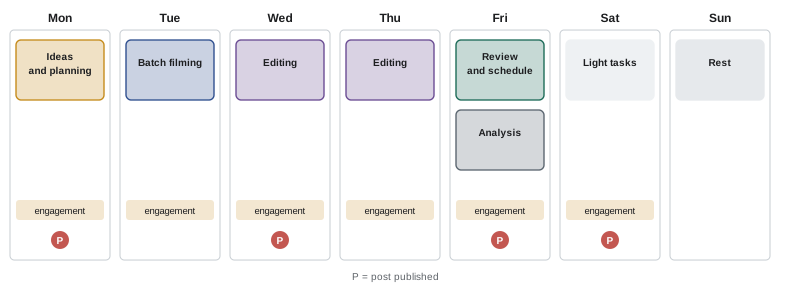
Batching and templates
Batching groups similar tasks: writing several scripts in one session, filming several videos in one setup, editing several videos in a row. A single half-day filming session might produce five to ten short videos when shot lists are prepared in advance and outfits, props and locations are organized. Editing templates, such as project files with preset text styles, colors, captions, intro and outro elements, sound effects and export settings, save time and keep series consistent (Lesson 10). Checklists for each stage reduce mistakes: a pre-publish checklist might include hook, captions checked, safe zones, disclosure if sponsored, music licensed for the account type, cover chosen, caption written and tagged. Over time, a library of templates, B-roll packs and checklists becomes one of a creator's most valuable assets.
Repurposing long content into shorts
Long videos, podcasts, live streams, webinars and talks contain many potential shorts. Effective repurposing involves more than cutting clips:
- Choose moments that stand alone: a complete tip, a strong opinion, a funny exchange, a surprising fact or a story with its own payoff.
- Write a new hook for each clip, since the original moment probably did not start with one.
- Reframe for vertical, keyframing the crop to follow speakers (CRE-130 Lesson 11).
- Tighten the pacing, removing pauses and digressions.
- Add captions, text and, where needed, B-roll.
- Point back to the full content in the caption or a pinned comment, without making the short dependent on it.
AI clipping tools can suggest moments from long videos automatically and reframe them, which saves time, but their selections and hooks usually need human judgment. Repurposing in the other direction works too: a popular short can become the starting point for a longer, deeper video.
Worked problem
Clipping a podcast episode
A creator has a 70-minute podcast interview with a nutrition researcher. How could they produce short-form content from it?
Show solution
- Review the transcript and mark six to ten moments that stand alone: surprising findings, myth corrections, practical tips, a memorable story.
- For each, write a new hook: "This common snack has more sugar than a doughnut" (checked against the source).
- Reframe the video to vertical with the speaker centered, trim pauses, and add accurate captions.
- Add B-roll or simple graphics for data mentioned, with sources in the caption.
- Publish over two weeks, each pointing to the full episode, and track which topics perform best for future episodes.
Answer: Select standalone moments from the transcript, write new hooks, reframe and tighten, add captions, graphics and sources, then publish over time and learn from results.
Cross-posting and platform differences
Posting the same short video to TikTok, Instagram Reels, YouTube Shorts and other platforms multiplies reach with little extra effort, and many creators do this. Some adjustments improve results: export clean versions without another platform's watermark, since some platforms have said they may show watermarked or reposted content less widely and favor original content; adapt captions, hashtags and keywords to each platform's audience and search behavior; use each platform's licensed music rather than carrying over music from another; check safe zones, which differ slightly between platforms; and consider timing and audience differences, since the same video may perform very differently on different platforms. Platform cultures differ too: humor, formats and trends that work on one may need adjusting for another. CRE-201 discusses cross-platform strategy in more depth.
| Step | Why it matters |
|---|---|
| Export clean, watermark-free files | Platforms may favor original uploads |
| Adapt caption and keywords | Search and audiences differ |
| Re-add music from each platform's library | Licenses do not transfer |
| Check safe zones per platform | Interface elements differ |
| Review performance separately | Audiences respond differently |
Managing a content calendar
A content calendar plans what will be published, where and when. For short form, it typically shows each video's working title, series or pillar, platforms, filming date, editing status, publishing date and any sponsorship. Calendars help balance the content mix (Lesson 10), plan around seasonal moments and brand campaigns, coordinate collaborators and editors, and maintain a buffer of finished videos. Simple spreadsheets, project management apps or shared calendars all work; what matters is that the calendar is kept up to date and reviewed weekly. Leave flexibility for timely trend content and reactions, which cannot be planned far ahead.
Quality control before posting
Short videos are often made quickly, so a final check catches avoidable problems. Before posting, watch the video full screen on a phone, once with sound and once without. Check that the hook works in the first second; that captions and on-screen text are accurate, spelled correctly and within the safe zone; that audio levels are balanced; that nothing private or sensitive is visible, such as addresses, screens or other people who have not agreed to appear; that facts and claims are accurate and sourced where necessary; that music is licensed for the account type; that sponsored content is disclosed; and that the cover and caption are ready. A few minutes of checking protects both quality and reputation.
Sustainability and burnout
The pace of short-form content, with frequent posting, fast-moving trends and constant feedback, puts creators at risk of burnout. Signs include exhaustion, loss of enthusiasm, anxiety about metrics, and declining creativity. Strategies for sustainability include setting a realistic schedule; batching to create a buffer; taking planned breaks, which platforms and audiences generally tolerate better than creators fear; limiting time spent checking analytics; separating work from personal time; delegating editing or administration as the business grows; and remembering that individual videos' performance varies widely and is not a measure of personal worth. CRE-350 covers creator wellbeing in depth. Long careers are built on consistency over years, not on intensity over weeks.
Capstone: a short-form series
The capstone asks you to plan, produce and analyze a short-form series that demonstrates the skills of this course. Your submission should include:
- A series plan: the audience, niche and goal; a recurring format with fixed and variable elements; a series name and visual identity; at least twenty episode ideas; and a posting schedule.
- Beat sheets and shot lists for at least three episodes.
- Three to five finished episodes of 15 to 90 seconds, demonstrating strong hooks, clear structure, shot variety, tight pacing, readable text and captions, purposeful sound, and a consistent identity.
- One trend adaptation or remix that fits your niche, with credit where appropriate.
- One repurposed clip from longer content, or a plan for repurposing.
- An analysis of the published episodes, if posted publicly, or of test screenings: hook retention, completion and feedback, with an experiment log and planned changes.
- A short reflection of about 500 words on your creative choices, any sponsorship considerations and disclosure, accessibility, and how you will sustain the series.
Present the capstone as a pitch to a collaborator or brand, showing both the creative work and the thinking behind it.
Delegation and teams
As short-form channels grow, many creators delegate parts of the workflow: editing, captioning, thumbnails and covers, scheduling, community management, research and administration. Delegating effectively requires documenting the workflow, templates and standards so that others can follow them; clear communication about deadlines and feedback; and careful handling of access to accounts, using platform tools that grant team members limited permissions rather than sharing passwords. Even with a team, the creator's voice, judgment and relationship with the audience remain central, so creators typically keep control of ideas, hooks, final approval and key interactions. CRE-401 covers building a media company and team.
Tools for scheduling and management
Scheduling tools, including platforms' own schedulers and third-party management apps, let creators prepare posts in advance and publish them at chosen times, which supports batching and consistent schedules. Some tools also centralize comments and messages from several platforms, provide combined analytics, and store media libraries. When choosing tools, check that they support the platforms and features you use, such as music or product tags, since some features are only available when posting natively in the platform app. Review scheduled posts before they publish, especially around sensitive news events, when a cheerful scheduled video may seem inappropriate.
Keeping archives
Short-form creators accumulate thousands of clips. Keeping organized archives of original footage, project files, music licenses and final exports, backed up following the 3-2-1 approach (CRE-130 Lesson 12), allows content to be repurposed, re-edited or provided to brands later, and protects against loss if an account is compromised or a platform changes. Downloading your published videos periodically, without platform watermarks where possible, preserves a record of your work independent of any platform.
Planning for platform change
Platforms change their features, policies and recommendation systems frequently, and sometimes face regulation or restrictions that affect their availability in particular countries (CRE-201 Lesson 11). Creators who depend entirely on one platform are vulnerable to these changes. Building presence on several platforms, collecting an email list or community space you control, keeping archives of your content, and developing skills that transfer across formats protect your work and income. Treat each platform as a channel to reach audiences rather than as the foundation of your whole business.
Reflecting on your practice
At regular intervals, perhaps every quarter, step back from daily production and review your short-form practice as a whole. Which series and formats grew your audience? Which ideas did you enjoy making most? Where did your workflow break down? What did viewers say they valued? How did you feel about the work and the pace? Writing brief answers and adjusting your goals, formats and schedule keeps your practice deliberate and healthy, rather than driven only by the most recent video's numbers.
From course to practice
The skills in this course, from ideas and hooks to structure, shooting, editing, text, sound, trends, series and analytics, work together. Improvement comes from making many videos, studying their results honestly, and refining one skill at a time. A practical approach after the course is to choose one skill each month to focus on, such as hooks in one month and pacing in the next, while continuing to publish consistently. Over a year, these focused improvements compound into a distinctive, effective short-form practice.
Above all, keep the viewer in mind at every stage: each workflow step, template and checklist exists to make videos that are worth the time people give them.
Common mistakes
MistakeDoing every stage for one video before starting the next.
InsteadBatch similar tasks across several videos.
MistakeCutting clips from long content without new hooks.
InsteadWrite a fresh hook and tighten each clip.
MistakeCross-posting watermarked files and foreign music.
InsteadExport clean files and use each platform's library.
MistakePosting without a final check.
InsteadReview with and without sound using a checklist.
MistakeUnsustainable posting pace.
InsteadPlan buffers, breaks and realistic schedules.
Summary and key terms
- A repeatable workflow runs from ideation to analysis.
- Batching, templates and checklists save time and improve consistency.
- Repurposed clips need new hooks, reframing and tight pacing.
- Cross-posting works best with clean files and platform-specific adjustments.
- A content calendar balances the mix and keeps a buffer.
- A final quality check protects quality and reputation.
- Sustainable habits support long careers; the capstone integrates the course.
- Workflow
- Repeatable sequence of production stages.
- Batching
- Grouping similar tasks.
- Template
- Reusable project or design setup.
- Pre-publish checklist
- List of checks before posting.
- Repurposing
- Adapting content for another format.
- Clipping
- Extracting short segments from long content.
- Cross-posting
- Publishing the same content on several platforms.
- Watermark
- Platform or creator logo embedded in a video.
- Content calendar
- Plan of what to publish and when.
- Burnout
- Exhaustion from sustained overwork and stress.
Practice problems
Work each problem on paper first, then reveal the answer to check.
List the stages of a short-form workflow.
Show answer
Ideation, planning, production, editing, review, publishing, engagement, analysis.
How many videos might a half-day batch session produce?
Show answer
About five to ten.
Name three items on a pre-publish checklist.
Show answer
Hook, captions, safe zones, disclosure, music, cover, caption.
What makes a good clip from long content?
Show answer
A moment that stands alone with its own payoff.
Why write new hooks for clips?
Show answer
The original moment rarely starts with one.
Why export clean files for cross-posting?
Show answer
Platforms may favor original, unwatermarked uploads.
Why re-add music on each platform?
Show answer
Licenses do not transfer.
What does a content calendar show?
Show answer
Titles, pillars, platforms, dates, status, sponsorships.
Name two signs of burnout.
Show answer
Exhaustion, lost enthusiasm, metric anxiety, declining creativity.
Name three capstone components.
Show answer
Series plan, beat sheets, episodes, trend adaptation, analysis, reflection.
Lesson quiz · 5 questions
Score 60% or more to complete this lesson.
Create a free account to save your progress, take quizzes and earn a certificate.