
CRE-220 · Lesson 5 of 12 · 25 min
Speaking to camera and presence
Talking to a camera is strange. In conversation, we watch the other person's face and adjust constantly to their reactions: a nod, a laugh, a puzzled look. A camera gives nothing back. Many people who are warm and funny in person become stiff, flat or rushed on camera, and viewers sense it immediately. Presence, the quality that makes someone feel alive, attentive and connected on screen, can be developed. This lesson covers the camera as a person, eye contact and eyelines, framing your energy, scripts, outlines and bullet points, reading without sounding like reading, teleprompter technique, energy levels for camera, delivering multiple takes, starting and ending strongly, and common on-camera problems and fixes. CRE-130 covers the technical setup of talking-head videos; this lesson focuses on performance.
The camera as a person
The most useful mental shift for on-camera work is to stop talking to "an audience" and start talking to one person. Viewers usually watch alone, on a phone or laptop, often with headphones; they experience a video as one person speaking to them. Picture a specific, friendly person, such as a friend who is interested in your topic or a typical viewer you have met, sitting just behind the lens, and speak to them. Some creators tape a small photo of a friend beside the lens, or imagine explaining their topic over coffee. This changes word choice ("you" rather than "you guys" or "everyone"), tone (conversational rather than presentational) and facial expression (responsive rather than fixed).
Eye contact and eyelines
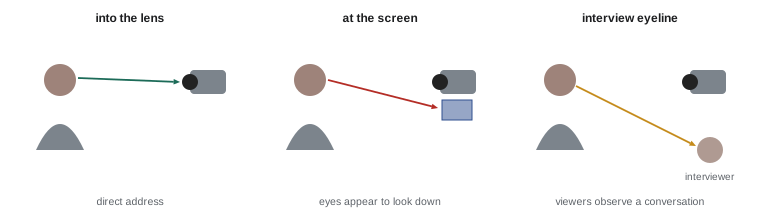
Looking into the lens creates eye contact with viewers, the single strongest signal of connection on camera. Looking at your own image on a flip screen or monitor makes your eyes appear to look slightly below the viewer, and darting glances to notes or screens read as distraction or uncertainty. Practical techniques include placing notes or a teleprompter as close to the lens as possible; marking the lens with a small sticker arrow as a reminder; and holding eye contact through key lines while allowing natural, brief glances away when thinking, as people do in real conversation. Constant, unblinking stare feels uncomfortable; natural eye contact includes small breaks. In interview-style videos, where the speaker looks at an interviewer beside the camera rather than into the lens (an off-camera eyeline), the relationship is different: viewers observe a conversation rather than being addressed directly (Lesson 10).
Scripts, outlines and bullet points
Creators prepare in different ways, each with trade-offs:
- Full scripts: every word written in advance. They give precision, tight timing and polished wording, essential for complex explanations, sponsored segments with required claims, and voiceovers. The risk is a stiff, read-aloud delivery.
- Outlines or bullet points: key points and examples in order, with the wording improvised. They produce more natural delivery but can wander and take longer to edit.
- Hybrid: scripted openings, transitions and key lines, with bullet points for the rest. Many experienced creators use this approach.
- Unscripted: speaking freely on a familiar topic, suitable for vlogs, reactions and live content (Lesson 9).
Whatever the method, write for the ear rather than the eye: short sentences, everyday words, contractions, and repetition of key ideas. Read your script aloud while writing; if a sentence is hard to say, rewrite it. CRE-120 covers scriptwriting in detail.
| Method | Strengths | Risks | Best for |
|---|---|---|---|
| Full script | Precision, timing, polish | Stiff, read-aloud delivery | Explainers, voiceover, sponsorships |
| Bullet points | Natural, conversational | Rambling, longer edits | Commentary, vlogs, opinion |
| Hybrid | Strong key lines, natural middle | Needs planning | Most talking-head content |
| Unscripted | Spontaneous, authentic | Disorganized, inconsistent | Live, reactions, casual vlogs |
Reading without sounding like reading
Most people sound different when reading: pitch flattens, pace becomes regular, emphasis falls on the wrong words and the voice takes on a "reading" tone. Techniques to avoid this include: internalizing the meaning of each section before recording, so you speak ideas rather than words; reading the script aloud many times until it feels familiar, then glancing at it only for structure; recording in short chunks of one or two sentences, looking down to read, then looking up to deliver from memory; marking pauses, emphasis and breath points in the script; and allowing yourself to paraphrase if it sounds more natural. Imagining that you are explaining to your chosen person, and reacting to their imagined response, brings back conversational variety.
Teleprompter technique
A teleprompter, either an app scrolling text near the lens or a hardware unit with beam-splitter glass in front of the lens, lets you read while maintaining eye contact (CRE-130 covers the equipment). Good teleprompter technique includes: setting the text large enough to read without squinting, with a few words per line; placing the prompter far enough away that eye movement across lines is not visible, typically at least a meter for a phone or tablet; adjusting scroll speed to your natural pace or using voice-following scrolling; rehearsing with the prompter before recording; marking pauses and emphasis in the text; and practicing so that you can look slightly away, gesture and react naturally without losing your place. Viewers can tell when someone is reading a prompter by fixed eyes, a monotone and a lack of natural pauses; practice and good preparation hide it.
Energy levels for camera
The camera and the small screen tend to flatten energy. Delivery that feels enthusiastic in the room often looks merely pleasant on screen, and delivery that feels calm can look bored. Many presenters therefore lift their energy by about 10 to 20 % above their natural conversational level, with slightly more facial expression, vocal variety and gesture. The amount depends on the format and the person: high-energy entertainment and short-form content suit more lift; calm educational, wellness or interview content suits less. Too much energy, such as shouting, constant excitement or exaggerated faces, feels forced and tiring. A useful exercise is to record the same segment at three levels, natural, slightly lifted and high, and watch them back on a phone; most people find the middle version looks most natural on screen. Lesson 6 covers body language and energy in more detail.
Worked problem
Calibrating energy for a tutorial
A creator records a cooking tutorial and finds that on playback they look "bored", though they felt fine while recording. What adjustments might help?
Show solution
- Record a short test segment at their normal level, then again with about 15 % more energy: slightly more smile, vocal variety and hand movement.
- Watch both on a phone, the way viewers will see them.
- Choose the level that looks natural on screen, not in the room.
- Lift energy especially at the opening, transitions and key moments, while keeping technical explanations calm and clear.
Answer: Lift energy slightly above conversational level, judged on a phone, with peaks at the opening and key moments.
Delivering multiple takes
Few presenters deliver perfect long takes. Recording in sections lets you focus on one idea at a time and edit together the best delivery. Useful habits include: pausing for a beat before and after each line so editors have clean cut points; doing several takes of important lines, such as the opening hook, with different emphasis or energy; keeping the camera rolling between takes, since relaxed moments often contain the most natural delivery; and staying consistent in position, energy and eyeline between takes so that they cut together. When you make a mistake, pause, then restart the sentence from the beginning, rather than stopping recording or correcting mid-sentence, which makes editing difficult. Many creators clap or say a marker word before retakes, making them easy to find in editing.
Starting and ending strongly
The first seconds on camera set viewers' impression of you. Common weak openings include long greetings ("Hey guys, welcome back to my channel, today we're going to ..."), apologies ("Sorry for not posting"), and visible hesitation. Strong openings start with energy and content: a question, a surprising statement, a story moment or a clear promise, delivered with eye contact. It often helps to begin recording a few seconds before speaking, take a breath, smile or set your expression, and then start. Endings deserve the same care: a clear final line delivered to the lens, followed by a pause and a held expression, rather than a trailing "so yeah ..." and a lunge for the camera.
Common on-camera problems and fixes
Common problems include: eyes darting to notes or the screen (move notes to the lens, use bullet points); swaying, rocking or fidgeting (plant your feet, sit on a stable chair, hold a prop or rest hands deliberately); flat delivery (lift energy, picture your person, mark emphasis); rushing (pause, breathe, rehearse with a timer); stiff posture (shake out tension, warm up, move slightly); and forced smiles (think of something genuinely pleasant, or let expression follow the content). Watching your recordings critically, ideally alongside a trusted friend or coach, and comparing them with presenters you admire, reveals your specific habits. Improvement comes from repetition: most confident on-camera presenters recorded hundreds of awkward takes before finding their style.
Delivering sponsored segments on camera
Sponsored segments test on-camera skills because they mix required messages with the need to sound genuine. Viewers skip or distrust segments that sound like a read advertisement. Effective sponsored delivery includes: disclosing the sponsorship clearly at the start of the segment, as advertising rules require (CRE-320); using your own words where the brand allows, rather than reading a script verbatim; sharing genuine experience with the product, including honest limitations; keeping the same energy and eye contact as the rest of the video, rather than switching to a "salesperson" voice; and keeping the segment concise. Practice sponsored lines until they feel natural, since brands often require exact wording for claims or offers. Lesson 7 discusses authenticity in sponsored content.
Presenting on location and in public
Presenting outdoors, at events or in public places adds challenges: noise, wind, passers-by, changing light and the self-consciousness of being watched by strangers. Preparation helps: know your lines well, keep segments short, choose positions with good light and less noise, and use a wireless microphone (CRE-130). Treat interruptions with good humor; brief, natural reactions to the environment can make location content feel lively and real. Respect people around you, and do not include identifiable strangers without considering their privacy. Walk-and-talk shots, where the presenter speaks while walking toward a camera, look dynamic but require rehearsal and a safe, clear path.
Watching playback without spiralling
Playback is essential, but it can trigger harsh self-criticism (Lesson 8). Set a specific purpose before watching, such as checking eye contact or pace, and note one thing that worked as well as one to improve. Avoid watching every take repeatedly during a shoot, which slows production and undermines confidence; check a few takes for technical problems and review in detail later.
Presence in short-form vertical video
Short-form vertical video brings the presenter very close, usually in a tight frame centered on the face, and viewers decide within a second or two whether to keep watching. Presence here means immediate energy and eye contact from the first frame, with no warm-up; expressive faces; compact gestures near the face; and a quick, varied rhythm. Many creators start speaking before the clip begins, cutting into the middle of a sentence so that the video starts in motion.
Presence checklist
Before each take, run a quick presence check: Am I picturing one person? Is my eyeline on the lens? Is my energy slightly lifted? Am I grounded? Do I know my first line? This takes seconds and prevents many common problems.
Common mistakes
MistakeTalking to "everyone".
InsteadSpeak to one specific person behind the lens.
MistakeWatching yourself on the flip screen.
InsteadLook into the lens for key lines.
MistakeReading the script word by word.
InsteadInternalize ideas and record in short chunks.
MistakeUsing natural room energy unchanged.
InsteadLift energy slightly and judge it on a phone.
MistakeStarting with long greetings.
InsteadOpen with content, energy and eye contact.
Summary and key terms
- Speak to one person, not an audience.
- Eye contact through the lens creates connection.
- Choose full scripts, bullets, hybrids or unscripted delivery for the content.
- Internalize scripts and record in chunks to avoid a reading voice.
- Use teleprompters with large text, distance and rehearsal.
- Lift energy slightly for camera and judge it on a phone.
- Record clean takes and start and end strongly.
- Presence
- The quality of seeming alive and connected on screen.
- Direct address
- Speaking straight into the lens to the viewer.
- Eyeline
- Direction of a speaker's gaze.
- Off-camera eyeline
- Looking at an interviewer beside the camera.
- Hybrid script
- Scripted key lines with bullet points between.
- Reading voice
- Flat or sing-song tone when reading.
- Teleprompter
- Device or app displaying text near the lens.
- Energy lift
- Raising delivery slightly above conversational level.
- Take
- One recorded attempt at a section.
- Cut point
- Clean moment for an editor to cut.
Practice problems
Work each problem on paper first, then reveal the answer to check.
Why speak to one person?
Show answer
Viewers usually watch alone and feel addressed personally.
What happens if you look at the flip screen?
Show answer
Your eyes appear to look below the viewer.
Name a strength and a risk of full scripts.
Show answer
Precision; stiff reading delivery.
What does writing for the ear involve?
Show answer
Short sentences, everyday words, contractions, repetition.
Describe the chunk technique.
Show answer
Read a sentence or two, look up and deliver from memory.
Why place a prompter at a distance?
Show answer
So eye movement across lines is not visible.
How much energy lift do many presenters use?
Show answer
About 10–20 % above conversational.
How should you handle a mistake mid-sentence?
Show answer
Pause and restart the sentence from the beginning.
Name two weak openings.
Show answer
Long greetings, apologies, hesitation.
How can you reduce fidgeting?
Show answer
Plant feet, use a stable chair, rest hands deliberately.
Lesson quiz · 5 questions
Score 60% or more to complete this lesson.
Create a free account to save your progress, take quizzes and earn a certificate.