
CRE-250 · Lesson 9 of 12 · 27 min
Moderation, safety and protecting yourself
Live streaming exposes creators to the public in real time, often from their homes. Most viewers are kind, but streams also attract spam, trolls, harassment, hate raids, scams, doxxing and, in the worst cases, threats and swatting. Viewers too can be harmed by abusive chats, scams and inappropriate contact, especially young viewers. Moderation and safety are therefore not optional extras; they are part of running a stream. This lesson covers why moderation matters, community rules, human moderators, automated tools, handling harassment and hate raids, protecting personal information and preventing doxxing, swatting and physical safety, protecting young viewers, scams and account security, and supporting your own wellbeing after incidents. CRE-201 and CRE-350 cover platform policy and creator wellbeing more broadly.
Why moderation matters
Chat sets the tone for everyone who watches. An unmoderated chat quickly fills with spam and hostility, drives away viewers, damages the streamer's reputation with sponsors and platforms, and can expose the streamer to policy violations for content they allowed. Moderation protects viewers, especially marginalized and young viewers who are frequent targets; protects the streamer's mental health; and makes the community a place people want to return to. Platforms hold streamers partly responsible for their communities, and many terms of service require reasonable efforts to moderate chat.
Community rules
Clear rules make moderation consistent and fair. Rules should be short, specific and visible in a pinned message, channel panels and a chat command. Common rules cover respect and no harassment, discrimination or hate speech; no spam, self-promotion or links without permission; no sharing personal information about anyone; no backseating or spoilers if the streamer chooses; English or other specified languages if needed for moderation; and following platform terms. Rules should state consequences, such as warnings, timeouts and bans, and how to appeal. Streamers should model the rules themselves.
Human moderators
Moderators, often called mods, are trusted community members given tools to delete messages, time out and ban users, manage chat settings and help the streamer. Good moderators are calm, fair, reliable and aligned with the streamer's values. Choose moderators who have shown good judgment over time rather than whoever asks first; brief them on rules and escalation; give them a private channel to communicate with each other and the streamer; and support them, since moderating abusive chats can be stressful. Many streamers have a moderation guide with examples of how to handle common situations. Moderators are usually volunteers; respect their time, thank them and do not expect them to work every stream. Larger channels may pay moderators or use professional moderation services.
| Situation | Typical moderator response |
|---|---|
| Spam or advertising | Delete and time out; ban bots |
| First minor rule breach | Friendly warning or short timeout with explanation |
| Harassment or slurs | Delete and ban; report to the platform |
| Personal information shared | Delete immediately, ban, alert the streamer privately, report |
| Threats of violence | Ban, record evidence, alert the streamer, report to the platform and, if credible, police |
| Viewer in crisis | Respond with care, share crisis resources, alert the streamer privately |
Automated tools
Platforms and third-party bots provide automated moderation: blocked-term lists that hide messages with specified words and their variations; automatic holding of risky messages for moderator review, using machine-learning filters for harassment and hate; link blocking; slow mode, which limits how often each user can post; follower-only or subscriber-only modes, which require viewers to have followed for a set time before chatting; verified-account requirements such as phone or email verification; emote-only mode during raids or incidents; and suspicious user detection that flags accounts evading bans. Bots such as Nightbot, StreamElements and Fossabot add commands, timers and filters. Configure these before you need them, since setting them up during an attack is stressful and slow.
Harassment and hate raids
Harassment can be individual, from a persistent troll, or coordinated, as in hate raids in which many accounts, often bots, flood a chat with abuse, usually targeting streamers from marginalized groups. Hate raids against Twitch streamers in 2021 led to the #ADayOffTwitch protest and new platform tools such as phone verification for chat and suspicious user detection. Responses include switching chat to follower-only, subscriber-only or emote-only mode; blocking incoming raids from unknown channels; using a "panic" macro that enables protective settings and switches to a safe scene; not engaging with attackers on stream, since reactions can encourage them; documenting with screenshots and logs; reporting to the platform; and taking a break. It is entirely acceptable to end a stream during an attack. Communities of streamers often share blocklists and support during waves of harassment.
Worked problem
Preparing a "shields up" macro
A streamer wants to be able to respond to a hate raid instantly with one button. What should the macro do?
Show solution
- Enable follower-only mode with a minimum follow time (for example 10 minutes) or subscriber-only mode.
- Turn on emote-only mode temporarily and stricter automatic message holding.
- Disable incoming raids from channels the streamer does not know, if the platform allows.
- Switch to a calm "be right back" scene and mute alerts and text-to-speech.
- Post a pinned message that the channel is dealing with spam and will return shortly.
Answer: A single macro that restricts chat, blocks unknown raids, mutes alerts and TTS, switches to a safe scene and posts a calm notice.
Protecting personal information and preventing doxxing
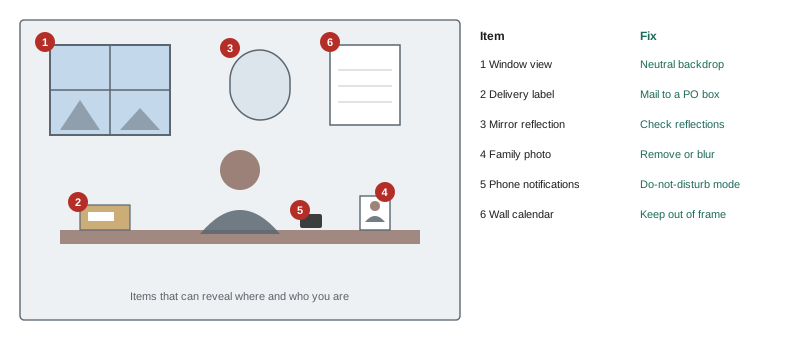
Doxxing is the publication of someone's private information, such as home address, legal name, family members, workplace or phone number, usually to harass or intimidate. Streamers reveal information unintentionally through backgrounds, windows, mail and packages on camera, reflections, local sounds, IRL streams that show their neighborhood, timestamps that reveal routines, metadata in images, and information shared with sponsors or on business registrations. Prevention includes keeping the background neutral and checking what is visible; never showing home exteriors, street views or windows with identifiable views; using a business address or post office box for mail and fan mail; delaying location-based content until after leaving; using separate email addresses and phone numbers for streaming; checking what public records show about you, such as business registrations and domain records, and using privacy services where available; and being careful about what friends and family post. If doxxed, document, report to platforms, contact police if threatened, and consider services that request removal of personal data from data broker sites.
Swatting and physical safety
Swatting is a dangerous crime in which someone makes a false emergency report, such as a hostage situation or shooting, to send armed police to a target's address, sometimes while the target is live. Swatting has caused injuries and deaths. Precautions include protecting your address, and in some areas registering with local police or emergency services programs that flag addresses at risk of swatting, where such programs exist; telling household members what to do if police arrive (stay calm, follow instructions, keep hands visible); and stopping the stream if police arrive, as broadcasting armed police at your home can escalate risk. Making false reports to emergency services is a criminal offense in both Canada and the United States. For in-person events and IRL streaming, plan routes, avoid announcing real-time locations, bring a companion, and leave if people behave threateningly.
Protecting young viewers
Many live audiences include minors, even on platforms with age minimums. Streamers and moderators should never share or request personal information from viewers, avoid private messaging with young viewers, keep conversations appropriate for a mixed audience, enforce rules against adults targeting minors in chat, take reports of grooming seriously and report them to the platform and, where appropriate, authorities, and be careful in viewer games where voice chat and private servers can expose children to risks. Lesson 12 covers legal obligations around children's data and advertising. Streamers who notice a viewer in distress, such as discussing self-harm, should respond with care, avoid public discussion of details, and share crisis resources; moderators can send a private message with resources.
Scams and account security
Streamers are targeted by scams: fake sponsorship offers that deliver malware in "contracts" or "game demos", phishing messages pretending to be platform staff, account recovery scams, impersonators who contact viewers asking for money, and fake giveaways. Protect accounts with strong unique passwords, a password manager, multi-factor authentication using an authenticator app or security key rather than text messages where possible, and careful checking of links and attachments. Verify sponsor offers through official company channels. Warn viewers that you will never ask them for money in private messages, and report impersonators. A compromised account can be used to stream harmful content or steal followers, and recovery can take time.
After an incident
Harassment, doxxing and threats are distressing. After an incident, take a break if needed, talk to trusted friends, fellow streamers or professionals, document what happened, report to platforms and police where appropriate, and review security settings. Some streamers find it helpful to tell their community briefly what happened without amplifying attackers; others prefer not to discuss it. There is no obligation to keep streaming through abuse. Platforms, creator organizations and mental health services offer resources, and CRE-350 discusses creator wellbeing in depth.
Writing a moderator guide
A short written moderator guide helps a moderation team act consistently. It typically covers the channel rules with examples; what moderators should delete, time out or ban for; the length of timeouts for first and repeated offenses; how to handle spoilers, self-promotion and backseating; what to do in a hate raid; how to escalate serious issues such as threats, self-harm statements or suspected minors at risk; and how to contact the streamer privately during a stream. Guides should also say what moderators should not do, such as arguing publicly with chatters or sharing private moderator discussions.
| Behavior | First response | Repeat response |
|---|---|---|
| Spam or links | Delete message | Short timeout |
| Spoilers | Delete and remind | 10-minute timeout |
| Backseating after warning | Friendly reminder | Short timeout |
| Slurs or hate | Ban | Report to platform |
| Threats or doxxing | Ban, save evidence | Report to platform and, if serious, police |
Moderation workload
Moderation needs grow with chat speed. A rough rule used by many communities is to have at least one active moderator for every few hundred concurrent viewers, more during events, raids and controversial topics. Estimating messages per minute helps plan coverage.
Worked problem
Estimating chat volume
A channel averages 300 concurrent viewers, and about 15 % of viewers chat, each sending about one message every 2 minutes. How many messages per minute arrive, and how many moderators might be needed if one moderator can comfortably review about 60 messages per minute?
Show solution
- Chatters: 300 x 0.15 = 45.
- Messages per minute: 45 x 0.5 = about 22.5.
- One moderator could handle this volume, but a second gives cover for breaks and raids.
- During an event with 1,000 viewers and the same rates: 1,000 x 0.15 x 0.5 = 75 messages per minute, needing at least two moderators plus automated filters.
Answer: About 23 messages per minute, so one or two moderators normally, and at least two with filters for larger events.
Looking after moderators
Moderators are often volunteers who see the worst messages so the streamer does not have to. Thank them publicly and privately, give them clear authority, back up their decisions in public and discuss disagreements privately, rotate duties during long streams, and encourage breaks after difficult incidents. Some streamers pay moderators or share income with them, especially in larger channels. A moderator team that feels respected stays longer and protects the community better.
Reviewing safety regularly
Safety settings should be reviewed every few months: check blocked terms, verify that two-factor authentication is still enabled on all accounts, update moderator lists when people step back, review what personal information is visible on social media and in old VODs, and practice the shields-up routine so it can be triggered quickly under pressure.
Safety planning also extends to the people around the streamer. Family members and housemates should know what to do if someone unexpected arrives at the door or calls claiming to know the streamer, and should avoid appearing on camera in ways that reveal their own identities or routines.
Common mistakes
MistakeNo rules until something goes wrong.
InsteadPublish clear rules and set up tools in advance.
MistakeChoosing moderators who ask first.
InsteadChoose people with proven judgment and brief them.
MistakeEngaging with attackers on stream.
InsteadLock down chat, document and report.
MistakeShowing windows, mail or local landmarks.
InsteadCheck backgrounds and use a PO box.
MistakeSMS-only account security.
InsteadUse an authenticator app or security key.
Summary and key terms
- Moderation protects viewers, streamers and the community.
- Clear, visible rules make moderation consistent.
- Choose and support trusted human moderators.
- Configure automated tools and a "shields up" macro before you need them.
- Prevent doxxing by controlling what streams and records reveal.
- Plan for swatting risks and physical safety.
- Protect young viewers, secure accounts and look after yourself after incidents.
- Moderator
- Trusted user who manages chat.
- Timeout
- Temporary ban from chat.
- Blocked terms
- Words automatically hidden from chat.
- Slow mode
- Limit on how often each user can post.
- Follower-only mode
- Chat restricted to followers of a minimum age.
- Hate raid
- Coordinated flood of abuse into a chat.
- Doxxing
- Publishing someone's private information.
- Swatting
- False emergency report to send police to someone.
- Grooming
- Building trust with a minor to exploit them.
- Multi-factor authentication
- Login requiring more than a password.
Practice problems
Work each problem on paper first, then reveal the answer to check.
Why does moderation matter to sponsors?
Show answer
Toxic chats damage brand safety and reputation.
Where should rules be visible?
Show answer
Pinned message, panels and a chat command.
What qualities make a good moderator?
Show answer
Calm, fair, reliable, aligned with values.
Name four automated moderation tools.
Show answer
Blocked terms, AutoMod holds, slow mode, follower-only, verification, link blocking.
What led to new tools on Twitch in 2021?
Show answer
Hate raids and the #ADayOffTwitch protest.
What should a shields-up macro do?
Show answer
Restrict chat, block raids, mute alerts, switch scene, post notice.
Name three ways streams reveal personal information.
Show answer
Windows, mail, reflections, IRL locations, metadata.
What should you do if police arrive during a stream?
Show answer
Stop the stream, stay calm and follow instructions.
Name two ways to protect young viewers.
Show answer
No personal info, no private messages, enforce rules, report grooming.
What is safer than SMS for account security?
Show answer
An authenticator app or security key.
Lesson quiz · 5 questions
Score 60% or more to complete this lesson.
Create a free account to save your progress, take quizzes and earn a certificate.