
CRE-499 · Lesson 4 of 12 · 28 min
Content strategy and the term calendar
A content strategy answers three questions: what you will make, how often, and why each piece exists. A calendar turns the answers into dates. This lesson draws on the pillar and format thinking from CRE-202 and CRE-301, the portfolio and planning methods from CRE-440 and the repurposing ideas from CRE-401, and combines them with a capacity calculation so that your plan is something you can actually deliver. The deliverable is a content strategy of one or two pages and a calendar covering weeks 4 to 14, with a buffer of finished content planned before launch.
Consistency matters more than volume. A channel that publishes one solid video every week for ten weeks usually learns and grows more than one that publishes five in the first week and then goes silent during exams. Viewers form habits around a reliable schedule, and you build skill through repetition. Plan a cadence you could keep even in your worst week of the term.
Content pillars
Content pillars are the three or four recurring themes that together deliver your brand promise. They give the channel shape, make idea generation easier and help viewers know what to expect. For Jordan's bike-repair channel, the pillars might be quick fixes (single repairs in under ten minutes), seasonal care (winter, spring tune-ups, storage), buying smart (choosing used bikes and parts on a budget) and safety (brakes, lights, visibility and when to see a professional).
Assign each pillar a purpose in your funnel. Some content is built for discovery, aimed at search and recommendations with broad appeal; some is built for depth, serving viewers who already know you; and some is built for conversion, inviting viewers to subscribe, join your list or try a product. CRE-340 described the same funnel from a brand's point of view. A healthy calendar mixes all three, weighted toward discovery early in the term, when you need new viewers most.
| Pillar | Purpose | Format | Example topics |
|---|---|---|---|
| Quick fixes | Discovery through search | Long video, 6 to 10 minutes, plus a short | Fix squeaky brakes; replace a chain; true a wheel |
| Seasonal care | Discovery and timing | Long video and checklist | Winterize a commuter bike; spring tune-up in 30 minutes |
| Buying smart | Depth and trust | Long video and community post | Inspect a used bike; parts worth paying more for |
| Safety | Depth and conversion | Short videos and newsletter | Brake checks before every ride; lights that are actually visible |
Formats and the hero, hub and help model
Choose formats that fit your pillars and capacity. A useful model divides content into help content, which answers specific questions people search for; hub content, regular episodes that bring subscribers back; and hero content, larger pieces made occasionally to reach new audiences. In a term, most of your work should be help and hub content, with perhaps one hero piece near the middle of term when your system is running smoothly. Short-form clips repurposed from long videos extend reach at low extra cost, as CRE-401 showed.
For each format, write a short template: typical length, structure (hook, promise, steps, payoff, call to action), thumbnail style and metadata pattern. Templates speed production and keep quality consistent, and they make it easier to judge results because each episode follows the same shape.
Calculating capacity
Capacity planning compares the hours a plan requires with the hours you have. Start with the production hours you estimated in lesson 1, corrected with real data from your log if you have it. Then estimate the hours each format takes, including scripting, filming, editing, thumbnails, metadata, uploading and the first hour of replying to comments. Multiply by the planned cadence and compare.
Aim for a planned utilization of about 80 % or less. The remaining 20 % absorbs things that always go wrong: a file that will not export, a reshoot, an illness, an exam week. CRE-440 described the planning fallacy, the tendency to underestimate how long tasks take even when we know we usually underestimate; a deliberate buffer is the cure.
Worked problem
Checking a weekly plan against capacity
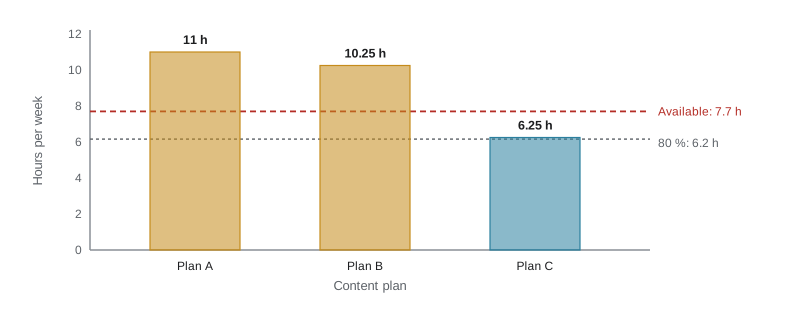
Jordan has 7.7 production hours a week. Logged data show a long video takes 8 hours with the new simpler template, a short repurposed from a long video takes 0.5 hours and a newsletter takes 1.5 hours. Plan A is one long video, three shorts and one newsletter every week. Plan B is one long video, three shorts weekly and a newsletter every two weeks. Calculate utilization for each.
Show solution
- Plan A hours: \( 8 + 3(0.5) + 1.5 = 11 \); utilization \( 11 / 7.7 \approx 143 \% \).
- Plan B hours: \( 8 + 1.5 + 0.75 = 10.25 \) (half a newsletter a week); utilization \( 10.25 / 7.7 \approx 133 \% \).
- Both plans exceed capacity.
- Plan C: a long video every two weeks (4 h a week), three shorts (1.5 h) and a newsletter every two weeks (0.75 h): \( 6.25 / 7.7 \approx 81 \% \).
Answer: Only plan C fits, at about 81 % utilization. Jordan can make it richer by adding a weekly short that is filmed fresh rather than repurposed if the log shows spare time after a few weeks. Starting conservatively and adding is easier than cutting back after missing deadlines.
Batching and the buffer
Batching means doing similar tasks together: scripting three videos in one session, filming two on the same afternoon while the bike and lights are set up, recording voice-overs together and designing several thumbnails at once. Batching reduces switching costs and setup time, often by a third or more for filming. It also lets you build a buffer: a set of finished, scheduled videos that keeps the channel publishing when life interrupts.
Plan to have at least two weeks of finished content ready before launch, and try to keep that buffer through the term. If the buffer drops to zero, treat it as a warning sign and simplify the next few pieces rather than staying up all night. CRE-350's advice on sustainable routines applies directly: the buffer is a wellbeing tool as much as a scheduling one.
Worked problem
Time saved by batching filming
Filming one video alone takes 0.75 hours of setup and 1.5 hours of shooting. Batching two videos in one session needs one setup and both shoots. How much time does batching save per video?
Show solution
- Separately: \( 2 \times (0.75 + 1.5) = 4.5 \) hours for two videos.
- Batched: \( 0.75 + 2 \times 1.5 = 3.75 \) hours.
- Saving: \( 4.5 - 3.75 = 0.75 \) hours, or about 0.375 hours per video.
Answer: Batching two shoots saves about 45 minutes, roughly 17 % of filming time. Batching three would save 1.5 hours over three videos. The saving grows with longer setups, such as lighting and stands.
Building the term calendar
With pillars, formats and capacity settled, build the calendar. A spreadsheet works well: one row per piece of content, with columns for pillar, format, working title, target keyword, script date, film date, edit date, publish date, status and links. Mark fixed dates first: launch day, exam weeks, holidays, mid-term review and presentation week. Then place content backward from publish dates, leaving space for the buffer.
Think about timing. Seasonal topics should publish ahead of the season, because search interest rises before the event: winter bike care in early November in much of Canada and the northern US, back-to-school budget meals in late August. Your term may not align with every season, so choose topics that fit the calendar you have. Note recurring events in your niche, such as product launches, holidays or competitions, and plan around them.
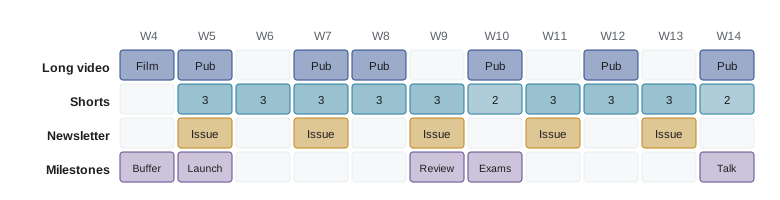
| Week | Long video | Shorts | Newsletter | Notes |
|---|---|---|---|---|
| 4 | Film 1 and 2 (batched) | Cut 6 from test footage | Welcome issue drafted | Build buffer |
| 5 | Publish 1 | 3 | Issue 1 | Launch week |
| 6 | Edit 3 | 3 | Cross-promotion | |
| 7 | Publish 2 | 3 | Issue 2 | |
| 8 | Publish 3 | 3 | Thumbnail test starts | |
| 9 | Edit 4 and 5 | 3 | Issue 3 | Mid-term review |
| 10 | Publish 4 | 2 | Exam week: lighter load | |
| 11 | 3 | Issue 4 | Monetization pilot set-up | |
| 12 | Publish 5 | 3 | Media kit | |
| 13 | 3 | Issue 5 | Business plan | |
| 14 | Publish 6 | 2 | Presentation |
Choosing topics with evidence
Fill the calendar with topics chosen from evidence rather than whim. Start with the outliers and gaps found in lesson 2, the questions you collected, and the search terms with clear demand. CRE-440 introduced ICE scoring (impact, confidence and ease, each scored 1 to 10 and multiplied or averaged) for ranking experiment ideas; it works for content ideas too. Keep a backlog of scored ideas so that you never face a blank page on filming day.
Worked problem
Ranking ideas with ICE scores
Jordan scores three ideas on impact, confidence and ease (1 to 10), averaging the three: (a) "Fix squeaky disc brakes" 8, 8, 7; (b) "Build a bike from parts for $100" 9, 5, 3; (c) "Five-minute pre-ride safety check" 6, 7, 9. Which should come first?
Show solution
- Idea (a): \( (8 + 8 + 7)/3 \approx 7.7 \).
- Idea (b): \( (9 + 5 + 3)/3 \approx 5.7 \).
- Idea (c): \( (6 + 7 + 9)/3 \approx 7.3 \).
Answer: Idea (a) ranks first and (c) a close second; (b) has the highest potential impact but low ease and confidence, so it suits a later hero piece once the system is proven. Scoring keeps ambitious ideas visible without letting them derail the schedule.
Balancing the mix
Check the finished calendar against your strategy. Does each pillar appear regularly? Is discovery content front-loaded? Are there conversion pieces that invite viewers to your owned channel? Does the mix respect your capacity even in exam weeks? CRE-440's portfolio idea applies here too: put most effort into proven formats, some into promising ones and a little into experiments, roughly in a 70/20/10 ratio. One experiment slot per two or three weeks is plenty in a capstone.
Finally, write down how you will decide to change the plan. For example: 'At mid-term, I will move one slot from the weakest pillar to the strongest, measured by watch time per video.' Building the review into the plan makes changes deliberate rather than reactive.
Protecting the plan during busy weeks
Look ahead to the weeks you know will be hardest, such as mid-terms, assignment deadlines and holidays, and mark them on the calendar as light weeks before the term gets busy. In a light week, publish only shorts or a pre-made piece from the buffer, and move editing and scripting to the weeks either side. Planning lighter weeks in advance is very different from missing uploads in a panic: viewers see a steady channel, and you avoid the guilt and catch-up work that follow a missed week. Review the calendar every Sunday for ten minutes, move one or two items if needed and keep the buffer at two pieces.
Common mistakes
MistakePlanning a cadence that only works in a perfect week.
InsteadPlan for your worst week and aim for 80 % utilization or less.
MistakeEstimating hours per video from hope instead of the log.
InsteadUse logged times and correct the plan as new data arrive.
MistakeLaunching with no finished content in reserve.
InsteadBank at least two weeks of content before launch and protect the buffer.
MistakePublishing seasonal topics on the day of the event.
InsteadPublish ahead of the season, when search interest is rising.
MistakeChoosing topics on impulse.
InsteadScore ideas with evidence and keep a ranked backlog.
Summary and key terms
- A content strategy defines what you will make, how often and why; the calendar turns it into dates.
- Three or four pillars deliver the brand promise and serve discovery, depth and conversion.
- Help, hub and hero content each have a role; most capstone effort goes to help and hub pieces.
- Utilization compares hours required with hours available; plan for about 80 % or less.
- Batching cuts setup time and builds a buffer of finished content before and during the term.
- The calendar places fixed dates first, works backward from publish dates and considers seasonal timing.
- Rank topics with evidence such as ICE scores and keep a 70/20/10 mix of proven, promising and experimental work.
- Content pillar
- A recurring theme that helps deliver the channel's promise.
- Cadence
- The regular rhythm at which content is published.
- Help content
- Content answering specific questions people search for.
- Hub content
- Regular episodes that bring existing viewers back.
- Hero content
- Larger, occasional pieces designed to reach new audiences.
- Utilization
- Planned hours divided by available hours.
- Batching
- Doing similar tasks together to reduce setup and switching time.
- Content buffer
- Finished content held in reserve to keep publishing on schedule.
- ICE score
- A rating of ideas by impact, confidence and ease.
- Planning fallacy
- The tendency to underestimate how long tasks will take.
Practice problems
Work each problem on paper first, then reveal the answer to check.
Name three purposes content can serve in a funnel.
Show answer
Discovery, depth and conversion.
A plan needs 9 hours a week and 10 are available. Utilization?
Show answer
90 %, above the 80 % guideline.
Why aim for about 80 % utilization?
Show answer
To leave a buffer for problems, illness and exams.
Setup 1 h, shoot 2 h each; batching three videos saves how much versus separate shoots?
Show answer
Separate 9 h, batched 7 h, saving 2 h.
When should a winter-care video be published?
Show answer
Ahead of the season, when search interest begins to rise.
What is the hero, hub and help model?
Show answer
Help answers searches, hub brings viewers back regularly, hero reaches new audiences occasionally.
ICE scores 6, 9, 9 average to?
Show answer
8.
What does a 70/20/10 mix mean?
Show answer
About 70 % proven formats, 20 % promising ones and 10 % experiments.
What should you do if the buffer reaches zero?
Show answer
Simplify upcoming pieces and rebuild the buffer rather than overworking.
Give two columns a content calendar spreadsheet should have.
Show answer
Pillar, format, title, keyword, script, film, edit and publish dates, status, links (any two).
Lesson quiz · 5 questions
Score 60% or more to complete this lesson.
Create a free account to save your progress, take quizzes and earn a certificate.