
CRE-499 · Lesson 5 of 12 · 30 min
Production system and quality bar
A production system is the set of steps, templates, checklists and tools that turns an idea in your backlog into a published piece of content, the same way every time. A quality bar is the minimum standard every piece must meet before it goes out. Together they let you publish consistently without relying on heroic effort, and they make it possible to hand parts of the work to someone else later, as CRE-401 described when it discussed standard operating procedures. This lesson also asks you to write an AI use policy, drawing on CRE-410. The deliverable is a production system document of two to three pages.
Professional creators are often less talented than people assume and more systematic. They reuse templates, follow checklists, batch work and review results against a standard. You will not build a perfect system in week 4; you will build a first version, run it for a few weeks and improve it at mid-term using your log.
Mapping the workflow
Start by writing down every step from idea to published piece and the first day after publishing. For a typical long video, the stages are idea selection, research, scripting or outlining, pre-production (shot list, props, location, permissions), filming, data management, editing, captions, thumbnail and metadata, review, scheduling, publishing and the first round of community replies. For each stage note the input, the output, the tool used, the typical time from your log and who does it.
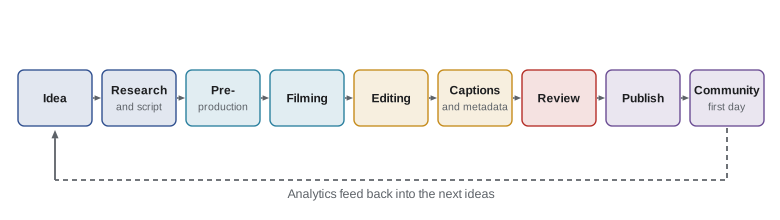
Mapping the workflow often reveals obvious improvements. Perhaps you script by typing and then re-type the script into a teleprompter app; perhaps you rename files by hand every time; perhaps you design each thumbnail from scratch. Each of these is a candidate for a template or a small automation. Look first at the longest stage, because a 20 % saving there matters more than a 50 % saving on a ten-minute task.
Worked problem
Finding the bottleneck
Jordan's logged times for a long video are: research and script 1.5 h, pre-production 0.5 h, filming 2 h, editing 3 h, captions 0.5 h, thumbnail and metadata 0.75 h, review and publish 0.25 h. Which stage is the bottleneck, and what would a 25 % cut there save compared with halving the thumbnail time?
Show solution
- Total: \( 1.5 + 0.5 + 2 + 3 + 0.5 + 0.75 + 0.25 = 8.5 \) hours.
- Editing is the longest stage at 3 h, about 35 % of the total.
- Cutting editing by 25 %: \( 0.25 \times 3 = 0.75 \) h saved.
- Halving thumbnail and metadata: \( 0.5 \times 0.75 = 0.375 \) h saved.
Answer: Editing is the bottleneck. A modest 25 % improvement there, through a template, a tighter script that reduces cutting or keyboard shortcuts, saves twice as much as halving the thumbnail task.
Scripts and outlines that save editing time
Many editing hours come from footage that was never needed or from searching for the right take. A tighter script or outline reduces both. For educational content, an outline with a strong hook, a clear promise, numbered steps and a payoff usually works better than a word-for-word script, which can sound stiff. Write the opening twenty to thirty seconds word for word, because that is where viewers decide whether to stay, and outline the rest.
Film with editing in mind. Clap or snap at the start of each take to mark it, say the step number aloud before each section, record a few seconds of silence for noise reduction, and film close-ups of key actions twice from different angles. These habits feel unnecessary on set and save large amounts of time at the editing desk.
File and data management
Lost footage is a common and avoidable capstone disaster. Use a consistent folder structure for every project, for example a project folder named with the date and slug, containing folders for footage, audio, graphics, exports and documents. Follow the 3-2-1 backup rule from CINE-320: three copies of important files, on two kinds of storage, with one copy off-site or in the cloud. Name exported files consistently so you can find the final version, and delete or archive raw footage only after the video is published and backed up.
Worked problem
Estimating storage needs
Jordan films at a bit rate of about 50 megabits per second and records about 40 minutes of raw footage per long video. With one long video every two weeks across the term (six videos) plus test footage of about 60 minutes, how much storage is needed for raw footage? Use 1 byte = 8 bits.
Show solution
- Data rate in megabytes per second: \( 50 / 8 = 6.25 \) MB/s.
- Per minute: \( 6.25 \times 60 = 375 \) MB, about 0.375 GB.
- Total minutes: \( 6 \times 40 + 60 = 300 \) minutes.
- Storage: \( 300 \times 0.375 = 112.5 \) GB.
Answer: About 113 GB of raw footage, or about 340 GB with three copies under the 3-2-1 rule. A 1 TB external drive plus cloud storage covers the term comfortably.
Checklists
A checklist turns your quality bar into steps that cannot be forgotten. Aviation and surgery use checklists not because experts are careless but because everyone forgets things under pressure. Write three short checklists: pre-filming, pre-publish and post-publish. Keep each to one screen and use it every time.
| Checklist | Example items |
|---|---|
| Pre-filming | Batteries charged; storage cleared; microphone tested; permissions for people and places; shot list printed; safety equipment ready |
| Pre-publish | Hook in first 30 seconds; captions edited; disclosure present if any benefit; music and footage cleared; title, thumbnail and description match; chapters added; audience setting correct; end screen and links checked |
| Post-publish | Pin a comment; reply to early comments; share to owned channel; cut shorts; log time and first-day metrics; note lessons for next video |
The pre-publish checklist is where compliance lives. Put disclosure, rights clearance, accessibility and the made for kids setting on it so that they are checked every time, not only when you remember. CRE-320, CRE-330 and CRE-450 provide the details; the checklist ensures they are applied.
Defining the quality bar
A quality bar describes 'good enough to publish' in concrete terms. Without one, perfectionists polish forever and others publish carelessly. Write five to eight criteria that every piece must meet, phrased so that you can check them quickly. For example: audio is clear with no background noise that masks speech; every step is visible on screen; information has been checked against at least one reliable source; captions are accurate; the thumbnail is readable at small size; and nothing in the video could reasonably cause harm if followed.
Separate must-have criteria from nice-to-have ones. A slightly imperfect color grade is acceptable; an unsafe repair instruction is not. Audio quality matters more than video quality for most viewers, so a clip-on microphone is usually a better first purchase than a new camera.
Worked problem
Choosing an equipment upgrade
Jordan has $150 to spend. Analytics show viewers drop off sharply during noisy outdoor sections. Options: a clip-on wireless microphone ($110), a phone gimbal ($120) or a small LED light ($60) plus a basic tripod ($40). Which should come first?
Show solution
- Evidence points to audio: the drop-offs coincide with noise.
- The microphone addresses the observed problem directly and fits the budget, leaving $40.
- The gimbal improves motion shots, which are not the observed problem.
- The light and tripod help indoor shots but not noisy outdoor audio.
Answer: Buy the microphone first. Upgrades should respond to evidence from your audience, and clear audio is the most common weakness in early channels.
Review before publishing
Build a short review step into every piece. Watch the final export from start to finish at normal speed, ideally after a break, with the pre-publish checklist beside you. If possible, ask a friend from the target audience to watch it too and tell you where they got bored or confused. Fresh eyes catch problems you can no longer see. For anything involving safety, health, money or legal claims, check facts against reliable sources and note them in the description where helpful.
An AI use policy
AI tools can save a great deal of time in a capstone: transcription, rough captions, outline brainstorming, noise reduction, thumbnail ideas and translation drafts, as CRE-410 explained. They also create risks: factual errors stated confidently, generic content, copyright and likeness concerns, and disclosure obligations for realistic synthetic media. Write a short AI use policy for your channel that says which tools you use, for what tasks, how a human reviews the output, what you will never use AI for, and how you will disclose AI use.
- Allowed with review: transcription, caption drafts, noise reduction, outline brainstorming, translation drafts, alternative title ideas.
- Allowed with disclosure: realistic synthetic images, voices or scenes, following platform labeling rules.
- Not allowed: inventing facts or quotes, cloning another person's voice or likeness without consent, generating fake reviews or testimonials.
- Always: a human checks facts, tone and accuracy before publishing, and keeps a record of significant AI use.
At the time of writing (October 2026), major platforms require creators to label realistic altered or synthetic content, and Canadian and US advertising regulators expect AI-generated endorsements or virtual influencers to be disclosed, as CRE-410 explained. Check current platform rules before publishing any realistic synthetic content, because they change often.
Worked problem
Measuring an AI time saving honestly
Using an AI transcription tool, Jordan's caption time falls from 30 minutes to 8 minutes of generation plus 12 minutes of correcting names and technical terms. The tool costs $10 a month and Jordan publishes about 15 captioned pieces a month (long videos and shorts) averaging 10 minutes of caption work saved each. Is the subscription worth it if Jordan values time at $18 an hour?
Show solution
- Saving on a long video: \( 30 - (8 + 12) = 10 \) minutes.
- Monthly saving: \( 15 \times 10 = 150 \) minutes, or 2.5 hours.
- Value: \( 2.5 \times 18 = \$45 \).
- Net benefit: \( 45 - 10 = \$35 \) a month.
Answer: The tool is worth it, but only because Jordan counted the correction time. Measuring net time saved, not just generation speed, is the honest way to judge AI tools, as CRE-410 emphasized.
Writing the system document
Bring everything together in your production system document: the workflow map with times, folder and backup structure, the three checklists, the quality bar, the review step, the AI use policy and a short section on what you plan to improve after four weeks of use. Keep it practical. If someone helped you next term, could they follow it? That is the test of a good system.
Common mistakes
MistakeOptimizing short tasks while ignoring the bottleneck.
InsteadFind the longest stage in your logged workflow and improve it first.
MistakeStoring footage in one place only.
InsteadFollow the 3-2-1 backup rule and a consistent folder structure.
MistakeRelying on memory for disclosures and rights checks.
InsteadPut compliance items on the pre-publish checklist and use it every time.
MistakeBuying camera upgrades before fixing audio.
InsteadLet audience evidence guide upgrades; clear audio usually comes first.
MistakeCounting only AI generation time.
InsteadMeasure net time saved after human review and correction.
Summary and key terms
- A production system makes publishing repeatable; a quality bar defines what is good enough to publish.
- Map every stage with times from your log and improve the bottleneck first.
- Outlines with a word-for-word hook and editing-aware filming habits cut editing time.
- Consistent folders and the 3-2-1 backup rule protect footage.
- Pre-filming, pre-publish and post-publish checklists keep quality and compliance consistent.
- Equipment upgrades and changes should respond to evidence, with audio usually first.
- An AI use policy sets allowed tasks, human review, disclosure and limits, with net time savings measured honestly.
- Production system
- The steps, templates, checklists and tools that turn ideas into published content.
- Quality bar
- The minimum standard every piece must meet before publishing.
- Bottleneck
- The stage that limits the speed of the whole workflow.
- Standard operating procedure
- A written description of how a recurring task is done.
- Checklist
- A short list of items checked every time a task is performed.
- 3-2-1 backup rule
- Three copies of data, on two kinds of storage, with one off-site.
- Bit rate
- The amount of data recorded per second of video.
- Shot list
- A planned list of shots to capture during filming.
- AI use policy
- A channel's rules for which AI tools are used, how and with what review and disclosure.
- Synthetic media
- Images, audio or video generated or substantially altered by AI.
Practice problems
Work each problem on paper first, then reveal the answer to check.
List six stages of a production workflow.
Show answer
Idea, research and script, pre-production, filming, editing, captions and metadata, review, publish, first-day community (any six).
Stages take 1, 4, 2 and 1 hours. Which is the bottleneck and what share of time is it?
Show answer
The 4-hour stage, 50 %.
Why write the first 30 seconds word for word?
Show answer
Viewers decide whether to stay in the opening, so the hook must be tight.
At 40 Mb/s, how much storage does 60 minutes of footage need?
Show answer
40/8 = 5 MB/s; 300 MB/min; 18 GB.
State the 3-2-1 backup rule.
Show answer
Three copies, two kinds of storage, one off-site.
Name two items for a pre-publish checklist.
Show answer
Captions, disclosure, rights clearance, matching metadata, audience setting, end screen (any two).
Why is audio often the first upgrade?
Show answer
Viewers tolerate imperfect video more than unclear or noisy audio.
Give one task AI may do with review and one it should never do.
Show answer
Review: transcription. Never: invent facts or clone a voice without consent.
An AI tool saves 3 hours a month valued at $20/h and costs $25. Net benefit?
Show answer
$35 a month.
What is the test of a good system document?
Show answer
Whether someone else could follow it to produce content to the same standard.
Lesson quiz · 5 questions
Score 60% or more to complete this lesson.
Create a free account to save your progress, take quizzes and earn a certificate.