
FILM-310 · Lesson 5 of 12 · 28 min
Recording, timecode and sync workflows
Film is recorded on two systems: the camera captures picture, and a separate recorder captures sound. This dual-system approach gives the sound team better microphones, more tracks and better preamplifiers than any camera, but it means picture and sound must be brought back together precisely. A sync error of just two frames, about 80 milliseconds, is visible to many viewers on a close-up. This lesson explains timecode, frame rates, slates and metadata, and follows the files from the recorder to the dialogue editor's session. FILM-220 lesson 9 introduced sync from the picture editor's side; here we look at it from the sound department's side.
Why double-system sound needs sync
Cameras and recorders each contain their own clock. Even two high-quality devices drift slightly apart over time because their crystal oscillators run at very slightly different speeds. Over a short take the drift is negligible, but over a long take, such as a 20-minute documentary interview or a concert, it can add up to frames. Sync therefore needs two things: a way to line up the start of each take, and a way to keep the devices running at the same speed during the take.
The clapperboard, or slate, solves the first problem. When the clapper sticks close, the frame in which they meet and the sharp transient in the audio mark the same instant. Editors line up the visible closing with the audio spike and the take is in sync. Waveform-matching software can also line up a recorder's audio with the camera's own scratch audio automatically. Timecode solves both problems more completely by writing the same running clock into both picture and sound files.
Timecode basics
SMPTE timecode, standardized by the Society of Motion Picture and Television Engineers, labels every frame with hours, minutes, seconds and frames, written HH:MM:SS:FF. On set, the sound recorder is usually the master timecode generator, and small timecode boxes jam-synced to it are attached to each camera. Jam sync means setting each device's clock to match the master; good timecode boxes then hold accurate time for many hours, with drift of well under a frame per day. Most productions use time-of-day timecode, in which the clock matches the real time of day, so files from different cameras and recorders can be matched easily.
Timecode must run at the project's frame rate, and every device must agree. Mismatched timecode rates are among the most common and painful sync problems in post. The mixer confirms the frame rate with the camera department and the post-production supervisor before the shoot and writes it on the sound report.
| Frame rate | Where used | Timecode notes |
|---|---|---|
| 23.976 fps | Most North American film-style production for television and streaming | Non-drop-frame timecode; runs 0.1 percent slower than real time |
| 24 fps | Theatrical features, some streaming projects | Non-drop-frame; matches real time |
| 25 fps | Europe and other PAL regions | Non-drop-frame; matches real time |
| 29.97 fps | North American broadcast video | Drop-frame timecode keeps the clock close to real time |
| 30 fps | Some web content and music video playback | Non-drop-frame |
| 48, 50, 59.94, 60 fps | High frame rate and some sports or variety | Must match the project; check with post |
The 0.1 percent problem: 23.976, 29.97 and drop-frame
North American television originally ran at 30 frames per second, but when color broadcasting was introduced in the 1950s the rate was reduced by a factor of 1000/1001 to about 29.97 fps to avoid interference. Film shot at 24 fps and transferred to video was likewise slowed to 23.976 fps. These fractional rates persist in digital production. A timecode counter that counts 30 frames per second while the video actually runs at 29.97 will slowly fall behind the real clock, by about 3.6 seconds per hour.
Drop-frame timecode solves this for 29.97 by skipping frame numbers, not actual frames: it skips frame numbers 00 and 01 at the start of every minute except every tenth minute, so the timecode stays within a fraction of a second of real time. Drop-frame timecode is usually written with a semicolon before the frames, such as 01:00:00;00. There is no standard drop-frame timecode for 23.976, so 23.976 projects use non-drop timecode that runs slightly slower than the wall clock.
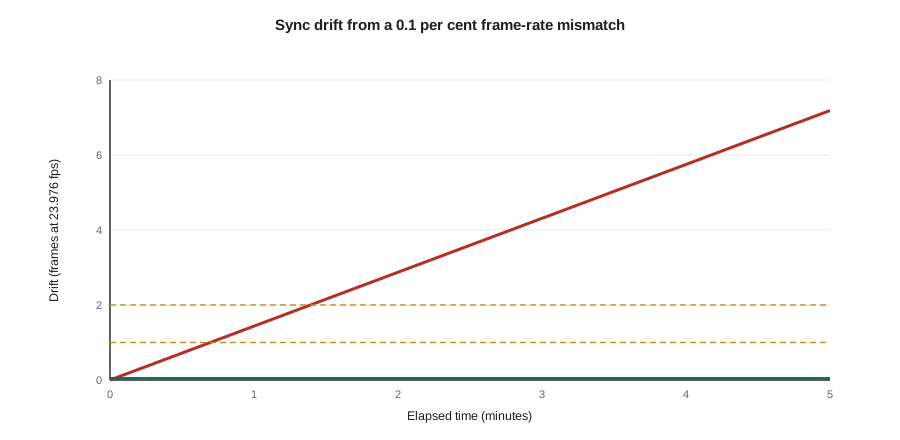
The sound department meets the 0.1 percent problem in a specific way. If audio is recorded at 48 kHz against 24 fps timecode but the picture is shot at 23.976 fps, the two will drift apart by 0.1 percent: about 3.6 seconds over an hour, or nearly 3 frames in two minutes. Older workflows recorded audio at 48.048 kHz to compensate; today the simplest rule is that the recorder's timecode must match the camera's frame rate exactly, and the sample rate stays at 48 kHz.
for minutes in [1, 2, 10, 60]:
    t = minutes * 60
    drift_s = t * (1 - 1000 / 1001)
    print(f'{minutes:3d} min: drift {drift_s * 1000:7.1f} ms = {drift_s * 23.976:5.2f} frames at 23.976 fps')
for fps in [23.976, 24, 25, 29.97]:
    print(f'{fps:6.3f} fps: 1 frame = {1000 / fps:5.2f} ms; 2 frames = {2000 / fps:5.1f} ms')
print('29.97 non-drop clock error per hour:', round(3600 * (1 - 1000 / 1001) * 1000 / 1000, 2), 's')1 min: drift 59.9 ms = 1.44 frames at 23.976 fps 2 min: drift 119.9 ms = 2.87 frames at 23.976 fps 10 min: drift 599.4 ms = 14.37 frames at 23.976 fps 60 min: drift 3596.4 ms = 86.23 frames at 23.976 fps 23.976 fps: 1 frame = 41.71 ms; 2 frames = 83.4 ms 24.000 fps: 1 frame = 41.67 ms; 2 frames = 83.3 ms 25.000 fps: 1 frame = 40.00 ms; 2 frames = 80.0 ms 29.970 fps: 1 frame = 33.37 ms; 2 frames = 66.7 ms 29.97 non-drop clock error per hour: 3.6 s
How much sync error is acceptable
Research on audiovisual synchrony, and broadcast recommendations such as ITU-R BT.1359, show that viewers are more tolerant of sound arriving late than early, because in nature light reaches us before sound. Broadcast guidance commonly treats sound leading picture by more than about 45 ms or lagging by more than about 125 ms as detectable, with tighter targets for production. In film post-production the standard is frame accuracy: sound editors work with sub-frame precision and aim for zero offset on dialogue. Sound effects may be slipped by a frame or two for creative reasons, such as making a punch land on the impact frame rather than the frame before.
Worked problem
How far off is this take?
An editor finds that a 23.976 fps take synced by slate at the head is late by 3 frames at the tail, 4 minutes later. What is the likely cause, and what is the offset in milliseconds?
Show solution
- Three frames at 23.976 fps is \( 3 \times 41.7 \approx 125 \) ms.
- A 0.1 percent drift over 240 s is about 240 ms, close to 6 frames; an offset of 3 frames over 4 minutes suggests about half that rate.
- A steady drift that grows during the take points to clocks running at different speeds, such as a camera without timecode lock, or a mismatch in sample rate or frame rate settings.
Answer: About 125 ms at the tail. Check whether the camera was jammed and whether the recorder and camera frame rates match. In post, the editor can correct drift by slightly speed-adjusting the audio, but the fix belongs on set.
Slates, smart slates and good habits
A smart slate displays running timecode received wirelessly from the recorder, so the camera sees the timecode number at the clap. Even with timecode on every device, mixers ask for a visible clap on each take, because it provides a backup and allows quick visual checks. Good slating habits include holding the slate in focus and in frame, clapping clearly but not explosively near actors, using a soft "tail slate" (clapped upside down at the end) when the head slate was missed, and calling "second sticks" when the first clap was missed.
When multiple cameras roll, each camera should see the slate or have its own timecode box. For documentary, where clapping may be intrusive, timecode boxes on every device and a quiet hand clap at a natural break serve the same purpose.
Metadata and file naming
Broadcast WAV files carry metadata in their headers: scene, take, tape or roll name, track names, timecode start, frame rate, sample rate and notes. This metadata travels with the files to editorial and later to the dialogue editor. When it is accurate, the sound team can automatically match each production file to the picture edit and find alternative takes in seconds. When it is wrong or missing, assistants spend days searching.
Mixers enter metadata on the recorder or a connected tablet as the day goes: scene and take numbers that match the script supervisor's notes, track names such as BOOM, MARA LAV and DEV LAV rather than "track 3", and circle takes the director liked. The sound report lists the same information with comments on problems and wild lines.
| Field | Example | Why it matters |
|---|---|---|
| Scene and take | 24A, take 3 | Matches picture and script notes |
| Roll or tape | Day 07 card A | Locates the original media |
| Track names | MIX L, MIX R, BOOM, MARA, DEV | Lets the dialogue editor choose microphones quickly |
| Timecode start and rate | 14:32:08:12, 23.976 non-drop | Automatic sync and conform |
| Sample rate and bit depth | 48 kHz, 24-bit | Avoids accidental conversion |
| Notes | Plane on line 4; wild line after take | Saves the dialogue editor time |
| Circle take | Yes | Shows the director's preferred takes |
From the set to editorial
At the end of each day, sound files are delivered to editorial, usually by copying from the recorder's cards to drives or uploading through the production's data workflow. The digital imaging technician or assistant editor syncs sound to picture using timecode and checks the result, creating synced dailies for the director and producers. On many productions the sync is done in the dailies software, then imported into the picture editing system with the production audio attached. The picture editor works mostly with the mix track, but the isos travel along, hidden, for later use.
Cloud and camera-to-cloud workflows now send proxy media and production audio from set to editorial within minutes. For sound, the key rule is unchanged: the original files, with full metadata and all tracks, must reach post-production untouched. Compressed or mixed-down versions are for review only.
Turnover: from picture edit to sound edit
At turnover, the assistant editor exports the edit's audio as an AAF (or the older OMF) file. The AAF contains the timeline's audio clips with their positions and, importantly, handles: extra seconds of audio beyond each cut, usually 5 to 10 seconds, so that dialogue editors can extend lines, find room tone and reach alternative microphones. The export also includes a reference video with burned-in timecode and a guide track, and an edit decision list that lets the sound team find the original source files.
The dialogue editor then performs a conform, sometimes called a re-link: software reads the AAF and edit decision list, finds the original multitrack production files using the metadata, and rebuilds the editor's timeline with all isolated tracks available. A successful conform depends on everything that happened on set: matching timecode, consistent file names, correct metadata and complete media.
Worked problem
Preparing a clean turnover
A picture editor is about to turn over a short film to the sound team. List the items that should be in the delivery.
Show solution
- AAF of the locked edit with embedded or linked audio and at least 5 seconds of handles.
- Reference video with burned-in timecode and the editor's temp mix on one track for comparison.
- All original production sound files with metadata, plus the sound reports.
- Edit decision list, a list of temp music and effects used, and notes from spotting.
- The project frame rate, start timecode (often 01:00:00:00 for reel 1) and sample rate confirmed in writing.
Answer: With these items the dialogue editor can conform to the original files, find alternative takes and reach clean audio beyond each cut. Missing metadata or handles turns a two-hour conform into days of manual work.
Picture changes and conforming
In reality, picture is rarely truly locked. When the director makes changes after turnover, the sound team must move every track to match the new cut. Change lists produced by the editing system show which shots moved, were trimmed or were added. Conform tools can apply these changes automatically, but large changes still require manual checking of every edit. This is why producers should treat the picture lock as a firm date, and why sound teams charge for conforming when changes are made after lock.
Common mistakes
MistakeLetting the camera and recorder run at different timecode frame rates
InsteadConfirm the project frame rate with camera and post before the shoot and match every device.
MistakeSkipping the slate because timecode is running
InsteadKeep a visible clap or tail slate as a backup and visual check.
MistakeNaming tracks track 1, track 2 and so on
InsteadName tracks by microphone and character so editors can choose quickly.
MistakeTurning over an AAF without handles
InsteadExport with at least 5 seconds of handles so dialogue can be extended and repaired.
MistakeMaking picture changes after lock without telling the sound team
InsteadIssue change lists and budget time for conforming.
Summary and key terms
- Double-system sound needs a common start point and a common speed.
- SMPTE timecode labels every frame; the recorder is usually the master and cameras are jam-synced.
- Fractional rates such as 23.976 and 29.97 run 0.1 percent slow; drop-frame keeps 29.97 timecode near real time.
- A frame-rate mismatch causes steady drift of about 3.6 seconds per hour.
- Accurate metadata, track names and sound reports make automatic conforming possible.
- Turnover includes an AAF with handles, a timecoded reference video, original files and an edit decision list.
- Picture changes after lock require conforming every sound track.
- Double-system sound
- Recording picture and sound on separate devices.
- SMPTE timecode
- A standard frame-by-frame time label in hours, minutes, seconds and frames.
- Jam sync
- Setting a device's timecode clock to match a master.
- Drop-frame timecode
- 29.97 fps timecode that skips frame numbers to stay close to real time.
- Smart slate
- A clapperboard that displays running timecode.
- Broadcast WAV (BWF)
- A WAV file format with metadata such as timecode and scene information.
- AAF
- Advanced Authoring Format, a file that carries an edit's audio clips and positions.
- Conform
- Rebuilding an edit with original source files, or updating tracks to a new cut.
- Change list
- A list of edits made to picture after turnover.
- Tail slate
- A slate clapped at the end of a take, held upside down.
Practice problems
Work each problem on paper first, then reveal the answer to check.
Why does double-system sound drift?
Show answer
The camera and recorder clocks run at very slightly different speeds.
What does jam sync do?
Show answer
Sets each device's timecode to match the master clock.
How much does a 0.1 percent speed difference drift over an hour?
Show answer
About 3.6 seconds.
How long is one frame at 23.976 fps?
Show answer
About 41.7 ms.
How is drop-frame timecode usually written?
Show answer
With a semicolon before the frames, such as 01:00:00;00.
Are viewers more tolerant of sound early or late?
Show answer
Late, because light normally reaches us before sound.
Name three metadata fields in a production sound file.
Show answer
Scene and take, track names, timecode start (also roll, sample rate, notes).
What are handles in an AAF?
Show answer
Extra audio beyond each edit for extending and repairing cuts.
What is a conform?
Show answer
Rebuilding the edit with original files, or updating tracks to a new cut.
Why keep a slate when timecode is running?
Show answer
As a backup and a visual sync check.
Lesson quiz · 5 questions
Score 60% or more to complete this lesson.
Create a free account to save your progress, take quizzes and earn a certificate.