
FILM-310 · Lesson 6 of 12 · 26 min
Dialogue editing
Dialogue is the backbone of almost every narrative film, and audiences will forgive almost anything except dialogue they cannot understand or that draws attention to itself. The dialogue editor's job is to take the production sound attached to the picture edit and turn it into a seamless, intelligible, consistent dialogue track: choosing the best microphone and take for every line, removing noises, smoothing backgrounds across cuts, and preparing the tracks so the re-recording mixer can work quickly. Done well, dialogue editing is invisible. The audience simply hears the characters speaking in a believable space.
What the dialogue editor receives
After the conform described in lesson 5, the dialogue editor has a session in which every clip of the picture edit is linked to its original multitrack production file. Under each clip of the mix track the editor can reach the boom, each lavalier, any plant microphones, and handles before and after each cut. The editor also has the sound reports, the script, the spotting notes and the director's comments. The first pass is listening: watching the film with dialogue only, noting problems such as noise, distortion, off-microphone lines, clothing rustle, lip smacks, overlaps and background jumps.
Dialogue editors work in a digital audio workstation with the reference picture locked to timecode. They use headphones and, for final judgments, calibrated loudspeakers at a consistent level, so that noise and tonal changes are judged as the mixer will hear them.
Choosing microphones and takes
For each line, the editor chooses which microphone to use. Booms usually give more natural perspective and match the shot; lavaliers give closer, cleaner sound when the boom was too far away or the location was noisy. A good rule is to use the boom where it is clean and close enough, and to switch to the lavalier when necessary, but not to switch back and forth within a sentence, because the change in tone and perspective is audible. Where two microphones are blended, the editor checks phase to avoid the comb filtering discussed in lesson 2.
Sometimes the best solution is a different take. If a word is lost under a truck in the chosen take, the same word from another take, with matching performance and timing, may fit. These alternative takes, called alts, are a dialogue editor's main tool before resorting to ADR. The editor must match not only the words but the emotional tone, the pace and the mouth movements, so that the replaced word is invisible against the picture. Small timing adjustments of a few frames are possible; large ones show as lip sync errors.
| Situation | Usual choice | Watch for |
|---|---|---|
| Clean boom, close enough | Boom | Shadows of off-axis sound if the actor turns |
| Noisy location, wide shot | Lavalier | Rustle, chest tone, mismatch with boom shots |
| Word lost to a noise | Alt take of the same word | Performance, pitch and sync match |
| Overlapping actors | Separate lavaliers on separate tracks | Bleed between microphones |
| Unusable line | Wild line or ADR | Matching perspective and room |
Splitting tracks and checkerboarding
A raw edit puts all dialogue on one or two tracks. The dialogue editor splits the clips across many tracks so that each has its own processing and its own background. The usual approach, called checkerboarding, places each character's lines, or each camera angle with a different background, on alternating tracks. Clips that need different equalization or noise reduction then sit on separate tracks where the mixer can treat them independently, and the editor can extend each clip's background under the next clip to create smooth transitions.
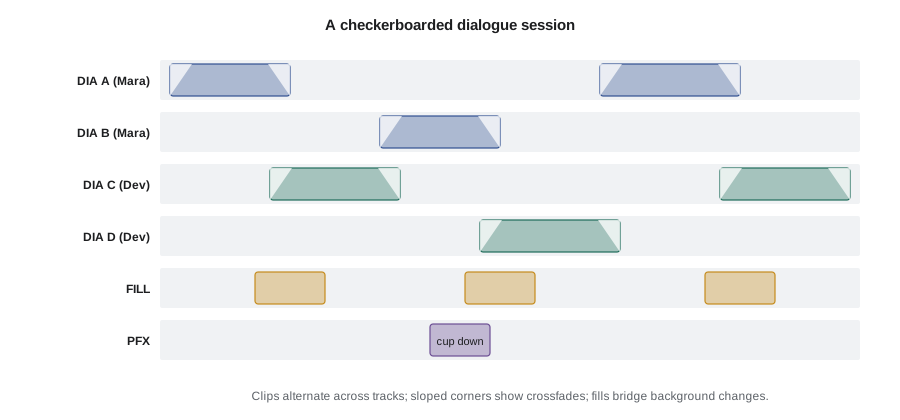
A common track layout for a feature has six to twelve dialogue tracks, one or two tracks for production effects (sounds from the production recording worth keeping, such as a door or footsteps that sound good), and tracks for room tone fill. The layout should be consistent across reels so the mixer always finds the same material in the same place.
Smoothing backgrounds across cuts
Every shot has a slightly different background because it was recorded at a different time, from a different microphone position or with different noise sources. When two shots are cut together, the background jumps at the edit. The dialogue editor's most important technical skill is hiding those jumps.
The basic technique is to extend each clip's background beyond the edit using the handles and overlap it with a crossfade. A crossfade of several frames, or longer for quiet scenes, lets one background blend into the next. Where the handles contain unwanted sounds, the editor finds clean room tone from elsewhere in the take, or from the recorded room tone, and lays it under the transition. Matching the level and color of the room tone to the dialogue is critical: room tone that is quieter or brighter than the background under the words makes the gaps more obvious, not less.
import numpy as np
rng = np.random.default_rng(310)
fs = 48000
def rms_db(x):
    return 20 * np.log10(np.sqrt(np.mean(x ** 2)))
shot_a = 0.010 * rng.standard_normal(fs)       # background under shot A
shot_b = 0.016 * rng.standard_normal(fs)       # louder background under shot B
print(f'shot A background {rms_db(shot_a):6.1f} dBFS')
print(f'shot B background {rms_db(shot_b):6.1f} dBFS')
print(f'jump at the cut   {rms_db(shot_b) - rms_db(shot_a):6.1f} dB')
fill = 0.012 * rng.standard_normal(fs)          # room tone from take B, a little quieter
a_filled = shot_a + fill                        # uncorrelated noise adds on a power basis
print(f'A with fill added {rms_db(a_filled):6.1f} dBFS')
print(f'remaining jump {rms_db(shot_b) - rms_db(a_filled):6.1f} dB')shot A background -40.0 dBFS shot B background -35.9 dBFS jump at the cut 4.1 dB A with fill added -36.2 dBFS remaining jump 0.3 dB
The code shows the principle behind a common trick: rather than turning shot B down, which would also lower the dialogue, the editor can add a little matching room tone under shot A so that its background rises toward shot B. Combined with a crossfade at the cut, the jump becomes too small to notice. Noise reduction, discussed below, can reduce the louder background, but adding fill is often the more natural solution.
Cleaning: noises, clicks and mouth sounds
Dialogue editors remove a wide range of unwanted sounds: crew noise, footsteps on hard floors during lines, prop clatter, clothing rustle, microphone bumps, lip smacks and clicks, breaths that are distracting, and sibilance. Each removal leaves a gap that must be filled with matching background. Small clicks can be repaired with spectral editing tools that show audio as a frequency-against-time picture, letting the editor paint out a cough or a chair squeak between words without affecting the voice.
Not every noise should be removed. Breaths are part of a performance; taking them all out makes characters sound robotic. Production effects such as a cup put down or a door closed in sync may sound better than anything Foley can create, so the dialogue editor moves them to the production effects track rather than deleting them. The goal is a clean track that still sounds alive.
Noise reduction
Modern noise reduction software, much of it using machine learning, can reduce steady background noise such as air conditioning, traffic hum or camera fan noise, and can separate voice from background with impressive results. Overuse produces artifacts: a watery, swirly sound, loss of consonants, and a voice that sounds detached from its space. Dialogue editors and mixers use noise reduction in modest amounts, often several gentle passes rather than one heavy pass, and compare the result against the original at the same loudness.
Some decisions belong to the dialogue editor and some to the mixer. Many supervising sound editors prefer editors to deliver tracks with only corrective clean-up, leaving broad noise reduction and equalization to the mixer, who can judge it in context with music and effects. Agree the division of labor at the start of the project.
Worked problem
Deciding between noise reduction and ADR
A key emotional line was recorded next to a busy road. The voice peaks at −18 dBFS on the lavalier and the traffic sits at −34 dBFS between words. Noise reduction can lower the traffic by about 10 dB before artifacts become noticeable. Should the line be replaced?
Show solution
- Signal-to-noise ratio before processing: \( -18 - (-34) = 16 \) dB.
- After about 10 dB of reduction: about 26 dB.
- For a quiet emotional line in a film with a calm score, the dialogue should usually sit 25 to 30 dB or more above the background; 26 dB is borderline but workable.
- Check alts first; if none is cleaner, try the processed line in context with music and effects before deciding.
Answer: Try processing and alts before ADR. If the processed line plays well in context, keep the original performance; if artifacts remain audible, put it on the ADR list as a backup.
Lip sync and sync checks
Every edit risks moving dialogue relative to picture. Dialogue editors check sync on close-ups by watching consonants that close the lips (b, p, m) and by checking hard sounds such as claps. Common causes of sync errors include clips slipped accidentally while editing, alts dropped in slightly late or early, and frame-rate or sample-rate mismatches during the conform. A one-frame error on a close-up may be visible to attentive viewers; two frames is usually obvious.
Preparing tracks for the mix
A well-prepared dialogue session makes the mix fast. Clips are grouped logically, crossfades are clean, levels are roughly balanced so the mixer is not starting from wildly different gains, unused material is removed or muted, and alternative choices are left on muted tracks nearby so the mixer and director can switch quickly. Notes flag any lines on the ADR list, any production effects that should be kept, and any places where the editor is unsure.
The dialogue editor also prepares the ADR list (lesson 7) as they go, noting lines that cannot be fixed with alts or processing and lines the director wants to change for performance or story reasons. The earlier the list is ready, the earlier actors can be booked.
| Item | Done when |
|---|---|
| Microphone choices | Each line uses the best source without switching mid-sentence |
| Alts | Damaged words replaced with matching takes in sync |
| Backgrounds | Every edit crossfaded and filled; no audible jumps |
| Noises | Crew noise, clicks and rustle removed or flagged |
| Production effects | Useful effects moved to their own tracks |
| Track layout | Consistent checkerboard across reels |
| ADR list | Lines needing replacement listed with timecodes and reasons |
| Notes | Uncertain decisions and alternatives documented |
The ethics of dialogue editing
Dialogue editors can change what people appear to say by moving words from other takes, and in documentary and unscripted work this power must be used carefully. Tightening pauses or removing a repeated word is accepted practice; constructing sentences that a contributor never said, or changing the meaning of a statement, is not. Many broadcasters' editorial guidelines require that editing preserves the meaning and context of what was said, and that audiences are not misled. In fiction, words can be moved freely to serve the performance the director and actor intended, but the actor's work should be respected.
US networks' standards and practices departments and journalism codes, such as the Society of Professional Journalists' code, emphasize accuracy and not misrepresenting what people said.
Common mistakes
MistakeSwitching between boom and lavalier within a sentence
InsteadChoose one source per line or phrase and match tone carefully at changes.
MistakeCutting dialogue clips with hard edits and no fills
InsteadExtend backgrounds with handles, crossfade and fill with matching room tone.
MistakeRemoving every breath for a clean track
InsteadKeep natural breaths that belong to the performance.
MistakeApplying heavy noise reduction in one pass
InsteadUse gentle passes, compare in context and leave broad processing to the mix if agreed.
MistakeRebuilding a documentary contributor's sentence from separate words
InsteadPreserve meaning and context; tighten only without changing what was said.
Summary and key terms
- The dialogue editor turns production audio into a seamless, intelligible, consistent dialogue track.
- Choose the best microphone and take for each line, using alts before ADR.
- Checkerboard clips across tracks so each background and character can be treated separately.
- Hide background jumps with handles, crossfades and matching room tone fills.
- Remove distracting noises but keep breaths and useful production effects.
- Use noise reduction sparingly and check lip sync on close-ups.
- Deliver organized tracks, notes and an early ADR list; preserve meaning in documentary work.
- Alt take
- An alternative take used to replace a damaged word or line.
- Checkerboarding
- Alternating clips across tracks so each can be processed separately.
- Crossfade
- Fading one clip out while the next fades in to smooth a transition.
- Room tone fill
- Clean ambient sound laid under gaps and edits to keep the background continuous.
- Production effects (PFX)
- Useful sound effects from the production recording kept on separate tracks.
- Spectral editing
- Editing audio in a frequency-against-time display to remove specific noises.
- Noise reduction
- Processing that lowers steady background noise while preserving the voice.
- Artifacts
- Unwanted side effects of processing, such as watery or swirly sound.
- Lip sync
- The alignment of dialogue with the actor's visible mouth movements.
- ADR list
- A list of lines to be re-recorded, with timecodes and reasons.
Practice problems
Work each problem on paper first, then reveal the answer to check.
What is the dialogue editor's main goal?
Show answer
A seamless, intelligible, consistent dialogue track that sounds natural.
When should an editor use a lavalier instead of the boom?
Show answer
When the boom is too distant or the location is noisy.
What is an alt take?
Show answer
A different take used to replace a damaged word or line.
Why checkerboard dialogue clips?
Show answer
So each background and character can be processed independently and smoothed with fills.
How do editors hide background jumps at cuts?
Show answer
Extend backgrounds with handles, crossfade and fill with matching room tone.
Name two tools for removing a cough between words.
Show answer
Spectral editing and replacing the gap with room tone.
Why keep some production effects?
Show answer
They are in sync and may sound better than recreated effects.
What artifacts does heavy noise reduction cause?
Show answer
Watery or swirly sound and lost consonants.
Which consonants help check lip sync?
Show answer
Lip-closing consonants such as b, p and m.
What is unacceptable in documentary dialogue editing?
Show answer
Constructing statements or changing the meaning of what someone said.
Lesson quiz · 5 questions
Score 60% or more to complete this lesson.
Create a free account to save your progress, take quizzes and earn a certificate.