
PHOT-320 · Lesson 7 of 12 · 27 min
Working to deadline: editing, transmission and metadata
In news, a picture that arrives after the deadline might as well not exist. Photographers must move from shooting to a published image quickly and reliably, without losing accuracy or quality. This lesson covers the workflow from camera to publication: ingesting and selecting images, adjusting them within ethical limits, embedding captions and metadata, transmitting over networks of different speeds, and the newer tools of content provenance that help prove an image is authentic.
Deadlines in a digital newsroom
Print editions still have fixed deadlines, often late evening for morning papers. Digital publishing has created continuous deadlines: the first picture of a breaking event is wanted as soon as possible, updates through the day, and a final, best selection for the main story. Wire services work to the minute because their subscribers compete to publish first. A photographer's workflow must therefore support a fast first file and later, better files.
Plan backward from the deadline. If the desk needs pictures by 9:30 p.m. and the event ends at 9:00 p.m., you have 30 minutes for selecting, adjusting, captioning and transmitting, and you may need to file during the event instead.
Worked problem
Budgeting time to deadline
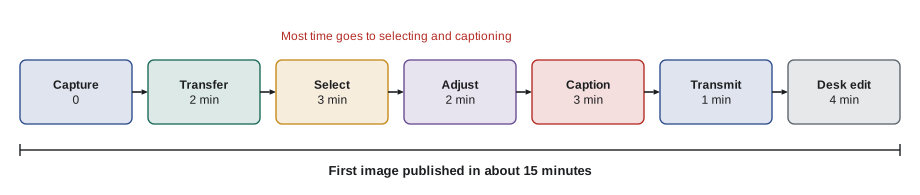
A council meeting is expected to vote at about 8:40 p.m. The web desk wants a picture within 15 minutes of the vote and the print desk needs the final selection by 9:30 p.m. Your steps take: transfer to phone or laptop 2 minutes, select 3 minutes, adjust 2 minutes per image, caption 3 minutes per image, transmit 1 minute per image. Can you send one image to the web by 8:55 p.m. and five to print by 9:30 p.m.?
Show solution
- Web: 2 + 3 + 2 + 3 + 1 = 11 minutes. Vote at 8:40 p.m. plus 11 minutes is 8:51 p.m., within the 15-minute target.
- Print: after the first image, four more at 2 + 3 + 1 = 6 minutes each = 24 minutes, plus 3 minutes to reselect, = 27 minutes.
- Starting at 8:51 p.m., the extra images are done by about 9:18 p.m., 12 minutes before the print deadline.
- Pre-writing caption details such as the council name, location and date before the vote saves time.
Answer: Yes: the first image by about 8:51 p.m. and five by about 9:18 p.m. Pre-loaded caption templates and a practiced routine make the difference.
Ingest and selection
Photographers ingest images from cards to a laptop, or transfer selected frames from the camera to a phone, and use software designed for fast browsing and tagging of news photographs. Good habits make the process reliable. Set the camera clock accurately, ideally synchronized to a phone or GPS, so that capture times are correct. Use two card slots where available, recording to both for backup. Rename files on ingest with a consistent pattern that includes date and assignment. Apply a caption template with information that applies to the whole shoot.
Selecting under deadline is different from editing a story. For news, choose quickly: the strongest, clearest, most informative frames, in focus, well exposed and accurately representing the event. Avoid sending many near-duplicates. Editors would rather have three strong, captioned images than thirty unsorted ones.
Adjusting images within ethical limits
News organizations allow adjustments that make an image look like what the photographer saw: correcting exposure, white balance and contrast, modest sharpening and noise reduction, cropping that does not change the meaning, and removing sensor dust spots. They prohibit changes to content: adding, removing, moving or altering elements in the scene, combining images, or adjustments so heavy that they mislead, such as darkening a background until a person disappears or changing the color of clothing. Lesson 9 discusses the rules and famous violations.
Work non-destructively where possible, keep the original file unaltered, and archive originals so that edits can be checked if questions arise. Many organizations require photographers to keep and supply raw or original files on request.
| Generally acceptable | Generally not acceptable |
|---|---|
| Exposure, contrast and white balance correction | Adding or removing objects or people |
| Cropping that preserves meaning | Cropping that changes meaning, such as removing a key person |
| Removing sensor dust | Cloning out distractions in the scene |
| Modest sharpening and noise reduction | Compositing frames or using generative fill |
| Conversion to black and white, if not misleading | Changing colors of objects or skin |
| Straightening a tilted horizon slightly | Heavy dodging and burning that hides content |
Captions and metadata
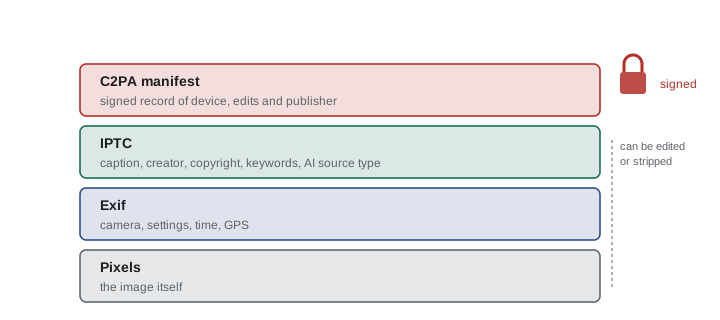
A news photograph travels with information embedded in the file. Camera metadata, in a format called Exif, records technical details: camera, lens, settings, date and time, and often location. Descriptive metadata follows the IPTC Photo Metadata Standard, maintained by the International Press Telecommunications Council, a body of news organizations. IPTC fields include the caption or description, headline, creator, credit line, copyright notice, usage terms, location fields, keywords and contact details. In recent years IPTC added fields to record whether an image was created or altered with generative AI, using a property called digital source type.
Filling in IPTC fields correctly is part of the job. The caption field carries the full caption; the creator and copyright fields protect your rights; the credit line tells publishers how to credit you; special instructions can carry embargoes or restrictions. Editors and archives rely on these fields to search, credit and license images years later.
Content provenance and C2PA
Because images can be edited or generated convincingly, news organizations and technology companies have developed standards to record where an image came from. The Coalition for Content Provenance and Authenticity, C2PA, publishes an open technical standard for attaching a signed record, called a manifest, to a media file. The manifest can record the capture device, time and place, the edits made and by which software, and the organizations that published it. Each step is signed cryptographically, so changes that are not recorded break the signature. Users see this information as content credentials, often through a small icon or a verification website.
Several camera makers now offer models that sign images at the moment of capture. Leica introduced the first such camera in 2023, and other makers followed. In 2026 Canon announced a system for news organizations, tested with Reuters, that adds C2PA provenance to images from some of its professional cameras. Editing software from major vendors can preserve and extend the manifest when images are adjusted. Some news organizations publish images with content credentials so readers can check them.
Content credentials have limits. They show that an image has a documented history, not that its content is true: a staged scene can carry valid credentials. Many platforms still strip metadata, including manifests, when images are uploaded, although some now read and display credentials. Absence of credentials does not prove an image is fake, since most images still lack them. And the system depends on trust in the organizations that issue signing certificates. Provenance is a tool for verification, not a replacement for ethics and judgment.
Transmission
Photographers transmit images by uploading files to the publication's system, often through a file transfer protocol (FTP) server, a web upload portal or a dedicated app. Cameras can send images directly over Wi-Fi or a wired network at venues, or to a phone that uploads over cellular data. At major events, wired connections at photo positions allow near-instant transmission.
Upload time depends on file size and connection speed. Note the units: file sizes are usually given in megabytes (MB) and connection speeds in megabits per second (Mbit/s), and one byte is eight bits.
where \( t \) is time in seconds, \( S \) the total size in megabytes, \( o \) an overhead allowance for protocols and retries, and \( R \) the upload rate in megabits per second.
Worked problem
Comparing file sizes and networks
A full-resolution JPEG from a 45-megapixel camera is about 15 MB; resized to 3,000 pixels on the long side it is about 2 MB. You want to send 8 images. Compare upload times over a congested cellular connection at 3 Mbit/s and a venue connection at 100 Mbit/s, with 20 percent overhead.
Show solution
- Full size: 8 × 15 = 120 MB. At 3 Mbit/s: 8 × 120 × 1.2 / 3 = 384 s, about 6.4 minutes. At 100 Mbit/s: 11.5 s.
- Resized: 8 × 2 = 16 MB. At 3 Mbit/s: 8 × 16 × 1.2 / 3 = 51 s. At 100 Mbit/s: about 1.5 s.
- On a weak connection, resizing saves more than five minutes.
Answer: About 6.4 minutes full size or under a minute resized on the congested network, against seconds on the venue line. Many photographers send resized first files, then full-resolution versions when time and bandwidth allow; check what your desk needs.
Cellular networks become congested at large events and disasters, when everyone tries to use them at once. Some photographers carry devices that bond several cellular connections or use satellite internet services for remote locations. Have a backup plan: a second network, a nearby location with better signal, or a colleague who can transmit.
Security and archives
Unencrypted transmission and lost cards can expose images, including sensitive pictures of sources or vulnerable people. Use secure upload methods, protect laptops and phones with passwords and encryption, and consider what is stored on devices when crossing borders or covering protests, where devices may be searched or seized. Lesson 10 covers legal protections for journalistic material, which differ between Canada and the United States.
Archive everything: originals, selects and captions, backed up in at least two places, one off-site. News archives become historical records, and licensing archives can provide income for freelancers. Good metadata makes archives searchable.
A practice routine
Rehearse your workflow before you need it. On a quiet day, time yourself transferring, selecting, adjusting, captioning and sending three images from the camera to a test address on your phone and on a laptop. Note where you lose time, such as typing names on a phone keyboard or searching for the right upload folder, and fix it with templates, shortcuts or saved settings. Repeat until the routine is quick and automatic, so that under real deadline pressure your attention is on accuracy rather than on the mechanics.
When things go wrong
Cards fail, batteries die, networks drop and software crashes, usually at the worst moment. Carry spare cards and batteries, a backup way to transfer files, such as a cable as well as wireless, and a second way to transmit. If you cannot file, tell the desk at once so they can plan around the delay or find another source. Editors can work with a late picture they know about; they cannot work with silence.
Finally, remember that the workflow serves the journalism. Speed matters, but the desk would rather receive a correct, well-captioned picture five minutes later than a wrong one now, and readers remember errors far longer than they remember who published first.
Common mistakes
MistakeLeaving the camera clock wrong by an hour after a time change.
InsteadSynchronize the clock regularly; capture times matter for verification.
MistakeSending thirty uncaptioned near-duplicates.
InsteadSend a few strong, captioned frames first.
MistakeCloning out a distracting sign in a news picture.
InsteadOnly correct exposure, color, crop and dust; never change content.
MistakeAssuming content credentials prove an image is true.
InsteadCredentials show provenance, not that the scene was unstaged.
MistakeConfusing megabytes and megabits when estimating upload time.
InsteadMultiply megabytes by eight to get megabits.
Summary and key terms
- Plan backward from deadlines and send a fast first file, then a fuller selection.
- Set accurate camera clocks, back up to two cards and use caption templates.
- Adjust only exposure, color, contrast, crop and dust; never alter content.
- Exif records camera data; IPTC fields carry captions, credits, rights and AI source type.
- C2PA content credentials sign an image's history but do not prove the scene is true.
- Upload time is \( t = 8S(1 + o)/R \); resize on slow networks.
- Secure devices and transmissions, and archive originals with good metadata.
Practice problems
Work each problem on paper first, then reveal the answer to check.
Upload time for 10 MB at 4 Mbit/s with no overhead?
Show answer
80 / 4 = 20 s.
Upload time for 50 MB at 20 Mbit/s with 25 percent overhead?
Show answer
8 × 50 × 1.25 / 20 = 25 s.
What does IPTC metadata carry?
Show answer
Descriptive information such as caption, creator, copyright, credit and keywords.
What does a C2PA manifest record?
Show answer
A signed history of the image's origin and edits.
Name one limit of content credentials.
Show answer
They do not prove the scene was not staged, and platforms may strip them.
Name two acceptable adjustments.
Show answer
Any two of exposure, white balance, contrast, crop without changing meaning, dust removal, modest sharpening.
Why synchronize the camera clock?
Show answer
Accurate capture times support captions and verification.
A 15-minute web deadline; steps take 2, 3, 2, 3 and 1 minutes. Is it met?
Show answer
Yes, in 11 minutes.
Why archive originals?
Show answer
To prove edits were acceptable and to keep a historical and licensing record.
What should you consider before crossing a border with a laptop of images?
Show answer
That devices may be searched, so protect sensitive material.
Lesson quiz · 5 questions
Score 60% or more to complete this lesson.
Create a free account to save your progress, take quizzes and earn a certificate.