
PHOT-499 · Lesson 10 of 12 · 28 min
The professional portfolio and online presence
The capstone exhibition lasts a week; the portfolio carries the work for years. This lesson is about turning the capstone into the main project of a professional portfolio, tailoring that portfolio to the people you want to reach, and launching the work online in a way that is accessible, measurable and consistent with the consents you obtained. VIS-410 lessons 1 to 5 covered what portfolios are for, editing and sequencing them, presentation formats, websites and social media in depth, and PHOT-410 lesson 6 covered marketing and branding for a photography business. Here the task is specific: the portfolio deliverable due in week 14, built around the capstone and aimed at a named professional destination.
What the portfolio deliverable is
The portfolio deliverable has three parts: a portfolio of about 20 to 30 images that includes the capstone as its main project alongside a small number of your strongest earlier projects; a portfolio website or updated existing site that presents it; and a one-page note naming the audience the portfolio is aimed at and explaining how the edit and presentation serve that audience. It is assessed on the quality and coherence of the edit, the fit to the stated audience, the professionalism and accessibility of the presentation, and the accuracy of the accompanying information.
| Criterion | What assessors look for |
|---|---|
| Edit | A tight selection; the capstone shown as a coherent project, not scattered singles |
| Fit to audience | Choices that match the stated destination, such as editorial, commercial, gallery or grants |
| Presentation | Clean, fast, consistent site; images at good size; clear navigation |
| Accessibility | Alt text, readable text contrast, keyboard navigation, captions for video |
| Information | Accurate captions, statement, biography, contact details and credits |
Choosing an audience
A portfolio that tries to please everyone usually pleases no one. Name a primary audience and design for it. Editorial and documentary editors want to see stories told across a sequence, strong captions, reliability and evidence that you can work with people; commercial clients want consistent quality across briefs, a clear specialty and evidence of meeting deliverables; galleries and curators want coherent bodies of work and a clear artistic voice; grant juries want a project with a defined question and evidence that you can deliver. You may later make different versions for different audiences, as VIS-410 lesson 2 explains, but the capstone deliverable should name one.
Amara named documentary editors at magazines and newspapers, and documentary grant juries, as her audience. She therefore led with Night Shift as a twelve-image story with captions, followed by two shorter earlier projects from PHOT-230 and PHOT-320, and a small set of commissioned event work from PHOT-340 to show she could deliver to a client. She left out her studio fashion work from PHOT-302, which was good but would have confused an editor about what she offered.
| Audience | Capstone images | Order | Text |
|---|---|---|---|
| Documentary editors | 10 to 15 | Story order | Full captions, short project text |
| Commercial clients | 6 to 10 | Strongest first | Brief note on the brief and deliverables |
| Galleries and curators | 15 to 20 | Exhibition sequence | Artist statement, installation shots |
| Grant juries | As the call specifies, often 10 to 20 | Project sequence | Statement and project description to the call's limits |
Structure of a portfolio website
A portfolio site should be simple to navigate on a phone and a large screen. A common structure has a home page that leads straight to the work, a page per project with images and a short text, an about page with biography and statement, a contact page, and optional pages for exhibitions, publications, clients or a newsletter sign-up. Put the capstone first. Use the same caption and text set you wrote in lesson 8, and link to the exhibition documentation and book dummy from the project page.
Choose a platform you can maintain. Hosted portfolio services are quick and need little technical work; general website builders offer more flexibility; a self-built site offers full control but needs ongoing maintenance and security updates. Whatever you choose, buy a domain in your name if you can and use an email address on that domain or a plain address with your name; reviewers notice playful or outdated addresses.
Images on the web: size, speed and quality
Large images are the point of a photography site, but heavy pages load slowly on mobile connections and lose visitors. Export web images from masters (lesson 7) at a long edge that suits your site layout, often 2,000 to 2,500 pixels, in sRGB, with moderate compression, and let the platform generate smaller versions for phones. Check page weight and loading time with your browser's developer tools or a free page-speed test.
Worked problem
Estimating page weight and load time
Amara's Night Shift page shows 12 images at about 600 KB each, plus 400 KB of text, code and fonts. A visitor on a mobile connection downloads at an effective 10 Mb/s. How long does the page take to download, and what happens if she switches to images of about 350 KB each?
Show solution
- Page weight: \( 12 \times 600 + 400 = 7600 \) KB, about 7.6 MB, which is \( 7.6 \times 8 = 60.8 \) megabits.
- Time at 10 Mb/s: \( 60.8/10 \approx 6.1 \) seconds, before any latency.
- With 350 KB images: \( 12 \times 350 + 400 = 4600 \) KB, about 36.8 megabits, or about 3.7 seconds.
Answer: About 6 seconds at first, falling to under 4 with lighter images; lazy loading, so that images below the screen load only as the visitor scrolls, cuts the initial wait further. Check that the lighter files still look good on a large display before switching.
Accessibility of the portfolio
An accessible portfolio reaches more people and signals professionalism. Provide alt text for every image (lesson 8), make text large enough and with enough contrast against the background, make sure the site can be navigated with a keyboard, give links descriptive names, caption any video and avoid text embedded in images. WCAG 2.1 Level AA is a reasonable target even where it is not legally required. Test with a free automated checker and by navigating your own site with the keyboard and a screen reader for a few minutes; automated checkers miss many problems.
| Check | Pass |
|---|---|
| Alt text on every portfolio image | Concise descriptions that complement captions |
| Text contrast | At least 4.5 to 1 for body text under WCAG Level AA |
| Keyboard navigation | All menus, galleries and forms reachable and usable with the keyboard |
| Link names | "View Night Shift" rather than "click here" |
| Video | Captions and, where needed, audio description |
| Zoom | Layout works at 200 percent zoom without losing content |
Consent, rights and protection online
Publishing online is a use that your releases and agreements must cover. Check the release matrix from lesson 3 before posting: images whose subjects excluded social media can appear on your portfolio site if their release covers it, but not on social platforms. Respect requests not to name people or locations, and strip GPS data from web files. Display a copyright notice and keep IPTC rights metadata in web files.
Photographers often ask how to protect images online. Visible watermarks deter casual copying but distract from the work and are easily removed; small, unobtrusive marks or none at all are usual on professional portfolios. Metadata, content credentials (PHOT-420 lesson 11), reverse image searches and registration where available are more useful tools. Many platforms and sites now offer ways to signal that images should not be used to train generative AI, through settings, metadata fields or website files that address crawlers; these signals are voluntary for those who receive them and the legal position was still developing at the time of writing (October 2026), as PHOT-420 lesson 10 explains.
In the United States, copyright arises automatically, but registration with the US Copyright Office is required before suing over a US work, and statutory damages and attorney's fees are generally available only if the work was registered before the infringement began or within three months of first publication. Group registration options make registering a body of photographs affordable. PHOT-410 lesson 4 covers licensing and enforcement.
Launching the work online
Plan the online launch to support the exhibition and outlast it. A simple plan might include an announcement a week before the opening with one strong image, a post on opening day with installation shots, a short series of posts during the run featuring one site or subject each (with permission), a newsletter to your list, and a project page that goes live on opening day. A short press release to local media and community organizations can bring coverage, especially for projects with a local subject. Use the press and social copy written in lesson 8.
If you send newsletters or other commercial email, the CAN-SPAM Act requires accurate headers and subject lines, a valid postal address and a working opt-out that you honor promptly. It does not require prior consent, but sending only to people who signed up is better practice and better for deliverability.
| When | Channel | Content |
|---|---|---|
| One week before | Social, newsletter | Announcement with one interior image, dates, access information |
| Opening day | Website | Night Shift project page goes live |
| Opening day | Social | Installation shots, thanks to partners |
| During the run | Social | One site per post with a subject quote, only where releases allow |
| Week after | Press release | To local paper and community radio, with three images and captions |
| Close | Newsletter | Exhibition documentation and book dummy link |
Measuring what works
Analytics show how people find and use your site. Useful measures for a portfolio are visits, where visitors come from, which project pages they view, how long they stay and how many contact you. Inquiries are rare relative to visits, so judge rates over months rather than days, and remember that the most valuable contacts often come from direct sharing by editors and peers rather than from search or social platforms.
Worked problem
From visits to inquiries
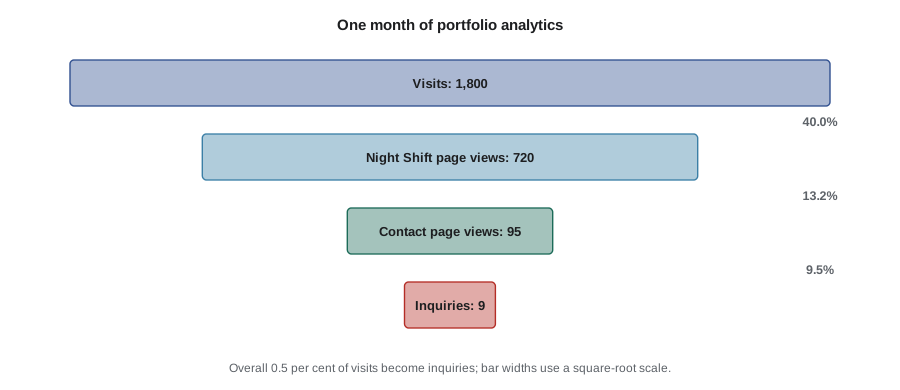
In the month after the opening, Amara's site has 1,800 visits. 720 visits include a view of the Night Shift page, 95 visitors view the contact page and 9 send an inquiry. What are the conversion rates at each step, and about how many visits would she need for 20 inquiries at the overall rate?
Show solution
- Visits to project views: \( 720/1800 = 40 \) percent.
- Project views to contact page views: \( 95/720 \approx 13.2 \) percent. Contact page views to inquiries: \( 9/95 \approx 9.5 \) percent.
- Overall: \( 9/1800 = 0.5 \) percent. For 20 inquiries: \( 20/0.005 = 4000 \) visits.
Answer: Rates of 40, about 13 and about 9.5 percent at each step, and 0.5 percent overall; about 4,000 visits for 20 inquiries if the rate held. With only 9 inquiries the overall rate is very uncertain, as the code below shows.
import math
def wilson(k, n, z=1.96):
    p = k / n
    d = 1 + z * z / n
    c = p + z * z / (2 * n)
    r = z * math.sqrt(p * (1 - p) / n + z * z / (4 * n * n))
    return (c - r) / d, (c + r) / d
for k, n in [(9, 1800), (36, 7200), (2, 95)]:
    lo, hi = wilson(k, n)
print(f'{k} of {n}: rate {k / n:.2%}, 95% interval {lo:.2%} to {hi:.2%}')9 of 1800: rate 0.50%, 95% interval 0.26% to 0.95% 36 of 7200: rate 0.50%, 95% interval 0.36% to 0.69% 2 of 95: rate 2.11%, 95% interval 0.58% to 7.35%
With 9 inquiries from 1,800 visits, the plausible range for the true rate runs from roughly a quarter of a percent to nearly one percent. Four times the data narrows the interval considerably. Treat month-to-month changes in inquiries as noise unless they are large and sustained.
Portfolio reviews and next steps
Before submitting the deliverable, show the portfolio to at least one professional outside the school if you can: a working photographer, an editor or a curator. Many cities and festivals hold portfolio review events, discussed in VIS-410 lesson 9; even a short conversation will tell you whether the edit and presentation communicate what you intend. Record the feedback in your log and use it in the reflection in lesson 12.
Common mistakes
MistakeMaking a portfolio for every possible audience at once
InsteadName one primary audience and edit and present the work for it.
MistakeScattering capstone images among other projects
InsteadPresent the capstone as a coherent project with its texts and documentation.
MistakeUploading full-resolution files that load slowly
InsteadExport web files at a suitable size and compression and check page weight.
MistakePosting images on social media that releases exclude
InsteadCheck the release matrix before every public use.
MistakeJudging the site by a few days of analytics
InsteadLook at trends over months; small numbers make rates uncertain.
Summary and key terms
- The portfolio deliverable combines an edit, a website and a note naming the audience.
- Choose a primary audience and shape the edit, order and texts for it.
- Put the capstone first on a simple site with project pages, about and contact.
- Export web images at suitable sizes and check page weight and load time.
- Aim for WCAG 2.1 Level AA and test with tools and by hand.
- Check releases before publishing; register copyright early to preserve statutory damages.
- Plan the online launch and measure conversion over months, not days.
- Portfolio
- A selection of work presented to show ability and direction to a chosen audience.
- Primary audience
- The group a portfolio is designed for first.
- Project page
- A web page presenting one body of work with its texts.
- Page weight
- The total size of the files a web page loads.
- Lazy loading
- Loading images only as they come into view.
- Contrast ratio
- A measure of the difference in luminance between text and background.
- Conversion rate
- The share of visitors who take a desired action.
- Confidence interval
- A range of plausible values for a quantity estimated from data.
- Press release
- A short announcement sent to media with key facts, images and contacts.
- Portfolio review
- A meeting at which professionals give feedback on a portfolio.
Practice problems
Work each problem on paper first, then reveal the answer to check.
How many images should a typical capstone portfolio deliverable contain?
Show answer
About 20 to 30, with the capstone as the main project.
A page loads 10 images of 500 KB and 500 KB of other files. What is its weight?
Show answer
5,500 KB, about 5.5 MB.
How long does 44 megabits take at 11 Mb/s?
Show answer
4 seconds.
1,200 visits produce 6 inquiries. What is the conversion rate?
Show answer
0.5 percent.
What contrast ratio does WCAG Level AA require for body text?
Show answer
At least 4.5 to 1.
Name two better protections than heavy watermarks.
Show answer
Metadata, content credentials, reverse image searches or registration.
What does a newsletter need under the CAN-SPAM Act?
Show answer
Accurate headers and subject lines, a postal address and a working opt-out.
Why name a primary audience?
Show answer
The edit, order and texts can then be designed for what that audience needs.
What should be first on a capstone portfolio site?
Show answer
The capstone project.
Why are rates from a few inquiries unreliable?
Show answer
Small numbers give wide confidence intervals.
Lesson quiz · 5 questions
Score 60% or more to complete this lesson.
Create a free account to save your progress, take quizzes and earn a certificate.