
SLS-140 · Lesson 5 of 12 · 19 min
Activities, tasks and notes
▶ Video coming soon A video version of this lesson is on the way.
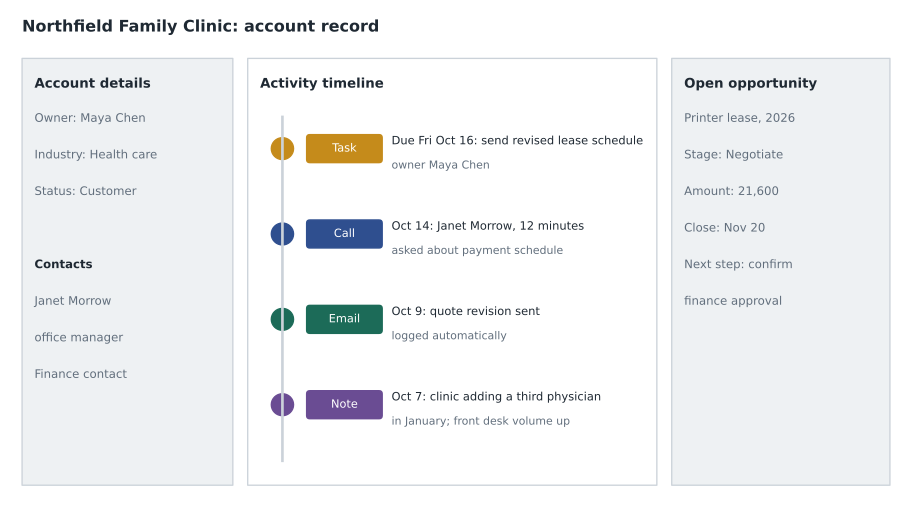
In the middle of October, Maya was out sick for three days. On the second day, Northfield Family Clinic's finance contact called Ridgeline with a question about the lease payment schedule. The call went to Jordan Reyes on the inside team. Jordan opened the account, read Maya's last three activity records and her latest note, saw an open task due that Friday to send the revised schedule, and found the draft schedule attached to the opportunity. He sent it that afternoon, logged the call and the email, closed Maya's task with a note explaining what he had done, and left her a message. When Maya came back, she did not need to ask anyone what had happened. Neither did the customer.
That kind of smooth hand-off depends on three kinds of record that most CRMs keep: activities, tasks and notes. They are the everyday working material of the CRM. Accounts, contacts and opportunities describe who and what; activities, tasks and notes describe what happened, what was learned and what has to happen next.
Activities: what happened
An activity is a record of an interaction or piece of work: a call, a meeting, an email, a visit, a demonstration, a text conversation. Activities are linked to the records they concern, so a call with Janet Morrow appears on her contact record, on the Northfield account and on the open opportunity. An activity record usually holds the type, date and time, the people involved, the subject, a short outcome and sometimes a duration.
Many activities can be logged automatically. Email and calendar integration can add every email to and from a customer, and every meeting with customer attendees, to the right records. Phone systems connected to the CRM can log calls with their length. Engagement platforms log each step of a sequence. Automatic logging saves time and makes the record more complete, but it creates two problems that sellers need to manage.
The first is noise. When every email is logged, the activity history fills with routine messages, and the important ones are harder to find. Good practice is to make sure the important interactions carry a clear subject and outcome, and to use notes (below) to record what was learned.
The second is privacy and accuracy. Automatic logging can attach a personal email to a customer record, or log a meeting with the wrong account because two people share a name. Sellers should check what is being logged on their behalf and remove anything that does not belong. Lesson 11 returns to this.
Tasks: what has to happen next
A task is a planned piece of work with an owner and a due date: send the revised lease schedule by Friday, call Tom Ostrowski next Tuesday, confirm the installation date with the clinic. Tasks appear on the owner's to-do list and can trigger reminders. Unlike activities, which record the past, tasks describe the future.
The difference between a task and a note is the most important habit in this lesson. If a customer asks for something and the seller writes "Janet asked for the revised schedule" in a note, the request is recorded but nothing will remind anyone to do it. If the seller creates a task "Send Janet the revised lease schedule" due Friday, the CRM will keep it visible until it is done. Lesson 2 described Grace's review of lost deals, in which 3 in 10 involved a customer request that was never delivered. Since then, Ridgeline's rule has been simple: every promise becomes a task.
| Activity | Task | Note | |
|---|---|---|---|
| Describes | Something that happened | Something that must happen | Something that was learned |
| Time | Past | Future | Any |
| Key fields | Type, date, people, outcome | Owner, due date, status | Text, author, date |
| Example | Call with Janet Morrow, 12 minutes, asked about payment schedule | Send revised lease schedule to Janet by Friday Oct 16 | Clinic adding a third physician in January; front desk volume will rise |
| Common mistake | Logging "called" with no outcome | No due date, or a vague subject | Burying a promise in the text |
Writing good tasks
A good task can be understood and completed by someone else. It has a specific action that begins with a verb, a clear object, an owner and a realistic due date. "Follow up" is not a task; it is a reminder that something should be done, without saying what. Compare these:
| Weak | Strong |
|---|---|
| Follow up with Halverson | Email Tom Ostrowski the 36-month and 48-month lease terms; book a 15-minute call to review (due Oct 8) |
| Keystone demo | Confirm demo room and attendees with Linda Sorensen; send calendar invite with agenda (due Oct 20) |
| Check on schools | Ask Prairie Valley facilities for the list of projector mounts older than 2015 (due Oct 23) |
| Call back | Call Janet Morrow to confirm she received the revised schedule and answer questions (due Oct 19) |
Due dates should reflect when the work should happen, not when it would be nice to have it done. A seller who gives every task the same due date of "today" ends each day with a list of overdue items and soon stops trusting the list. Tasks with no due date are often never done at all.
Notes: what was learned
A note is free text attached to a record: what the customer said, what the seller observed, context that does not fit in a field. Notes are where the most valuable and the most fragile information in a CRM lives. Valuable, because they capture the things that make a seller sound informed: Northfield's bad experience with a five-year lease, Keystone's embarrassment in front of dealers, the fact that Halverson Law's managing partner wants short meetings. Fragile, because notes that are vague, too long or full of private opinions are worse than no notes at all.
SLS-120 covered taking notes during a conversation, in the buyer's own words. This lesson is about what goes into the CRM afterward. A good CRM note is short, factual and useful to a colleague. It records what the customer said and wanted, what was agreed and anything unusual that someone else would need to know. Many sales teams use a simple structure.
| Part | What to write | Example from Keystone discovery meeting |
|---|---|---|
| Situation | Key facts about the customer's situation | 6 meeting rooms; bookings by email to reception; 3 double bookings during September dealer visits |
| Need and impact | The problem in the customer's words, and why it matters | Dale: "We looked like we can't run a meeting." Plant manager upset; spring dealer meetings in March |
| People | Who was involved, roles, preferences | Dale Petrie decides; Linda Sorensen runs bookings; IT contractor must approve any software |
| Agreed | What was agreed or promised | Ridgeline to propose booking software for 6 rooms plus video in 2 rooms; demo week of Oct 26 |
| Next step | Covered by a task, with a date | Task: send proposal outline to Dale by Oct 16 |
Notes should be written soon after the conversation, while memory is fresh. Ridgeline's guideline is the same day. Many CRMs and meeting tools now offer AI-generated summaries of calls and meetings; lesson 10 discusses how to use them, but the principle is the same: a seller should read and correct any summary before it goes into the record.
What not to write
Everything in a CRM note can be read by colleagues, and in many situations it can also be seen by the customer. Under Canadian and US privacy laws discussed in lesson 11, individuals can often request access to the personal information a company holds about them, and notes can also come out in legal disputes. A good test before saving a note is to imagine the customer reading it.
That test rules out opinions about a person's character or appearance ("difficult", "clueless"), guesses about private matters such as health, family or finances, information the seller has no business reason to record, and anything the customer said in confidence that they would not expect to be written down. It does not rule out honest, useful observations: "Prefers short meetings and email summaries" or "Concerned about long contract terms after a bad experience" are respectful and help the next person serve the customer well.
Worked problem
Rewriting a weak note
An account executive wrote this note after a call: "Talked to Tom. Grumpy as usual. Said maybe. Will chase." Rewrite it so it is useful and fair, and identify the task that is missing.
Show solution
- Identify the facts: the call was with Tom Ostrowski; he did not commit; the reason is missing.
- Ask the seller what Tom actually said: he wanted to compare a 36-month and a 48-month term before deciding, and he was concerned about the buyout clause.
- Remove the opinion ("grumpy") and replace the vague outcome ("maybe") with what was said.
- Rewritten note: "Call with Tom Ostrowski (finance). Not ready to decide; wants 36- vs 48-month comparison and clarity on early buyout terms. Prefers figures in a single table by email."
- Missing task: "Email Tom a one-page comparison of 36- and 48-month terms with buyout clauses explained" with a due date.
Answer: The new note tells a colleague what Tom needs and how he likes to receive it, without any judgment of his character, and the promise is now a task that the CRM will track.
Activities in retail
At Juniper & Pine, most activity is recorded by the point-of-sale system: purchases, returns, deliveries and service requests. Associates add notes and follow-up tasks in the clienteling app. Bev's standard for associates after a sale is one useful note and, for any sale over 1,500 dollars, a follow-up task to check in a few days after delivery. Aiden found that the follow-up call after delivery was where many of his second sales started: a customer happy with a new sofa asks about a matching chair, or mentions that the dining table is next.
Retail tasks also cover promises made on the floor: "Call Mrs. Dhillon when the queen frame in walnut arrives", "Text the Kowalchuks the delivery window once dispatch confirms". In a busy store, these are easy to forget, and a forgotten promise costs more goodwill than the original help earned.
Keeping the to-do list working
A task list is only useful if it reflects reality. That means closing tasks when they are done, rescheduling them honestly when plans change, deleting tasks that are no longer needed, and reviewing the list each morning. Grace recommends that sellers start each day with three steps: clear or reschedule anything overdue, look at today's tasks and meetings, and check new activity on key accounts. The lab in lesson 12 turns this into a daily routine.
Logging activity on the move
Field sellers spend much of their day away from a desk, and activity is easiest to forget between visits. CRM mobile apps help: they can show the next meeting's account details, let the seller dictate a short note into the phone after a visit, and create a follow-up task in a few taps. Maya's habit after every site visit is to sit in her car for three minutes before driving off and record the outcome, the note and any tasks while the meeting is fresh. If she waits until the end of the day, she finds she has forgotten at least one detail and often a promise. Voice notes should still be read and corrected before they are saved, especially when speech recognition has turned a product name or a person's name into something else.
Common mistakes
MistakeA note recording a customer's request is enough.
InsteadEvery promise or request should also become a task with an owner and a due date.
Mistake"Follow up" is a good task subject.
InsteadA task should name a specific action and object, such as "Email Tom the lease comparison".
MistakeAutomatic logging means sellers never need to record anything.
InsteadAutomatic logging captures that interactions happened; sellers still need outcomes and notes on what was learned.
MistakeCRM notes are private to the seller.
InsteadColleagues can read them, and customers may be able to request them; write notes you would be comfortable with the customer reading.
MistakeEvery task should be due today so nothing is forgotten.
InsteadUnrealistic dates make the list unusable; give each task a realistic date and review the list daily.
Summary and key terms
- Activities record what happened, tasks record what must happen next, and notes record what was learned.
- Automatic logging of email, meetings and calls saves time but needs checking for noise, privacy and accuracy.
- Every promise or customer request should become a task with a specific action, an owner and a realistic due date.
- Good notes are short, factual and useful to a colleague; a simple structure is situation, need and impact, people, agreed and next step.
- Write notes as if the customer might read them: leave out opinions about character and unnecessary personal information.
- A daily review of overdue and upcoming tasks keeps the to-do list trustworthy.
- Activity
- A record of an interaction or piece of work, such as a call, meeting or email.
- Task
- A planned piece of work with an owner and a due date.
- Note
- Free text attached to a record, capturing what was learned.
- Automatic activity logging
- Integration that records emails, meetings or calls in the CRM without manual entry.
- Hand-off
- Passing work on a customer to a colleague so that they can continue without asking for context.
Practice problems
Work each problem on paper first, then reveal the answer to check.
Turn "Follow up with Northfield" into a strong task.
Show answer
For example: "Call Janet Morrow to confirm the revised lease schedule and answer questions (due Oct 19)."
What three kinds of information does a note record that fields usually do not?
Show answer
For example: the customer's situation in their words, the impact of the problem, and people's preferences or concerns.
Which of these belongs in a note: "Ruth is impatient" or "Ruth prefers 30-minute meetings with an agenda"?
Show answer
The second; it is factual, respectful and useful.
Why does Bev ask for a follow-up task after sales over 1,500 dollars?
Show answer
A check-in after delivery shows care, catches problems early and often leads to a second sale.
Lesson quiz · 5 questions
Score 60% or more to complete this lesson.
Create a free account to save your progress, take quizzes and earn a certificate.