
VIS-120 · Lesson 5 of 12 · 24 min
Color spaces, gamma and log encoding
The same RGB numbers can describe very different colors depending on how they are interpreted. A pixel with values 255, 0, 0 is "pure red", but which red? The red of an ordinary web display, the more saturated red of a wide-gamut monitor, or the red of a cinema projector? And how bright is a value of 128 compared with 255: half as bright, or about a fifth? Color spaces and transfer functions answer these questions. VIS-110 introduced color models and the CIE chromaticity diagram; this lesson applies those ideas to working files, explaining the color spaces image makers actually use, gamma and other transfer functions, log encoding for video, HDR standards, and how to choose working and delivery spaces.
What defines a color space
An RGB color space is defined by three things:
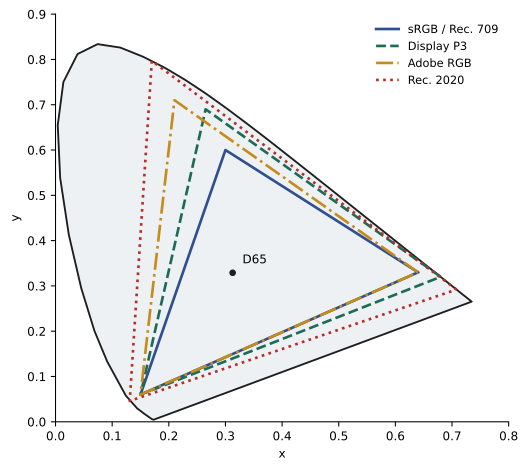
- Primaries: the exact chromaticities of its red, green and blue, which form a triangle on the CIE chromaticity diagram. Colors inside the triangle, the gamut, can be represented with positive values.
- White point: the chromaticity that equal RGB values represent, usually D65 (a daylight white of about 6,500 K) for displays and video, or D50 in print and some photographic spaces.
- Transfer function: the relationship between stored numbers and light intensity, such as a gamma curve, a log curve or the HDR PQ curve.
Two files with identical numbers but different color spaces display differently. A color profile, usually an ICC profile embedded in the file, tells software which space the numbers belong to so it can display them correctly. Files without an embedded profile are usually assumed to be sRGB, which can make wide-gamut images look dull or oversaturated if the assumption is wrong.
Common color spaces
- sRGB: created in 1996 for typical displays and the web, with primaries matching Rec. 709 HD video. It remains the default for web, social media, most consumer devices and many print labs.
- Adobe RGB (1998): a wider gamut, especially in greens and cyans, designed to cover more of what CMYK printing can reproduce. Common for professional print workflows.
- Display P3: Apple's variant of the DCI-P3 cinema gamut with a D65 white point and the sRGB transfer curve, used by most modern phones, tablets and many laptops; wider than sRGB, especially in reds and greens.
- ProPhoto RGB: a very large gamut that includes nearly all real surface colors and some imaginary colors outside human vision, used as a working space in Lightroom and for archival masters; it must be used with 16-bit files to avoid banding.
- Rec. 709: the HD television standard, sharing sRGB primaries.
- Rec. 2020: the UHD and HDR television standard, with very wide primaries that few displays fully reach.
- DCI-P3: the digital cinema projection gamut, with a different white point from Display P3.
- Camera native and ACES spaces: very wide spaces used in cinema workflows, discussed below.
| Space | White point | Relative gamut | Typical use |
|---|---|---|---|
| sRGB / Rec. 709 | D65 | Standard | Web, social media, HD video, many labs |
| Display P3 | D65 | About 25 % larger than sRGB | Phones, tablets, modern laptops |
| Adobe RGB (1998) | D65 | About 35 % larger than sRGB | Professional print |
| ProPhoto RGB | D50 | Very large | Editing and archival masters (16-bit) |
| Rec. 2020 | D65 | Very large | UHD and HDR video |
| DCI-P3 | DCI white | Similar to Display P3 | Cinema projection |
Gamma and transfer functions
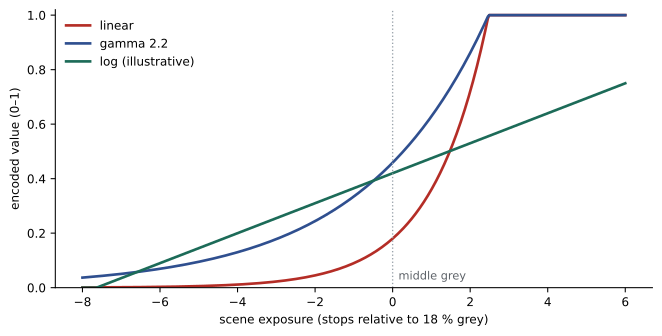
Camera sensors respond linearly: twice the light produces twice the value. Human vision does not: we perceive brightness roughly logarithmically, so we are much more sensitive to differences in dark tones than in bright ones. If an 8-bit file stored linear light values, most of its 256 levels would be spent on bright tones where we cannot distinguish them, and shadows would be coarsely stepped. Gamma encoding solves this by applying a power function before storage, so that more code values are allocated to darker tones, matching perception:
For sRGB, the effective gamma is about 2.2 (the actual curve has a short linear segment near black). A mid-gray surface reflecting 18 % of the light, linear value 0.18, is encoded at about 0.46, or a code value of about 118 out of 255, close to the middle of the range where it appears perceptually. Displays apply the inverse function, so the overall system reproduces scene brightness relationships. Rec. 709 video uses a similar camera curve, and BT.1886 defines display gamma for HD at about 2.4 for dim viewing environments.
Worked problem
Gamma encoding of mid-gray
With a simple gamma of 2.2, find the 8-bit code value for a surface reflecting 18 % of the light that a white surface reflects, and for a surface reflecting 1 %.
Show solution
- Encoded value for 18 %: 0.18^(1/2.2) = 0.18^0.4545 ≈ 0.459.
- Code value: 0.459 × 255 ≈ 117.
- Encoded value for 1 %: 0.01^0.4545 ≈ 0.123.
- Code value: 0.123 × 255 ≈ 31.
- Linear encoding would give only 46 and 3, wasting levels on highlights and leaving very few for shadows.
Answer: About 117 for 18 % gray and 31 for 1 %, compared with 46 and 3 if stored linearly.
Editing software sometimes works in linear light internally, because operations that model physics, such as blending, blurring, compositing and exposure changes, behave correctly only on linear values. Visual effects and cinema pipelines routinely use linear, 32-bit floating-point working spaces for this reason.
Log encoding
Video cameras offer log profiles, such as Sony S-Log3, Canon C-Log, Panasonic V-Log, Nikon N-Log, ARRI LogC and RED Log3G10. A log curve compresses a wide scene dynamic range into the available code values by allocating roughly equal numbers of values to each stop of exposure. The image looks flat and desaturated straight out of the camera, but it preserves highlight and shadow detail for grading. Log footage requires 10-bit (or higher) recording, because spreading 13 or more stops across only 256 levels would cause banding when the image is expanded in grading. Log footage is converted to a display space in post-production, using a manufacturer's conversion LUT or color management transform, before creative grading.
LUTs and color management for video
A lookup table (LUT) is a table that maps input color values to output values. 1D LUTs adjust each channel's tone curve; 3D LUTs map every RGB combination, allowing complex color transformations. LUTs are used to convert log footage to Rec. 709 for monitoring on set, to apply a consistent show look, and to emulate film stocks. Technical LUTs convert between spaces; creative LUTs apply a look. A common mistake is applying a creative LUT designed for one camera's log to footage from another, giving wrong colors.
Modern color-managed workflows instead use transforms defined by color management systems. The Academy Color Encoding System (ACES) defines a very wide scene-referred working space, input transforms for each camera, and output transforms for each display, so footage from different cameras can be combined consistently and delivered to SDR, HDR and cinema from one grade. DaVinci Resolve offers its own color-managed pipeline (DaVinci Wide Gamut) on the same principle.
HDR standards
High dynamic range video uses new transfer functions and wider gamuts. PQ (Perceptual Quantizer, SMPTE ST 2084) encodes absolute brightness up to 10,000 nits, and is used by HDR10, HDR10+ and Dolby Vision, with metadata describing the content. HLG (Hybrid Log-Gamma) is a relative curve, backward compatible with standard dynamic range displays, developed for broadcast. HDR delivery uses Rec. 2020 primaries and 10-bit or 12-bit encoding. Grading HDR requires an HDR-capable reference monitor; consumer displays vary enormously in peak brightness and tone-map content to their capabilities. HDR stills are also emerging, with formats such as HDR AVIF, HEIF and gain map JPEGs supported on recent phones and browsers.
Choosing working and delivery spaces
Practical rules for still images:
- Edit raw files in a wide space: raw converters such as Lightroom use a wide internal space based on ProPhoto primaries.
- Export 16-bit TIFF or PSD masters in Adobe RGB or ProPhoto RGB when they will be printed or archived, and keep them at 16 bits.
- Export images for the web and social media in sRGB, which displays correctly almost everywhere; Display P3 is an option for platforms and audiences known to support it.
- Ask print labs which space they expect; many consumer labs want sRGB, while professional labs accept Adobe RGB or work from ICC profiles (Lesson 6).
- Always embed the profile when exporting.
For video, choose a project color management approach at the start, monitor in the delivery space (Rec. 709 for most SDR deliveries), and deliver in the specification each platform or broadcaster requires.
Converting between color spaces
Converting an image from one color space to another, such as from Adobe RGB to sRGB, changes the numbers so that the colors look the same, as far as the destination gamut allows. Colors outside the destination gamut are mapped inside it, according to a rendering intent (Lesson 6). Converting is different from assigning a profile, which changes the interpretation of the existing numbers without changing them, and therefore changes how the image looks. Assigning is used to correct files that were tagged with the wrong profile or none at all; converting is used to prepare a file for a destination. Confusing the two is a common source of color shifts. In Photoshop, the commands are named Convert to Profile and Assign Profile; raw processors convert automatically on export to the chosen space.
Wide gamut on the web
Modern browsers on most platforms color manage images and support wide-gamut displays, so a Display P3 image with an embedded profile can show more saturated reds and greens than sRGB on a phone or laptop with a P3 screen, while still displaying acceptably on sRGB screens. However, some platforms and apps strip profiles or ignore them, in which case P3 numbers are interpreted as sRGB and colors look duller or shifted. For most work sRGB remains the safe choice; P3 is worthwhile for portfolios and campaigns aimed at modern devices, provided files are tested on the platforms used.
Monitoring color on set
Color decisions in video begin on set. Cinematographers and DITs monitor log footage through LUTs or transforms that show an approximation of the final look, on calibrated field monitors. False color and waveform tools, introduced in VIS-110, measure exposure objectively, independent of monitor brightness or ambient light. Agreeing on the monitoring transform and look with the colorist before the shoot ensures that what the director approves on set can be reproduced in the grade, and that the camera team exposes for the intended transform rather than for the flat log image.
Black and white conversion
Converting color images to black and white is a color space decision too. Simply desaturating gives each color a fixed gray value that may lose separation between, say, red flowers and green leaves of similar brightness. Raw processors and pixel editors offer channel-based conversions that let the photographer control how bright each color becomes in the monochrome result, much as photographers once used colored filters on black and white film: a red filter darkens blue skies and makes clouds stand out. Black and white masters are still best kept as RGB files, so that later adjustments and toning remain possible.
Common mistakes
MistakeExporting web images in Adobe RGB or ProPhoto.
InsteadConvert to sRGB for general web delivery.
MistakeStripping the ICC profile on export.
InsteadEmbed the profile so software interprets colors correctly.
MistakeUsing ProPhoto RGB with 8-bit files.
InsteadUse ProPhoto only at 16 bits.
MistakeRecording log in 8-bit.
InsteadRecord log at 10-bit or higher.
MistakeApplying a creative LUT built for another camera's log.
InsteadConvert to a common space first or use matching transforms.
Summary and key terms
- A color space is defined by primaries, white point and transfer function.
- ICC profiles tell software how to interpret RGB numbers.
- sRGB suits the web; Adobe RGB and ProPhoto suit print and archive masters.
- Gamma encoding allocates more code values to shadows, matching vision.
- Log encoding spreads stops evenly and needs 10-bit recording.
- LUTs and ACES manage color across cameras and displays.
- HDR uses PQ or HLG with Rec. 2020 primaries.
- Color space
- A defined way of interpreting color values.
- Gamut
- The range of colors a space or device can represent.
- White point
- The chromaticity of equal RGB values.
- ICC profile
- Data describing a file's or device's color space.
- Gamma
- Power-law transfer function for encoding brightness.
- Linear light
- Values proportional to physical light intensity.
- Log profile
- Camera encoding that compresses many stops into code values.
- LUT
- Lookup table mapping input colors to output colors.
- ACES
- Academy Color Encoding System for color management.
- PQ
- Perceptual Quantizer HDR transfer function.
Practice problems
Work each problem on paper first, then reveal the answer to check.
Name the three things that define an RGB color space.
Show answer
Primaries, white point, transfer function.
What is usually assumed for untagged files?
Show answer
sRGB.
Which space covers more greens and cyans for print?
Show answer
Adobe RGB.
Why must ProPhoto be used at 16 bits?
Show answer
Its large gamut spreads levels thin, causing banding at 8 bits.
Encode 50 % linear light with gamma 2.2.
Show answer
0.5^0.4545 ≈ 0.73, code about 186.
Why do VFX pipelines work in linear light?
Show answer
Physical operations like blending behave correctly.
Why does log footage look flat?
Show answer
Stops are spread evenly to preserve dynamic range.
What is the difference between technical and creative LUTs?
Show answer
Technical converts spaces; creative applies a look.
Which HDR curve is backward compatible with SDR?
Show answer
HLG.
Which space should general web images use?
Show answer
sRGB.
Lesson quiz · 5 questions
Score 60% or more to complete this lesson.
Create a free account to save your progress, take quizzes and earn a certificate.