
CINE-101 · Lesson 10 of 12 · 25 min
On set: workflow, data and safety
A film set can look chaotic, but a well-run set follows a precise rhythm. Each scene moves through the same stages, each take starts and ends with the same calls, every take is identified and recorded, and every byte of footage is copied and verified before the cards are reused. These routines exist because a shooting day is expensive and unrepeatable: a lost card, an unlabelled take or an injured crew member can undo weeks of work. This lesson covers the workflow of a scene, the sequence of calls for a take, slates and reports, data management, and the professional and safety habits that make a set work.
Block, light, rehearse, shoot
Each scene or setup typically moves through four stages:
- Block: the director works out the actors' positions and movements with them on set, while the director of photography and key crew watch. Marks are placed for actors and the camera positions are decided.
- Light: the actors leave (often replaced by stand-ins of similar height and complexion) while the camera, lighting and grip departments set up. The sound team plans microphone positions, and the art department finishes dressing the set.
- Rehearse: the actors return for a rehearsal with camera, so that the operator, focus puller, boom operator and actors can coordinate movements and timing. Problems such as boom shadows or missed marks are fixed now.
- Shoot: takes are recorded until the director is satisfied, then the next setup begins.
On small productions the stages blur, but the logic remains: decide what happens before lighting it, and rehearse before rolling.
The calls for a take
Takes begin and end with a standard sequence of calls, which coordinates everyone and identifies the take:
- "Lock it up" or "Quiet on set": the assistant director asks everyone to be silent and still, and doors are closed.
- "Roll sound": the sound mixer starts recording and answers "speed" (or "sound rolling").
- "Roll camera": the camera operator starts recording and answers "rolling".
- "Mark it" or "slate": the second camera assistant reads the slate aloud ("Scene 12B, take 3") and claps the sticks, then steps out of frame.
- "Background action" (if extras are present), then "Action": called by the director.
- "Cut": called by the director (or by anyone, for safety). Recording stops.
The director then decides whether to go again, adjust something, or move on, and indicates which takes are good ("print that" or "circle that"), which the script supervisor and camera and sound reports record.
Slates and numbering
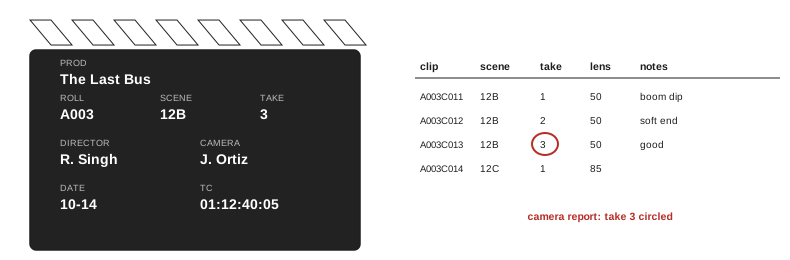
The slate identifies every take so that editors can find it. It shows the production name, director and camera operator, date, camera roll or card, scene, shot and take, and often the frame rate and timecode. Scene numbers come from the script; shots within a scene are often indicated by letters (12, 12A, 12B for the master and subsequent setups), and takes are numbered from 1 for each shot. Some conventions to know:
- Tail slate: when slating at the start is impossible, the slate is shown upside down at the end of the take, and the editor knows to sync at the end.
- MOS: written on the slate (and the sticks not clapped) for takes recorded without sound.
- Second sticks: if the clap was missed or obscured, the assistant calls "second sticks" and claps again.
- Pickups and series: a take that starts partway through a scene is noted as a pickup (PU); several takes recorded without cutting are noted as a series.
Reports and notes
Three records are kept for each take. The camera report lists each clip with its scene, shot and take, lens, stop and notes such as "soft focus at end" or "circle take". The sound report lists each audio file with its tracks (which microphone is on which channel) and notes such as "plane at end". The script supervisor's notes record the action and dialogue covered, deviations from the script, timings, continuity details and the director's preferred takes. Together these let the editor find the best material quickly instead of watching every take, and they are kept with the media. Many productions now use apps or digital slates that generate reports automatically, but the content is the same.
Data management
In digital production, the camera cards are the negatives. Losing them loses the shoot. Productions therefore follow strict data management, often run by a dedicated data wrangler or digital imaging technician (DIT):
- Copy, never move: footage is copied from the card to at least two separate drives using software that verifies each copy with a checksum, a mathematical fingerprint that confirms the copy is identical to the original. Simple drag-and-drop copies can silently fail.
- Follow the 3-2-1 rule: three copies of the data, on at least two different types of media or devices, with one copy stored in a different location (for example taken home by the producer or uploaded to the cloud).
- Organize consistently: a folder structure by date, camera and card (for example Day02/CamA/A003), and names that match the camera reports.
- Never format a card until the footage is confirmed on two verified copies; label cards clearly as full, copied or ready, often with coloured tape.
- Sound files are backed up with the same care, alongside the sound reports.
- Keep a log of every card offloaded, its size, the destinations and the checksum result.
Worked problem
Planning storage for a shoot
A two-day shoot uses two cameras, each expected to record about 3 hours of footage a day at 150 Mbps. How much storage is needed for three copies, and how should it be organized?
Show solution
- Data per camera-hour: 150 × 0.45 ≈ 67.5 GB.
- Per day: 67.5 × 3 hours × 2 cameras ≈ 405 GB; for two days about 810 GB per copy.
- Three copies: about 2.4 TB, plus sound files and a margin. Use, for example, two 2 TB working drives on set and a third 2 TB drive or cloud upload kept off site.
Answer: About 0.8 TB per copy and 2.4 TB for three copies. Planning storage before the shoot avoids the dangerous temptation to reformat cards before backups are complete.
Working on set
Film sets have a culture that new crew members learn quickly. Be on time, which in film means early; know your job and stay near your department; keep walkie-talkie traffic short; repeat calls such as "rolling" and "cut" so that people far from the camera hear them; never walk through a shot or stand in an actor's eyeline during a take; keep your phone silent; and ask before touching another department's equipment. Respect for actors matters: keep the set calm and quiet during emotional scenes, and keep non-essential people out of their way. Many productions now have codes of conduct and designated people to whom harassment or unsafe practices can be reported confidentially, and every crew member has the right to work without harassment.
Health and safety
Long days, heavy equipment, electricity, heights, vehicles, weather and fatigue make film sets hazardous. A safety culture on set includes a safety briefing at the start of each day and before any hazardous scene; clear walkways with cables covered; sandbagged stands; lifting with proper technique and help; first aid supplies and a trained person on set; weather plans for heat, cold and lightning; and reasonable hours with meal breaks and adequate rest between days. Fatigue causes many accidents, including car crashes on the drive home after very long shoots. Anyone on set may call "cut" or stop work if they see an unsafe situation.
In Canada, film sets are workplaces under provincial occupational health and safety legislation; employers must identify hazards, train workers and provide safe equipment, and provincial industry associations and agencies publish safety guidelines for film and television production. Union agreements (for example with IATSE locals, DGC and ACTRA) set hours, rest periods and safety requirements on many productions.
Wrapping
At the end of the day ("that's a wrap"), each department packs its equipment, the location is restored to the condition it was found in, rubbish is removed, and the owner is thanked. The camera and sound departments hand final cards to the data wrangler, and reports are completed and filed with the media. The producer or assistant director confirms the next day's call sheet. Leaving locations in good condition keeps them, and the whole filmmaking community, welcome.
Running a small set
On a student or small professional shoot, there may be no assistant director, so someone must take that role: keeping time, calling for quiet, moving the day forward and making the decision to move on when the schedule demands it. A useful habit is to post the shot list where everyone can see it and tick off setups as they are completed, so the whole crew knows how the day is going. At the halfway point of the day, compare progress with the plan: if the crew is behind, decide early which shots can be simplified or combined, rather than discovering at the end of the day that the most important close-ups were never shot. Directors on small sets learn to prioritize: shoot the shots the story cannot do without first, and treat the rest as a bonus.
Communication on set should be calm and clear. Give one instruction at a time, confirm that it has been heard, and keep discussions about problems away from actors who are preparing for a take. When something goes wrong, focus on the fix rather than on blame; there will be time to analyse later.
Video village and review
On many sets, a monitor area (sometimes called video village) lets the director, producer and script supervisor watch takes as they are recorded. Keep it small and quiet, away from the actors' sightlines. Reviewing a take on the monitor or playing it back can catch focus problems, boom dips and continuity errors before the setup is struck, but repeated playback slows the day; reserve it for takes that really need checking. Before moving to a new setup, the director and department heads confirm that they have what they need, because returning to a setup later means relighting and rebuilding it.
End-of-day review
At the end of each shooting day, the director, producer and key crew briefly review what was achieved against the plan, list any missing shots that must be picked up later, and adjust the next day's call sheet. The data wrangler confirms that all cards from the day are backed up and verified, and the sound recordist confirms the same for audio. Equipment is checked, batteries are put on charge, and damaged or faulty items are noted for repair or replacement. These ten minutes at the end of a long day prevent many problems the next morning.
Common mistakes
MistakeLighting before the scene is blocked.
InsteadBlock, then light, rehearse and shoot.
MistakeSkipping slates on small shoots.
InsteadSlate every take, using tail slates or MOS when appropriate.
MistakeDragging files off cards without verification.
InsteadCopy with checksum verification to at least two drives.
MistakeReformatting a card before backups are confirmed.
InsteadFormat only after two verified copies exist, and label card status.
MistakePushing tired crews through very long days.
InsteadRespect hours, meals and rest; fatigue causes accidents.
Summary and key terms
- Scenes move through blocking, lighting, rehearsing and shooting.
- Takes follow a standard sequence of calls from quiet on set to cut.
- Slates identify scene, shot and take; tail slates, MOS and pickups have conventions.
- Camera reports, sound reports and script notes help editors find the best takes.
- Data management copies with checksums, follows 3-2-1 and never formats unverified cards.
- Set etiquette and a respectful, harassment-free workplace are part of the job.
- Safety briefings, controlled hazards and reasonable hours protect cast and crew.
- Blocking
- Working out actors' positions and movements.
- Stand-in
- A person who replaces an actor during lighting setup.
- Speed
- The sound mixer's confirmation that recording has started.
- Tail slate
- A slate shown upside down at the end of a take.
- MOS
- A take recorded without sound.
- Circled take
- A take marked as preferred by the director.
- Camera report
- A record of each clip with its details and notes.
- Checksum
- A value used to verify that a copied file is identical to the original.
- 3-2-1 rule
- Three copies, two media types, one copy off site.
- DIT
- Digital imaging technician, responsible for data and image quality on set.
Practice problems
Work each problem on paper first, then reveal the answer to check.
What are the four stages of shooting a scene?
Show answer
Block, light, rehearse, shoot.
What does the sound mixer answer after "roll sound"?
Show answer
"Speed."
When is a tail slate used?
Show answer
When the take cannot be slated at the start; the slate is shown upside down at the end.
What does MOS on a slate mean?
Show answer
The take is recorded without sound.
What does a sound report record?
Show answer
Each audio file, its tracks and notes on problems.
Why use checksum verification when copying footage?
Show answer
To confirm each copy is identical to the original.
What is the 3-2-1 rule?
Show answer
Three copies, on two types of media, with one off site.
How much data does 5 hours at 100 Mbps produce?
Show answer
About 225 GB.
Why should crew repeat calls such as "rolling"?
Show answer
So people far from the camera hear them.
Who may call "cut" for safety?
Show answer
Anyone who sees an unsafe situation.
Lesson quiz · 5 questions
Score 60% or more to complete this lesson.
Create a free account to save your progress, take quizzes and earn a certificate.