
CINE-302 · Lesson 7 of 12 · 25 min
On-set data capture: lens data, HDRIs, LiDAR and references
The photographed plate is only part of what visual effects artists need. To light CG creatures as if they were in the scene, to rebuild environments, to match lenses exactly and to place elements at the right scale, artists rely on data captured on set: lens and camera information, lighting references, high dynamic range panoramas, measurements and scans of sets and props, and witness footage. Much of this is gathered by the VFX data team, but it affects the camera department directly: it needs time in the schedule, access to the set, and sometimes the camera itself. This lesson covers camera and lens data, grey and chrome balls and colour charts, HDRI capture, LiDAR scanning and photogrammetry, texture and reference photography, witness cameras and performance capture, and organizing and protecting the data.
Camera and lens data
For every VFX take, the data team records camera and lens information, increasingly captured automatically through camera metadata and smart lens systems. The essentials are:
- Camera body, sensor mode, resolution and recording format.
- Lens make, model, serial number and focal length; for zooms, the focal length used and any zooming during the shot.
- Focus distance, iris (T-stop) and any changes during the shot.
- Filters, including ND, diffusion and polarizers.
- Frame rate, shutter angle and exposure index.
- Camera height above the floor, tilt and roll, distance to subject, and dolly or crane positions.
Smart lens protocols, such as Cooke /i, ARRI LDS and similar systems, record focus, iris and zoom frame by frame in the camera's metadata, and some systems add inertial data for camera orientation. This data helps matchmovers solve shots with focus pulls and zooms and allows lens distortion and breathing to be modelled precisely (Lesson 6). Paper or digital VFX camera reports supplement automatic metadata with information such as camera height and notes.
Grey balls, chrome balls and colour charts
Simple physical references are among the most valuable data. A matte grey ball, usually 18 % reflectance, shows the direction, softness and colour of the light at the position where a CG object will be, revealing the key, fill and bounce as they would fall on a smooth round surface. A chrome ball, a mirrored sphere, reflects the entire environment, showing where each light source is and how bright it is, including reflections that a CG object should show. A colour chart, such as a Macbeth-style chart, provides known colours and greys for matching colour and exposure between the plate and CG. These references are filmed at the end of each setup, held in the position of the CG element, with the same camera, lens and settings as the plate. Many productions use a combined rig, a grey ball and a chrome ball on a stick with a chart attached, for speed.
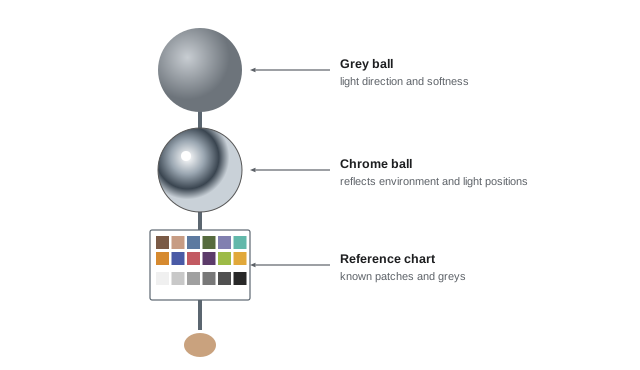
HDRI capture
A high dynamic range image (HDRI) is a 360-degree panoramic image of the environment that records light levels across a very wide range, from deep shadows to the sun or bright fixtures, without clipping. CG artists use HDRIs for image-based lighting: the HDRI surrounds the CG object in the renderer and lights it with the real environment's light, producing realistic illumination and reflections. HDRIs are captured by shooting bracketed exposures, typically seven to nine frames spaced one to two stops apart, in several directions with a fisheye or wide lens on a panoramic head rotating around the lens's entrance pupil, then merging and stitching them. The brightest sources, such as the sun or HMIs, may need neutral density filters or very fast shutter speeds to avoid clipping. HDRIs should be captured from the position of the CG element, with the lighting set exactly as for the shot, ideally immediately after the take, and with a colour chart and grey card in one frame for calibration. On LED volumes, HDRIs of the virtual environment can be captured from within the engine (Lesson 11).
Here \(n\) is the number of brackets, \(s\) the spacing in stops and \(\text{DR}_{\text{camera}}\) the dynamic range of a single exposure; the total must exceed the scene's range from the darkest shadow to the brightest source.
Worked problem
Planning HDRI brackets
An exterior scene has deep shadows about 6 stops below middle grey and the sun about 17 stops above. The stills camera used for HDRIs records about 12 stops in a single frame. How many brackets spaced 2 stops apart are needed to cover the range?
Show solution
- Scene range: 6 + 17 = 23 stops.
- Required additional range beyond one frame: 23 − 12 = 11 stops.
- At 2-stop spacing: 11 / 2 = 5.5, so 6 additional brackets beyond the first.
- Total: 7 brackets; in practice, an ND filter may still be needed for the sun disc.
Answer: About 7 brackets 2 stops apart, possibly with ND for the sun itself.
LiDAR scanning and surveys
LiDAR (light detection and ranging) scanners measure millions of points in a set or location by timing laser pulses, producing a precise 3D point cloud of the space. VFX teams scan sets, locations and large props so that artists can build accurate digital versions for set extensions, matchmoving, collision and shadow casting, and virtual production environments. A full scan of a large set may take an hour or more, so scanning is often scheduled before or after shooting, during meal breaks, or overnight. Total stations, survey instruments used in construction, measure specific points such as tracking markers and set corners with high precision. Handheld and phone-based LiDAR provides quicker, less accurate scans for small areas and previs. Scans should be taken with the set dressed as it appears on camera, since moved furniture or changed walls invalidate the data.
Photogrammetry and texture photography
Photogrammetry builds 3D models from many overlapping photographs taken from different angles. It is used for props, costumes, small set pieces, rocks, trees and sometimes whole buildings, producing models with realistic textures. For actors, photogrammetry rigs with dozens or hundreds of synchronized cameras capture a full-body or head scan in a fraction of a second, used to build digital doubles (Lesson 9). Texture and reference photography records surfaces, materials and details under neutral, even light, often cross-polarized to remove reflections, along with colour charts. Artists also need general reference photographs of sets, costumes, props and lighting setups from many angles. Good practice is to photograph everything relevant to VFX shots before it is struck, since sets and costumes may be gone by the time a question arises.
| Capture | Tools | Used for |
|---|---|---|
| Lighting reference | Grey ball, chrome ball, chart | Matching CG light and colour |
| HDRI | Stills camera, fisheye, panoramic head, brackets | Image-based lighting and reflections |
| LiDAR | Terrestrial laser scanner | Accurate set and location geometry |
| Survey | Total station, tape measures | Marker positions and scale |
| Photogrammetry | Many overlapping photos or camera rigs | Textured 3D models of props and people |
| Texture photography | Cross-polarized stills, charts | Surface materials for CG |
| Witness cameras | Additional video cameras | Extra viewpoints for motion reconstruction |
Witness cameras and performance capture
Witness cameras are additional cameras, often small and simple, that film the action from other angles during VFX takes. They help artists reconstruct the 3D motion of actors, stunt performers, props and vehicles, and can provide reference for animators. For CG characters driven by actors, performance capture records body and facial motion using marker suits, head-mounted cameras and optical tracking systems, either in a dedicated volume or on set alongside principal photography. Cinematographers working with performance capture may need to accommodate head-mounted cameras, marker suits and tracking cameras in the lighting and frame, and to light the reference footage of the performers so that their faces are clearly visible.
Scheduling data capture
Data capture takes time, and the camera department should plan for it. Typical time requirements are a few seconds per take for grey and chrome references, a few minutes per setup for HDRIs, and longer for scans and photogrammetry. Communicating with the first assistant director so that these captures are built into the schedule, and doing them while the crew resets for the next setup, minimizes delays. The cinematographer should keep lighting unchanged until HDRIs and references are complete, since they must represent the light used for the shot.
Organizing and protecting data
VFX data must be organized so that it can be found months later by artists who were not on set. The data team logs each item against shot IDs, with camera reports, slates, timestamps and notes, and stores it in the production's VFX data system. File naming conventions, folder structures, backups and secure transfer follow the same principles as camera data (CINE-202 Lesson 12). Scans and photogrammetry of actors are biometric and personal data, increasingly governed by contracts and guild agreements that limit their use, and must be stored securely and used only as agreed. Productions should obtain consent and follow applicable privacy laws and union rules on digital replicas of performers.
The data wrangler's day
The VFX data wrangler, sometimes called the on-set VFX coordinator or data capture technician, is responsible for most of the information described in this lesson. Before a setup, they review the shot breakdown and agree with the VFX supervisor which data is needed. During the setup, they record camera height, tilt, distance to subject, lens, focus distance and filters, often with a tablet application that ties notes to slate and take. Between takes or after the setup is complete, they photograph the set, shoot grey and chrome balls and charts, capture HDRIs, and coordinate with the camera assistant to collect lens metadata. At the end of the day, they back up and organize the data with names that match the camera reports, so editorial and vendors can find what belongs to each shot months later.
Lens grids and distortion
Every lens bends straight lines slightly, especially wide-angle and anamorphic lenses. To match CG elements to the plate, VFX artists need a model of each lens's distortion at the focus distances used. The standard reference is a lens grid: a flat chart of regular squares or dots, photographed filling the frame with each lens, often at several focus distances and, for zooms, at several focal lengths. Grids are usually shot during camera prep or at the end of a day when the lenses are available, and labelled with lens serial numbers. Anamorphic lenses also show breathing and focus-dependent squeeze changes, which may need additional grids. Smart lens systems that record distortion metadata reduce, but do not always eliminate, the need for grids.
Measuring the set
Simple measurements still matter even when LiDAR is available. A tape measure, laser distance meter and inclinometer can record the height of the camera, the distance to key marks, the size of a door or window, and the tilt of the camera head. These measurements check the solver's results, help reconstruct a scene if a scan fails, and give compositors a quick sense of scale. A sketch of the set with dimensions, camera positions and light positions is one of the most valuable documents a data wrangler can produce.
Colour charts and grey cards
A colour chart photographed in each lighting setup gives colourists and compositors a known reference: they can check that the plate's colour pipeline is correct and match CG elements to the real lighting. Charts should be held at the subject position, facing the camera and lit by the key light, filling a reasonable part of the frame without glare. Shoot the chart at the same settings as the take, not with a different stop or filter, and record which take it belongs to. Where the light changes during a shot, as in a sunset or a scene with moving practicals, shoot charts at several points.
Common mistakes
MistakeChanging the lighting before HDRIs are captured.
InsteadKeep the setup until references and HDRIs are done.
MistakeGrey and chrome balls held anywhere convenient.
InsteadHold them where the CG element will be.
MistakeToo few HDRI brackets with a clipped sun.
InsteadCover the full range and use ND for the brightest sources.
MistakeScanning sets after they are redressed.
InsteadScan as dressed for camera.
MistakeStoring actor scans without controls.
InsteadSecure them and use only as contracts allow.
Summary and key terms
- VFX artists need lens, camera, lighting and geometry data from set.
- Smart lens systems record focus, iris and zoom per frame.
- Grey balls, chrome balls and charts are quick, essential references.
- HDRIs capture the full lighting environment for image-based lighting.
- LiDAR, surveys and photogrammetry provide geometry and textures.
- Witness cameras and performance capture record motion.
- Data must be scheduled, organized and protected, including actors' biometric data.
- Smart lens
- Lens that reports focus, iris and zoom electronically.
- Grey ball
- Matte sphere showing light direction and softness.
- Chrome ball
- Mirrored sphere reflecting the environment.
- HDRI
- High dynamic range 360-degree environment image.
- Image-based lighting
- Lighting CG with an HDRI.
- LiDAR
- Laser scanning that measures 3D points.
- Point cloud
- Set of measured 3D points from a scan.
- Total station
- Survey instrument measuring precise positions.
- Photogrammetry
- 3D reconstruction from overlapping photographs.
- Performance capture
- Recording body and facial motion of actors.
Practice problems
Work each problem on paper first, then reveal the answer to check.
Name four items of camera and lens data.
Show answer
Body, lens and serial, focal length, focus, iris, filters, frame rate, height.
What does a grey ball show?
Show answer
Light direction, softness and colour.
What does a chrome ball show?
Show answer
Reflections of the whole environment and light positions.
What is image-based lighting?
Show answer
Lighting CG with an HDRI.
Brackets needed for 20 stops with a 12-stop camera at 2-stop spacing?
Show answer
5 brackets.
Why capture HDRIs immediately after the take?
Show answer
The lighting must match the shot.
What does LiDAR produce?
Show answer
A 3D point cloud.
What is photogrammetry used for?
Show answer
Textured 3D models of props, sets and people.
What are witness cameras for?
Show answer
Extra viewpoints for motion reconstruction.
Why protect actor scans?
Show answer
They are biometric data governed by contracts and law.
Lesson quiz · 5 questions
Score 60% or more to complete this lesson.
Create a free account to save your progress, take quizzes and earn a certificate.