
CISSP-113 · Lesson 1 of 12 · 30 min
Network models: OSI and TCP/IP for security professionals
Domain 4 of the CISSP, Communication and Network Security, carries about 13 % of the exam weight under the outline ISC2 has used since 15 April 2024 (checked October 2026; ISC2 reviews its outlines through a job task analysis roughly every three years, so confirm the current outline before you book). It has three sub-domains: 4.1, apply secure design principles in network architectures; 4.2, secure network components; and 4.3, implement secure communication channels according to design. This course is independent study material. It is not produced, endorsed or reviewed by ISC2, and none of its questions are taken from any real exam. Every scenario is original and written to train the judgement the exam rewards.
This first lesson builds the mental model that the rest of the course hangs on. Network models describe how communication is divided into layers, each with its own job, its own addresses and its own protocols. Security professionals use the models constantly: to describe where an attack happens, to decide which control can stop it, to read a vendor's claim that a firewall works "at layer 7", and to explain to managers why a single control is never enough. Lessons 2 and 3 then go deeper into addressing and the core protocols. If you want the physical and data centre side of networking, the course DCE-210 Networking and Telecommunications for Data Centres covers cabling, fabrics and carriers; here we stay with what a security manager needs.
Why layered models exist
A network is a stack of cooperating functions. Something must turn bits into signals on a wire or radio channel, something must deliver frames between neighbouring devices, something must route packets across many networks, something must make sure data arrives complete and in order, and something must present the data to an application in a form it understands. Layering separates these jobs so that each can change without breaking the others. A web browser does not care whether the user is on fibre, Wi-Fi or a 5G phone, because the lower layers hide those details. Layering also lets vendors build interoperable products, and it gives everyone a shared vocabulary.
Two models matter for the exam. The Open Systems Interconnection reference model, OSI, was published by the International Organization for Standardization as ISO/IEC 7498-1. It has seven layers and is a teaching and design model; almost no network runs pure OSI protocols today. The TCP/IP model, also called the internet model or the Department of Defense model, describes the protocol suite the internet actually uses. It is usually shown with four layers, sometimes five. Exam questions mostly use OSI layer numbers, so you must know them well, but you must also be able to map them to TCP/IP.
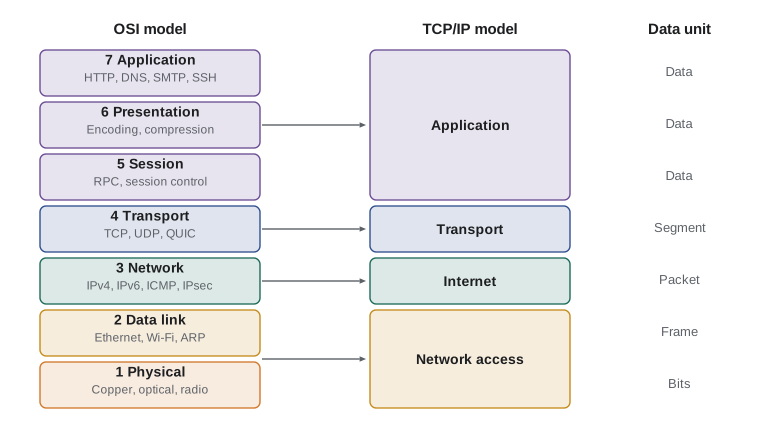
The seven OSI layers
Layer 1, the physical layer, moves raw bits as electrical, optical or radio signals. It defines connectors, voltages, wavelengths, cable types and signalling rates. Devices that work only at layer 1 include hubs, repeaters, media converters and the cables themselves. Security concerns here are physical: wiretapping, cable cuts, electromagnetic emanations, radio jamming and someone plugging an unauthorized device into an open wall jack.
Layer 2, the data link layer, delivers frames between devices on the same local network segment. It uses hardware addresses, the 48-bit media access control or MAC addresses burned into network interfaces, and it detects transmission errors with a frame check sequence. The IEEE splits it into the logical link control and media access control sublayers. Ethernet (IEEE 802.3) and Wi-Fi (IEEE 802.11) are layer 2 technologies, and switches and wireless access points are layer 2 devices. Attacks here include MAC flooding, MAC spoofing, ARP poisoning, VLAN hopping and rogue access points.
Layer 3, the network layer, moves packets between networks using logical addresses, today IPv4 and IPv6 addresses. It handles routing, fragmentation and, through ICMP, error reporting. Routers and layer 3 switches operate here, as do packet-filtering firewalls in their simplest form. IPsec also works at layer 3, which is why it can protect any traffic above it. Attacks include IP spoofing, route injection, ICMP abuse and denial of service floods.
Layer 4, the transport layer, provides end-to-end delivery between processes on hosts, identified by port numbers. TCP gives reliable, ordered, connection-oriented delivery with flow and congestion control; UDP gives fast, connectionless delivery with no guarantees. Stateful firewalls track layer 4 sessions. Attacks include SYN floods, port scanning, session hijacking and UDP reflection.
Layers 5, 6 and 7 are the session, presentation and application layers. The session layer sets up, manages and tears down dialogues between applications; examples often given are remote procedure calls, NetBIOS sessions and the control of sessions in protocols such as SQL connections. The presentation layer handles data formats, character encoding, compression and, in the classical teaching, encryption. The application layer provides network services to applications: HTTP, DNS, SMTP, SNMP, SSH and many more. In practice the TCP/IP model folds all three into one application layer, and TLS is hard to place: it sits above TCP and below HTTP, and different textbooks put it at layer 4, 5, 6 or 7. For the exam, accept that TLS protects application data and is commonly described as operating between the transport and application layers.
| OSI layer | Data unit | Addresses or identifiers | Typical devices and protocols | Example attacks |
|---|---|---|---|---|
| 7 Application | Data | URLs, user names | HTTP, DNS, SMTP, SSH, SNMP; web application firewalls, proxies | Injection, phishing, DNS abuse |
| 6 Presentation | Data | Formats and encodings | Character sets, compression, data serialization | Malformed data, encoding tricks |
| 5 Session | Data | Session identifiers | RPC, NetBIOS sessions, session tokens | Session hijacking and fixation |
| 4 Transport | Segment (TCP) or datagram (UDP) | Port numbers | TCP, UDP, QUIC; stateful firewalls | SYN flood, port scan, reflection |
| 3 Network | Packet | IP addresses | IPv4, IPv6, ICMP, IPsec; routers | Spoofing, route injection, floods |
| 2 Data link | Frame | MAC addresses, VLAN tags | Ethernet, Wi-Fi, ARP, 802.1X; switches, access points | ARP poisoning, MAC flooding, VLAN hopping |
| 1 Physical | Bits | None | Cables, fibre, radio, hubs, repeaters | Tapping, jamming, cutting |
Two memory aids are common. From layer 1 upwards: Please Do Not Throw Sausage Pizza Away. From layer 7 downwards: All People Seem To Need Data Processing. Use whichever helps, but practise placing real protocols and devices, because exam questions rarely ask for a layer name alone. They describe a device or attack and ask which layer it targets, or which control works at the same layer.
The TCP/IP model
The TCP/IP model grew out of ARPANET research in the 1970s and is documented across many Requests for Comments published by the Internet Engineering Task Force, the IETF. In its common four-layer form the layers are: network access or link, covering OSI layers 1 and 2; internet, covering layer 3; transport, covering layer 4; and application, covering layers 5 to 7. Some textbooks split the bottom layer into physical and data link, giving five layers. The model is pragmatic: it describes protocols that work rather than an ideal design.
The mapping matters because vendors and exam writers mix vocabularies. A "layer 7 firewall" inspects application content. A "layer 3 switch" routes. A "layer 2 VPN" carries Ethernet frames across a wider network so that distant sites appear to share one segment. When a question uses TCP/IP layer names, translate them to OSI numbers before you reason about controls.
Encapsulation and decapsulation
As data moves down the stack on the sending host, each layer adds its own header, and sometimes a trailer, around the data it receives from the layer above. This is encapsulation. An application message becomes the payload of a TCP segment, the segment becomes the payload of an IP packet, and the packet becomes the payload of an Ethernet frame, which is finally sent as bits. On the receiving host each layer strips its header in turn, which is decapsulation, and hands the payload upwards. Intermediate devices only open the layers they need: a switch reads the frame header, a router reads the packet header and rewrites the frame, and a stateful firewall reads up to the transport header.
Encapsulation explains several security facts. First, a control can only act on what it can see. A packet filter that reads IP and port numbers cannot block a malicious command hidden inside an allowed HTTPS session, because it never opens the payload. Second, encryption at a given layer hides everything above it from devices in the path. IPsec in tunnel mode hides the inner IP addresses, ports and application data; TLS hides the application data but leaves IP addresses and ports visible. Third, attackers abuse encapsulation through tunnelling: carrying one protocol inside another to slip past filters, for example hiding command and control traffic inside DNS queries or HTTPS.
Worked problem
Overhead of encapsulation
An application sends 1,000 bytes of data over TCP and IPv4 on Ethernet. Using minimum header sizes (TCP 20 bytes, IPv4 20 bytes, Ethernet header 14 bytes and frame check sequence 4 bytes), how large is the frame and what fraction is overhead?
Show solution
- TCP segment: 1,000 + 20 = 1,020 bytes.
- IPv4 packet: 1,020 + 20 = 1,040 bytes.
- Ethernet frame: 1,040 + 14 + 4 = 1,058 bytes.
- Overhead: 58 ÷ 1,058 ≈ 5.5 %.
Answer: The frame is 1,058 bytes, of which about 5.5 % is protocol overhead. Adding an IPsec tunnel or a VPN adds more headers, a point lesson 7 returns to when it discusses MTU.
Bandwidth, latency and throughput
Security designs also have to respect performance, and three measures come up repeatedly. Bandwidth is the capacity of a link, in bits per second. Latency is the time a bit takes to travel from sender to receiver, made up of propagation delay set by distance and the speed of signals in the medium, plus serialization, queuing and processing delays. Throughput is the rate of useful data actually delivered, which is always less than bandwidth because of overhead, retransmissions and protocol behaviour. Jitter is the variation in latency, and it matters most for voice and video.
The bandwidth-delay product, bandwidth multiplied by round-trip time, gives the amount of data that can be in flight on a path at once. TCP must keep at least that much data unacknowledged to fill the pipe. When security devices such as inspection proxies or VPN concentrators add latency, they increase the bandwidth-delay product and can quietly cut throughput for long-distance transfers. Managers who place a cloud-based inspection service far from their users sometimes see this effect as complaints that file transfers have become slow.
# Bandwidth-delay product: how much data must be in flight to fill a link
links = [('Office LAN', 1e9, 0.001), ('Toronto to Vancouver WAN', 1e9, 0.060), ('Satellite (geostationary)', 50e6, 0.600), ('LEO satellite', 200e6, 0.040)]
for name, bps, rtt in links:
    bdp_bytes = bps * rtt / 8
print(f"{name:28s} {bps/1e6:7.0f} Mb/s RTT {rtt*1000:5.0f} ms BDP {bdp_bytes/1e6:6.2f} MB")Office LAN 1000 Mb/s RTT 1 ms BDP 0.12 MB Toronto to Vancouver WAN 1000 Mb/s RTT 60 ms BDP 7.50 MB Satellite (geostationary) 50 Mb/s RTT 600 ms BDP 3.75 MB LEO satellite 200 Mb/s RTT 40 ms BDP 1.00 MB
Worked problem
Latency added by a security proxy
A branch office reaches a data centre 3,000 km away over fibre. Light in fibre travels at about 200,000 km/s. The company adds a cloud inspection service whose nearest point of presence adds a 1,200 km detour each way plus 4 ms of processing. Estimate the round-trip time before and after.
Show solution
- Propagation one way before: 3,000 ÷ 200,000 = 0.015 s = 15 ms, so 30 ms round trip.
- Extra distance: the detour adds 1,200 km in each direction, so 2,400 km per round trip, which is 2,400 ÷ 200,000 = 0.012 s = 12 ms.
- Processing: about 4 ms on each pass through the service, roughly 8 ms per round trip.
- After: about 30 + 12 + 8 = 50 ms round trip.
Answer: Round-trip time rises by about two thirds, from about 30 ms to about 50 ms. Throughput for a single TCP flow with a fixed window falls by about 40 %, so the design should choose a closer inspection point or tune window sizes.
Using the models to reason about controls
Defence in depth on a network means placing controls at several layers so that an attack that defeats one meets another. Physical security protects layer 1. Port security, 802.1X authentication and dynamic ARP inspection protect layer 2. Routing filters, anti-spoofing rules and IPsec protect layer 3. Stateful firewalls protect layer 4. Web application firewalls, secure email gateways and TLS inspection protect layer 7. When a question describes an attack, identify the layer, then choose the control that operates at that layer, or, if the question asks for the best overall answer, the control that addresses the root cause.
Remember also that the models describe flows, not organizations. Many exam scenarios hide the layer question inside business language. "A visitor connected a laptop to a conference room jack and reached the finance file server" is a layer 2 access control failure: the fix is network access control and segmentation, not a stronger password on the file server. "Users can reach a phishing site even though the firewall blocks known bad IP addresses" is a layer 7 problem: the fix is DNS filtering or a web proxy with reputation and content inspection.
| Scenario | Layer at issue | Control at the right layer |
|---|---|---|
| Attacker floods a switch with fake source MAC addresses | 2 | Port security limiting MAC addresses per port |
| Spoofed source addresses from the internet claim to be internal | 3 | Ingress filtering and anti-spoofing rules (BCP 38) |
| Thousands of half-open TCP connections exhaust a server | 4 | SYN cookies, SYN proxy on the firewall, rate limiting |
| SQL injection in a web form | 7 | Input validation, parameterized queries, web application firewall |
| Contractor taps a fibre in a shared riser | 1 | Locked pathways, armoured or monitored fibre, encryption above layer 1 |
Thinking like a manager
The exam is written for security leaders, not packet engineers. When a Domain 4 question offers a technical fix and a governance fix, read carefully: if the root problem is that no one owns the network design, or that there is no policy for segmentation, the governance answer is better. When the question asks what to do first, understanding the environment, through documentation, an inventory of assets and flows or a risk assessment, usually comes before buying or configuring anything. Use the layered models to communicate: a manager who can explain that a firewall sees addresses and ports but not intent will make better investment decisions than one who believes any single device makes the network safe.
Common mistakes
MistakeAssuming a firewall that filters on IP addresses and ports can stop malicious content in allowed traffic.
InsteadPacket and stateful filters see layers 3 and 4; content threats need application-layer inspection or endpoint controls.
MistakeMemorizing layer names without placing devices and attacks.
InsteadPractise mapping real protocols, devices and attacks to layers, because questions describe situations, not labels.
MistakeTreating TLS as hiding IP addresses and ports.
InsteadTLS protects application data; addresses and ports remain visible. Tunnel-mode IPsec hides inner headers.
MistakeIgnoring the latency that security services add.
InsteadMeasure round-trip time and bandwidth-delay product before and after placing proxies or inspection services.
MistakeChoosing a single control for a multi-layer threat.
InsteadLayer controls so that one failure does not expose the asset: defence in depth.
Summary and key terms
- Domain 4 is about 13 % of the CISSP and covers secure network architecture, components and channels.
- OSI has seven layers: physical, data link, network, transport, session, presentation and application.
- TCP/IP usually has four layers: network access, internet, transport and application.
- Each layer has its own data unit and identifiers: bits, frames and MAC addresses, packets and IP addresses, segments and ports.
- Encapsulation wraps data in headers at each layer; controls can only inspect the layers they open.
- Bandwidth-delay product shows how much data must be in flight; added latency from security services lowers throughput.
- Match each threat to its layer and place controls at several layers for defence in depth.
- OSI model
- The seven-layer ISO reference model for network communication.
- TCP/IP model
- The four-layer model describing the internet protocol suite.
- Encapsulation
- Adding a layer's header, and sometimes trailer, around data from the layer above.
- Frame
- The layer 2 data unit, addressed with MAC addresses.
- Packet
- The layer 3 data unit, addressed with IP addresses.
- Segment
- The TCP data unit at layer 4; a UDP unit is called a datagram.
- MAC address
- A 48-bit hardware address identifying a network interface on a local segment.
- Latency
- The delay for data to travel from sender to receiver.
- Bandwidth-delay product
- Link capacity multiplied by round-trip time: the data in flight needed to fill the link.
- Tunnelling
- Carrying one protocol inside another, used for VPNs and abused to evade filters.
Practice problems
Work each problem on paper first, then reveal the answer to check.
At which OSI layer do switches normally operate?
Show answer
Layer 2, the data link layer.
Which OSI layers does the TCP/IP application layer cover?
Show answer
Layers 5, 6 and 7.
What identifier does layer 4 use to reach a process on a host?
Show answer
A port number.
What is the data unit at layer 3?
Show answer
A packet.
Why can a packet filter not block malware inside allowed HTTPS?
Show answer
It only reads layer 3 and 4 headers, not the encrypted application payload.
Name one layer 2 attack.
Show answer
ARP poisoning, MAC flooding, MAC spoofing or VLAN hopping.
What does tunnel-mode IPsec hide that TLS does not?
Show answer
The inner IP addresses and port numbers.
What is the bandwidth-delay product of a 100 Mb/s link with a 40 ms round trip?
Show answer
100,000,000 × 0.04 ÷ 8 = 500,000 bytes, about 0.5 MB.
Which document defines the OSI reference model?
Show answer
ISO/IEC 7498-1.
What should a manager usually do before buying a network security product?
Show answer
Understand the environment and risks: inventory assets and flows and assess risk.
Lesson quiz · 5 questions
Score 60% or more to complete this lesson.
Create a free account to save your progress, take quizzes and earn a certificate.