
CMPUT-174 · Lesson 2 of 12 · 29 min
How computers represent information
Everything a computer stores or processes, whether a number, a word, a photograph, a song or a program, is ultimately a pattern of bits. A bit is a single binary digit, 0 or 1, which hardware can store reliably as one of two states: a high or low voltage, a charged or uncharged cell, a magnetized region pointing one way or the other. This lesson explains how patterns of bits represent whole numbers, negative numbers, fractions, text, images and sound, and why those choices have consequences that programmers meet every day, from rounding surprises to garbled characters. CMPUT-229 goes down to the hardware; here the aim is to understand the representations well enough to predict what your Python programs will do.
Why binary?
Computers could in principle use ten states per digit, like our decimal notation, but distinguishing two states is far easier and more reliable for electronics. A transistor that is either clearly on or clearly off tolerates noise, temperature changes and manufacturing variation in a way that a circuit trying to hold one of ten voltage levels does not. So hardware works in binary, and everything else is built on top by agreement about what patterns mean. The same eight bits, 01000001, can mean the number 65, the letter A, part of a colour in an image or part of a machine instruction, depending entirely on how a program interprets them. Meaning is not in the bits; it is in the representation.
Bits are grouped. Eight bits make a byte, the smallest unit most computers address individually. A byte can hold 2 to the power 8, or 256, different patterns. Larger quantities use prefixes. Storage makers and networking use decimal prefixes, so a kilobyte is 1,000 bytes and a gigabyte is a billion bytes, while operating systems often report sizes using binary multiples: a kibibyte (KiB) is 1,024 bytes and a gibibyte (GiB) is 1,073,741,824 bytes. That difference is why a drive sold as 1 terabyte shows as about 931 GiB on your computer.
# How many patterns can n bits hold, and what do storage prefixes mean?
for n in (1, 2, 4, 8, 16, 32, 64):
    print(f"{n:2d} bits -> {2**n:,} patterns")

tb_decimal = 10**12                 # "1 TB" on the box
gib = 2**30
print(f"1 TB = {tb_decimal / gib:.1f} GiB")1 bits -> 2 patterns 2 bits -> 4 patterns 4 bits -> 16 patterns 8 bits -> 256 patterns 16 bits -> 65,536 patterns 32 bits -> 4,294,967,296 patterns 64 bits -> 18,446,744,073,709,551,616 patterns 1 TB = 931.3 GiB
Whole numbers in binary
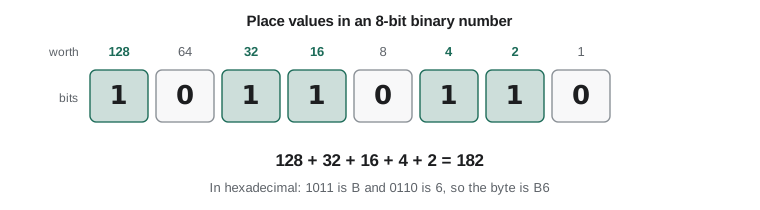
Decimal is a positional system with base 10: in 352, the 3 means three hundreds, the 5 five tens and the 2 two ones, because the places are worth 100, 10 and 1, which are powers of 10. Binary works the same way with base 2. The places, from right to left, are worth 1, 2, 4, 8, 16, 32, 64, 128 and so on. The binary number 10110110 therefore means 128 + 32 + 16 + 4 + 2 = 182.
To convert a decimal number to binary, repeatedly divide by 2 and record the remainders; reading the remainders from last to first gives the binary digits. Python can do the conversions for you with the built-in functions bin, hex and int, but it is worth doing a few by hand, and writing the algorithm yourself, so you understand what those functions do.
def to_binary(n):
    """Return the binary digits of a non-negative whole number as a string."""
    if n == 0:
        return "0"
    digits = ""
    while n > 0:
        digits = str(n % 2) + digits   # remainder becomes the next digit on the left
        n = n // 2
    return digits

for n in (5, 13, 182, 255, 1000):
    mine = to_binary(n)
print(f"{n:5d} -> {mine:>12s} bin() says {bin(n)} back again: {int(mine, 2)}")5 -> 101 bin() says 0b101 back again: 5 13 -> 1101 bin() says 0b1101 back again: 13 182 -> 10110110 bin() says 0b10110110 back again: 182 255 -> 11111111 bin() says 0b11111111 back again: 255 1000 -> 1111101000 bin() says 0b1111101000 back again: 1000
Hexadecimal, base 16, is a convenient shorthand for binary. It uses the digits 0 to 9 and the letters A to F for ten to fifteen. Because 16 is 2 to the power 4, each hexadecimal digit stands for exactly four bits, so a byte is always two hex digits. The binary number 1011 0110 splits into 1011 (eleven, B) and 0110 (six), giving B6 in hexadecimal. Programmers meet hexadecimal in colour codes such as #1C6B58 in web pages, in memory addresses, in network hardware addresses and in error messages.
| Decimal | Binary | Hexadecimal | Where you might see it |
|---|---|---|---|
| 0 | 0000 0000 | 00 | A byte with every bit off |
| 10 | 0000 1010 | 0A | The newline character in text files |
| 65 | 0100 0001 | 41 | The letter A in ASCII and UTF-8 |
| 127 | 0111 1111 | 7F | Largest value of a signed byte |
| 182 | 1011 0110 | B6 | Our worked example |
| 255 | 1111 1111 | FF | Largest value of an unsigned byte; full brightness in a colour channel |
Worked problem
Converting between bases by hand
Convert 45 to binary and hexadecimal, and convert hexadecimal 3C to decimal.
Show solution
- 45 / 2 = 22 remainder 1; 22 / 2 = 11 r 0; 11 / 2 = 5 r 1; 5 / 2 = 2 r 1; 2 / 2 = 1 r 0; 1 / 2 = 0 r 1.
- Reading remainders from last to first gives 101101; padded to a byte, 0010 1101.
- Split into nibbles: 0010 is 2 and 1101 is 13, which is D, so 45 is 2D in hexadecimal.
- 3C means 3 sixteens plus 12 ones, which is 48 + 12 = 60.
Answer: 45 = 101101 in binary = 2D in hexadecimal; 3C in hexadecimal is 60.
Negative numbers and fixed sizes
Hardware stores numbers in a fixed number of bits, commonly 8, 16, 32 or 64. With 8 bits, unsigned values run from 0 to 255. To store negative numbers, almost all modern computers use two's complement. In an 8-bit two's complement number, the leftmost bit is worth minus 128 instead of plus 128, while the other bits keep their usual values. So 1000 0000 is minus 128, 1111 1111 is minus 128 plus 127, which is minus 1, and 0111 1111 is plus 127. The range is minus 128 to plus 127.
There is a neat shortcut for negating a number: invert every bit and add one. Five is 0000 0101; inverting gives 1111 1010, and adding one gives 1111 1011, which is minus 5. The great advantage of two's complement is that the same addition circuit works for positive and negative numbers: adding 0000 0101 and 1111 1011 gives 1 0000 0000, and when the ninth bit is discarded, the 8-bit result is zero, exactly as 5 plus minus 5 should be.
def twos_complement(value, bits=8):
    """Return the bit pattern of value in two's complement with the given width."""
    if not -(2**(bits - 1)) <= value < 2**(bits - 1):
        raise ValueError(f"{value} does not fit in {bits} bits")
    return format(value & (2**bits - 1), f"0{bits}b")

def from_twos(pattern):
    bits = len(pattern)
    n = int(pattern, 2)
    return n - 2**bits if pattern[0] == "1" else n

for v in (5, -5, 127, -128, -1):
    p = twos_complement(v)
    print(f"{v:5d} -> {p} -> {from_twos(p)}")

def wrap8(x):
    """Keep only the low 8 bits of x and read them as a signed number."""
    return from_twos(format(x & 0xFF, "08b"))

# Overflow: what happens if a fixed 8-bit signed counter goes past 127?
print("120 + 10 in 8 bits:", wrap8(120 + 10))
print("-100 - 50 in 8 bits:", wrap8(-100 - 50))5 -> 00000101 -> 5 -5 -> 11111011 -> -5 127 -> 01111111 -> 127 -128 -> 10000000 -> -128 -1 -> 11111111 -> -1 120 + 10 in 8 bits: -126 -100 - 50 in 8 bits: 106
The last two lines show overflow: in a fixed 8-bit signed number, 120 plus 10 wraps around to minus 126 because 130 does not fit, and minus 100 minus 50 wraps the other way to plus 106. Overflow has caused real disasters, including the 1996 loss of the first Ariane 5 rocket, when a 64-bit floating-point value was converted to a 16-bit signed integer that could not hold it. Python's own integers are arbitrary precision: they grow to as many bits as needed, so 2 to the power 200 is computed exactly. But Python programs constantly exchange data with files, databases, hardware and other languages that use fixed sizes, and libraries such as NumPy, used in AI-110 and the robotics courses, use fixed-size integers for speed, so overflow is something every programmer must keep in mind.
Fractions and floating point
Numbers with fractional parts are usually stored as floating-point numbers, a binary version of scientific notation. A 64-bit float, which is what Python's float type uses, stores a sign bit, an 11-bit exponent and a 52-bit fraction, following the IEEE 754 standard. This gives about 15 to 17 significant decimal digits and a huge range, from about 10 to the minus 308 to 10 to the 308. The catch is that most decimal fractions cannot be represented exactly in binary, just as one third cannot be written exactly in decimal. The decimal 0.1 is a repeating fraction in binary, so the float closest to 0.1 is very slightly off, and small errors appear when such numbers are combined.
print(0.1 + 0.2)
print(0.1 + 0.2 == 0.3)
print(f"{0.1:.20f}")                 # the float actually stored for 0.1

import math
print(math.isclose(0.1 + 0.2, 0.3))   # compare with a tolerance instead

total = 0.0
for _ in range(10):
    total += 0.1
print("ten lots of 0.1:", total)

from decimal import Decimal
print("with Decimal:", sum(Decimal("0.1") for _ in range(10)))
print("money in cents:", sum(10 for _ in range(10)) / 100)0.30000000000000004 False 0.10000000000000000555 True ten lots of 0.1: 0.9999999999999999 with Decimal: 1.0 money in cents: 1.0
This is not a Python bug; every language that uses IEEE 754 floats behaves the same way. The practical rules are simple. Never test floats for exact equality; use a tolerance, as math.isclose does. Expect tiny errors to accumulate in long sums. For money, where exact cents matter, store whole numbers of cents or use the decimal module, which represents decimal fractions exactly. Scientific programs, covered in later physics and machine learning courses, use more careful numerical methods to keep errors under control.
Text: characters, code points and encodings
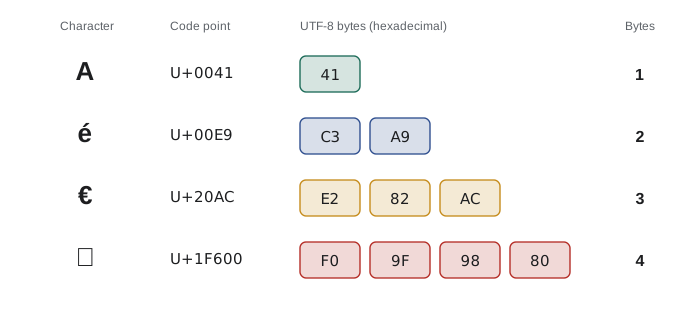
Text is stored by giving each character a number and then storing the numbers as bytes. The early standard, ASCII, defined in the 1960s, used 7 bits for 128 characters: unaccented English letters, digits, punctuation and control codes such as newline. That was not enough for French accents, let alone Cree syllabics, Chinese characters or emoji. Unicode solves this by giving every character in every writing system its own number, called a code point, written like U+00E9 for é. Unicode now defines more than 150,000 characters.
A code point still has to be turned into bytes, and the rules for doing that are called an encoding. UTF-8 is by far the most common encoding on the web and in files. It uses one byte for ASCII characters, so plain English text in UTF-8 is identical to ASCII, and two, three or four bytes for other characters. Python 3 strings are sequences of Unicode code points; you convert them to bytes with encode and back with decode.
for ch in ["A", "e", "é", "ᐃ", "€", "中", "\U0001F600"]:
    code = ord(ch)                       # the Unicode code point
    data = ch.encode("utf-8")            # the bytes stored in a UTF-8 file
    print(f"U+{code:04X}  {len(data)} byte(s)  {data.hex(' ')}")

word = "café"
print(len(word), "characters,", len(word.encode("utf-8")), "bytes in UTF-8")
garbled = word.encode("utf-8").decode("latin-1")   # decoding with the wrong encoding
print("decoded with the wrong encoding:", garbled)U+0041 1 byte(s) 41 U+0065 1 byte(s) 65 U+00E9 2 byte(s) c3 a9 U+1403 3 byte(s) e1 90 83 U+20AC 3 byte(s) e2 82 ac U+4E2D 3 byte(s) e4 b8 ad U+1F600 4 byte(s) f0 9f 98 80 4 characters, 5 bytes in UTF-8 decoded with the wrong encoding: café
The six characters printed are A, e, e with an acute accent, the Inuktitut syllable i, the euro sign, the Chinese character for middle, and a smiling face emoji. Their UTF-8 sizes run from one to four bytes. The last two lines show a common real-world bug: the word café takes four characters but five bytes, and if those bytes are decoded with the wrong encoding, the accented letter turns into two wrong characters, the familiar é seen on badly configured websites. The fix is always to know, and state, the encoding of every file you read or write. Lesson 10 shows how in Python's open function; Python 3.15, scheduled for release in October 2026, makes UTF-8 the default for opening text files on all platforms, but stating it explicitly remains good practice.
Images and sound, briefly
A digital image is a grid of picture elements, or pixels. In a typical colour image, each pixel stores three numbers for red, green and blue intensity, each from 0 to 255 in one byte, so one pixel needs three bytes. A 12-megapixel photo therefore has 36 million bytes of raw data before compression. Formats such as PNG compress without losing information, while JPEG discards detail people are unlikely to notice, which is why a photo file is usually a few megabytes rather than 36. PHOT-420 explains how cameras process those numbers.
Sound is a continuously varying air pressure. To digitize it, a microphone's signal is measured, or sampled, many times a second, and each sample is stored as a number. CD-quality audio takes 44,100 samples per second per channel, each sample 16 bits, for two channels. The sampling theorem says a sample rate must be more than twice the highest frequency you want to capture, and human hearing tops out near 20,000 hertz, which is why 44,100 was chosen. Compressed formats such as MP3 and AAC shrink the data by removing sounds people cannot hear well.
# Raw (uncompressed) sizes of some everyday media
photo_pixels = 4000 * 3000                  # a 12-megapixel camera
photo_bytes = photo_pixels * 3              # 3 bytes per pixel (red, green, blue)
print(f"raw photo: {photo_bytes / 10**6:.0f} MB")

seconds = 3 * 60 + 30                       # a 3.5-minute song
cd_bytes = 44_100 * 2 * 2 * seconds         # samples/s * bytes/sample * channels
print(f"CD-quality song: {cd_bytes / 10**6:.1f} MB")
mp3_bytes = 192_000 / 8 * seconds           # a 192 kilobit-per-second MP3
print(f"same song as MP3: {mp3_bytes / 10**6:.1f} MB ({cd_bytes / mp3_bytes:.1f} times smaller)")

hd_frame = 1920 * 1080 * 3
print(f"one second of raw HD video at 30 frames/s: {hd_frame * 30 / 10**6:.0f} MB")raw photo: 36 MB CD-quality song: 37.0 MB same song as MP3: 5.0 MB (7.3 times smaller) one second of raw HD video at 30 frames/s: 187 MB
Programs are data too
The stored-program idea from the 1940s means that a program's instructions are also just bits in memory. A processor fetches a pattern of bits, interprets it as an instruction such as add these two registers, carries it out, and fetches the next. Python adds layers on top: your source code is text, Python translates it into an intermediate form called bytecode, and the Python interpreter, itself a program written in C, carries out the bytecode. You can even look at the bytecode Python makes from a function, which shows that the program you wrote has become data the interpreter reads.
import dis

def average(a, b):
    return (a + b) / 2

dis.dis(average) 3 RESUME 0
4 LOAD_FAST_LOAD_FAST 1 (a, b)
BINARY_OP 0 (+)
LOAD_CONST 1 (2)
BINARY_OP 11 (/)
RETURN_VALUEYou do not need to read bytecode to program well, and its exact form changes between Python versions, which is why this listing is not checked against a fixed output. The point is the idea: the same memory that holds your data holds the instructions that process it. That idea underpins compilers in CMPUT-415, operating systems in CMPUT-379 and many security attacks studied in CMPUT-331, where an attacker tricks a program into treating data as instructions.
Common mistakes
MistakeBelieving bits have a fixed meaning, such as 01000001 always being the letter A.
InsteadMeaning comes from the representation a program applies; the same byte can be a number, a character or part of an instruction.
MistakeTesting floating-point results with ==, for example 0.1 + 0.2 == 0.3.
InsteadCompare with a tolerance using math.isclose, or use integers or Decimal when exact decimal values matter.
MistakeStoring money as floats of dollars.
InsteadStore whole numbers of cents, or use the decimal module.
MistakeAssuming one character is one byte.
InsteadIn UTF-8 a character takes one to four bytes; len of a string counts characters, len of its encoded bytes counts bytes.
MistakeReading or writing text files without knowing their encoding.
InsteadState the encoding, normally UTF-8, every time you open a text file.
MistakeAssuming overflow never matters because Python integers grow.
InsteadData exchanged with files, devices, other languages and libraries such as NumPy often uses fixed sizes that can overflow.
Summary and key terms
- All information in a computer is stored as patterns of bits; meaning comes from the agreed representation.
- Binary is positional with base 2; hexadecimal is a compact way to write binary, one digit per four bits.
- Fixed-size integers use two's complement for negative numbers and can overflow; Python's own integers grow as needed.
- Floats follow IEEE 754 and cannot represent most decimal fractions exactly, so compare with tolerances.
- Unicode gives every character a code point; UTF-8 encodes code points in one to four bytes.
- Images are grids of pixels and sound is a sequence of samples; compression makes them practical to store and send.
- Programs are data too: Python turns source code into bytecode that the interpreter carries out.
- Bit
- A binary digit, 0 or 1; the smallest unit of information.
- Byte
- A group of eight bits, able to hold 256 different patterns.
- Hexadecimal
- Base-16 notation using 0 to 9 and A to F; each digit represents four bits.
- Two's complement
- The standard way to store signed integers, in which the leftmost bit has a negative place value.
- Overflow
- When a result is too large or too small for the fixed number of bits available.
- Floating point
- A binary form of scientific notation used to store real numbers approximately.
- Unicode
- The standard that assigns a code point to every character in every writing system.
- Code point
- The number Unicode assigns to a character, written like U+00E9.
- UTF-8
- The most common Unicode encoding, using one to four bytes per character.
- Bytecode
- The intermediate instructions Python generates from source code for its interpreter to run.
Practice problems
Work each problem on paper first, then reveal the answer to check.
Convert 1100 1010 from binary to decimal.
Show answer
128 + 64 + 8 + 2 = 202.
Convert 77 to binary and to hexadecimal.
Show answer
77 = 0100 1101 in binary = 4D in hexadecimal.
What is hexadecimal FF in decimal, and why does it appear in colour codes?
Show answer
255; it is the largest value of one byte, full intensity for a colour channel.
Find the 8-bit two's complement pattern for minus 20.
Show answer
20 is 0001 0100; invert to 1110 1011; add one: 1110 1100.
What range of values can a 16-bit two's complement integer hold?
Show answer
From minus 32,768 to plus 32,767.
Why does 0.1 + 0.2 print 0.30000000000000004?
Show answer
0.1 and 0.2 cannot be stored exactly in binary floating point, and their tiny errors show in the sum.
How should a program test whether a computed float equals 2.5?
Show answer
With a tolerance, for example math.isclose(x, 2.5).
How many bytes does the string "naïve" take in UTF-8, and why?
Show answer
Six: five characters, of which ï takes two bytes and the others one each.
A raw image is 1920 by 1080 pixels with 3 bytes per pixel. How large is it?
Show answer
1920 times 1080 times 3 = 6,220,800 bytes, about 6.2 MB.
Why must audio be sampled at more than 40,000 times a second to capture all audible sound?
Show answer
The sampling theorem requires more than twice the highest frequency, and hearing reaches about 20,000 hertz.
Lesson quiz · 5 questions
Score 60% or more to complete this lesson.
Create a free account to save your progress, take quizzes and earn a certificate.