
CMPUT-174 · Lesson 9 of 12 · 29 min
Lists, tuples, dictionaries and sets
Real programs work with collections of data: all the marks in a class, the words in a document, the readings from a sensor, the contacts in a phone. Python has four core collection types, each suited to different jobs. Lists are ordered, changeable sequences; tuples are ordered sequences that cannot change; dictionaries map keys to values for fast lookup; and sets hold unique items with fast membership tests. This lesson covers how to create and use each, the important difference between changing a collection and rebinding a name, list comprehensions, and two classic algorithms on lists, searching and sorting, where you will count steps and see for the first time how much the choice of algorithm matters as data grows.
Lists
A list is an ordered collection of items written in square brackets, such as [72, 45, 88]. Lists can hold items of any type, including other lists, and they share the indexing and slicing rules of strings from lesson 8. Unlike strings, lists are mutable: you can change an item, add items and remove items in place. That makes lists the everyday workhorse for collecting and processing data.
temps = [3.5, -2.0, 7.25, 0.0]
temps[1] = -1.5              # change an item in place
temps.append(12.0)           # add to the end
temps.insert(0, -4.0)        # insert at a position
print(temps, len(temps))

removed = temps.pop()        # remove and return the last item
temps.remove(0.0)            # remove the first item equal to 0.0
print(removed, temps)

print(sorted(temps), temps)  # sorted returns a new list
temps.sort(reverse=True)     # sort changes the list in place and returns None
print(temps)
print(temps.index(3.5), 7.25 in temps, temps.count(-1.5))[-4.0, 3.5, -1.5, 7.25, 0.0, 12.0] 6 12.0 [-4.0, 3.5, -1.5, 7.25] [-4.0, -1.5, 3.5, 7.25] [-4.0, 3.5, -1.5, 7.25] [7.25, 3.5, -1.5, -4.0] 1 True 1
Note the difference between sorted(temps), a function that returns a new sorted list and leaves the original alone, and temps.sort(), a method that sorts the list in place and returns None. Writing temps = temps.sort() is a classic mistake that replaces your data with None. The general rule in Python is that methods which change an object in place return None, to make that mistake easier to notice.
| Operation | Example | Effect |
|---|---|---|
| Index, slice | xs[0], xs[-1], xs[1:3] | Read items, as for strings |
| Assign item | xs[2] = 9 | Replace an item in place |
| append(x) | xs.append(4) | Add x at the end |
| extend(ys) | xs.extend([5, 6]) | Add every item of ys at the end |
| insert(i, x) | xs.insert(0, 1) | Insert x before position i |
| pop(), pop(i) | xs.pop() | Remove and return the last item, or item i |
| remove(x) | xs.remove(4) | Remove the first item equal to x |
| sort(), reverse() | xs.sort() | Rearrange in place; return None |
| len, sum, min, max | sum(xs) | Built-in functions that work on lists |
| in | 4 in xs | True if any item equals 4 |
Mutation, aliasing and copies
Lesson 4 showed that variables are names referring to objects and that b = a makes two names for one object. With mutable lists this matters a great deal. A function that receives a list can change the caller's list, because the parameter refers to the same object. Sometimes that is exactly what you want; often it is a surprise. A famous trap is creating a grid with [[0] * 3] * 3, which makes three references to one inner list, so changing one row appears to change them all.
def add_bonus(marks, bonus):
    for i in range(len(marks)):
        marks[i] += bonus        # changes the caller's list in place

def with_bonus(marks, bonus):
    return [m + bonus for m in marks]   # builds a new list, original untouched

scores = [70, 80]
add_bonus(scores, 5)
print("after add_bonus:", scores)
new = with_bonus(scores, 5)
print("after with_bonus:", scores, new)

grid_wrong = [[0] * 3] * 3       # three names for ONE row
grid_wrong[0][0] = 1
print(grid_wrong)
grid = [[0] * 3 for _ in range(3)]   # three separate rows
grid[0][0] = 1
print(grid)after add_bonus: [75, 85] after with_bonus: [75, 85] [80, 90] [[1, 0, 0], [1, 0, 0], [1, 0, 0]] [[1, 0, 0], [0, 0, 0], [0, 0, 0]]
Prefer functions that return new lists unless changing the list in place is the documented purpose, as with sort. When you need an independent copy, use xs.copy(), list(xs) or xs[:]. These make a shallow copy: a new outer list whose items are the same objects. For lists of lists, use copy.deepcopy from the standard library if the inner lists must be independent too.
List comprehensions
A list comprehension builds a new list from an existing sequence in one readable expression: [expression for item in sequence if condition]. It replaces the common loop pattern of starting with an empty list and appending. Comprehensions are concise and idiomatic, but keep them simple; if one needs more than one condition or a nested loop, an ordinary loop is often clearer.
marks = [72, 45, 88, 91, 38, 67]
squares = [n * n for n in range(1, 6)]
passed = [m for m in marks if m >= 50]
curved = [min(m + 5, 100) for m in marks]
words = "the quick brown fox".split()
lengths = [len(w) for w in words]
print(squares, passed, curved, lengths, sep="\n")

# The same as passed, written as a loop
passed_loop = []
for m in marks:
    if m >= 50:
        passed_loop.append(m)
print(passed == passed_loop)[1, 4, 9, 16, 25] [72, 88, 91, 67] [77, 50, 93, 96, 43, 72] [3, 5, 5, 3] True
Tuples
A tuple is an ordered sequence like a list, written with parentheses, such as (53.5, -113.5), but it is immutable: once created it cannot change. Tuples are used for small, fixed groups of related values, such as a coordinate, a date or a database row, and they can be unpacked into separate names in one assignment. Functions that need to return several values return a tuple. Because tuples are immutable, they can be dictionary keys and set items, which lists cannot.
edmonton = (53.55, -113.49)          # latitude, longitude
lat, lon = edmonton                   # unpacking
print(f"latitude {lat}, longitude {lon}")

def min_max(values):
    return min(values), max(values)   # returns a tuple

low, high = min_max([7, 2, 9, 4])
print(low, high)

a, b = 1, 2
a, b = b, a                           # swap using tuple packing and unpacking
print(a, b)

try:
    edmonton[0] = 0
except TypeError as e:
print("TypeError:", e)latitude 53.55, longitude -113.49 2 9 2 1 TypeError: 'tuple' object does not support item assignment
Dictionaries
A dictionary maps keys to values, written in braces with a colon between each key and its value: {"apple": 1.25, "pear": 0.95}. You look up a value by its key with d[key], add or change an entry with d[key] = value, and test for a key with key in d. Keys must be immutable, usually strings, numbers or tuples; values can be anything. Dictionaries keep items in the order they were inserted.
The great strength of dictionaries is speed. Looking up a key takes about the same time whether the dictionary holds ten entries or ten million, because Python stores entries in a hash table: it computes a number from the key, called a hash, and uses it to jump almost directly to the right place. Searching a list for an item, by contrast, may have to look at every item. CMPUT-204 explains how hash tables achieve this.
prices = {"apple": 1.25, "pear": 0.95, "kiwi": 0.60}
prices["mango"] = 2.10                # add
prices["pear"] = 0.99                 # change
print(prices["apple"], "kiwi" in prices, len(prices))
print(prices.get("plum"), prices.get("plum", 0.0))   # get avoids KeyError

try:
    prices["plum"]
except KeyError as e:
    print("KeyError:", e)

for fruit, price in prices.items():   # loop over key-value pairs
    print(f"{fruit:<6} {price:5.2f}")

order = {"apple": 4, "kiwi": 6, "plum": 2}
total = sum(prices[f] * n for f, n in order.items() if f in prices)
print(f"order total {total:.2f}; not stocked: {[f for f in order if f not in prices]}")1.25 True 4 None 0.0 KeyError: 'plum' apple 1.25 pear 0.99 kiwi 0.60 mango 2.10 order total 8.60; not stocked: ['plum']
Dictionaries model many real situations naturally: a phone book maps names to numbers, a gradebook maps student IDs to marks, an inventory maps product codes to quantities, and the word counter in lesson 8 maps words to counts. A dictionary can also replace a long if-elif chain that maps specific values to results, which lesson 5 mentioned: a lookup table such as {"A": 4.0, "B": 3.0, "C": 2.0} is shorter and easier to change than five branches.
Sets
A set is an unordered collection of unique items, written in braces like {"red", "green"}, or created from a sequence with set(). Adding a duplicate has no effect. Sets offer the fast membership test of dictionaries, and the operations of mathematical set theory: union, intersection and difference. They are ideal for removing duplicates and for questions such as "which students are in both courses?"
cmput = {"Aiyana", "Ben", "Chen", "Dara"}
math_ = {"Chen", "Dara", "Elif"}
print(sorted(cmput & math_))     # intersection: in both
print(sorted(cmput | math_))     # union: in either
print(sorted(cmput - math_))     # difference: in CMPUT only
print("Elif" in cmput)

emails = ["a@x.ca", "b@y.com", "a@x.ca", "c@z.org", "b@y.com"]
unique = set(emails)
print(len(emails), "addresses,", len(unique), "unique")
empty = set()                    # {} would create an empty dictionary
print(type(empty).__name__, type({}).__name__)['Chen', 'Dara'] ['Aiyana', 'Ben', 'Chen', 'Dara', 'Elif'] ['Aiyana', 'Ben'] False 5 addresses, 3 unique set dict
| Type | Ordered? | Mutable? | Duplicates? | Typical use |
|---|---|---|---|---|
| list | Yes | Yes | Allowed | A sequence of items to process, sort or change |
| tuple | Yes | No | Allowed | A fixed group of related values; a record; a dictionary key |
| dict | Insertion order | Yes | Keys unique | Looking up values by key |
| set | No | Yes | No | Membership tests, removing duplicates, set operations |
Searching: linear and binary search
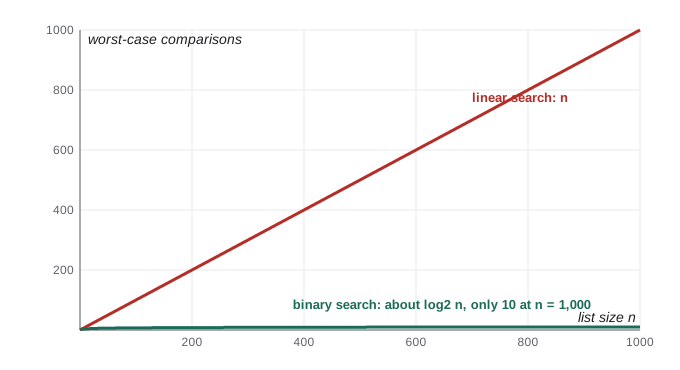
Searching for an item is one of the most common tasks in computing. The simplest method, linear search, checks each item in turn until it finds a match or reaches the end. It works on any list, but in the worst case, when the item is last or missing, it examines every item: n comparisons for a list of n items. Python's in operator and the list index method do a linear search.
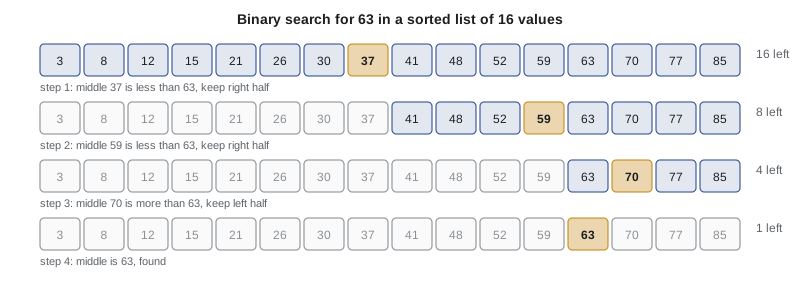
If the list is sorted, there is a much faster method. Binary search compares the target with the middle item. If they match, it is done; if the target is smaller, it must be in the left half, so the right half is discarded; otherwise the left half is discarded. Each comparison halves the range still to search. A sorted list of a million items needs at most 20 comparisons, because halving a million twenty times leaves one item; linear search might need a million.
def linear_search(items, target):
    """Return (index, comparisons); index is None if not found."""
    comparisons = 0
    for i, x in enumerate(items):
        comparisons += 1
        if x == target:
            return i, comparisons
    return None, comparisons

def binary_search(items, target):
    """items must be sorted. Return (index, comparisons)."""
    low, high = 0, len(items) - 1
    comparisons = 0
    while low <= high:
        mid = (low + high) // 2
        comparisons += 1
        if items[mid] == target:
            return mid, comparisons
        elif items[mid] < target:
            low = mid + 1          # target can only be in the right half
        else:
            high = mid - 1         # target can only be in the left half
    return None, comparisons

for n in (16, 1_000, 1_000_000):
    data = list(range(0, 2 * n, 2))          # n sorted even numbers
    target = data[-1]                        # worst case for linear search
    print(f"n = {n:>9,}: linear {linear_search(data, target)[1]:>9,} comparisons, "
          f"binary {binary_search(data, target)[1]:>2}")
print("missing value:", binary_search(list(range(0, 32, 2)), 7))n = 16: linear 16 comparisons, binary 5 n = 1,000: linear 1,000 comparisons, binary 10 n = 1,000,000: linear 1,000,000 comparisons, binary 20 missing value: (None, 4)
The step counts show the difference dramatically. Linear search grows in proportion to n; binary search grows with the number of times n can be halved, the base-2 logarithm of n. In the notation CMPUT-204 introduces, linear search is O(n) and binary search is O(log n). For a few dozen items the difference does not matter. For millions it is the difference between instant and noticeably slow, and for billions it can be the difference between possible and impossible. The catch is that binary search needs sorted data, and sorting has a cost of its own.
Sorting: selection sort
Sorting puts items in order, and it is so common that whole books are written about it. Python's built-in sorted and sort use an algorithm called Timsort, invented by Tim Peters for Python in 2002, which is fast on real data. To understand what sorting involves, it helps to write a simple algorithm yourself. Selection sort repeatedly finds the smallest remaining item and moves it to the front of the unsorted part. It is easy to understand and to prove correct, but it always makes about n squared over 2 comparisons, so it is slow for large lists.
def selection_sort(items):
    """Return a sorted copy of items, counting comparisons."""
    xs = list(items)                 # work on a copy
    comparisons = 0
    for i in range(len(xs) - 1):
        smallest = i
        for j in range(i + 1, len(xs)):
            comparisons += 1
            if xs[j] < xs[smallest]:
                smallest = j
        xs[i], xs[smallest] = xs[smallest], xs[i]   # swap into place
    return xs, comparisons

import random
random.seed(174)
data = [random.randint(1, 99) for _ in range(10)]
result, c = selection_sort(data)
print(data)
print(result, c, "comparisons")
print(result == sorted(data))

for n in (10, 100, 1_000):
    _, c = selection_sort(random.sample(range(10 * n), n))
print(f"n = {n:5d}: {c:>7,} comparisons (n squared / 2 = {n * n // 2:,})")[1, 57, 4, 64, 47, 9, 29, 31, 14, 96] [1, 4, 9, 14, 29, 31, 47, 57, 64, 96] 45 comparisons True n = 10: 45 comparisons (n squared / 2 = 50) n = 100: 4,950 comparisons (n squared / 2 = 5,000) n = 1000: 499,500 comparisons (n squared / 2 = 500,000)
Ten times as many items means about a hundred times as many comparisons, the signature of quadratic growth that lesson 6 saw with pairs. Faster algorithms such as merge sort, quicksort and Timsort need roughly n times log n comparisons, which for a million items is about 20 million instead of 500 billion. You will study them in CMPUT-204. In practice, always use Python's sorted, which can also sort by any key you choose.
students = [("Dara", 49), ("Aiyana", 91), ("Ben", 67), ("Chen", 78)]
print(sorted(students))                                  # by name (first item)
print(sorted(students, key=lambda s: s[1], reverse=True))  # by mark, highest first
words = ["banana", "Cherry", "apple", "Date"]
print(sorted(words), sorted(words, key=str.lower)) # case-insensitive order[('Aiyana', 91), ('Ben', 67), ('Chen', 78), ('Dara', 49)]
[('Aiyana', 91), ('Chen', 78), ('Ben', 67), ('Dara', 49)]
['Cherry', 'Date', 'apple', 'banana'] ['apple', 'banana', 'Cherry', 'Date']The key argument takes a function that computes, for each item, the value to sort by. lambda s: s[1] is a lambda expression, a small unnamed function that returns the second item of s. Plain sorting places the capitalized words "Cherry" and "Date" before all the lower-case words, because of the code-point order from lesson 2; sorting with key=str.lower gives ordinary dictionary order.
Worked problem
Choosing a data structure
A library app must (a) keep a reading list in the order a student adds books, (b) find a book's shelf location from its call number instantly, (c) record a book's fixed publication details, and (d) list which genres a student has read, without repeats. Which collection fits each?
Show solution
- (a) An ordered, changeable sequence: a list.
- (b) Fast lookup by key: a dictionary mapping call number to location.
- (c) A fixed group of values that should not change: a tuple, such as (title, author, year).
- (d) Unique items with membership tests: a set of genres.
Answer: List, dictionary, tuple and set respectively.
Common mistakes
MistakeWriting xs = xs.sort(), which replaces the list with None.
InsteadCall xs.sort() on its own line, or use ys = sorted(xs).
MistakeAssuming b = a copies a list.
InsteadUse a.copy(), list(a) or a[:] for a shallow copy; copy.deepcopy for nested lists.
MistakeCreating a grid with [[0] * 3] * 3.
InsteadUse [[0] * 3 for _ in range(3)] so each row is a separate list.
MistakeUsing d[key] for a key that may be missing.
InsteadUse key in d first, or d.get(key, default).
MistakeUsing {} to create an empty set.
Instead{} is an empty dictionary; use set().
MistakeRunning binary search on unsorted data.
InsteadBinary search only works on sorted data; sort first, or use linear search or a set or dictionary.
Summary and key terms
- Lists are ordered and mutable; methods such as append, pop and sort change them in place and return None.
- Two names can refer to one list, so functions can change a caller's list; copy when independence is needed.
- List comprehensions build new lists concisely from existing sequences.
- Tuples are immutable sequences for fixed groups of values, unpacking and multiple return values.
- Dictionaries map immutable keys to values with fast lookup; sets store unique items with fast membership tests.
- Linear search takes up to n comparisons; binary search on sorted data takes about log2 n.
- Selection sort takes about n squared over 2 comparisons; use the built-in sorted, with key functions, in practice.
- List
- An ordered, mutable sequence written in square brackets.
- Tuple
- An ordered, immutable sequence written in parentheses.
- Dictionary
- A mapping from unique, immutable keys to values.
- Set
- An unordered collection of unique items.
- Mutable
- Able to be changed in place after creation.
- Aliasing
- Two or more names referring to the same object.
- List comprehension
- An expression that builds a list from a sequence, with an optional condition.
- Hash table
- A structure that uses a computed hash of each key to find entries quickly.
- Binary search
- Searching sorted data by repeatedly halving the range that could contain the target.
- Selection sort
- Sorting by repeatedly selecting the smallest remaining item and moving it into place.
Practice problems
Work each problem on paper first, then reveal the answer to check.
Given xs = [5, 3, 8], what do xs.append(1), xs.pop(0) and xs.sort() leave in xs?
Show answer
[1, 3, 8].
Write a comprehension giving the lengths of the words in sentence.split() that are longer than 3 letters.
Show answer
[len(w) for w in sentence.split() if len(w) > 3]
Why can a tuple be a dictionary key but a list cannot?
Show answer
Keys must be immutable; tuples are immutable and lists are not.
Write code that counts how many times each letter appears in a word using a dictionary.
Show answer
counts = {}; for ch in word: counts[ch] = counts.get(ch, 0) + 1
Two lists of student IDs are given. How do you find the IDs in both?
Show answer
set(a) & set(b).
What is the maximum number of comparisons binary search needs for 1,000 sorted items? For 1,000,000?
Show answer
About 10, since 2 to the 10th is 1,024; about 20, since 2 to the 20th is 1,048,576.
Trace binary search for 23 in [2, 5, 8, 12, 16, 23, 38, 56, 72, 91].
Show answer
mid 4 (16) < 23, low = 5; mid 7 (56) > 23, high = 6; mid 5 (23) found in 3 comparisons.
How many comparisons does selection sort make on 20 items?
Show answer
19 + 18 + ... + 1 = 190.
Sort a list of (name, age) tuples by age, youngest first.
Show answer
sorted(people, key=lambda p: p[1])
A function receives a list and must not change it. How should it produce a modified version?
Show answer
Build and return a new list, for example with a comprehension, instead of assigning to items of the parameter.
Lesson quiz · 5 questions
Score 60% or more to complete this lesson.
Create a free account to save your progress, take quizzes and earn a certificate.