
CON-310 · Lesson 3 of 12 · 28 min
Cost codes, WBS and the cost-loaded schedule
A cost code is the address of a cost. Every hour worked, every invoice paid and every dollar committed must be charged to one, so that actual cost can be compared with the budget line for the same work. The cost code structure therefore shapes everything else in the cost system: how fine the budget is, what the field has to record, what the reports can show, and how cost links to the schedule. This lesson explains how cost code structures are built, how they relate to the work breakdown structure (WBS), how much detail is enough, and how loading the budget onto the schedule produces the planned value curve that earned value analysis needs.
What a cost code identifies
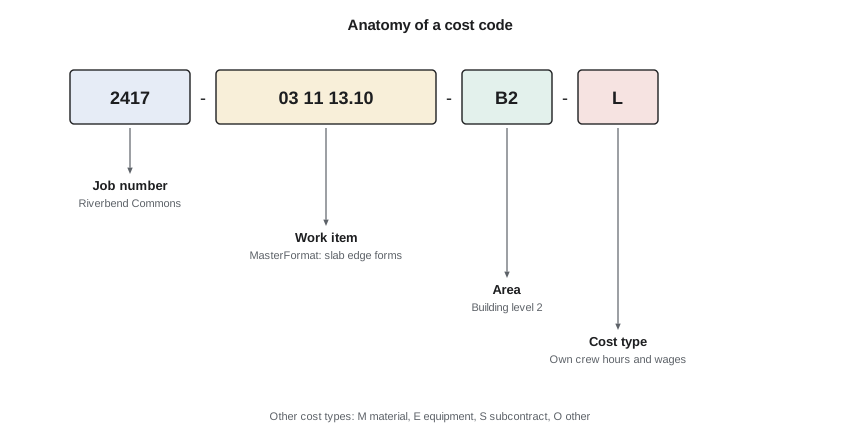
Most contractor cost codes combine several pieces of information in one string. A typical structure has a job number, a work item based on a standard classification, sometimes a location or area, and a cost type.
| Element | Purpose | Example |
|---|---|---|
| Job number | Separates projects in the company ledger | 2417 |
| Work item | Identifies the work, usually from a standard classification | 03 11 13.10 Slab edge forms |
| Area or phase (optional) | Separates locations, buildings, floors or phases | B2 = level 2 |
| Cost type | Labour, material, equipment, subcontract or other | L |
Standard classifications give the work item a meaning that is consistent across jobs. In North America the most widely used is MasterFormat, published by the Construction Specifications Institute (CSI) and Construction Specifications Canada (CSC), which organizes work by specification section into 50 divisions (the 2020 edition is the current base edition, with periodic updates). UNIFORMAT II, which organizes cost by building element (substructure, shell, interiors, services), is common in early estimates and owner cost plans. Many contractors use a simplified, company-specific version of MasterFormat so that codes stay short and familiar to the field.
| Classification | Organized by | Typical use in cost control |
|---|---|---|
| MasterFormat (CSI and CSC) | Work result and specification section | Contractor cost codes, subcontract packages |
| UNIFORMAT II (ASTM E1557) | Building system or element | Owner cost plans, conceptual estimates, comparing projects |
| Company standard code list | Simplified MasterFormat with company additions | Day-to-day field coding and historical cost database |
| Owner or program codes | Owner-defined WBS, often by facility and system | Required reporting on large owner programs |
Cost codes and the work breakdown structure
The work breakdown structure is a hierarchical decomposition of the project scope into deliverables and work packages (CON-210 Lesson 2 used it to build the schedule). The cost code structure and the WBS answer different questions: the WBS asks what must be delivered, while cost codes ask what kind of work and cost it is. On many building projects the two are combined, with the WBS providing the upper levels (building, floor, system) and cost codes the lower levels (work item and cost type).
Where they meet, earned value practice uses the term control account: the point at which scope, schedule and budget are integrated and assigned to one responsible manager. On a contractor's building project, a control account might be 'level 2 structure' or 'concrete work, all levels', depending on how the work is managed. The important thing is that each control account has a defined scope, budget and schedule, and that actual cost is collected at the same level, so that planned value, earned value and actual cost can be compared like for like (Lesson 7).
How much detail is enough?
More cost codes give more information but cost more to run. Each code is something the foreman must choose on a timecard, the coordinator must allocate invoices to, and the cost engineer must report on. Too few codes hide problems: if all concrete labour is one code, a loss on formwork can be masked by a gain on finishing. Too many codes produce poor data: foremen faced with eighty codes guess, and the result is precise-looking nonsense.
| Too coarse | About right | Too fine |
|---|---|---|
| One code for all concrete labour | Separate codes for forming, reinforcing, placing and finishing | Separate codes for each footing and each pour |
| General conditions as one line | Supervision, offices, utilities, hoisting, cleanup, protection | Each temporary light and extension cord |
| Problems hidden by offsetting gains | Each code a distinct, measurable activity with its own crew | Field cannot code accurately; data unreliable |
Useful tests for a self-performed labour code are: it covers work that one crew does as a distinct activity; it has a measurable quantity, so that progress and productivity can be tracked; and it is large enough to matter, perhaps more than a few hundred hours. Subcontract work usually needs only one code per subcontract, because the subcontractor tracks its own detail. Area codes are worth adding where locations are clearly separate and the work is repetitive, such as floors of a residential tower, because they let productivity be compared floor by floor.
Worked problem
Choosing codes for Riverbend Commons formwork
Northline's estimate carried 4,850 crew-hours of formwork for footings, walls, columns, elevated slabs and slab edges across four levels. Should the codes be by element, by level, or both?
Show solution
- By element only: 5 codes; productivity differs widely between walls and slabs, so element codes are needed.
- By level only: 4 codes; would mix very different activities.
- By element and level: up to 20 codes, but footings occur only at the foundation, so about 14 codes.
- Elevated slab forming repeats on three levels and is the largest item (about 1,900 hours), so tracking it by level shows the learning curve.
Answer: Use element codes for all formwork, and add level codes only for elevated slabs and columns, which repeat; about 11 codes in total, each large and measurable.
Cost codes in the field
Cost data are only as good as the coding at the source. Practical steps help. Print or display a short list of active codes for each crew, with plain descriptions, rather than the full company list. Close codes for work that is finished so that time cannot be charged to them. Have the superintendent review timecard coding daily or weekly while memories are fresh. Use mobile time-entry apps that show only the codes for the crew's current activities. And explain to foremen why coding matters; a foreman who sees the productivity report for his crew each week will code more carefully than one who never sees the results.
The cost-loaded schedule
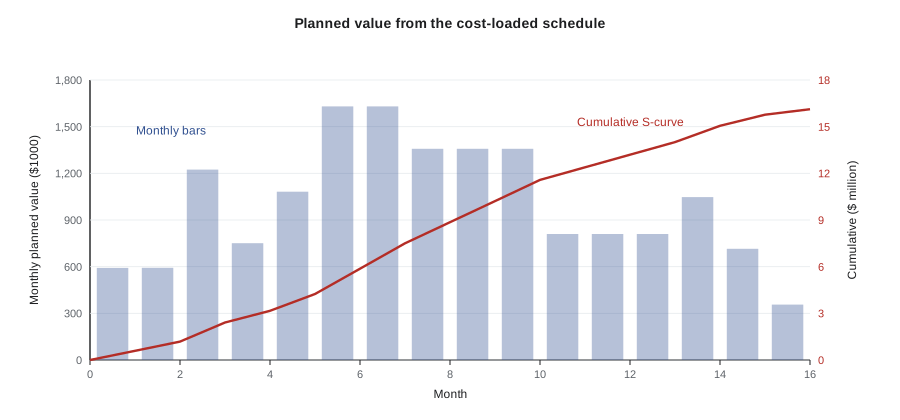
A cost-loaded schedule assigns budget amounts to the activities in the project schedule. Because each activity has planned dates, the budget can then be spread over time, giving a planned value for each period and a cumulative curve. This curve, often called the S-curve because of its typical shape, is the baseline against which progress and cost are measured. It is also the starting point for the owner's cash flow forecast and the contractor's own cash planning (Lesson 11).
Activities can be cost loaded in several ways. Each activity can be assigned its own budget directly; or budget lines can be linked to activities, with one line spread over several activities or several lines combined into one activity. The spread within an activity is usually linear (equal amounts each day), but front-loaded or back-loaded spreads can be used where the work is not uniform, such as a mechanical package where equipment is delivered late in the activity.
# Cost-load a simplified Riverbend schedule and print monthly planned value (amounts $1000)
acts = [  # name, start month, duration (months), budget
    ("Site and foundations", 1, 3, 1_420), ("Structure L1-L4", 3, 5, 3_160),
    ("Envelope", 6, 5, 2_740), ("Mechanical and electrical", 5, 10, 3_310),
    ("Interiors", 8, 8, 2_880), ("General conditions", 1, 16, 1_904),
    ("Site works and close-out", 14, 3, 710),
]
months = 16
pv = [0.0] * (months + 1)
for name, start, dur, bud in acts:
    for m in range(start, start + dur):
        pv[m] += bud / dur                          # linear spread
cum = 0
for m in range(1, months + 1):
    cum += pv[m]
    bar = "#" * int(pv[m] / 40)
print(f"Month {m:>2}: {pv[m]:7,.0f} cumulative {cum:8,.0f} {bar}")Month 1: 592 cumulative 592 ############## Month 2: 592 cumulative 1,185 ############## Month 3: 1,224 cumulative 2,409 ############################## Month 4: 751 cumulative 3,160 ################## Month 5: 1,082 cumulative 4,242 ########################### Month 6: 1,630 cumulative 5,872 ######################################## Month 7: 1,630 cumulative 7,502 ######################################## Month 8: 1,358 cumulative 8,860 ################################# Month 9: 1,358 cumulative 10,218 ################################# Month 10: 1,358 cumulative 11,576 ################################# Month 11: 810 cumulative 12,386 #################### Month 12: 810 cumulative 13,196 #################### Month 13: 810 cumulative 14,006 #################### Month 14: 1,047 cumulative 15,053 ########################## Month 15: 716 cumulative 15,768 ################# Month 16: 356 cumulative 16,124 ########
The monthly amounts rise as more trades work at once and fall during close-out, so the cumulative curve is steep in the middle and flat at both ends. Comparing the budget total with the final cumulative value is a useful check that every dollar has been loaded onto an activity.
Pitfalls in cost loading
Cost-loaded schedules are powerful but easy to distort. The most common distortion is front-loading: assigning more value to early activities than they are worth so that early billings run ahead of cost. Owners and their consultants look for this, because it shifts cash and risk to the owner and leaves less money in the contract to finish the work if the contractor fails. A second pitfall is loading cost onto summary activities or milestones that do not represent real work, which makes the planned value curve meaningless. A third is failing to update the cost loading when the schedule is revised, so that planned value no longer matches the plan the team is actually following.
Many Canadian owners require a cost-loaded schedule or a schedule of values tied to the schedule, and the payment certifier compares progress claims against it (CON-220 Lesson 5). A front-loaded schedule of values may be rejected, or the certifier may reduce early claims until value matches work in place.
| Check | What it catches |
|---|---|
| Total cost loaded equals current budget (or contract value for billing) | Missing or double-counted amounts |
| Cost per day of each activity is reasonable for its crew and materials | Front-loading and unbalanced loading |
| No cost on milestones or summary bars | Value that cannot be earned by real work |
| Loading updated with each approved schedule revision | Planned value that no longer reflects the plan |
| Cost-loaded activities map to control accounts | Inability to compare planned, earned and actual cost |
Two baselines: cost and billing
Contractors often maintain two cost loadings. The owner-facing schedule of values loads the contract value (including fee and markups) onto activities or line items for billing. The internal control baseline loads the cost budget, so that planned value can be compared with actual cost. The two curves have similar shapes but different totals, and on a lump sum job only the internal one is shown in the cost report. Mixing them causes errors: comparing actual cost with planned value based on contract value overstates the apparent cost underrun by the amount of the fee.
Worked problem
Two curves for the same work
At the end of month 6, cumulative planned value based on the cost budget is $5.87 million. The contract value is 4.5 % above cost. What is the planned billing at the same date, assuming billing follows the same profile?
Show solution
- Planned billing = planned cost value × (1 + fee rate).
- 5.87 × 1.045 = $6.13 million.
Answer: About $6.13 million. If actual cost were compared with $6.13 million instead of $5.87 million, the job would look about $260,000 better than it is.
Common mistakes
MistakeMaking a cost code for every footing and every pour.
InsteadMake each code a distinct, measurable activity large enough to matter, so the field can code accurately.
MistakeUsing one labour code for all concrete work.
InsteadSeparate activities with different productivity, such as forming, reinforcing, placing and finishing.
MistakeGiving foremen the full company code list.
InsteadShow each crew a short list of active codes and close codes when work is finished.
MistakeLoading cost onto milestones and summary bars.
InsteadLoad cost only onto activities that represent real work.
MistakeFront-loading the schedule to improve early cash flow.
InsteadLoad cost at its true value; owners check, and front-loading shifts risk unfairly.
MistakeComparing actual cost with planned value based on contract value.
InsteadUse a cost-based baseline for cost control and a contract-value baseline for billing.
Summary and key terms
- A cost code identifies the job, the work item, sometimes the area, and the cost type.
- MasterFormat is the usual basis for contractor work item codes; UNIFORMAT II organizes cost by building element.
- The WBS and cost codes combine at control accounts, where scope, schedule and budget meet under one manager.
- Self-performed codes should be distinct, measurable and large enough to matter; subcontracts usually need one code each.
- Good field coding needs short code lists, timely review and feedback to foremen.
- A cost-loaded schedule spreads the budget over time to produce the planned value S-curve.
- Avoid front-loading, cost on milestones and stale loadings, and keep cost and billing baselines separate.
- Cost code
- An identifier showing where a cost is charged: job, work item, area and cost type.
- MasterFormat
- The CSI and CSC classification of construction work by specification section.
- UNIFORMAT II
- A classification of building cost by element or system.
- Work breakdown structure
- A hierarchical decomposition of project scope into deliverables and work packages.
- Control account
- The point where scope, schedule and budget are integrated under one manager.
- Cost-loaded schedule
- A schedule in which activities carry budget amounts.
- Planned value
- The budgeted value of work scheduled to be done by a given date.
- S-curve
- The cumulative planned (or earned or actual) value plotted over time.
- Front-loading
- Assigning more value to early activities than they are worth.
- Schedule of values
- The breakdown of the contract price used for progress billing.
Practice problems
Work each problem on paper first, then reveal the answer to check.
Name the four common elements of a contractor cost code.
Show answer
Job number, work item, area or phase, cost type.
What is the difference between MasterFormat and UNIFORMAT II?
Show answer
MasterFormat organizes by work result and specification section; UNIFORMAT II by building element or system.
Give three tests for a good self-performed labour code.
Show answer
Distinct crew activity, measurable quantity, large enough to matter.
Why do subcontracts usually need only one cost code each?
Show answer
The subcontractor tracks its own detail; the contractor controls the commitment and billings.
An activity has a budget of $240,000 and a duration of 4 months with a linear spread. What is its monthly planned value?
Show answer
$60,000.
What is front-loading and why do owners object to it?
Show answer
Assigning excess value to early work; it shifts cash and risk to the owner.
What is a control account?
Show answer
The level at which scope, schedule and budget are integrated and assigned to one manager.
Planned cost value is $4.2 million and the fee is 5 %. What is the planned billing on the same profile?
Show answer
$4.41 million.
Why add area codes for elevated slabs in a multi-storey building?
Show answer
To compare productivity floor by floor and see the learning curve.
Name two checks on a cost-loaded schedule.
Show answer
Total equals budget, reasonable cost per day, no cost on milestones, updated with revisions, maps to control accounts.
Lesson quiz · 5 questions
Score 60% or more to complete this lesson.
Create a free account to save your progress, take quizzes and earn a certificate.