
CYB-101 · Lesson 6 of 12 · 25 min
Public key infrastructure and certificates
▶ Video coming soon A video version of this lesson is on the way.
Lesson 5 ended with a puzzle. Asymmetric encryption lets anyone send Rosa a secret message using her public key, but how does the sender know the public key really belongs to Rosa? If an attacker can trick Theo's browser into using the attacker's public key instead of the online shop's, the attacker can read everything, however strong the encryption. The answer is public key infrastructure, or PKI: the system of certificates, certificate authorities and trust that binds public keys to identities. Every padlock in a browser address bar depends on it.
This lesson explains what a certificate contains, how certificate authorities and the chain of trust work, what happens during a secure web connection, and the practical tasks that fall to IT staff: watching expiry dates, handling warnings and keeping private keys private.
What a certificate is
A digital certificate is a small data file that says, in effect, this public key belongs to this name, and it is signed by an organization that vouches for the claim. The most common kind is an X.509 certificate used for TLS, the protocol behind HTTPS. Its main fields are the subject (who the certificate is for, such as shop.ridgelinecoffee.example), the subject alternative names (the full list of host names the certificate covers), the public key, the issuer (the certificate authority that signed it), the validity period (not before and not after dates), a serial number, the permitted uses of the key, and the issuer's digital signature over all of it.
Because the certificate is signed, nobody can change any field without breaking the signature. And because the signature is made with the issuer's private key, anyone with the issuer's public key can check it. The certificate does not need to be kept secret; the server sends it to every visitor. What must be kept secret is the matching private key, which never leaves the server.
| Field | Example for Ridgeline's shop | Why it matters |
|---|---|---|
| Subject | shop.ridgelinecoffee.example | Who the certificate is for |
| Subject alternative names | shop.ridgelinecoffee.example, www.ridgelinecoffee.example | Every name the browser will accept |
| Issuer | An intermediate certificate authority | Who vouches for the binding |
| Validity | Not before 2026-09-01, not after 2027-03-19 | Expired certificates are rejected |
| Public key | An elliptic-curve public key | Used to set up the secure session |
| Signature | Made with the issuer's private key | Proves the certificate is unaltered |
Certificate authorities and the chain of trust
A certificate authority (CA) is an organization trusted to check that a certificate request is genuine and then to sign the certificate. For a public website, the CA must verify that the requester controls the domain name, usually by asking them to place a specific value in a DNS record or on the website. This domain validation is enough for the padlock. Organization validation and extended validation certificates add checks on the legal identity of the organization, though modern browsers no longer display that extra detail prominently.
Browsers and operating systems ship with a trust store: a list of root CA certificates they trust completely. Root CAs keep their private keys offline in highly protected facilities and rarely use them directly. Instead, a root signs one or more intermediate CA certificates, and the intermediates sign the certificates for websites. When Theo's browser receives the shop's certificate, it follows the chain: the shop's certificate is signed by the intermediate, the intermediate is signed by the root, and the root is in the trust store. If every signature checks out, every certificate is within its validity dates and the name matches, the browser trusts the connection.
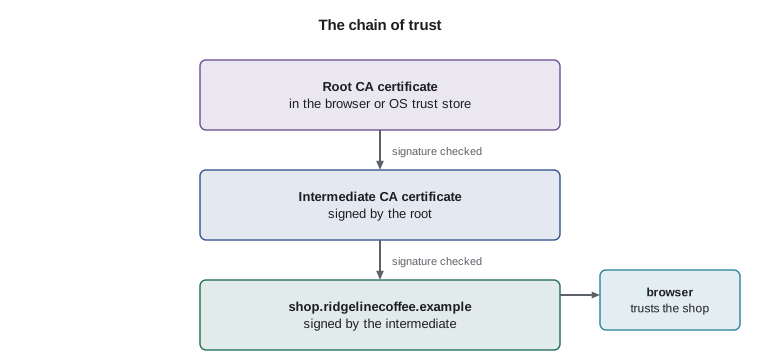
A common misconfiguration is a server that sends only its own certificate and not the intermediate. Some browsers can fetch the missing intermediate and connect; others, and many apps and devices, report an error. When a site works on one computer and fails on another with a certificate error, a missing intermediate is a prime suspect.
Try it yourself
Walk the chain of trust
Each certificate is a dictionary with a subject and an issuer. Complete chain_to_root(name, certs, trusted_roots) so that it follows issuers upward from the certificate whose subject is name, and returns the list of subjects in the chain if it ends at a trusted root, or None if the chain breaks (an issuer is missing) or ends at an untrusted root. A root certificate is one whose issuer is itself.
certs = {
    "shop.ridgelinecoffee.example": {"issuer": "Example Intermediate CA"},
    "Example Intermediate CA": {"issuer": "Example Root CA"},
    "Example Root CA": {"issuer": "Example Root CA"},
    "evil.example": {"issuer": "Homemade Root"},
    "Homemade Root": {"issuer": "Homemade Root"},
}
trusted_roots = {"Example Root CA"}

def chain_to_root(name, certs, trusted_roots):
    chain = [name]
    # follow issuers until you reach a root (issuer == subject)
    return chain

print(chain_to_root("shop.ridgelinecoffee.example", certs, trusted_roots))
print(chain_to_root("evil.example", certs, trusted_roots))
What happens in a TLS connection
When a browser connects to an HTTPS site, the TLS handshake sets up the secure session in a few round trips. The browser says which versions and ciphers it supports. The server replies with its choices and its certificate chain, and proves it holds the private key matching the certificate. The two sides use a key-agreement method to create a fresh symmetric session key that is never sent across the network, so even someone recording all the traffic cannot work it out. From then on, everything is encrypted and protected against tampering with that session key. TLS 1.3 is the current version; TLS 1.2 is still widely accepted, while earlier versions and the old SSL protocols are obsolete and should be disabled.
The padlock means the connection is encrypted and the server proved it owns the name in the address bar. It does not mean the site is honest. The phishing site Anita nearly used had a valid certificate for its own look-alike name, because criminals can obtain domain-validated certificates just as easily as anyone else. Staff need to check the name, not just the padlock.
Certificate lifetimes and expiry
Every certificate has an end date, and an expired certificate causes browsers to show a full-page warning that drives customers away. Certificate lifetimes have been getting shorter, because short-lived certificates limit the damage if a private key is stolen and force organizations to automate renewal. Under rules agreed by the CA/Browser Forum, the industry body of certificate authorities and browser makers, the maximum lifetime of a publicly trusted TLS certificate fell to 200 days for certificates issued from 15 March 2026. It is scheduled to fall to 100 days in March 2027 and to 47 days in March 2029.
With lifetimes that short, manual renewal is no longer realistic. Automated certificate management, usually through the ACME protocol used by services such as Let's Encrypt and most hosting platforms, requests and installs new certificates on a schedule without anyone touching them. Ridgeline's hosted shop renews its certificate automatically, but the NAS, the router's admin page and any internal tools need checking. Jordan keeps a small list of every certificate Ridgeline relies on, with its expiry date, and a script that warns well in advance.
from datetime import date
certs = {
    "shop.ridgelinecoffee.example": date(2027, 3, 19),
    "nas.office.ridgeline.example": date(2026, 11, 30),
    "roastlog.ridgeline.example": date(2026, 10, 25),
}
today = date(2026, 10, 19)
for name, expires in sorted(certs.items(), key=lambda kv: kv[1]):
    days = (expires - today).days
    status = "RENEW NOW" if days <= 14 else "renew soon" if days <= 45 else "ok"
print(f"{days:>4} days {status:<10} {name}")6 days RENEW NOW roastlog.ridgeline.example 42 days renew soon nas.office.ridgeline.example 151 days ok shop.ridgelinecoffee.example
Try it yourself
Certificate expiry checker
Complete status(expires, today) so that it returns "expired" if the expiry date is before today, "renew now" if it expires within 14 days (including today), "renew soon" within 45 days, and "ok" otherwise. Both arguments are datetime.date objects.
from datetime import date

def status(expires, today):
    days = (expires - today).days
    return "ok"

today = date(2026, 10, 19)
for d in [date(2026, 10, 1), date(2026, 10, 25), date(2026, 11, 30), date(2027, 3, 19)]:
    print(d, status(d, today))
Names, wildcards and warnings
A certificate is valid only for the names listed in it. A wildcard certificate for *.ridgelinecoffee.example covers shop.ridgelinecoffee.example and www.ridgelinecoffee.example, but the wildcard covers exactly one label: it does not cover ridgelinecoffee.example itself or a deeper name such as admin.shop.ridgelinecoffee.example. When a name does not match, the browser warns. Other common warnings are expired certificates, certificates from an untrusted issuer, and a computer clock set so wrong that valid certificates appear expired or not yet valid.
The right response to a certificate warning depends on where it appears. On a public website such as the bank, a warning is a reason to stop, not click through, because it may indicate an on-path attack. On an internal device such as the NAS, which may use a self-signed certificate created by the device itself, the better fix is to replace it with a certificate from a trusted source, or from Ridgeline's own internal CA if it ever needs one, so that staff are never trained to ignore warnings.
Try it yourself
Does the certificate cover this name?
Complete covers(pattern, host). An exact pattern matches only the identical host name (ignore letter case). A wildcard pattern such as *.ridgelinecoffee.example matches any host with exactly one extra label in place of the asterisk, such as shop.ridgelinecoffee.example, but not ridgelinecoffee.example and not a.b.ridgelinecoffee.example.
def covers(pattern, host):
    pattern, host = pattern.lower(), host.lower()
    # handle exact names first, then patterns starting with *.
    return pattern == host

for h in ["shop.ridgelinecoffee.example", "ridgelinecoffee.example", "a.shop.ridgelinecoffee.example"]:
    print(h, covers("*.ridgelinecoffee.example", h))
Revocation and keeping private keys private
Sometimes a certificate must be withdrawn before it expires, for example if the server's private key is stolen. The CA then revokes it and publishes the fact, traditionally through certificate revocation lists or an online status check. In practice revocation checking has always been patchy, which is another reason the industry is moving to short lifetimes: a stolen key for a short-lived certificate is only useful for a short time. Public CAs also record every certificate they issue in Certificate Transparency logs, public records that let domain owners spot certificates issued for their names without permission.
Private keys are the crown jewels of PKI. They should be generated on the server or device that uses them, never emailed, stored with tight permissions, and backed up only where necessary. If a private key may have been exposed, the certificate must be revoked and replaced with one using a new key. The same principles apply beyond websites: code-signing keys, email signing keys and the keys of any internal CA all need the same care.
Worked problem
Diagnosing a certificate warning
Staff report that the NAS web page shows a certificate warning on Anita's computer, but the online shop and the bank work normally. What should Jordan check, and in what order?
Show solution
- Other sites work, so the computer's clock and trust store are probably fine; the problem is specific to the NAS.
- Open the certificate details: is it self-signed, expired, or issued for a different name, such as the NAS's default name instead of nas.office.ridgeline.example?
- The NAS was showing a self-signed certificate created by the device, so the browser cannot follow a chain to a trusted root.
- Fix: install a certificate the computers trust for the name staff use, and tell staff not to click through warnings.
Answer: Inspect the certificate first; here the cause was a self-signed device certificate, fixed by installing a trusted one rather than teaching staff to ignore the warning.
Common mistakes
MistakeAssuming the padlock means a website is trustworthy.
InsteadThe padlock proves encryption and control of the name shown; always check the name itself.
MistakeClicking through certificate warnings out of habit.
InsteadStop on public sites and investigate; fix internal certificates so that warnings never become normal.
MistakeRenewing certificates by hand from a calendar reminder.
InsteadAutomate renewal with ACME or the platform's built-in tools; lifetimes are now 200 days and shrinking.
MistakeInstalling only the server certificate without the intermediate.
InsteadConfigure the full chain so that every client can verify it.
MistakeEmailing a private key to a colleague or a vendor.
InsteadGenerate keys where they are used and never send them; if exposed, revoke and replace.
MistakeExpecting a wildcard to cover the bare domain or deeper subdomains.
InsteadA wildcard covers exactly one label; list other names separately.
Summary and key terms
- PKI binds public keys to identities through signed certificates.
- A certificate contains the subject, alternative names, public key, issuer, validity dates and the issuer's signature.
- Trust flows from root CAs in the trust store through intermediates to server certificates.
- The TLS handshake authenticates the server and agrees a fresh symmetric session key.
- Publicly trusted certificates are limited to 200 days from March 2026, falling to 47 days by 2029, so renewal must be automated.
- Names, wildcards, expiry, untrusted issuers and wrong clocks cause most certificate warnings.
- Private keys must be protected; revocation and Certificate Transparency help when things go wrong.
- PKI
- Public key infrastructure: certificates, authorities and trust that bind keys to identities.
- certificate
- A signed file binding a public key to a name.
- certificate authority
- An organization that verifies requests and signs certificates.
- root certificate
- A self-signed CA certificate held in a trust store.
- intermediate certificate
- A CA certificate signed by a root that signs server certificates.
- chain of trust
- The sequence of signatures from a server certificate up to a trusted root.
- TLS
- Transport Layer Security, the protocol behind HTTPS.
- self-signed certificate
- A certificate signed by its own key rather than a trusted CA.
- ACME
- A protocol for automatically requesting and renewing certificates.
- revocation
- Withdrawing a certificate before it expires.
Practice problems
Work each problem on paper first, then reveal the answer to check.
Which part of a certificate must be kept secret?
Show answer
None of the certificate; the matching private key, which stays on the server, must be kept secret.
Why do root CAs sign intermediates rather than server certificates directly?
Show answer
So the root's private key can stay offline and protected; an intermediate can be replaced if compromised.
A certificate for *.ridgelinecoffee.example is used on admin.shop.ridgelinecoffee.example. Will browsers accept it?
Show answer
No; the wildcard covers only one label.
Every HTTPS site on one laptop shows certificate errors, but other computers are fine. What is a likely cause?
Show answer
The laptop's clock is badly wrong, making valid certificates look expired or not yet valid.
Why are certificate lifetimes getting shorter?
Show answer
Short lifetimes limit the damage from stolen keys and force automation; revocation checking is unreliable.
What does a phishing site's valid certificate prove?
Show answer
Only that the connection is encrypted and the site controls its own look-alike name, not that it is legitimate.
Lesson quiz · 5 questions
Score 60% or more to complete this lesson.
Create a free account to save your progress, take quizzes and earn a certificate.