
ENCM-100 · Lesson 4 of 5 · 32 min
Functions
As programs grow, the same calculation turns up in several places: the stress check for every beam, the unit conversion for every input, the root-finder for every equation. Copying and pasting the code works until you find a mistake in it and have to fix it in seven places, missing one. Functions solve this. A function packages a calculation under a name, takes inputs, and returns a result, so it can be written once, tested once, and used everywhere.
Functions are also the main tool for managing complexity. A well-named function lets you think "check the beam" instead of the five lines that do it, just as an engineer thinks "use the moment formula" without re-deriving it. This chapter covers defining and calling functions, parameters and return values, documentation, default and keyword arguments, scope, testing with assert, passing functions to other functions, and organizing functions into modules.
Defining and calling a function
A function definition starts with def, then the function's name, its parameters in brackets, and a colon. The indented body does the work, and a return statement sends the result back to the caller.
import math

def pipe_velocity(flow_Ls, diameter_mm):
    """Return the mean flow velocity in m/s for a full circular pipe."""
    flow_m3s = flow_Ls / 1000
    diameter_m = diameter_mm / 1000
    area_m2 = math.pi * diameter_m ** 2 / 4
    return flow_m3s / area_m2

v = pipe_velocity(12, 100)
print(f"{v:.3f} m/s")
print(f"{pipe_velocity(12, 150):.3f} m/s")
Output: 1.528 m/s, then 0.679 m/s.
Defining a function does not run it; it only creates it. The body runs each time the function is called, as in pipe_velocity(12, 100). The values in the call (12 and 100) are arguments; they are assigned, in order, to the parameters in the definition (flow_Ls and diameter_mm). When the body reaches return, the function stops and the call is replaced by the returned value.
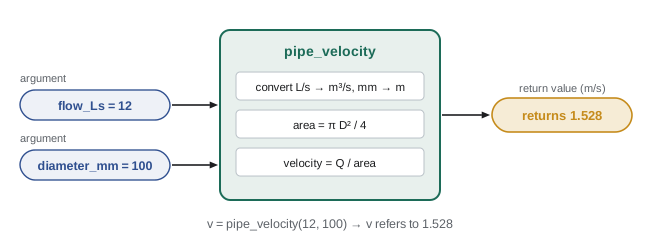
A function with no return statement returns the special value None. A common beginner bug is a function that prints its answer instead of returning it: the result appears on screen, but the calling code cannot use it in further calculations. As a rule, calculation functions should return values, and only the top level of a program should print.
Docstrings
The string on the first line of the body, in triple quotes, is a docstring. It documents what the function does, its parameters and units, and what it returns. Python keeps it with the function, so help(pipe_velocity) displays it, and code editors show it when you type the function's name. Write one for every function others might use, which in engineering means nearly every function.
def bending_stress(moment_Nmm, b_mm, h_mm):
    """Maximum bending stress in a solid rectangular section.

    Parameters
    ----------
    moment_Nmm : bending moment in N.mm
    b_mm, h_mm : section width and depth in mm

    Returns
    -------
    Stress in MPa (N/mm^2), from sigma = 6M / (b h^2).
    """
    return 6 * moment_Nmm / (b_mm * h_mm ** 2)

print(bending_stress(45e6, 100, 300))
Output: 30.0, matching the result from Lesson 2.
Why functions: removing repetition
Worked problem
Refactoring repeated code
A script checks three timber beams by repeating the same lines three times with different numbers. Rewrite it with a function.
Show solution
- Before (one of three nearly identical copies):
stress1 = 6 * 45e6 / (100 * 300 ** 2) if stress1 <= 10: print("Beam 1 OK", stress1) else: print("Beam 1 FAILS", stress1)- After: one function, called in a loop over the beam data.
ALLOWABLE_MPa = 10 def check_beam(moment_Nmm, b_mm, h_mm): """Return (stress in MPa, True if within the allowable stress).""" stress = 6 * moment_Nmm / (b_mm * h_mm ** 2) return stress, stress <= ALLOWABLE_MPa beams = [(45e6, 100, 300), (45e6, 150, 400), (80e6, 200, 500)] for i, (M, b, h) in enumerate(beams, start=1): stress, ok = check_beam(M, b, h) status = "OK" if ok else "FAILS" print(f"Beam {i}: {stress:.2f} MPa {status}")- Output: Beam 1: 30.00 MPa FAILS; Beam 2: 11.25 MPa FAILS; Beam 3: 9.60 MPa OK.
Answer: The formula and the allowable stress now appear once. To change the design rule, you change one function, and every beam is rechecked consistently
Two new features appear in that example. A function can return several values separated by commas; Python packs them into a tuple, and the caller unpacks them into separate names (stress, ok = …). And the conditional expression "OK" if ok else "FAILS" chooses between two values in one line.
Parameters: defaults and keywords
Parameters can have default values, used when the caller leaves them out. Callers can also name arguments explicitly (keyword arguments), which makes calls with many parameters much easier to read and less error-prone, since the order no longer matters.
def to_kPa(value, unit="psi"):
    """Convert a pressure to kPa. unit is "psi", "bar" or "atm"."""
    if unit == "psi":
        return value * 6.894757
    elif unit == "bar":
        return value * 100
    elif unit == "atm":
        return value * 101.325
    else:
        raise ValueError(f"Unknown unit: {unit}")

print(to_kPa(250))               # default unit, psi
print(to_kPa(3, "bar"))          # positional
print(to_kPa(unit="atm", value=2))   # keywords, any order
1723.6892500000001
300
202.65The raise statement deliberately stops the program with an error when the function is given a unit it does not know. That is far better than silently returning a wrong number: a loud failure is found immediately, a quiet one may be found after construction.
Scope: where names exist
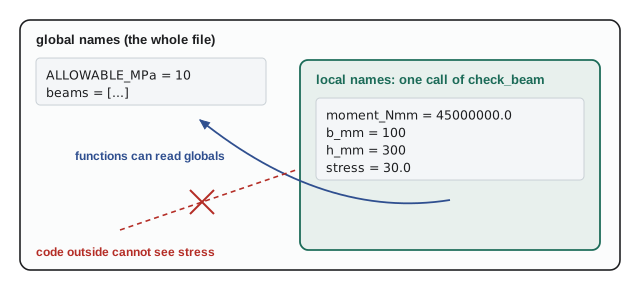
Variables created inside a function (including its parameters) are local: they exist only while the function runs and are invisible outside it. Variables created at the top level of a script are global and can be read inside functions.
Worked problem
A scope error
Why does this fail?
Show solution
def area_circle(d): area = 3.14159 * d ** 2 / 4 return area area_circle(0.2) print(area)- Python reports NameError: name 'area' is not defined. The name area existed only inside the function call, and the call's returned value was thrown away because it was not stored.
Answer: Store the returned value: a = area_circle(0.2), then print(a). Information gets out of a function through return, not through its local variables
Reading global constants (like ALLOWABLE_MPa) inside a function is fine. Changing global variables from inside functions is possible with the global keyword, but it makes programs hard to follow and test; pass values in as arguments and return results instead.
Testing functions
Because a function is a self-contained unit with defined inputs and outputs, it is easy to test on its own. The assert statement checks that a condition is True and stops with an AssertionError if it is not. A handful of asserts with hand-calculated answers, run every time the code changes, catches mistakes early.
import math

def pipe_velocity(flow_Ls, diameter_mm):
    """Mean velocity in m/s for a full circular pipe."""
    area_m2 = math.pi * (diameter_mm / 1000) ** 2 / 4
    return (flow_Ls / 1000) / area_m2

# Tests with answers worked out by hand
assert math.isclose(pipe_velocity(0, 100), 0.0)
# 1 m^3/s through an area of exactly 1 m^2 (D = 1128.379 mm) gives 1 m/s
assert math.isclose(pipe_velocity(1000, 1128.379), 1.0, rel_tol=1e-6)
# halving the diameter quarters the area, so velocity rises 4 times
assert math.isclose(pipe_velocity(12, 50), 4 * pipe_velocity(12, 100))
print("All tests passed")
The tests use special cases (zero flow), a case with a known answer, and a physical relationship (velocity scales as 1/D²). Larger projects use testing frameworks such as pytest, which run hundreds of tests automatically, but the idea is the same.
Functions as arguments
In Python, a function is a value like any other: it can be stored in a variable or passed to another function. This lets you write general tools, such as a root-finder that works on any equation.
Worked problem
A reusable bisection function
Turn the bisection loop from Lesson 3 into a function that takes any function f and a bracket, then use it to solve \(x^3 - 2x - 5 = 0\) and \(\cos x = x\).
Show solution
import math def bisect(f, lo, hi, tol=1e-8): """Find a root of f between lo and hi, where f(lo) and f(hi) differ in sign.""" if f(lo) * f(hi) > 0: raise ValueError("f(lo) and f(hi) must have opposite signs") while hi - lo > tol: mid = (lo + hi) / 2 if f(lo) * f(mid) <= 0: hi = mid else: lo = mid return (lo + hi) / 2 def cubic(x): return x ** 3 - 2 * x - 5 def cos_minus_x(x): return math.cos(x) - x print(bisect(cubic, 2, 3)) print(bisect(cos_minus_x, 0, 1))- Output: 2.094551485031843, then 0.7390851341187954.
Answer: One tested root-finder now solves any equation you can write as f(x) = 0 with a bracket. The check at the top fails loudly if the bracket is invalid instead of returning nonsense
For short one-off functions, Python offers lambda expressions: bisect(lambda x: math.cos(x) - x, 0, 1) does the same as the second call without defining cos_minus_x separately.
Worked problem
A numerical derivative
Write a function that estimates \(f'(x)\) with the central difference \([f(x + h) - f(x - h)]/(2h)\), and test it on \(\sin x\) at 0 and \(x^3\) at 2.
Show solution
import math def derivative(f, x, h=1e-5): """Central-difference estimate of f'(x).""" return (f(x + h) - f(x - h)) / (2 * h) print(derivative(math.sin, 0)) print(derivative(lambda x: x ** 3, 2))- Output: 0.9999999999833332, then 12.00000000021184.
- Exact answers: \(\cos 0 = 1\) and \(3(2)^2 = 12\). The estimates agree to about 10 digits.
Answer: The function works for any f passed to it, including built-ins such as math.sin. Numerical derivatives are how engineering software differentiates functions that exist only as code or data
Modules: organizing your functions
Once you have useful functions, put them in their own file and import them wherever needed. If engcalc.py contains pipe_velocity, bending_stress and to_kPa, any script in the same folder can write:
import engcalc

v = engcalc.pipe_velocity(12, 100)

# or import particular names directly
from engcalc import bending_stress
s = bending_stress(45e6, 100, 300)
This is exactly how math works: it is a module of functions someone else wrote and tested. Building your own library of trusted, tested, documented functions is one of the best investments an engineer who programs can make; many firms maintain shared libraries of verified calculation routines for exactly this reason.
Recursion, briefly
A function may call itself, which is called recursion. It suits problems defined in terms of smaller versions of themselves, such as walking through a tree of folders or a nested structure. Each recursive function needs a base case that stops the recursion. For most numerical engineering work, plain loops are simpler and faster, so treat recursion as a tool to recognize rather than one to reach for first.
Common mistakes
MistakePrinting a result inside a calculation function instead of returning it.
InsteadReturn the value; let the calling code decide whether to print, store or use it.
MistakeForgetting to store the returned value: area_circle(0.2) on its own line.
Insteada = area_circle(0.2), then use a.
MistakeTrying to use a function's local variables outside it.
InsteadLocals vanish when the call ends; get results out with return.
MistakePassing arguments in the wrong order to a function with several parameters.
InsteadUse keyword arguments (pipe_velocity(flow_Ls=12, diameter_mm=100)) for clarity.
MistakeReturning a plausible number when given invalid input.
Insteadraise ValueError with a clear message; loud failures are found early.
MistakeNo documentation or tests.
InsteadA docstring with units, and a few asserts with hand-checked answers, for every function others will use.
Summary and key terms
- A function packages a calculation: def name(parameters):, an indented body, and return value.
- Arguments in a call are assigned to parameters; the call is replaced by the returned value. Without return, a function returns None.
- Docstrings document purpose, parameters, units and results; help() displays them.
- Functions remove repetition, so rules and formulas are written and fixed in one place; they can return several values as a tuple.
- Default values and keyword arguments make calls flexible and clear; raise errors on invalid input.
- Local variables exist only during a call; pass data in with arguments and out with return.
- Test functions with assert and hand-calculated cases; functions can be passed as arguments to build general tools; modules collect functions for reuse.
- Function
- A named, reusable block of code that takes inputs and returns a result.
- Parameter
- A name in a function definition that receives an argument.
- Argument
- A value passed to a function when it is called.
- Return value
- The value a function sends back to its caller.
- Docstring
- A string at the start of a function body that documents it.
- Default argument
- A parameter value used when the caller does not supply one.
- Keyword argument
- An argument passed by parameter name, such as unit="bar".
- Scope
- The region of a program where a name is defined.
- Local variable
- A variable that exists only within one call of a function.
- assert
- A statement that stops the program if a condition is false; used for tests.
- Lambda
- A short anonymous function written as an expression.
- Refactoring
- Restructuring code to improve it without changing what it does.
Practice problems
Work each problem on paper first, then reveal the answer to check.
Write a function weight_N(mass_kg) that returns the weight with g = 9.81 m/s², and use it to print the weight of a 2500 kg beam.
Show answer
def weight_N(mass_kg): return mass_kg * 9.81. weight_N(2500) returns 24525.0.
What does this print? def f(x): x * 2 then print(f(3)).
Show answer
None. The function computes x * 2 but does not return it.
Write circle_area(d) and a test that checks a diameter of 2 gives π.
Show answer
def circle_area(d): return math.pi * d ** 2 / 4. assert math.isclose(circle_area(2), math.pi).
Write a function that returns both the area and perimeter of a rectangle, and show how to unpack the result.
Show answer
def rect(w, h): return w * h, 2 * (w + h). area, perim = rect(3, 4) gives 12 and 14.
Give to_kPa a new unit "MPa" and show the call for 0.8 MPa.
Show answer
Add elif unit == "MPa": return value * 1000. to_kPa(0.8, "MPa") returns 800.0.
Explain why the call to_kPa(3, "kpa") raises an error, and suggest an improvement.
Show answer
The unit check is case-sensitive, so "kpa" is unknown. Add a "kPa" option and compare unit.lower() against lower-case names.
Use bisect to find the positive root of x² − 7 = 0.
Show answer
bisect(lambda x: x ** 2 - 7, 0, 3) returns about 2.6457513.
Use derivative() to estimate the slope of eˣ at x = 1. What should it be?
Show answer
derivative(math.exp, 1) ≈ 2.718281828, which is e, as expected since d/dx eˣ = eˣ.
A function uses a global variable G that a teammate changes to 10 elsewhere in the script. What problem does this cause, and how should the function be written instead?
Show answer
Results change silently depending on code elsewhere. Pass g as a parameter with a default: def weight_N(mass_kg, g=9.81).
Why should calculation functions avoid input() and print()?
Show answer
So they can be reused and tested automatically with any inputs, in loops, in other programs and in test suites. Input and output belong at the top level.
Lesson quiz · 5 questions
Score 60% or more to complete this lesson.
Create a free account to save your progress, take quizzes and earn a certificate.