
PHOT-302 · Lesson 10 of 12 · 25 min
Digital capture, tethering and on-set workflow
Almost every professional fashion shoot is shot tethered: the camera is connected to a computer so that each image appears immediately on a large, calibrated screen where the photographer, stylist, art director and client can judge it. Tethering changes how a set works. It enables collaboration and approval in real time, catches problems before the model changes, and starts the file workflow that ends with delivery. On larger shoots, a dedicated digital technician (digital tech, or DIT) runs this station. This lesson covers tethering hardware and software, the role of the digital tech, colour management on set, live styles and previews, file naming and session structure, backups and data security, selects and client approval on set, and handover to post-production. It builds on the raw processing and colour workflow covered in PHOT-202 without repeating its editing techniques.
Tethering hardware
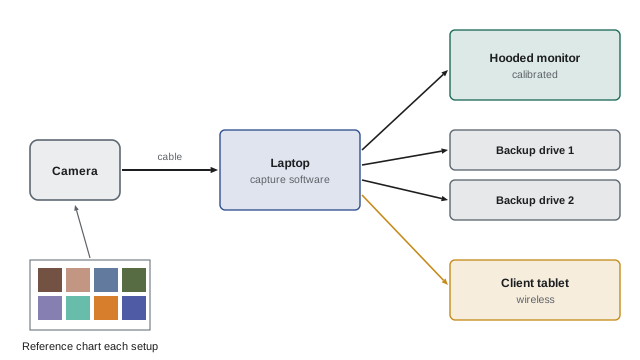
A tethered setup connects the camera to a laptop or desktop computer by USB cable, or sometimes wirelessly. Cables should be long (5 m or more with active extension), securely attached at the camera with a cable lock so a tug does not damage the port, and routed and taped to the floor so no one trips. The computer needs a fast processor and storage to handle large raw files quickly. A large external monitor, calibrated and hooded against reflections, shows images to the team; an additional monitor or tablet may serve the client area. Power must be reliable, with a battery or uninterruptible power supply on location. On location, a portable cart or case with a laptop, battery and shade hood allows tethering anywhere; wireless tethering reduces cables but is slower and less reliable with large files.
Tethering software
Tethering software controls capture, imports each image as it is taken, applies adjustments and displays it. Common applications include Capture One, which dominates professional fashion and commercial tethering, Lightroom Classic and camera makers' own utilities. Key features include immediate import and display of raw files; the ability to adjust exposure, white balance and style and apply them automatically to the next images; overlays to check framing against a layout or cover template (Lesson 7); focus checking at 100 %; rating and tagging selects; naming and organizing captures in a session; and live view on the computer screen to set framing. Some software allows a client to view images on a tablet or remotely through a web gallery.
The digital tech
A digital tech is a specialist responsible for capture, colour, files and data on set. Their tasks include setting up and testing the tethering station; profiling the camera and calibrating screens; managing white balance and colour with a grey card or colour checker; adjusting exposure and live styles; checking focus and sharpness; watching for problems such as dust, flare, stray hair, creases or visible clips; organizing and naming files; backing up continuously; marking selects with the client; and preparing files for handover. Experienced digital techs also act as a second set of eyes for the photographer and translate the client's comments into adjustments. On smaller shoots, the photographer or an assistant takes on these duties.
Colour management on set
Consistent, accurate colour begins at capture. At the start of each lighting setup, and whenever light changes on location, photograph a colour reference chart or grey card in the model's position. In the tethering software, set white balance from the grey patch and, for critical colour work such as e-commerce, apply a custom camera profile built from the chart. Calibrate screens to a known standard before the shoot and keep the viewing environment controlled, with the monitor hooded and away from coloured walls or direct sun. Compare important garments on screen with the physical samples under neutral light, and note any colours the camera struggles to reproduce so retouchers can correct them. Consistent colour across a series of images, especially across days or locations, depends on this discipline.
Live styles and previews
Clients and teams react to what they see. A neutral raw preview can look flat and fail to convey the intended mood, while a styled preview with contrast, colour grading and perhaps black and white conversion helps everyone see the vision. Digital techs build styles (presets) before the shoot based on the mood board and apply them to captures as they arrive, adjusting as needed. The styles should be realistic, reflecting what is achievable in post-production, and should not hide problems such as poor focus or exposure. The style is saved with the session and passed to retouchers as a reference for the final look.
File naming and session structure
A clear session structure keeps files organized and findable. Common practice includes naming each session with the date, client and job (for example, 20261015_Brand_SS27_Campaign); creating folders or collections for each look or setup; using a capture naming template that includes the job, look and sequence number; applying metadata such as copyright, photographer, client and keywords at import; and keeping selects, outputs and trash separate. Consistent naming allows the photographer, retoucher and client to refer to images precisely in feedback, for example "look 4, frame 0237".
Backups and data security
Raw files from a fashion shoot are the most valuable output of a very expensive day, and they exist only on set until they are backed up. Good practice is to save captures to the computer's internal drive while copying them in real time or at regular intervals to at least one external drive, and to create a second backup on a separate drive before leaving set, kept in a different bag or vehicle. Some photographers also record to memory cards in the camera's second slot as a simultaneous backup. After the shoot, files are copied to the studio's storage system and an offsite or cloud backup (the 3-2-1 rule: three copies, on two types of media, with one offsite). Unreleased fashion collections and campaigns are confidential; protect files with password-protected drives, encrypted transfers and agreements about not sharing images before the client allows.
Worked problem
Planning storage for a shoot
A campaign uses a 100-megapixel camera producing raw files of about 110 MB. The plan is 12 looks with about 250 frames each. How much storage is needed for one complete copy, and for three copies?
Show solution
- Frames: 12 looks × 250 frames = 3,000 frames.
- Size of one copy: 3,000 × 110 MB = 330,000 MB.
- Convert to gigabytes: 330,000 MB ÷ 1,000 = 330 GB.
- Add about 20 % for session files, previews and extra frames: 330 × 1.2 ≈ 396 GB, about 400 GB.
- Three copies (working, backup, offsite): 3 × 400 GB = 1.2 TB.
Answer: About 400 GB per copy and 1.2 TB for three copies; bring drives with spare capacity.
Selects and approval on set
On commercial shoots, the client and art director approve images on set before moving to the next look, so that the required deliverables are captured. The digital tech marks favourites with ratings or colour tags as the team reviews, and may build a simple selects collection or layout comparison. On editorials, the photographer and fashion editor mark favourites but usually make final selections after the shoot. Clear communication avoids conflicting instructions: decide in advance who has authority to approve, keep comments focused on the brief, and confirm that a look is complete before the model changes. Some productions now use remote approval, with clients viewing a live gallery from another city.
| Workflow stage | Who | Output |
|---|---|---|
| Station setup and calibration | Digital tech | Tested, calibrated system |
| Colour reference each setup | Digital tech, assistant | Grey card or chart frame |
| Capture and live style | Photographer, digital tech | Styled previews |
| Focus and detail checks | Digital tech | Problems caught on set |
| Selects and approval | Client, art director, photographer | Rated or tagged selects |
| Backups | Digital tech | Two or more copies before leaving set |
| Handover | Digital tech, producer | Session, styles and notes for retouching |
Handover to post-production
At the end of the shoot, the digital tech prepares a handover: the complete session or raw files with styles and adjustments; the selects marked by the client; colour chart frames for each setup; notes on colour issues, problems to fix and requests made on set; and the client's shot list matched to selected frames. This package goes to the photographer's studio, the client or a retouching studio. Contact sheets or a web gallery are often sent to the client within a day or two so they can confirm final selects for retouching (Lesson 11). Good handover saves time, cost and misunderstandings in post-production.
Tethering without a digital tech
Photographers working alone or with small teams can still tether. Practical approaches include a laptop on a stand near the camera position, a simple capture template and preset prepared in advance, an assistant watching the screen and backups, and a tablet for the stylist and model to see images. On fast-moving location shoots, photographers may shoot to cards and review periodically on a laptop instead of tethering continuously. The principles, accurate colour, organized files, reliable backups and timely feedback, remain the same.
Exposure discipline when tethering
A tethered screen can be misleading. Bright, large monitors make images look better than they are, and live styles can hide clipped highlights or crushed shadows. Digital techs rely on objective tools: the histogram, highlight and shadow warnings, and readings of key areas such as skin, the brightest garment and the background. For e-commerce, background values are often specified precisely, for example a white background reading at or very near pure white without spilling onto the garment. Checking exposure numerically at each setup avoids unpleasant surprises in post-production and keeps a series of images consistent.
Metadata and captions
Metadata travels with each image and supports credits, rights and searchability. At import, apply copyright notices, the photographer's name and contact details, the client and job, and usage notes if needed. For editorial stories, the stylist's credit sheet can be matched to frames later and added as captions or keywords, which helps the publication and the photographer's archive. Some clients require specific metadata fields for their asset management systems. Embedding metadata is not a substitute for written agreements, but it reminds anyone who finds the file who owns it and how to ask for permission.
Common on-set problems and fixes
Experienced digital techs learn to spot problems quickly. Typical issues include dust spots on the sensor, which appear in the same place in every frame and can be cleaned during a break; focus slightly behind the eyes, which may indicate autofocus settings to adjust; light flare from a background light reaching the lens, fixed with a flag; colour shifts when a window light changes as clouds pass; loose threads, lint or price tags on garments; and hair crossing the face. Calling attention to these issues calmly and immediately, at a natural pause, saves hours of retouching and prevents reshoots. A short checklist taped near the monitor can help less experienced teams.
Working on location without power
On remote locations, power is limited. Portable power stations can run a laptop and monitor for several hours, and batteries should be charged the night before and rotated during the day. Shading the screen with a hood or tent keeps it visible in sunlight, and keeping the laptop cool prevents slowdowns. When power runs short, switch to shooting on cards and review images periodically, making backups at each break.
Security for confidential shoots
Some campaigns and collections are kept secret until launch. Confidential shoots may restrict phones on set, limit who can see the monitor, require non-disclosure agreements from crew and talent, and use encrypted drives and secure transfer services. Behind-the-scenes posts must wait until the client gives permission. Digital techs play a central role in enforcing these rules and should confirm the client's requirements before the shoot day.
Common mistakes
MistakeLoose tether cable at the camera port.
InsteadUse a cable lock and tape cables down.
MistakeNo colour reference after a lighting change.
InsteadShoot a chart or grey card for each setup.
MistakeUnrealistic live styles that hide problems.
InsteadUse achievable styles and check focus at 100 %.
MistakeOnly one copy of files when leaving set.
InsteadMake at least two backups on separate drives.
MistakeConflicting approvals from several people.
InsteadAgree who approves before the shoot.
Summary and key terms
- Tethering displays each frame on a calibrated screen for the team.
- Secure cables, fast computers and reliable power support capture.
- Digital techs manage capture, colour, files and backups.
- Colour charts, profiles and calibrated screens keep colour consistent.
- Realistic live styles communicate the vision.
- Clear naming, backups and data security protect valuable files.
- Selects, approvals and a complete handover lead to post-production.
- Tethering
- Connecting the camera to a computer for live capture.
- Digital tech
- Specialist managing capture, colour and data.
- Cable lock
- Clamp protecting the camera port.
- Colour chart
- Reference card for white balance and profiles.
- Camera profile
- Colour calibration for a specific camera and light.
- Live style
- Preset applied to captures as they arrive.
- Session
- Organized project structure for a shoot.
- 3-2-1 rule
- Three copies, two media types, one offsite.
- Selects
- Chosen frames marked for approval.
- Handover
- Files and notes passed to post-production.
Practice problems
Work each problem on paper first, then reveal the answer to check.
Why tether on a fashion shoot?
Show answer
Real-time viewing, collaboration and approval.
What protects the camera port?
Show answer
A cable lock.
Name four digital tech tasks.
Show answer
Setup, colour, exposure, focus checks, files, backups, selects.
When should a colour chart be shot?
Show answer
At each setup and whenever light changes.
Why build live styles?
Show answer
To show the intended mood to the team.
Give a session naming example.
Show answer
Date_Client_Season_Job.
What is the 3-2-1 rule?
Show answer
Three copies, two media, one offsite.
Storage for 2,000 frames of 60 MB?
Show answer
120 GB.
Who approves on a commercial set?
Show answer
Client and art director.
What goes in a handover?
Show answer
Session, styles, selects, colour frames, notes.
Lesson quiz · 5 questions
Score 60% or more to complete this lesson.
Create a free account to save your progress, take quizzes and earn a certificate.