
ROB-110 · Lesson 4 of 12 · 29 min
Version control with Git and project structure
Robot software changes constantly. You tune a parameter, fix a bug in a driver, try a new obstacle-avoidance idea, and then at the end of a long day of testing the robot behaves well and nobody is sure exactly which version of which file made it work. Version control solves this problem. It records every change to your code with a description, an author and a date, lets you return to any earlier version, lets several people work on the same code without overwriting each other, and lets you say with certainty which code was running on the robot during a particular test. Git is the version control system used by ROS 2 itself and by almost every robotics team. This lesson teaches the Git workflow, how to organize ROS 2 code into repositories, and the licensing and ownership questions every robot programmer meets.
What Git records
Git stores the history of a project in a repository, a hidden .git directory inside your project folder. You edit files normally in the working tree. When a set of changes is ready, you choose which changes to include by adding them to the staging area, then record them as a commit: a snapshot of the whole project with a message explaining why it changed. Each commit points to the one before it, so the history forms a chain you can browse, compare and return to. Because every copy of a repository contains the full history, you can commit on a robot with no internet connection and share the commits later.
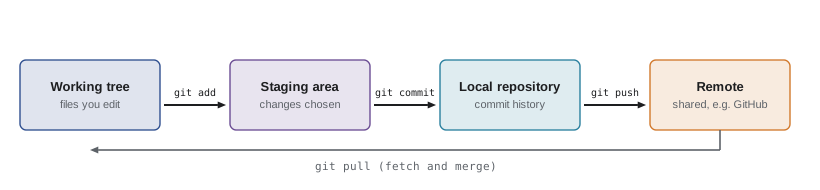
Git identifies every file version and every commit by a hash, a 40-character fingerprint computed from the content. Identical content always produces the same hash, and the tiniest change produces a completely different one. That is how Git can tell instantly whether two copies of a file are the same and why a commit ID, often abbreviated to its first seven characters, uniquely names a version of your project. The program below computes the ID that Git gives a small parameter file, using the same recipe Git uses for file contents, called blobs.
import hashlib


def git_blob_id(text):
    """Return the ID Git gives a file with this content."""
    data = text.encode()
    header = f"blob {len(data)}\0".encode()
    return hashlib.sha1(header + data).hexdigest()


v1 = "max_speed: 0.5\n"
v2 = "max_speed: 0.8\n"
print(git_blob_id(v1))
print(git_blob_id(v2))
print(git_blob_id(v1) == git_blob_id("max_speed: 0.5\n"))377bd92eb98b4a7c1cd068cc07f81ae97cf56e58 ac7db4ac8e28220f0b7b92e394a124c4fda0fc12 True
Changing one digit in the file changes the whole ID, while the same content always gives the same ID. You can check the first line yourself on any Linux computer: printf followed by the same text, piped into git hash-object --stdin, prints an identical hash. Git has traditionally used the SHA-1 hash function shown here and now also supports the stronger SHA-256 for new repositories.
The everyday workflow
Most days you use only a handful of Git commands. You configure your name and email once, so that your commits are attributed to you. Then, for each piece of work, you check what has changed, stage the changes you want, commit them with a clear message and share them.
# one-time set-up
git config --global user.name 'Ada Robotics'
git config --global user.email ada@example.com
# start tracking a package
cd ~/ros2_ws/src/my_robot
git init
# see what changed
git status
git diff
# stage and record a change
git add my_robot/obstacle_stop.py
git commit -m 'Stop when obstacle closer than 0.4 m'
# browse history
git log --oneline
Good commit messages explain why a change was made, not just what changed, because the diff already shows what. Stop when obstacle closer than 0.4 m tells a teammate what behaviour to expect; fixed stuff does not. Commit small, coherent changes often: a commit that changes the stopping distance and also reformats three unrelated files is hard to review and hard to undo. If you make a mistake, git restore discards uncommitted changes to a file, and git revert creates a new commit that undoes an earlier one without rewriting history.
| Command | Purpose |
|---|---|
| git status | Show which files are modified, staged or untracked |
| git diff | Show line-by-line changes not yet staged |
| git add | Stage changes for the next commit |
| git commit -m | Record staged changes with a message |
| git log --oneline | List commits, one per line |
| git switch -c name | Create and move to a new branch |
| git merge name | Combine another branch into the current one |
| git push / git pull | Send commits to, or fetch and merge from, a remote |
| git restore file | Discard uncommitted changes to a file |
| git revert commit | Undo an earlier commit with a new commit |
Branches, merging and code review
A branch is an independent line of development. The main branch, usually called main, should always contain code that works on the robot. When you start something new, such as a different path-following algorithm, you create a branch, commit your experiments there and merge the branch back into main only when it works. If the idea fails, you simply switch back to main and the robot's working code was never touched. Several people can work on separate branches at once.
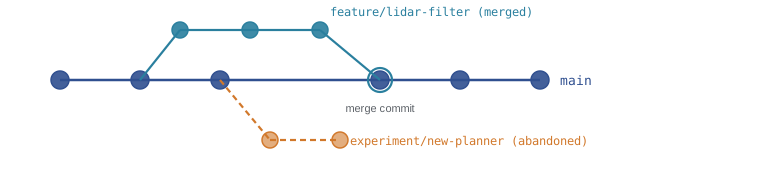
When two branches change the same lines of the same file differently, Git cannot decide which to keep and reports a merge conflict. It marks the conflicting sections in the file, and you edit them to the correct result, then add and commit. Conflicts are normal and not dangerous, but they are easier to resolve when branches are short-lived and merged often.
Teams usually share code through a hosting service such as GitHub or GitLab, which keeps a central remote copy of each repository. You clone a repository to get your own copy, push your branch to the remote and open a pull request (called a merge request on GitLab), which invites teammates to review the changes before they are merged. Reviews catch bugs, spread knowledge of the code through the team and are an excellent way to learn. Hosting services can also run automated checks, called continuous integration, that build the code and run its tests on every pull request; ROB-360 builds a full pipeline of this kind.
Structuring a ROS 2 project
ROS 2 code is organized into packages, each a directory with a description file and its source code, and packages live in the src directory of a workspace, which lesson 8 explains in detail. The question for version control is how packages map to repositories. Small projects often keep all their packages in one repository. Larger ones split them: a robot's drivers, its description files and its applications may live in separate repositories with separate owners and release schedules, and you also depend on packages written by others.
The vcs tool, installed as python3-vcstool, manages many repositories at once from a simple file, conventionally ending in .repos, that lists each repository's URL and the version to use. A new teammate can recreate the entire set of source code with one command, and you can record exactly which version of every repository was on the robot during an experiment.
repositories:
  my_robot:
    type: git
    url: https://github.com/example-lab/my_robot.git
    version: main
  my_robot_description:
    type: git
    url: https://github.com/example-lab/my_robot_description.git
    version: v1.2.0
Some files should never be committed. Building a ROS 2 workspace creates build, install and log directories that can be regenerated at any time and change on every build; Python creates __pycache__ directories. A .gitignore file lists names and patterns for Git to ignore. Also keep secrets, such as passwords and access tokens, out of repositories: anything committed stays in the history even after you delete the file, and public repositories are scanned constantly by people looking for credentials.
Worked problem
Why recorded data does not belong in Git
A team records three 1.2 GB data files each test day and commits them to their code repository. After 20 test days, how much history must every new teammate download when they clone the repository?
Show solution
- Data per day: \( 3 \times 1.2 = 3.6 \) GB.
- After 20 days: \( 20 \times 3.6 = 72 \) GB.
- Git keeps every committed version forever, so deleting the files later does not shrink the history.
- Every clone downloads all 72 GB, and every operation that scans history slows down.
Answer: About 72 GB, and it keeps growing. Store recordings on a file server or cloud storage, or use Git Large File Storage, and commit only code and small configuration files.
Versions, releases and knowing what ran
When a set of commits is ready to be used by others or deployed to robots, you mark it with a tag, a permanent name for a commit such as v1.3.0. ROS 2 packages use semantic versioning, written MAJOR.MINOR.PATCH. You increase the patch number for bug fixes that change nothing else, the minor number when you add features that existing users can ignore, and the major number when you make a change that could break code that depends on yours, such as renaming a topic or changing a message definition. The version also appears in each package's package.xml file.
Worked problem
Choosing the next version
Your driver package is at version 2.4.1. Decide the next version for each change: (a) fixing a crash when the serial cable is unplugged; (b) adding an optional battery-voltage topic; (c) renaming the velocity topic from cmd_vel to base/cmd_vel.
Show solution
- (a) A bug fix with no change to the interface is a patch: 2.4.2.
- (b) A new optional feature that existing users can ignore is a minor change: 2.5.0, resetting the patch number.
- (c) Renaming a topic breaks every program that publishes to the old name, so it is a major change: 3.0.0.
Answer: 2.4.2, 2.5.0 and 3.0.0 respectively.
When you run an experiment, record the commit that was running. The command git describe --dirty prints the nearest tag, how many commits have been made since it, the abbreviated commit hash and the word dirty if there are uncommitted changes. Saving that string in your experiment notes or in the metadata of your recorded data means that months later you can rebuild exactly the code that produced a result, which is the foundation of reproducible robotics research.
Licences and who owns the code
Open-source code comes with a licence that says what others may do with it. Most ROS 2 packages use the Apache License 2.0, which allows almost any use, including in commercial products, provided the licence and notices are kept, and which includes an explicit patent grant. The BSD licences are similarly permissive. Copyleft licences such as the GPL require that software built from the code be released under the same licence when it is distributed, which some companies avoid for products. When you create a package, choose a licence deliberately and record it in package.xml and a LICENSE file, and check the licences of everything you depend on before shipping a product.
Who owns the code you write is a separate question from its licence. In Canada, the Copyright Act makes the employer the first owner of copyright in a work made by an employee in the course of employment, unless they agree otherwise, so code you write in a robotics job usually belongs to your employer. Contractors and freelancers generally own what they write unless their contract assigns it. Universities set their own intellectual property policies, which vary widely: some leave ownership with students and researchers, others claim a share when university resources are used, so read your institution's policy before building a start-up on a class project.
Contributing to open-source projects is one of the best ways to learn robotics software and to show employers what you can do. Many ROS 2 projects ask contributors to certify that they have the right to submit their code, for example by adding a sign-off line to each commit under the Developer Certificate of Origin. If you are employed, check that your employer permits the contribution first.
Common mistakes
MistakeCommitting build, install and log directories from a ROS 2 workspace.
InsteadAdd them to .gitignore; they are regenerated by every build.
MistakeExperimenting directly on main and breaking the robot's working code before a demonstration.
InsteadCreate a branch for each experiment and merge only what works.
MistakeWriting commit messages such as update or fixes.
InsteadExplain the purpose of the change, such as Limit turn rate to 1 rad/s to reduce wheel slip.
MistakeCommitting passwords, access tokens or large recorded data files.
InsteadKeep secrets in environment variables or local files listed in .gitignore, and store data outside Git or in Git LFS.
MistakeNot recording which code version ran during an experiment.
InsteadSave the output of git describe --dirty with your notes and recorded data.
Summary and key terms
- Git records snapshots of a project as commits; changes move from the working tree to the staging area to the local repository and then to a shared remote.
- Commits and file versions are identified by content hashes, so identical content always has the same ID.
- Branches isolate experiments; merging combines them, and conflicts are resolved by editing the marked lines.
- Pull requests and code review, backed by automated checks, keep shared code healthy.
- ROS 2 packages live in a workspace's src directory; .repos files and the vcs tool manage many repositories at once.
- Semantic versioning signals the impact of a release; tags and git describe record exactly what ran on the robot.
- Choose and record a licence deliberately; employment usually gives your employer ownership of code you write at work.
- Repository
- A project folder together with its complete version history.
- Commit
- A recorded snapshot of the project with a message, author and date.
- Staging area
- The set of changes selected to go into the next commit.
- Hash
- A fixed-length fingerprint computed from content, used by Git to identify versions.
- Branch
- A movable name for a line of development.
- Merge conflict
- A situation in which two branches changed the same lines differently and a person must choose the result.
- Remote
- A shared copy of a repository, typically on a hosting service.
- Pull request
- A request for teammates to review and merge changes from a branch.
- Semantic versioning
- Version numbers of the form MAJOR.MINOR.PATCH that signal the impact of changes.
- .repos file
- A YAML file listing repositories and versions for the vcs tool to fetch.
Practice problems
Work each problem on paper first, then reveal the answer to check.
Put these in order for recording a change: git commit, edit the file, git add.
Show answer
Edit the file, git add, git commit.
What does git status tell you that git log does not?
Show answer
The current state of the working tree and staging area: modified, staged and untracked files.
Write three lines for a .gitignore file in a ROS 2 workspace.
Show answer
build/, install/ and log/ (and __pycache__/).
Your package is at 0.9.3 and you add a new optional parameter. What is the next version?
Show answer
0.10.0.
Why does changing a message definition usually call for a major version bump?
Show answer
Programs built against the old definition can no longer communicate correctly, so dependent code breaks.
What should you do if a merge reports a conflict in config.yaml?
Show answer
Open the file, edit the marked sections to the correct combined content, then git add and git commit.
A teammate deletes a committed password file in a new commit. Is the password safe?
Show answer
No. It remains in the history; it must be changed, and the history rewritten if the repository is shared.
What does git describe --dirty print, and why is it useful in an experiment log?
Show answer
The nearest tag, commits since, abbreviated hash and dirty if uncommitted changes exist, which identifies exactly what code ran.
Name the licence used by most ROS 2 packages and one condition it imposes.
Show answer
Apache 2.0; you must keep the licence and copyright notices when redistributing.
Two files differ only in one character. Will Git give them the same blob ID?
Show answer
No. Any change in content produces a completely different hash.
Lesson quiz · 5 questions
Score 60% or more to complete this lesson.
Create a free account to save your progress, take quizzes and earn a certificate.