
VIS-120 · Lesson 7 of 12 · 25 min
Ingest, verification and file organization
The moments between finishing a shoot and having safe, organized copies of the files are the most dangerous in any workflow. Cards are lost, damaged, accidentally formatted or overwritten; copies fail silently; files are dumped into folders with names like "New Folder (3)" and never found again. Professional workflows treat this stage, called ingest or offload, as a deliberate process: copy, verify, rename, organize, back up, and only then reuse the cards. This lesson covers ingest software and verification with checksums, file naming conventions, folder structures for stills and video, the role of a digital imaging technician (DIT) on film sets, and habits that keep a growing collection organized.
The ingest process
A robust ingest follows a consistent sequence:
- Protect the card: set the write-protect switch on SD cards where available, and never browse or edit files on the card itself.
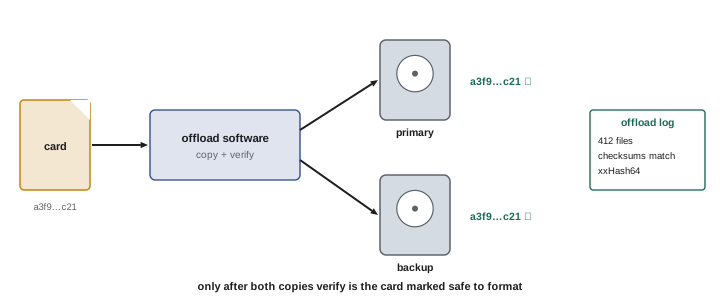
- Copy all files, including folders and sidecar files, to at least two separate drives, ideally at the same time.
- Verify that the copies match the originals exactly, using checksums.
- Rename files and add basic metadata (copyright, creator, location, job) during import.
- Organize files into the project's folder structure.
- Back up according to the backup plan (Lesson 11).
- Only after verified copies exist in two places, mark the card as ready for reuse, and format it in the camera before the next shoot.
Some photographers keep cards unformatted until the job is delivered, using cards as an extra temporary backup. Whatever the system, it should be consistent so that a full card can never be mistaken for an empty one: many professionals turn cards upside down in their wallets or use coloured labels to mark used cards.
Verification and checksums
Copying files can fail without warning: a cable glitch, a failing drive or a software error can produce a file that looks correct but is corrupted, and the problem may not be discovered until months later. Checksums prevent this. A checksum, or hash, is a short value calculated from every bit of a file; if even one bit differs, the checksum changes. Verified copying calculates the checksum of each source file and each copy and compares them.
Common algorithms include MD5, an older cryptographic hash still widely used for file verification; SHA-1 and SHA-256, stronger cryptographic hashes; and xxHash, a very fast non-cryptographic hash popular in film and television offloads because it keeps up with fast drives. For detecting accidental corruption, all of these are effective; cryptographic strength matters only when protecting against deliberate tampering. Tools such as Hedge, ShotPut Pro, Silverstack and DaVinci Resolve's Clone tool perform verified offloads to multiple destinations and produce reports listing every file and its checksum, which can travel with the media as proof of a good copy. Simple drag-and-drop copying in a file browser does not verify contents.
Worked problem
Planning offload time
A shoot produces two 512 GB cards per day, each about 90 % full. The card reader sustains 800 MB/s, and the destination drives sustain 500 MB/s each. Verification requires reading the copies back. Estimate the offload time per day if both destinations are written simultaneously.
Show solution
- Data per day: 2 × 512 GB × 0.9 ≈ 922 GB.
- Copying is limited by the slower drives: 500 MB/s.
- Copy time: 922,000 MB / 500 MB/s ≈ 1,844 s ≈ 31 minutes.
- Verification reads the copies back, roughly doubling the time: about 62 minutes.
- Allow about 1 to 1.5 hours per day, and use faster drives or more readers if the schedule is tight.
Answer: About an hour per day including verification.
The digital imaging technician
On film, television and large commercial productions, a digital imaging technician (DIT) or data wrangler manages media on set. Responsibilities include receiving camera cards or magazines with clear handoff procedures, performing verified offloads to multiple drives, checking footage for focus, exposure, noise and technical problems, applying on-set looks and LUTs, generating dailies and proxies for editors and producers, maintaining logs and reports, and returning cleared cards to the camera team. Clear communication between camera assistants and the DIT, often using tape labels on cards marked "full", "copied" and "cleared", prevents the catastrophic error of formatting media that has not been safely copied.
File naming conventions
Camera file names such as DSC_1234.NEF repeat every 10,000 frames and are duplicated across cameras, so two different images can easily have the same name. Renaming during ingest gives each file a unique, informative name. A common pattern combines the capture date, a project or client code, and a sequence number, for example 2026-10-22_SmithWedding_0001.CR3. Good naming rules include:
- Use dates in ISO 8601 order (year-month-day), so names sort chronologically.
- Keep names short and avoid spaces and special characters such as / \ : * ? " < > |, which cause problems on some operating systems, servers and websites; use hyphens or underscores instead.
- Use leading zeros in sequence numbers (0001 rather than 1) so files sort correctly.
- Keep the original camera file name in metadata if it may be needed.
- Use consistent suffixes for derivatives, such as _edit, _web or _print, and never reuse a master's name for an export.
For video, camera clip names often already include camera letter, reel or card number and clip number (for example A003C012), which editors use to match media; many productions keep these original names unchanged and add organization through folders and metadata instead.
Folder structures
A clear folder structure lets anyone find files quickly. Common approaches organize by date (year, then date and shoot name), by client or project, or by a combination. A simple structure for a photography business might be:
- 2026 / 2026-10-22_SmithWedding / 01_RAW, 02_SELECTS, 03_EDITED, 04_EXPORTS (with web and print subfolders), 05_DOCS.
For video productions, a standard project template keeps camera media, audio, proxies, project files, graphics, music, exports and documents in predictable places, and camera media is organized by shoot day and camera or card, for example Day01 / A_Cam / A001. Whichever structure is chosen, it should be documented and used consistently, ideally created automatically by ingest software from a template. Catalog software (Lesson 8) adds keywords, ratings and collections on top of folders, but folders remain the foundation, because files must be findable even without the catalog.
| Folder | Contents | Notes |
|---|---|---|
| 01_RAW (or CAMERA) | Original camera files as ingested | Never edited; source of truth |
| 02_SELECTS | Chosen images or clip lists | Often managed in the catalog instead |
| 03_WORK | Layered PSD, TIFF masters, project files | Versioned working files |
| 04_EXPORTS | JPEG, web, print, video deliverables | Organized by destination |
| 05_DOCS | Briefs, releases, contracts, reports | Includes offload logs |
Culling and selection
After ingest comes culling: choosing the images or takes worth keeping and editing. A wedding may produce 3,000 frames from which 500 are delivered; a documentary may have 100 hours of footage for a 90-minute film. Fast culling tools display previews quickly and let the editor tag images with ratings (one to five stars), colour labels or picks and rejects using keyboard shortcuts. A typical approach is two or more passes: first rejecting obvious failures such as missed focus, closed eyes or test shots, then choosing the best among similar frames, then selecting final images. AI-assisted culling tools now group similar images and flag blinks and focus problems, but final selection remains an editorial and creative decision. Rejected images may be deleted after delivery, or kept in archive, depending on business policy and storage costs.
In Canada, photographers who capture identifiable people for commercial use should obtain model releases, and private-sector privacy laws such as PIPEDA, Quebec's Law 25 and provincial laws in Alberta and British Columbia govern personal information, which can include identifiable images of clients and their guests; storing and transferring client files securely is part of handling that information responsibly.
Ingest on location
Location work adds challenges: limited time, no reliable power, and the risk of theft or damage while travelling. A practical location kit includes a laptop or a dedicated backup device, two fast portable SSDs, a card reader, spare cables and a power bank or charger. At the end of each day, or between sessions at an event, cards are offloaded to both SSDs with verification, and the SSDs are carried separately, for example one in a camera bag and one in personal luggage, so that a single theft or accident cannot take both. Some photographers also upload selected or all images to cloud storage over hotel or mobile connections when bandwidth allows. Cards themselves are kept until both copies have reached the studio safely, providing a third copy in transit.
On larger productions, the DIT station is a small workshop of its own, with powerful laptops or workstations, RAID arrays, multiple card readers, calibrated monitors and uninterruptible power supplies. The DIT's reports, listing every clip, its checksum, and any technical notes such as soft focus or exposure warnings, travel with the shuttle drives to post-production. When problems are spotted on set, such as a dead pixel, a mis-set frame rate or a soft lens, the DIT alerts the camera team immediately, while the problem can still be fixed and scenes reshot.
Importing into catalogues
Most still photographers ingest through catalogue software, which can copy files from cards to one location and simultaneously make a second copy elsewhere, rename them, apply metadata presets and develop presets, and build previews for fast browsing. The import options include copying (or converting to DNG) into a dated or project folder structure, or adding files already copied by a dedicated offload tool. Many professionals prefer to use a dedicated verified offload tool first and then add the verified files to the catalogue, because catalogue imports generally do not verify copies with checksums. Building standard-sized or 1:1 previews during import, and smart previews for editing away from the main storage, saves time later.
Keeping the system consistent
Systems fail when they depend on memory. Writing the ingest procedure down as a short checklist, and following it every time, ensures that steps are not skipped when tired or rushed at the end of a long shoot. Assistants and second shooters should follow the same checklist, use the same naming conventions and folder templates, and label cards the same way. Periodic reviews, for example at the end of each season, catch drifting habits and improve the system as equipment and software change.
Duplicates and file hygiene
Collections tend to accumulate duplicates: images imported twice, exports saved in several places, copies made for a client folder. Duplicates waste storage and backup capacity and cause confusion about which file is the real master. Catalogue software can detect duplicates during import, and dedicated tools find identical files by checksum or similar images by content. A good habit is to keep exports in clearly defined export folders that can be deleted and regenerated from masters at any time, so that only masters and essential working files need long-term protection. Temporary files, render caches and abandoned experiments should be cleared regularly, after confirming they are not needed.
Measuring the workflow
Timing each stage of ingest for a few typical jobs, from removing cards to having verified, renamed and backed-up files in the catalogue, shows where time goes and where improvements pay off. Faster readers, simultaneous offloads to two drives, better presets or a cleaner folder template can often halve ingest time, which matters when a busy season brings several shoots a week.
Common mistakes
MistakeCopying by drag and drop without verification.
InsteadUse offload software with checksum verification.
MistakeFormatting a card after a single copy.
InsteadWait until verified copies exist on two drives.
MistakeKeeping camera names like DSC_1234 for everything.
InsteadRename with date, project and sequence during ingest.
MistakeUsing spaces and special characters in names.
InsteadUse hyphens or underscores and ISO dates.
MistakeCreating ad hoc folders for each shoot.
InsteadUse a documented, consistent folder template.
Summary and key terms
- Ingest copies, verifies, renames, organizes and backs up before cards are reused.
- Checksums detect any change in a file's contents.
- xxHash, MD5 and SHA algorithms are used for verified offloads.
- DITs manage media, verification and dailies on set.
- File names should be unique, sortable and free of special characters.
- Consistent folder templates make files findable without a catalog.
- Culling uses ratings and multiple passes to select the best work.
- Ingest
- Transferring media from cards into a managed workflow.
- Offload
- Copying camera media to storage, especially on set.
- Checksum
- A value calculated from a file to detect changes.
- xxHash
- Fast non-cryptographic hash used in media offloads.
- Verified copy
- A copy whose checksum matches the source.
- DIT
- Digital imaging technician managing media on set.
- Dailies
- Footage from each day prepared for review.
- ISO 8601
- Date format year-month-day.
- Culling
- Selecting images or takes to keep.
- Folder template
- A standard structure created for each project.
Practice problems
Work each problem on paper first, then reveal the answer to check.
List the main ingest steps.
Show answer
Copy, verify, rename, organize, back up, then reuse cards.
What does a checksum detect?
Show answer
Any change in a file's bits.
Why is xxHash popular on film sets?
Show answer
It is very fast.
Does drag and drop verify copies?
Show answer
No.
600 GB at 400 MB/s, plus verification: time?
Show answer
About 25 min copy, about 50 min total.
Name three DIT responsibilities.
Show answer
Offloads, checking footage, dailies, logs, LUTs.
Rewrite "Oct 22 2026 Smith wedding 1.cr3" as a good file name.
Show answer
2026-10-22_SmithWedding_0001.cr3.
Why use leading zeros?
Show answer
So files sort correctly.
Why keep folders even with a catalog?
Show answer
Files must be findable without the catalog.
What is the first culling pass?
Show answer
Rejecting obvious failures.
Lesson quiz · 5 questions
Score 60% or more to complete this lesson.
Create a free account to save your progress, take quizzes and earn a certificate.