
CON-260 · Lesson 3 of 12 · 30 min
Authoring tools and open standards
Models are created in authoring software, reviewed in coordination software and exchanged between dozens of firms, each using its own tools. A structural engineer may model in one product, the steel detailer in another, the mechanical contractor in a third, and the owner's facility management system may use none of them. This lesson looks at the families of authoring tools a construction manager will meet and, more importantly, at the open standards that let information move between them: IFC, BCF, IDS, COBie and the openBIM principles behind them. The aim is not to teach any product, but to understand what can and cannot be exchanged reliably, and how to write requirements that survive the trip.
Families of authoring tools
Authoring tools fall into a few broad families. Architectural and multidisciplinary building modelers create walls, floors, roofs, rooms and building systems with parametric families. Structural modeling and detailing tools model steel connections, reinforcing and precast elements to fabrication level. MEP fabrication tools model ductwork, piping and electrical containment using manufacturers' content and can output cutting lists and spool drawings. Civil and infrastructure tools model terrain, corridors, alignments and utilities. Each family has several competing products, and many firms use more than one.
| Family | Typical outputs | Typical authors | Common exchange |
|---|---|---|---|
| Architectural / multidisciplinary | Design models, drawings, schedules, room data | Architects, engineers | IFC, native files, PDF |
| Structural detailing | Steel and precast shop drawings, CNC files, rebar schedules | Steel detailers, precasters, rebar detailers | IFC, CIS/2 (legacy), NC/DSTV files |
| MEP fabrication | Spools, hanger layouts, cut lists, prefab assemblies | Mechanical, plumbing, electrical trades | IFC, native, fabrication data |
| Civil and infrastructure | Surfaces, corridors, alignments, pipe networks | Civil engineers, surveyors | LandXML, IFC 4.3, native |
| Visualization and review | Renderings, walkthroughs, mark-ups | Designers, contractors, owners | IFC, native, image formats |
Native file formats are the proprietary formats each tool saves in. They carry the full intelligence of the model, including parametric relationships and constraints, but they generally open only in the same product (and sometimes only in the same or newer version). A construction manager should never assume that a model can be opened, let alone edited, by another party without checking software and versions in the BIM execution plan.
Why open standards matter
Openness matters for three reasons. First, project teams change: the designer, contractor and owner rarely use the same software, and an owner may keep a building for decades after the authoring product has changed or disappeared. Second, competition: an owner that accepts only one vendor's files locks itself and its contractors into that vendor. Third, archiving: a public owner that must retain records for many years needs formats that will still be readable.
The international body for open BIM standards is buildingSMART International, a not-for-profit organization with national chapters, including buildingSMART Canada and buildingSMART USA. Its approach, called openBIM, rests on a few principles: interoperability is key to digital transformation; open and neutral standards should be developed to support it; reliable data exchanges depend on independent quality benchmarks; collaboration workflows are enhanced by open and agile data formats; flexibility of choice of technology creates more value for all stakeholders; and sustainability is safeguarded by long-term interoperable data standards.
IFC: Industry Foundation Classes
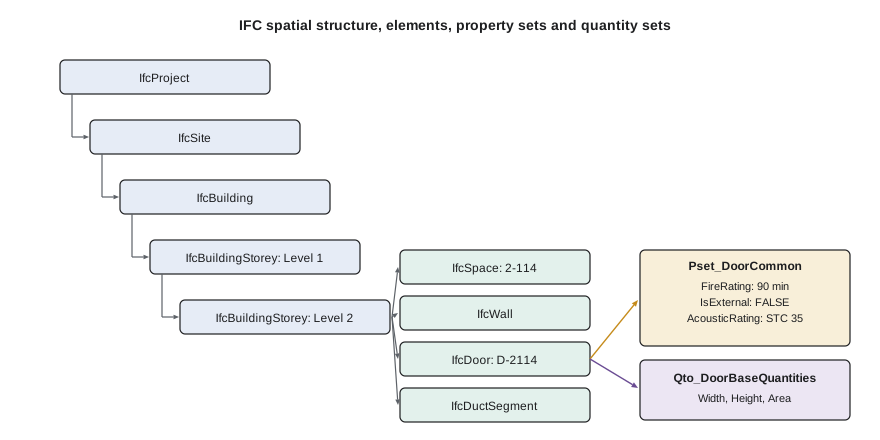
Industry Foundation Classes (IFC) is the open, vendor-neutral data schema for exchanging building and infrastructure information. It defines entities (such as IfcWall, IfcDoor, IfcBeam, IfcSpace and IfcDuctSegment), their properties and their relationships, and it can be written in several file encodings, the most common being the text-based STEP format with the extension .ifc. IFC 4.3, which extends the schema to infrastructure such as roads, railways, bridges and ports, was approved by buildingSMART and published by ISO as ISO 16739-1:2024.
An IFC file contains not just geometry but a spatial structure (project, site, building, story, space), element types, property sets and quantity sets. Property sets beginning with Pset_ are standardized by buildingSMART; for example, Pset_DoorCommon includes FireRating, IsExternal and AcousticRating. Quantity sets beginning with Qto_ hold measured quantities such as length, area and volume. Projects can add their own property sets for owner-specific data.
Worked problem
Reading an IFC entity
A door exported to IFC appears in the file (simplified) with: entity IfcDoor; Name "D-2114"; ObjectType "HM single flush 90 min"; OverallHeight 2134 mm (7 ft 0 in); OverallWidth 915 mm (3 ft 0 in); contained in IfcBuildingStorey "Level 2"; property set Pset_DoorCommon with FireRating "90 min", IsExternal FALSE; and a custom property set HSM_Asset with Manufacturer "Example Door Co." and AssetCode "DR-02-114". What can an estimator, a code reviewer and a facility manager each take from this record?
Show solution
- Estimator: the entity class and type identify it as a hollow-metal single door of a specified size, so it can be counted and priced by type.
- Code reviewer: Pset_DoorCommon gives the fire rating and the story containment shows where it is, so rated doors can be checked against the fire separation plan.
- Facility manager: the custom property set gives the manufacturer and an asset code that can be loaded into the maintenance system.
- Because the data are in standard and agreed property sets, any IFC-capable tool can read them without the authoring software.
Answer: One IFC record serves several users. The value depends on agreeing which property sets and values are required, and checking that they are filled.
IFC is powerful but imperfect. Exports depend on how well the authoring tool maps its internal objects to IFC classes and on the export settings chosen. A common failure is a model in which everything exports as IfcBuildingElementProxy, a generic class, because modelers used the wrong categories. Another is geometry exported correctly but with properties missing. IFC is excellent for coordination, quantities and handover, but round-tripping (exporting, editing in another tool and importing back with full parametric behavior) remains limited.
IFC certification by buildingSMART tests whether software imports and exports particular exchange requirements correctly. Asking which IFC version and which model view definitions a product is certified for is a sensible question during procurement. A model view definition (MVD) is a subset of the IFC schema for a particular purpose; the most widely used for IFC 4 is the Reference View, intended for coordination and viewing rather than editing.
BCF: BIM Collaboration Format
Coordination produces issues: a clash, a missing opening, a question about a detail. Emailing screenshots loses the context. The BIM Collaboration Format (BCF), also from buildingSMART, packages an issue as a small file or an online record containing a title, description, status, assignee, due date, comments, a camera viewpoint and the identifiers (GUIDs) of the elements involved. Anyone opening the issue in a BCF-capable tool is taken to the same view with the same elements selected, regardless of which software created the issue.
BCF can be exchanged as files (.bcfzip) or through a web service API that synchronizes issues between platforms. Using BCF lets a design team keep working in its own authoring software while the contractor manages coordination in a separate tool, without losing track of who must do what.
IDS: Information Delivery Specification
Requirements written in prose ("all doors shall have a fire rating") are hard to check automatically. The Information Delivery Specification (IDS), a buildingSMART standard approved in 2024, expresses information requirements in a machine-readable XML format. An IDS file states, for example, that every IfcDoor on a project must have Pset_DoorCommon.FireRating with a value from a list, or that every IfcSpace must have a name matching a pattern. Checking software can then test an IFC model against the IDS and report which elements fail.
Worked problem
Turning a requirement into a check
An owner's information requirements say: "Every mechanical equipment item shall carry a manufacturer, model number, serial number (at handover) and the owner's asset tag in the format ME-###." The model at handover contains 312 IfcFlowMovingDevice and IfcUnitaryEquipment elements. An IDS-based check reports 312 with manufacturer, 305 with model number, 270 with serial number and 296 with an asset tag matching the pattern. How many elements fail, at minimum, and what should the contractor do?
Show solution
- Failures by property: model number 312 − 305 = 7; serial number 312 − 270 = 42; asset tag 312 − 296 = 16.
- Some elements may fail more than one test, so at least 42 elements fail (the largest single shortfall) and at most 7 + 42 + 16 = 65.
- The contractor should export the failing list, assign it to the mechanical subcontractor, collect serial numbers from nameplates and correct asset tags before re-submitting.
Answer: At least 42 equipment items fail. A machine-readable specification turns handover review from a manual spot check into a complete, repeatable test.
COBie: data for operations
Construction Operations Building information exchange (COBie) is a structured format for delivering the asset information a facility manager needs: spaces, zones, equipment types and components, systems, spare parts, warranties, documents and maintenance jobs. It was developed for U.S. federal owners and is now included in the National BIM Standard–United States; it is also used in Canada, the United Kingdom and elsewhere. COBie can be delivered as an IFC file or, more commonly, as a spreadsheet with standard worksheets.
| COBie worksheet | Contents | Example row |
|---|---|---|
| Facility | The building or site | Northgate Medical Pavilion |
| Floor | Levels | Level 2 |
| Space | Rooms and spaces | 2-114 Clean utility |
| Type | Types of equipment and products, with warranty and manufacturer | AHU type 1, 10,000 L/s |
| Component | Individual installed items, with serial numbers and locations | AHU-1, serial 12345, roof |
| System | Groups of components that serve a function | Supply air system 1 |
| Job | Maintenance tasks with frequency | Replace filters, quarterly |
COBie is simple in principle but laborious in practice. Most of the data, such as serial numbers, installation dates and warranty start dates, exist only after installation and must be collected in the field. Projects that leave COBie to the last month before handover usually deliver it late and incomplete. Lesson 7 shows how field apps can capture this information as equipment is installed and commissioned.
Other exchange formats
Several other formats appear on construction projects. LandXML carries civil data such as surfaces and alignments, and is still widely used for machine control (CON-250). gbXML carries building geometry for energy analysis. Point clouds use formats such as E57 (an open ASTM standard) and LAS. PDF remains the legal document of record on most projects, so models and drawings must be kept consistent. Proprietary formats from the major vendors are often exchanged directly when all parties use the same tool, which is convenient but creates dependence.
Writing software and exchange requirements
Interoperability problems are cheapest to solve before the project starts. The BIM execution plan (Lesson 4) should list, for each party, the authoring software and version, the formats to be exchanged, the IFC version and export settings, the property sets required, the coordinate system and origin, and the frequency of exchange. A short test exchange at the start, in which each party exports a sample model and the coordinator federates and checks it, catches most problems before they affect real work.
Worked problem
A test exchange
At kickoff, five discipline models are exported to IFC 4 and federated. The coordinator finds: the structural model is 1.2 m east and 0.3 m higher than the architectural model; the mechanical model exports all equipment as IfcBuildingElementProxy; the electrical model is in imperial units while all others are metric; and the civil model has no building stories. What should be fixed before coordination starts?
Show solution
- Agree and apply the shared project base point and elevation datum so the structural model aligns.
- Correct the mechanical model categories or export mapping so equipment exports as the proper IFC classes.
- Confirm the units of each model and that the import converts them correctly, or have the electrical model exported in metric.
- Accept that the civil model is a site model, but make sure it shares the coordinate system and survey point.
Answer: Each of these problems would have produced false clashes or missing data later. A test exchange costs a few hours and saves weeks.
Finally, the construction manager should remember that open standards are tools, not guarantees. A perfectly valid IFC file can still contain wrong information. Exchange standards make checking possible; people still have to do the checking.
Common mistakes
MistakeAssuming any party can open native files.
InsteadList software and versions in the BIM execution plan and agree exchange formats.
MistakeAccepting IFC exports without checking classes and properties.
InsteadRun a test exchange and check that elements export to the right classes with required properties.
MistakeEmailing screenshots to track coordination issues.
InsteadUse BCF so issues carry viewpoints, element identifiers, status and assignees across tools.
MistakeWriting information requirements only in prose.
InsteadExpress key requirements in IDS so models can be checked automatically.
MistakeLeaving COBie data collection to the end of the job.
InsteadCapture asset data in the field as equipment is installed and commissioned.
Summary and key terms
- Authoring tools fall into families: architectural, structural detailing, MEP fabrication, civil and review.
- Native files carry full intelligence but tie users to a product and version.
- buildingSMART develops open standards on openBIM principles.
- IFC is the open schema for building and infrastructure data; IFC 4.3 is ISO 16739-1:2024.
- Property sets (Pset_) and quantity sets (Qto_) carry data with IFC elements.
- BCF carries coordination issues with viewpoints and element identifiers between tools.
- IDS expresses information requirements in a machine-readable form for automated checks.
- COBie delivers asset data for operations, much of which must be captured in the field.
- Native format
- The proprietary file format of an authoring tool.
- openBIM
- buildingSMART's approach to collaboration based on open, neutral standards.
- IFC
- Industry Foundation Classes, an open schema for building and infrastructure information.
- Property set
- A named group of properties attached to an IFC element.
- Model view definition (MVD)
- A subset of IFC defined for a particular exchange purpose.
- IfcBuildingElementProxy
- A generic IFC class used when an element has no more specific class.
- BCF
- BIM Collaboration Format, an open format for coordination issues.
- IDS
- Information Delivery Specification, a machine-readable format for information requirements.
- COBie
- Construction Operations Building information exchange, a format for asset data.
- E57
- An open ASTM format for point clouds and imagery.
Practice problems
Work each problem on paper first, then reveal the answer to check.
Which ISO standard publishes IFC 4.3?
Show answer
ISO 16739-1:2024.
What does an IFC property set beginning with Pset_ indicate?
Show answer
A property set standardized by buildingSMART.
Why might a whole model export as IfcBuildingElementProxy?
Show answer
Elements were modeled in generic or wrong categories, or export mapping was not set.
What does a BCF issue contain?
Show answer
Title, description, status, assignee, comments, viewpoint and element identifiers.
What problem does IDS solve?
Show answer
It makes information requirements machine-readable so models can be checked automatically.
Name four COBie worksheets.
Show answer
Facility, Floor, Space, Type, Component, System, Job (any four).
A handover check finds 400 components: 380 with serial numbers and 392 with warranty dates. What is the minimum number failing?
Show answer
At least 20 (the larger shortfall).
Which format is commonly used for civil surfaces and alignments?
Show answer
LandXML.
List four items a BIM execution plan should state about exchange.
Show answer
Software and versions, formats, IFC version and settings, property sets, coordinates and origin, frequency.
Why is round-tripping through IFC limited?
Show answer
Parametric relationships and constraints do not transfer fully between tools.
Lesson quiz · 5 questions
Score 60% or more to complete this lesson.
Create a free account to save your progress, take quizzes and earn a certificate.