
CON-260 · Lesson 7 of 12 · 33 min
Field management software
Most of the information on a construction project is not in the model. It is in requests for information, submittals, daily reports, inspection checklists, photos, meeting minutes, punch lists, change events and payment applications. For decades these lived in binders, email threads and spreadsheets. Cloud-based field management platforms now put them in one place, accessible from a phone or tablet on site and from the office. This lesson covers what these platforms do, how the main workflows run, how to measure them and how to roll them out so the field actually uses them. It deliberately avoids comparing products: the major platforms offer similar core functions, and the choice usually depends on integration, cost and the firm's existing systems.
What field management platforms do
A field management platform is a project database with forms, workflows and permissions. Each record type (an RFI, a submittal, an inspection) has fields, a status, an assignee and a history. Users create and update records from the field, attach photos and mark up drawings; the platform routes records to the right people, sends reminders and keeps an audit trail. Most platforms also hold the current drawing set and specifications, synchronized for offline use, so a foreman can open the latest sheet without searching.
| Module | Purpose | Typical users |
|---|---|---|
| Drawings and specifications | Current, superseded and marked-up sheets, hyperlinked | Everyone |
| RFIs | Questions to the design team and their answers | Field engineers, design team |
| Submittals | Shop drawings, product data and samples for review | Trades, project engineers, design team |
| Daily logs | Weather, manpower, equipment, work done, visitors, delays | Superintendents, foremen |
| Inspections and quality | Checklists, test results, deficiencies | Quality managers, foremen, inspectors |
| Safety | Hazard assessments, toolbox talks, incidents, observations | Safety staff, all workers |
| Punch lists | Deficiencies near completion and their closure | Superintendents, trades, architect |
| Change management | Change events, quotes, change orders | Project managers, owner |
| Photos and documents | Time-stamped, located images and files | Everyone |
Requests for information
An RFI is a formal question from the contractor to the design team when the contract documents are unclear, conflicting or incomplete. CON-120 described what makes a good RFI. A digital RFI workflow adds structure: each RFI has a number, a subject, a question, a suggested solution, references to drawings and specifications, attachments, a due date, a ball-in-court party and a record of the answer and its distribution. Linking RFIs to drawing locations means that anyone opening the sheet sees a pin where an RFI applies.
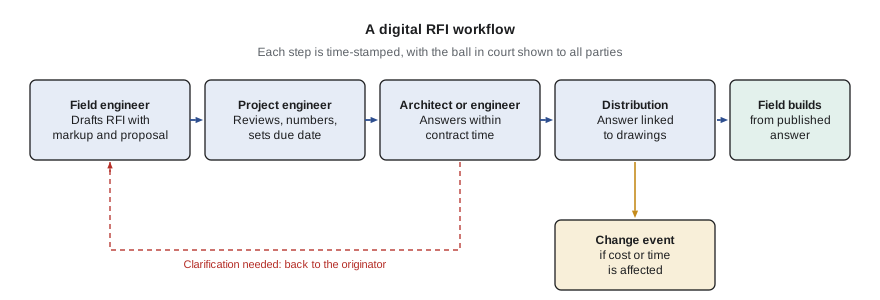
Contracts often set a response time for RFIs, such as five or ten working days, and the platform's due dates should reflect it. RFI metrics tell the project manager whether questions are being answered fast enough to keep work moving. The following script computes turnaround statistics from simulated RFI data.
import random, statistics

random.seed(42)
rfis = []
for n in range(1, 121):
    discipline = random.choice(["Arch", "Struct", "Mech", "Elec"])
    base = {"Arch": 6, "Struct": 5, "Mech": 9, "Elec": 7}[discipline]
    days = max(1, round(random.gauss(base, 3)))      # working days to answer
    rfis.append((n, discipline, days))

all_days = [d for _, _, d in rfis]
print(f"RFIs: {len(rfis)}  mean {statistics.mean(all_days):.1f} d  median {statistics.median(all_days)} d")
late = sum(d > 7 for d in all_days)
print(f"Answered after the 7-day contract time: {late} ({late / len(rfis):.0%})")
for disc in ["Arch", "Struct", "Mech", "Elec"]:
    d = [x for _, k, x in rfis if k == disc]
print(f"{disc:6s} n={len(d):3d} mean={statistics.mean(d):4.1f} max={max(d):2d}")RFIs: 120 mean 6.2 d median 6.0 d Answered after the 7-day contract time: 39 (32%) Arch n= 35 mean= 5.7 max=12 Struct n= 41 mean= 4.4 max=10 Mech n= 21 mean= 9.6 max=15 Elec n= 23 mean= 6.9 max=12
Reports like this show where the bottleneck is. Here the mechanical engineer is slowest on average, which may justify a conversation about staffing or about sending fewer, better-written RFIs. Averages hide outliers, so the oldest open RFIs should also be reviewed individually at each project meeting.
Worked problem
RFI turnaround and schedule risk
On a mid-rise residential project, the contract requires RFI answers within 7 working days. In the past month, 34 RFIs were answered: 20 within 7 days, 9 in 8–14 days and 5 in 15 days or more. Six RFIs are currently open, of which two have been open for 18 days and relate to structural openings needed before the level 6 deck pour in 10 working days. What is the on-time rate, and what should the project manager do?
Show solution
- On-time rate = 20 ÷ 34 ≈ 59 %.
- Late answers = 14 of 34 ≈ 41 %, a significant share.
- The two old structural RFIs are on the critical path: if not answered within about 5 working days, there will not be time to detail and install sleeves before the pour.
- Actions: call the structural engineer to escalate the two RFIs, offer a meeting with the proposed solution, notify the owner in writing of the potential delay as the contract requires, and review RFI quality and frequency with the design team.
Answer: Only 59 % of RFIs were answered on time; the two critical structural RFIs need immediate escalation and written notice.
Submittals
Submittals (shop drawings, product data, samples, mock-ups and test reports) show how the contractor and trades intend to meet the design. A submittal register lists every required submittal, usually extracted from the specifications, with its specification section, responsible trade, required review time and the date it is needed on site. Working backward from the need date, the register sets the date each submittal must be submitted, which links submittals to procurement and the schedule.
Worked problem
Back-scheduling a submittal
Curtain wall units must be on site on 15 June. The supplier needs 16 weeks from approval to delivery. The contract allows the architect 15 working days (3 weeks) for review, and the project team assumes one resubmission cycle of 2 weeks plus 2 weeks of review. When must the first submittal go to the architect?
Show solution
- Delivery 15 June − 16 weeks fabrication and shipping = approval needed by about 23 February.
- Resubmission: 2 weeks to revise + 2 weeks review = 4 weeks; so the first review must finish by about 26 January.
- First review of 3 weeks: submittal must reach the architect by about 5 January.
- Add a week of internal review by the general contractor: the trade must deliver it by about 29 December.
Answer: The curtain wall submittal must reach the architect in early January, about five and a half months before the units are needed.
Digital submittal workflows route packages to reviewers in sequence or in parallel, track the ball in court, record review stamps (such as reviewed, reviewed as noted, revise and resubmit, rejected) and link approved submittals to the procurement log and to the model elements they represent. Approved product data later become part of the handover package.
Daily logs and site records
The daily log is the project's diary: weather, workforce by trade, equipment on site, work performed, deliveries, inspections, visitors, safety observations, delays and instructions received. Digital logs are faster to complete, can pull weather automatically, can be compared across days and are easy to search when a dispute arises months later. Photos attached to the log, with time stamps and locations, are powerful evidence of conditions and progress.
Daily logs only help if they are complete and objective. A log that says "good day, work progressing" is useless in a claim. A log that records "Electrical crew of 6 stood down 10:00–13:30 waiting for ceiling grid to be released in zone C; foreman notified GC superintendent at 10:05" is valuable. Training superintendents and foremen in what to record is as important as the software.
Records also matter for payment and liens. State prompt-payment statutes and mechanics' lien laws set timelines and notice requirements that vary widely from state to state, and federal projects are governed by the Prompt Payment Act and Miller Act. Accurate, time-stamped records of work in place and of notices given help contractors get paid and defend their position.
Inspections, quality and safety
Inspection and test plans become digital checklists: before a slab pour, the foreman confirms formwork, reinforcing, embeds, sleeves and cover, attaches photos and gets the engineer's sign-off; before ceilings close, each trade confirms its above-ceiling work and inspection. Deficiencies found are logged with a location pin, photo, responsible trade and due date. Quality metrics such as first-time pass rate and open deficiencies by trade show where problems are recurring.
Worked problem
First-time pass rate
In one month, 180 above-ceiling inspections were completed: 141 passed first time, 33 passed after one correction and 6 needed two or more corrections. Mechanical accounted for 22 of the 39 failed first inspections. What is the first-time pass rate, and where should the quality manager focus?
Show solution
- First-time pass rate = 141 ÷ 180 ≈ 78 %.
- Failed first inspections = 180 − 141 = 39.
- Mechanical share of failures = 22 ÷ 39 ≈ 56 %.
- Focus on mechanical above-ceiling work: review the common deficiency types with the mechanical foreman and add a pre-inspection self-check.
Answer: The first-time pass rate is 78 %; mechanical causes more than half of the failures and should be the focus.
Safety modules handle hazard assessments, toolbox talks, observations, near misses and incident reports. HSE courses cover the content of these programs; the digital point is that forms are completed on site, routed automatically and analyzed for trends, and that workers can report hazards quickly from a phone. Lesson 9 shows how safety data feed dashboards.
Punch lists and closeout
Near completion, the architect, owner and contractor walk the building and record deficiencies on a punch list (also called a deficiency list). Digital punch lists pin each item to a location on a drawing, attach photos, assign the responsible trade and track closure with before-and-after photos. Because each trade sees only its own items on a phone, items get closed faster. Closeout also includes collecting warranties, operation and maintenance manuals, as-built information, attic stock and training records, which the platform can track as a checklist.
Asset data for handover (Lesson 3) are best captured as equipment is installed and commissioned rather than at the end. A field engineer scanning a QR code or barcode on a newly installed pump can record its serial number, installation date and photo of the nameplate in seconds, linked to the model element. By substantial completion, the asset register is largely complete.
Worked problem
Capturing asset data during installation
A project has 640 maintainable equipment items. If asset data are collected at the end, a two-person team expects to need 12 minutes per item including access and searching. If collected at installation by scanning tags, foremen need about 2 minutes per item. Compare the hours.
Show solution
- End-of-job method: 640 × 12 minutes = 7,680 minutes = 128 hours of team time; with two people, 256 person-hours if both are needed at each item.
- At installation: 640 × 2 minutes = 1,280 minutes ≈ 21.3 hours.
- Saving ≈ 128 − 21 = about 107 hours of elapsed team time, and the data are captured while access is easy.
Answer: Capturing data at installation needs roughly one-sixth of the time and gives better data, because equipment is still accessible and labeled.
Integration and data flow
Field platforms create the most value when they connect to other systems. Common integrations include the accounting system (commitments, change orders and payment applications), the scheduling tool (activities linked to inspections and RFIs), the document platform or CDE (drawings and models), and the owner's systems at handover. Without integration, staff re-type data, and the systems drift apart. Before selecting a platform, a contractor should map which data flow where, and test the integrations on a pilot project.
Data ownership and export also matter. The contract should state that project records belong to the parties who need them and can be exported in usable formats at the end of the project; a platform subscription that ends with the project should not take the record with it. Lesson 11 returns to these questions.
Rolling out a field platform
Field adoption follows the principles in Lesson 1. Start with a few modules that solve real pain, such as drawings, RFIs and daily logs; make them mandatory and retire the old process; train in short, practical sessions on site; give foremen devices that work with gloves, in sunlight and offline; and review usage weekly. Trades must be included: if subcontractors cannot access the platform, they will keep using email, and the record will be split.
| Phase | Focus | Measure of success |
|---|---|---|
| Month 1 | Drawings and specifications on devices; RFIs | All RFIs in the platform; current sheets used on site |
| Month 2 | Daily logs and photos | Logs complete every day with photos |
| Month 3 | Inspections and deficiencies | Checklists used for all hold points |
| Months 4–6 | Submittals, change events, punch lists | No parallel email or spreadsheet logs |
| Ongoing | Integrations and dashboards | Data flow to accounting and schedule without re-typing |
Common mistakes
MistakeLetting RFIs live in email alongside the platform.
InsteadMake the platform the only channel for RFIs and distribute answers from it.
MistakeWriting vague daily logs.
InsteadRecord facts: crews, hours, locations, delays, instructions and notices, with photos.
MistakeBuilding the submittal register from memory.
InsteadExtract submittals from the specifications and back-schedule them from need dates.
MistakeLeaving asset data collection to the end of the job.
InsteadCapture asset data by scanning tags at installation and commissioning.
MistakeChoosing a platform before mapping integrations.
InsteadMap data flows and test integrations with accounting, schedule and CDE on a pilot.
Summary and key terms
- Field platforms hold drawings, RFIs, submittals, logs, inspections, safety, punch lists, change and photos in one place.
- Digital RFIs carry structure, due dates and links to drawings; turnaround metrics show bottlenecks.
- Submittal registers come from the specifications and are back-scheduled from need dates.
- Daily logs must be factual and complete; they matter for payment, liens and disputes.
- Digital inspections give first-time pass rates and deficiency trends.
- Punch lists and asset data are best captured with locations, photos and tags as work proceeds.
- Integration with accounting, scheduling and the CDE avoids re-typing and drift.
- Rollouts succeed when modules solve real problems, old processes are retired and trades are included.
- Field management platform
- Software for managing project records and workflows from site and office.
- RFI
- Request for information: a formal question to the design team.
- Ball in court
- The party currently responsible for acting on a record.
- Submittal register
- A list of all required submittals with responsibilities and dates.
- Back-scheduling
- Working backward from a need date to set earlier milestones.
- Daily log
- The daily record of site conditions, workforce, work, delays and events.
- First-time pass rate
- The share of inspections passed without correction.
- Punch list
- A list of deficiencies to be corrected near completion.
- Asset tag
- A label, often with a barcode or QR code, identifying an equipment item.
- Integration
- An automated data connection between two systems.
Practice problems
Work each problem on paper first, then reveal the answer to check.
Of 50 RFIs, 38 were answered within the contract time. What is the on-time rate?
Show answer
76 %.
What fields should a digital RFI include?
Show answer
Number, subject, question, suggested solution, references, attachments, due date, ball in court, answer and distribution.
Material needed on site 1 October requires 12 weeks fabrication after approval and 3 weeks review. When must it be submitted, ignoring resubmission?
Show answer
About 15 weeks before 1 October, around mid-June.
Rewrite 'electrical delayed today' as a useful log entry.
Show answer
Electrical crew of 6 stood down 09:00–11:30 in zone B awaiting ceiling grid release; GC notified at 09:10.
200 inspections, 170 pass first time. What is the first-time pass rate?
Show answer
85 %.
Why capture asset data at installation?
Show answer
Equipment is accessible and labeled, it takes far less time and the data are more accurate.
Name three common integrations for a field platform.
Show answer
Accounting, scheduling, CDE or document platform, owner FM systems.
Why must trades be included in the platform?
Show answer
Otherwise they keep using email and the project record is split.
What should the contract say about platform data at the end of the project?
Show answer
Records can be exported in usable formats and remain available to the parties.
Which modules are good first steps in a rollout?
Show answer
Drawings and specifications, RFIs, daily logs.
Lesson quiz · 5 questions
Score 60% or more to complete this lesson.
Create a free account to save your progress, take quizzes and earn a certificate.