
PHOT-220 · Lesson 8 of 12 · 25 min
Headshots and business portraits
Headshots are among the most commercially important portraits. Professionals use them on company websites, LinkedIn and other networking profiles, speaker programs, press releases, book jackets, real estate signs and casting submissions. A good headshot can influence first impressions, hiring decisions and client trust; research on online profiles suggests that viewers form impressions of competence, likeability and trustworthiness from a face within a fraction of a second. Business portrait photography ranges from single headshots to on-site sessions photographing hundreds of employees consistently. This lesson covers types of headshots and their requirements, communicating competence and approachability, clothing and grooming guidance, lighting setups for headshots, backgrounds and brand consistency, framing and crops for different uses, on-site corporate sessions, actor and personal branding headshots, and delivery.
Types of headshots
Different uses call for different styles:
- Corporate headshots: consistent, professional images for company websites and directories, often on plain or branded backgrounds, with a standard framing and lighting applied to everyone.
- Personal branding headshots: images for entrepreneurs, consultants and creators that express personality and brand, often on location or with color, sometimes with several looks.
- Actor and performer headshots: images for casting directors that must look exactly like the actor, show their range and type, and follow industry conventions, usually with minimal retouching.
- Executive and editorial portraits: more varied and environmental portraits of leaders for annual reports, media and features.
- Social and networking headshots: simple, clear images for professional profiles, often cropped to small circles.
| Type | Key priorities | Typical setting |
|---|---|---|
| Corporate | Consistency, professionalism, brand fit | Plain or branded backdrop, standard light |
| Personal branding | Personality, brand colors, variety | Location or styled studio |
| Actor | Accuracy, range, current look | Simple backgrounds, natural light or soft studio |
| Executive | Authority, context | Office, environmental |
| Networking profile | Clarity at small sizes | Simple background, tight crop |
Communicating competence and approachability
Most business headshots aim for a combination of competence and warmth: the subject should look capable and confident, but also approachable and trustworthy. Different organizations and roles shift the balance: a law firm may want more authority, a family dental practice more warmth, a technology start-up more casual energy. Expression is the main tool: a soft, genuine smile, engaged eyes with a slight squinch, and good posture convey both qualities (Lesson 5). Body angle, a slight lean toward the camera, and open posture add approachability; a squarer stance and a more neutral expression add authority. Ask the client what impression they want, look at examples together, and photograph a range of expressions so the best can be chosen.
Clothing and grooming guidance
Advising subjects on clothing before the session prevents many problems. General guidance includes wearing well-fitting clothing that the subject feels confident in and that matches how they present themselves at work; choosing solid colors and simple textures over busy patterns, fine stripes and large logos, which distract and can create moiré; bringing two or three options with different necklines and colors; ensuring clothing is clean and pressed; and considering the background color, since a dark jacket against a dark backdrop can merge. For grooming, recommend a fresh haircut a few days before rather than the day before, and makeup that is natural and matte, since shiny skin reflects light. Have a mirror, comb, lint roller, blotting papers and clips available on set. Respect personal, cultural and religious dress, such as head coverings, which are part of the person's professional identity.
Lighting setups for headshots
Headshot lighting should be flattering, consistent and quick to reproduce. Common approaches include:
- Large soft key: a large softbox, octabox or umbrella slightly above eye level and about 30 to 45 degrees to one side, close to the subject, with a reflector or second light for fill. Soft, sculpted, flattering for most people.
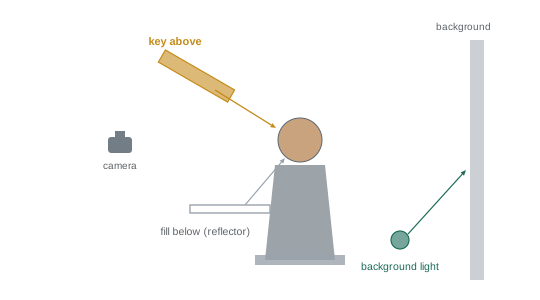
- Clamshell: one light above and in front of the face and a reflector or second light below, creating even, shadowless, beauty-style light with catchlights top and bottom, popular for corporate and actor headshots.
- Window light: on location or in a studio with good windows, a natural, approachable look.
- Background and hair lights: a light on the background controls its brightness and creates a glow or gradient behind the head; a hair or rim light separates dark hair from dark backgrounds.
Once set, the lighting for corporate sessions should stay fixed, with marks on the floor for the subject's position, so that every employee is lit identically. PHOT-210 covers these lighting patterns in depth.
Backgrounds and brand consistency
Backgrounds communicate as much as lighting. Neutral grays, white and black are timeless and work across websites and print; colored backgrounds can match a company's brand colors; textured backdrops add warmth; and blurred office or outdoor environments suggest a real workplace. Consistency is crucial for organizations: every person on a team page should have the same background, framing, lighting and color treatment, or the page looks disorganized. Some companies prefer white or transparent backgrounds so that their designers can place headshots on any color; in that case, photograph against a light background lit evenly, with good separation for clean cut-outs (PHOT-202). Document all settings, distances and backdrop choices, so that new employees photographed months later match the original set.
Framing and crops for different uses
Headshots are cropped differently for different platforms: tight circles on social profiles, squares on staff directories, vertical rectangles on websites and print, wide banners for speaker pages. Shoot with extra space around the head and shoulders, typically framing from mid-chest to a little above the head, so that the image can be cropped to all these shapes without cutting the top of the head or shoulders awkwardly. Keep the eyes at a consistent height in the frame across all employees, usually about one third from the top, using a framing grid or tethered overlay. For circular crops, keep the face centered and leave room around it. Deliver standard crops along with the full frame, and agree aspect ratios and pixel sizes in advance.
Worked problem
Planning a corporate headshot day
A company with 120 employees wants consistent headshots in one day at its office, on a mid-gray background, delivered as square crops for its website and circles for its intranet. How should the photographer plan the day?
Show solution
- Allow about 5 minutes per person: 120 × 5 = 600 minutes, or 10 hours, so request a two-station setup or a second day, or schedule tightly over 8 hours with an assistant handling check-in.
- Set up a mid-gray backdrop, a large soft key with fill, a background light for even gray, and floor marks; shoot tethered with an overlay showing the eye line and square crop.
- Send clothing guidance in advance and schedule employees in 5-minute slots with a check-in list linking names to file numbers.
- Lock exposure, white balance and lighting, check the first images on a calibrated screen, and take a gray card frame at the start and after breaks.
- Deliver square and circular crops at specified sizes with filenames matching employee names.
Answer: Schedule about 5 minutes per person with assistance, fixed lighting and marks, tethered framing overlays, name tracking and standardized crops.
On-site corporate sessions
Photographing many people at an organization's office is efficient for clients but logistically demanding. Practical considerations include a room with enough space (at least 4 to 5 meters deep for an 85 mm lens and background separation) and controllable light; arriving early to set up and test; a check-in system with an assistant or coordinator; a mirror and grooming station; tethered shooting so that subjects can see and approve images quickly, if the client wants; and clear communication about timing so that employees arrive prepared. Each session should still feel personal: greet each person, make a joke, give quick direction and encouragement, and capture a genuine expression in a short time. Many photographers develop a short, repeatable script of directions and prompts for this purpose.
Actor and personal branding headshots
Actor headshots follow specific conventions. They must look exactly like the actor on their best ordinary day, because casting directors expect the person who walks in to match the photograph; heavy retouching, unusual hair or makeup that the actor does not normally wear, and dramatic lighting are discouraged. Actors usually want several looks representing the roles they are cast for, such as a warm commercial look and a more serious theatrical or dramatic look, with different clothing and expressions. Eyes and expression are paramount. Industry preferences for framing, color and style change over time and vary by market, so research current casting expectations. Personal branding sessions, by contrast, often include several locations, outfits and props that express the person's business, plus lifestyle and working images for websites and social media.
Delivery and usage
Headshot delivery should be prompt and organized. Provide an online gallery for selection, agree on the number of retouched images included, and deliver final files in the required sizes, crops and formats, with filenames matching people's names for corporate sessions. Retouching for headshots is usually natural: removing temporary blemishes, stray hairs and lint, softening under-eye shadows slightly and balancing color (PHOT-202). Agree on usage: corporate headshots are often licensed for broad use by the company, including websites, print and press; personal headshots for the individual's professional use. Contracts should specify rights, including whether the company can continue using images after an employee leaves.
Headshots on location and outdoors
Not all headshots are made against backdrops. Many professionals prefer headshots with soft, blurred office or outdoor backgrounds, which feel more approachable and contemporary. On location, choose a background with even tones and some depth, such as a corridor, a window-lit office or trees in shade, place the subject several meters in front of it, and use a short telephoto lens at a moderate aperture to blur it. Keep the background consistent across a team by using the same spot and framing. Outdoor headshots benefit from open shade and a reflector or soft flash for catchlights. Weather and changing light make outdoor corporate sessions less predictable, so have an indoor backup.
Headshots for LinkedIn and small displays
Headshots are often seen at very small sizes, such as a circle a few centimeters across on a phone. At small sizes, simple backgrounds, strong separation between subject and background, good contrast on the face, and a tight crop with the face filling much of the frame work best. Bright, clear eyes and a genuine expression read even at thumbnail size. Test crops at small sizes before delivery. Many platforms also crop to circles automatically, so keep the face centered with space around it.
Updating headshots
Headshots should be updated when appearance changes significantly, such as a new hairstyle, glasses or beard, or every few years, so that clients and colleagues recognize the person. Companies often schedule regular headshot days for new hires; documenting the original lighting, framing and backdrop allows new images to match the existing set, even years later.
Headshot retouching standards for teams
When retouching a team, apply the same level of retouching to everyone, so that no one appears more heavily edited than colleagues. Agree on a standard with the client, such as removing temporary blemishes and stray hairs, softening under-eye shadows slightly and evening skin tone, and document it. Consistent color grading and crops complete a unified set. If an individual requests additional retouching, discuss it with them and the client, keeping edits natural.
Feedback and approval
For corporate sessions, many clients appreciate seeing a few sample images at the start of the day to approve the lighting, background and framing before the rest of the team is photographed. Approval at this stage prevents costly reshoots and gives the client confidence that the results will meet their brand standards.
Common mistakes
MistakeDifferent lighting and backgrounds within one team.
InsteadFix lighting, backdrop, framing and color for consistency.
MistakeCropping too tightly in camera.
InsteadLeave room for squares, circles and banners.
MistakeNo clothing guidance before the session.
InsteadSend advice on solid colors, fit and options.
MistakeHeavily retouching actor headshots.
InsteadKeep actors looking exactly like themselves.
MistakeRushing people through without connection.
InsteadUse a short, warm, repeatable script of direction.
Summary and key terms
- Headshots serve corporate, branding, acting, executive and networking uses.
- Most aim to communicate both competence and approachability.
- Clothing and grooming guidance prevents common problems.
- Large soft key, clamshell and window light suit headshots; fix settings for teams.
- Backgrounds and consistent treatment support brands.
- Frame loosely for multiple crops and keep eye lines consistent.
- Plan on-site sessions carefully, follow actor conventions and agree usage.
- Corporate headshot
- Consistent professional portrait for an organization.
- Personal branding
- Images expressing an individual's business identity.
- Actor headshot
- Portrait for casting that must look exactly like the actor.
- Clamshell lighting
- Light above and fill below the face.
- Background light
- Light controlling backdrop brightness.
- Hair light
- Light separating hair from the background.
- Eye line
- Height of the eyes in the frame.
- Tethered shooting
- Shooting to a computer for immediate review.
- Check-in list
- Record linking people to image files.
- Usage rights
- Agreed permissions for how images may be used.
Practice problems
Work each problem on paper first, then reveal the answer to check.
Name four types of headshots.
Show answer
Corporate, personal branding, actor, executive, networking.
What two qualities do business headshots usually balance?
Show answer
Competence and approachability.
Why avoid fine stripes?
Show answer
They distract and can cause moiré.
What is clamshell lighting?
Show answer
Key above and fill below the face.
Why fix lighting for corporate sessions?
Show answer
For consistency across the team.
Why frame loosely?
Show answer
To allow square, circle and banner crops.
Time needed for 60 people at 5 minutes each?
Show answer
300 minutes, or 5 hours.
Minimum room depth for headshots with an 85 mm lens?
Show answer
About 4–5 m.
Why minimal retouching for actors?
Show answer
They must match their real appearance.
What should contracts specify for corporate headshots?
Show answer
Usage rights, including after an employee leaves.
Lesson quiz · 5 questions
Score 60% or more to complete this lesson.
Create a free account to save your progress, take quizzes and earn a certificate.