
PYTH-101 · Lesson 3 of 12 · 22 min
Expressions and operators
▶ Video coming soon A video version of this lesson is on the way.
Lesson 2 gave values names. This lesson is about combining them. An expression is any piece of code that Python can work out to a single value: 42 is an expression, so is price * stock, and so is stock < reorder_point. Operators are the symbols that combine values inside expressions, such as + for addition and < for 'less than'. Ridgeline's programs are full of expressions: the value of the stock, the number of bags a batch fills, the change owed to a customer, and the yes-or-no question of whether a coffee needs roasting.
You will learn the arithmetic operators, including two that surprise newcomers, the comparison operators that produce True or False, and the logical operators and, or and not that combine those answers. You will also learn the order in which Python applies operators, and how to use parentheses to make your intentions clear.
Arithmetic operators
Python has seven arithmetic operators. Four are familiar from school: + adds, - subtracts, * multiplies and / divides. The other three are floor division //, which divides and rounds down to a whole number, the remainder or modulo operator %, which gives what is left over after floor division, and exponentiation **, which raises a number to a power.
| Operator | Meaning | Example | Result |
|---|---|---|---|
| + | Addition | 42 + 30 | 72 |
| - | Subtraction | 42 - 3 | 39 |
| * | Multiplication | 18.50 * 3 | 55.5 |
| / | Division (always a float) | 10 / 4 | 2.5 |
| // | Floor division | 10200 // 340 | 30 |
| % | Remainder (modulo) | 10250 % 340 | 50 |
| ** | Exponentiation | 2 ** 10 | 1024 |
Floor division and remainder belong together. When Kai roasts a batch that yields 10,250 grams of coffee, 10250 // 340 says how many full 340-gram bags it fills, and 10250 % 340 says how many grams are left over for the sample jar. The two results always fit back together: bags times 340 plus the leftover gives the original weight. Python's built-in function divmod returns both at once.
roasted_g = 10250
bag_g = 340
full_bags = roasted_g // bag_g
left_over = roasted_g % bag_g
print("Full bags:", full_bags)
print("Grams left over:", left_over)
print("Check:", full_bags * bag_g + left_over)
print("divmod gives:", divmod(roasted_g, bag_g))Full bags: 30 Grams left over: 50 Check: 10250 divmod gives: (30, 50)
The remainder operator has many uses beyond leftovers. A number is even when n % 2 is 0. Mei's stamp card gives every tenth drink free, so drink number n is free when n % 10 is 0. Converting 135 minutes to hours and minutes uses 135 // 60 for the hours and 135 % 60 for the minutes. Whenever a problem involves cycles, groups of a fixed size or wrapping around, think of % and //.
drink_number = 30
print("Free drink?", drink_number % 10 == 0)
roast_minutes = 135
print(roast_minutes // 60, "hours and", roast_minutes % 60, "minutes")
print("Is 42 even?", 42 % 2 == 0)Free drink? True 2 hours and 15 minutes Is 42 even? True
Division with / always produces a float, even when the numbers divide exactly. Floor division of two integers gives an integer, but floor division involving a float gives a float, so 10.0 // 3 is 3.0. Note also that floor division rounds down, toward negative infinity, not toward zero, so -7 // 2 is -4. Negative numbers rarely appear in stock counts, but they do in temperatures and account balances, so it is worth knowing.
Order of operations
When an expression contains several operators, Python applies them in a fixed order called precedence. Exponentiation comes first, then the unary minus that makes a number negative, then multiplication, division, floor division and remainder, then addition and subtraction, then comparisons, then not, then and, and finally or. Operators of equal precedence are applied from left to right, except ** which works from right to left.
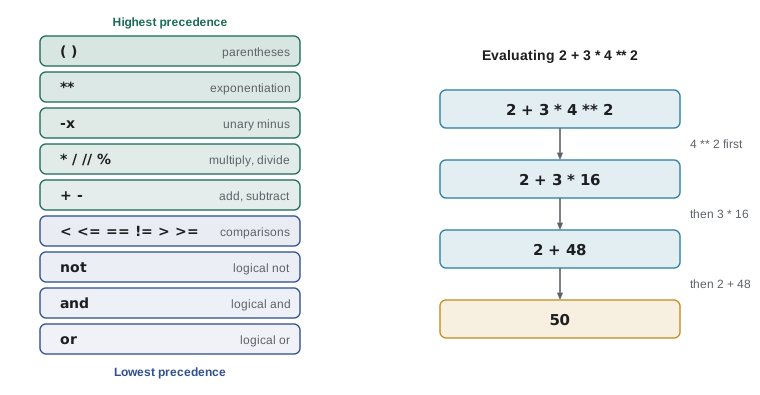
Precedence explains why 2 + 3 * 4 is 14 and not 20: the multiplication happens first. Parentheses override precedence, so (2 + 3) * 4 is 20. The best advice is to use parentheses whenever there is any chance a reader could be unsure, even if Python would get it right without them. Code is read far more often than it is written.
price = 5.25
qty = 2
muffin = 3.75
print(price * qty + muffin)          # multiplication first
print(price * (qty + 1))             # three lattes
subtotal = price * qty + muffin
tax_rate = 0.05
print(round(subtotal * (1 + tax_rate), 2))14.25 15.75 14.96
A classic mistake is calculating an average as a + b + c / 3, which divides only c by three. The intended expression is (a + b + c) / 3. Another is writing a fraction such as a cost per kilogram as cost / green_kg * 1000 when you meant cost / (green_kg * 1000). Reading each expression aloud with its parentheses usually catches these slips.
Operators on strings
Some arithmetic operators also work on strings, with meanings that make sense for text. The + operator concatenates, or joins, two strings into one. The * operator repeats a string a whole number of times, which is handy for drawing simple lines in text reports. Other operators, such as - and /, have no meaning for strings and cause a TypeError.
first = "Sunrise"
second = "Blend"
print(first + " " + second)
print("=" * 24)
print("Stock report".upper())
print("-" * 24)
bags = 42
print("Bags: " + str(bags))Sunrise Blend ======================== STOCK REPORT ------------------------ Bags: 42
Mixing types with + is the most common TypeError for beginners. Python will not guess whether 'Bags: ' + 42 means joining text or adding numbers, so it refuses, with the message can only concatenate str (not "int") to str. Convert the number with str first, or pass the values to print separated by commas, or use the f-strings introduced in lesson 4, which are the neatest solution.
Comparison operators
Comparison operators ask a question about two values and answer with a Boolean, True or False. There are six: == for equal to, != for not equal to, < for less than, > for greater than, <= for less than or equal to, and >= for greater than or equal to. These answers drive every decision a program makes, as lesson 5 will show.
stock = 9
reorder_point = 10
print(stock < reorder_point)
print(stock == 9)
print(stock != 9)
print(stock >= reorder_point)
print("RC-104" == "RC-104")
print("latte" == "Latte")True True False False True False
Do not confuse == with =. A single equals sign assigns; a double equals sign compares. Writing if stock = 0 is a syntax error in Python, which protects you from a mistake that causes subtle bugs in some other languages. Strings compare character by character, so the comparison is case-sensitive: 'latte' and 'Latte' are different. Strings also compare by alphabetical order using the underlying character codes, so 'Colombia' < 'Ethiopia' is True, but every capital letter comes before every lowercase letter.
Python lets you chain comparisons in a natural way. The expression 100 <= points < 300 is True when points is at least 100 and below 300, which is exactly Ridgeline's Roast loyalty tier. Most languages require you to write two separate comparisons joined with and; in Python the chained form is both shorter and clearer.
points = 180
print("Roast tier?", 100 <= points < 300)
drop_temp = 212
print("Drop temperature in range?", 205 <= drop_temp <= 225)Roast tier? True Drop temperature in range? True
Logical operators
The logical operators and, or and not combine Booleans. An expression with and is True only when both sides are True. An expression with or is True when at least one side is True. The operator not flips True to False and False to True. These words read almost like English, which makes Python conditions easy to follow.
| A | B | A and B | A or B | not A |
|---|---|---|---|---|
| True | True | True | True | False |
| True | False | False | True | False |
| False | True | False | True | True |
| False | False | False | False | True |
stock = 9
reorder_point = 10
roaster_free = True
print("Roast today?", stock < reorder_point and roaster_free)
is_weekend = False
is_holiday = True
print("Closed?", is_weekend or is_holiday)
print("Open?", not (is_weekend or is_holiday))Roast today? True Closed? True Open? False
Python evaluates and and or lazily, an approach called short-circuit evaluation. If the left side of an and is False, the whole expression must be False, so Python does not even look at the right side; if the left side of an or is True, the result must be True. This matters when the right side could fail. For example, bags > 0 and total / bags > 20 never divides by zero, because when bags is 0 the division is skipped.
Combining several logical operators raises precedence questions again: not binds tightest, then and, then or. The expression a or b and c means a or (b and c). As with arithmetic, add parentheses whenever a reader might hesitate.
Try it yourself
Bags from a batch
A roast yields roasted_g grams of coffee. Using the variables in the starter, calculate full_bags, the number of full 340 g bags, and left_over, the grams that remain. Use the operators from this lesson, not a calculator.
For 10,250 g the answers are 30 bags and 50 g. Write the calculations with the variables, so that the same code works for any batch.
roasted_g = 10250
bag_g = 340
full_bags = 0
left_over = 0
print(full_bags, left_over)
Putting expressions together
Real calculations combine several operators and variables. Theo's online shop charges a flat shipping fee of 8.00 for orders below 50.00 and ships free above that. A program can compute the shipping fee without any if statement at all, using the fact that True behaves like 1 and False like 0 in arithmetic. That trick is clever, and you will see it in other people's code, but for clarity Ridgeline's programs will usually use the if statements of lesson 5.
order_total = 37.00
shipping = 8.00 * (order_total < 50)
print("Shipping:", shipping)
print("To pay:", order_total + shipping)
order_total = 64.50
shipping = 8.00 * (order_total < 50)
print("Shipping:", shipping, "To pay:", order_total + shipping)Shipping: 8.0 To pay: 45.0 Shipping: 0.0 To pay: 64.5
Built-in functions are another source of values inside expressions. You have met print, type, int, float, str and round. Others that are useful with numbers are abs, which removes the sign from a number, min and max, which choose the smallest and largest of several values, and pow, which is the same as **. The math module, which you import with import math, adds square roots, rounding up and down, and constants such as pi.
import math
print(abs(-3.5))
print(max(42, 15, 27, 9))
print(min(42, 15, 27, 9))
print(math.ceil(43 / 6))      # boxes needed for 43 bags, 6 to a box
print(math.floor(10.2))
print(math.sqrt(144))3.5 42 9 8 10 12.0
The math.ceil call answers a real shipping question: 43 bags packed six to a box need 43 / 6 = 7.17 boxes, which in the physical world means 8 boxes. Rounding up is the right choice here, and rounding to the nearest number would leave one bag without a box. Choosing between round, floor and ceil is a small decision that experienced programmers make deliberately.
Worked problem
A change calculator
A customer pays for a latte (5.25) and a muffin (3.75) with a 20.00 bill. Mei wants a script that prints the change, and how many 5.00 bills and 1.00 coins (loonies in Canada, dollar coins or bills in the United States) make up the whole-dollar part of it.
Show solution
- Total: 5.25 + 3.75 = 9.00, so the change is 20.00 - 9.00 = 11.00.
- To avoid float surprises, work in cents: change_cents = round((20.00 - 9.00) * 100), which is 1100.
- Whole dollars: dollars = change_cents // 100 gives 11, and cents = change_cents % 100 gives 0.
- Fives: dollars // 5 gives 2; ones: dollars % 5 gives 1.
- Check: 2 * 5 + 1 = 11 and 11 + 9 = 20, so the answer is consistent.
Answer: Change of 11.00: two 5.00 bills and one 1.00 coin.
paid = 20.00
total = 5.25 + 3.75
change_cents = round((paid - total) * 100)
dollars = change_cents // 100
cents = change_cents % 100
print("Change:", dollars, "dollars and", cents, "cents")
print("Fives:", dollars // 5, "Ones:", dollars % 5)Change: 11 dollars and 0 cents Fives: 2 Ones: 1
Try it yourself
Does this coffee need roasting?
Set the variable needs_roast to a Boolean expression that is True when stock is below reorder_point and green_kg_available is at least 12, the size of one batch. Do not write True or False directly; write an expression with comparison and logical operators.
Then change the starting values to check that your expression gives False when the stock is high or there is too little green coffee.
stock = 9
reorder_point = 10
green_kg_available = 15
needs_roast = False
print(needs_roast)
Common mistakes
MistakeWriting a + b + c / 3 for an average.
InsteadGroup the sum first: (a + b + c) / 3.
MistakeUsing = in a comparison, as in stock = 0 inside a condition.
InsteadUse == to compare; = only assigns.
MistakeJoining text and numbers with +, as in 'Bags: ' + 42.
InsteadConvert with str(), pass separate items to print, or use an f-string.
MistakeExpecting / to give a whole number for bags or boxes.
InsteadUse // for whole units and % for the remainder; use math.ceil when you must round up.
MistakeAssuming string comparisons ignore case.
InsteadCompare lowercase versions, such as answer.lower() == 'yes', when case should not matter.
MistakeWriting x > 0 or < 10 as if it were English.
InsteadEach side needs a full comparison: x > 0 or x < 10, or use a chain such as 0 < x < 10.
Summary and key terms
- An expression is code that Python works out to a value; operators combine values in expressions.
- Arithmetic: + - * / // % **; / always gives a float, // floors and % gives the remainder.
- Precedence: ** first, then * / // %, then + -, then comparisons, then not, and, or; parentheses override it.
- Strings support + for joining and * for repeating, but not mixing with numbers.
- Comparisons (== != < > <= >=) return True or False and can be chained, as in 100 <= points < 300.
- and, or and not combine Booleans and short-circuit, skipping the right side when the answer is already known.
- For money, working in whole cents avoids float rounding surprises.
- expression
- Code that evaluates to a single value.
- operator
- A symbol or keyword that combines values, such as + or and.
- operand
- A value that an operator works on.
- floor division
- Division that rounds the result down to a whole number, written //.
- modulo (remainder)
- The amount left over after floor division, written %.
- precedence
- The order in which Python applies different operators.
- concatenation
- Joining strings end to end with +.
- comparison operator
- An operator that compares two values and returns a Boolean.
- logical operator
- and, or or not, used to combine or invert Booleans.
- short-circuit evaluation
- Skipping the second operand of and or or when the first decides the result.
Practice problems
Work each problem on paper first, then reveal the answer to check.
What are 17 // 5, 17 % 5 and 17 / 5?
Show answer
3, 2 and 3.4.
What is 2 + 3 * 2 ** 2?
Show answer
14: 2 ** 2 is 4, 3 * 4 is 12, 2 + 12 is 14.
A tour group of 23 people splits into cars that seat 4. How many cars are needed? Write the expression.
Show answer
math.ceil(23 / 4), which is 6; or (23 + 3) // 4.
Write a condition that is True when a drink number n earns a free drink on a 10-stamp card.
Show answer
n % 10 == 0
What does 'ab' * 3 produce?
Show answer
'ababab'
Why is 0 < bags and total / bags > 20 safe when bags is 0?
Show answer
and short-circuits: when 0 < bags is False, the division is never evaluated.
Lesson quiz · 5 questions
Score 60% or more to complete this lesson.
Create a free account to save your progress, take quizzes and earn a certificate.