
PYTH-101 · Lesson 8 of 12 · 24 min
Lists and tuples
▶ Video coming soon A video version of this lesson is on the way.
So far each variable has held a single value. Real data comes in collections: the six coffees on Ridgeline's list, every sale in a day, the temperatures logged during a roast. Writing a separate variable for each item would be hopeless. Python's list type holds any number of values in order, under one name, and lets you add, remove, sort and search them. Its cousin, the tuple, holds a fixed group of values that belong together, such as the code, name and price of one coffee. This lesson covers both, and with them the stock report finally stops repeating itself.
You will learn to create and change lists, loop over them with enumerate and zip, use the built-in functions that summarize them, build new lists with comprehensions, and avoid the most famous list trap in Python: two names that turn out to be tied to the same list.
Creating and using lists
A list is written as values separated by commas inside square brackets. The values, called elements or items, can be of any type, and a list can mix types, although in practice most lists hold items of one kind. The empty list, [], is a list with no items yet, and it is the usual starting point for a list that a program fills up as it runs.
coffees = ["Sunrise Blend", "Ethiopia Guji", "Colombia Huila",
           "Sumatra Dark", "Decaf Swiss Water", "Espresso Ridge"]
stock = [42, 15, 27, 9, 12, 30]
print(coffees)
print(len(coffees), "coffees")
print(coffees[0], "and", coffees[-1])
print(coffees[1:3])
print("Sumatra Dark" in coffees)['Sunrise Blend', 'Ethiopia Guji', 'Colombia Huila', 'Sumatra Dark', 'Decaf Swiss Water', 'Espresso Ridge'] 6 coffees Sunrise Blend and Espresso Ridge ['Ethiopia Guji', 'Colombia Huila'] True
Lists use the same indexing and slicing as strings: indexes start at 0, negative indexes count from the end, slices stop before their end index, and len gives the number of items. The in operator tests whether a value is in the list. A list can even contain other lists, which is one way to store a table, although lesson 9 shows better ways.
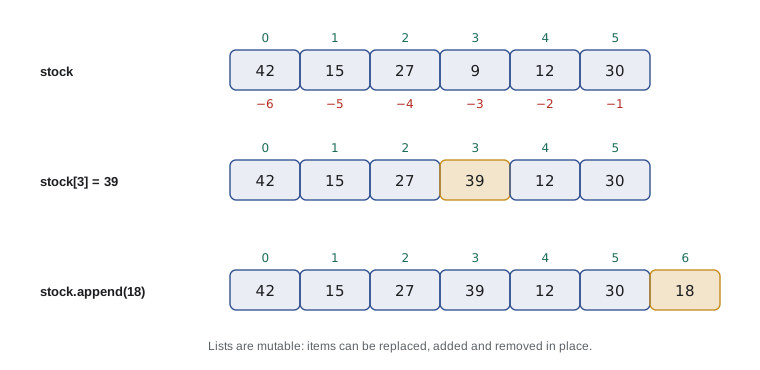
The big difference from strings is that lists are mutable: you can change them in place. Assigning to an index replaces that item. This is exactly what a stock list needs, because stock levels change all day.
stock = [42, 15, 27, 9, 12, 30]
stock[3] = stock[3] + 30     # a fresh batch of Sumatra Dark
stock[0] -= 2                # two bags of Sunrise sold
print(stock)[40, 15, 27, 39, 12, 30]
List methods
Lists come with methods for adding and removing items. append adds one item at the end and is by far the most used. insert puts an item at a given position, shifting the rest along. remove deletes the first item equal to a value, and raises a ValueError if there is none. pop removes an item by index, the last one by default, and returns it. index finds the position of a value, and count counts how often it appears.
orders = []
orders.append("RC-101")
orders.append("RC-104")
orders.append("RC-101")
orders.insert(0, "RC-106")      # a rush order goes first
print(orders)
print("RC-101 ordered", orders.count("RC-101"), "times")
next_order = orders.pop(0)
print("Packing", next_order, "- still waiting:", orders)
orders.remove("RC-104")
print(orders, "position of RC-101:", orders.index("RC-101"))['RC-106', 'RC-101', 'RC-104', 'RC-101'] RC-101 ordered 2 times Packing RC-106 - still waiting: ['RC-101', 'RC-104', 'RC-101'] ['RC-101', 'RC-101'] position of RC-101: 0
Unlike string methods, most list methods change the list itself and return None. A line such as orders = orders.append('RC-102') is therefore a bug: the item is appended, and then orders is set to None. Remember the difference: string methods give back a new string; list methods change the list.
Sorting has two forms. The method sort sorts a list in place and returns None. The built-in function sorted returns a new sorted list and leaves the original alone. Both accept reverse=True for descending order and a key function, such as key=len to sort strings by length or key=str.lower to sort without regard to capital letters.
names = ["Sumatra Dark", "colombia Huila", "Ethiopia Guji", "Espresso Ridge"]
print(sorted(names))
print(sorted(names, key=str.lower))
print(sorted(names, key=len))
stock = [42, 15, 27, 9, 12, 30]
stock.sort(reverse=True)
print(stock)['Espresso Ridge', 'Ethiopia Guji', 'Sumatra Dark', 'colombia Huila'] ['colombia Huila', 'Espresso Ridge', 'Ethiopia Guji', 'Sumatra Dark'] ['Sumatra Dark', 'Ethiopia Guji', 'colombia Huila', 'Espresso Ridge'] [42, 30, 27, 15, 12, 9]
Looping over lists
A for loop goes through a list item by item, which is the most common thing to do with a list. Python's built-in functions sum, min and max summarize a list of numbers in one call, and the familiar counter and accumulator patterns from lesson 6 work just as well on lists.
sales = [5.25, 3.75, 9.00, 4.95, 5.75, 3.25]
print(f"Total: {sum(sales):.2f}")
print(f"Average: {sum(sales) / len(sales):.2f}")
print("Smallest:", min(sales), "Largest:", max(sales))
big = 0
for amount in sales:
    if amount >= 5:
        big += 1
print(big, "sales of 5.00 or more")Total: 31.95 Average: 5.33 Smallest: 3.25 Largest: 9.0 3 sales of 5.00 or more
Often you need each item's position as well as its value. The function enumerate provides both: for i, name in enumerate(coffees) gives the index and the item on each iteration. When two lists line up item by item, as coffees and stock do, zip pairs them: for name, bags in zip(coffees, stock) goes through both lists together. These two functions remove the need for most manual index counters.
coffees = ["Sunrise Blend", "Ethiopia Guji", "Colombia Huila",
           "Sumatra Dark", "Decaf Swiss Water", "Espresso Ridge"]
stock = [42, 15, 27, 9, 12, 30]
for number, (name, bags) in enumerate(zip(coffees, stock), start=1):
    flag = "  <- reorder" if bags < 10 else ""
print(f"{number}. {name:<18}{bags:>3}{flag}")1. Sunrise Blend 42 2. Ethiopia Guji 15 3. Colombia Huila 27 4. Sumatra Dark 9 <- reorder 5. Decaf Swiss Water 12 6. Espresso Ridge 30
Changing a list while you loop over it, for example removing items as you find them, causes items to be skipped, because the positions shift under the loop's feet. The safe approach is to build a new list of the items you want to keep, or to loop over a copy made with a slice, as in for code in orders[:]:.
Try it yourself
Low-stock list
Write a function low_stock(names, counts, limit=10) that returns a new list of the names whose count is below limit, in the original order. With the coffee data, low_stock(coffees, stock) returns ['Sumatra Dark'], and with a limit of 16 it returns ['Ethiopia Guji', 'Sumatra Dark', 'Decaf Swiss Water'].
coffees = ["Sunrise Blend", "Ethiopia Guji", "Colombia Huila", "Sumatra Dark", "Decaf Swiss Water", "Espresso Ridge"]
stock = [42, 15, 27, 9, 12, 30]

def low_stock(names, counts, limit=10):
    result = []
    return result

print(low_stock(coffees, stock))
List comprehensions
Building a new list from an old one is so common that Python has a compact syntax for it, the list comprehension. The expression [bags * 2 for bags in stock] means 'a list of bags * 2 for each bags in stock'. An if at the end filters: [name for name, bags in zip(coffees, stock) if bags < 10] keeps only the low coffees. A comprehension does the same job as a loop with append, in one readable line.
stock = [42, 15, 27, 9, 12, 30]
prices = [18.50, 22.00, 19.75, 20.25, 19.00, 21.50]
values = [b * p for b, p in zip(stock, prices)]
print(values)
print(f"Total stock value: {sum(values):,.2f}")
low = [b for b in stock if b < 15]
print("Low counts:", low)
labels = [f"RC-{n}" for n in range(101, 107)]
print(labels)[777.0, 330.0, 533.25, 182.25, 228.0, 645.0] Total stock value: 2,695.50 Low counts: [9, 12] ['RC-101', 'RC-102', 'RC-103', 'RC-104', 'RC-105', 'RC-106']
Comprehensions are idiomatic Python, and you will see them everywhere. Use them for simple transformations and filters. When the logic needs several steps, or several conditions, an ordinary loop with append is clearer, and clarity always wins.
Names, aliasing and copying
Lesson 2 described variables as name tags tied to values. With mutable values such as lists, that picture becomes vital. An assignment such as backup = stock does not copy the list; it ties a second name tag to the same list. A change made through either name is visible through both, because there is only one list. Two names for one object are called aliases.
stock = [42, 15, 27]
backup = stock            # an alias, not a copy
backup[0] = 0
print("stock:", stock)    # changed too
stock = [42, 15, 27]
real_copy = stock.copy()  # or stock[:] or list(stock)
real_copy[0] = 0
print("stock:", stock, "copy:", real_copy)stock: [0, 15, 27] stock: [42, 15, 27] copy: [0, 15, 27]
The same thing happens when a list is passed to a function: the parameter becomes another name for the caller's list, so a function that appends to or changes its parameter changes the caller's list. Sometimes that is exactly what you want, as when a sell function updates the stock list. Often it is a surprise. A good rule is that a function should either change a list it is given and return None, or leave it alone and return a new list, and its docstring should say which.
Tuples
A tuple is like a list that cannot be changed. It is written with parentheses, or simply with commas: ('RC-104', 'Sumatra Dark', 20.25). Tuples support indexing, slicing, len, in and looping, but not item assignment or append. They are used for small, fixed groups of related values, such as the parts of a record, a pair of coordinates or the multiple values a function returns.
coffee = ("RC-104", "Sumatra Dark", 20.25)
code, name, price = coffee          # unpacking
print(name, "costs", price)
print(coffee[0], len(coffee))
price_list = [
    ("RC-101", "Sunrise Blend", 18.50),
    ("RC-104", "Sumatra Dark", 20.25),
    ("RC-106", "Espresso Ridge", 21.50),
]
for code, name, price in price_list:
print(f"{code} {name:<16}{price:>6.2f}")Sumatra Dark costs 20.25 RC-104 3 RC-101 Sunrise Blend 18.50 RC-104 Sumatra Dark 20.25 RC-106 Espresso Ridge 21.50
Unpacking, as in code, name, price = coffee, assigns each element to a name in one line, and it works directly in a for header, which makes looping over a list of tuples very readable. Trying to change a tuple, as in coffee[2] = 21.00, raises a TypeError. That immutability is a safeguard: a record passed around a program cannot be altered by accident. Lists of tuples like the one above are a simple and effective way to hold a table of records; lesson 9 introduces dictionaries, which let you look records up by key.
A tuple with one element needs a trailing comma, as in ('RC-101',), because parentheses alone just group an expression. The swap idiom a, b = b, a, which exchanges two values without a temporary variable, works by packing the right side into a tuple and unpacking it on the left.
Worked problem
The stock report from a list of tuples
Theo wants the stock report from lesson 4 to work for any number of coffees and to flag low stock, without one print line per coffee. Design the data and the loop.
Show solution
- Data: a list of tuples, each (code, name, price, bags), so that adding a coffee means adding one tuple.
- Header: print the column titles and a rule, as before.
- Loop: for code, name, price, bags in coffees, compute value = price * bags, add it to a running total and print the row, with a LOW flag when bags < 10.
- Footer: print the rule and the total, formatted with ,.2f.
- Check: the values 777.00, 330.00, 533.25, 182.25, 228.00 and 645.00 add up to 2,695.50.
Answer: One loop prints every row, and the total is 2,695.50.
coffees = [
    ("RC-101", "Sunrise Blend", 18.50, 42),
    ("RC-102", "Ethiopia Guji", 22.00, 15),
    ("RC-103", "Colombia Huila", 19.75, 27),
    ("RC-104", "Sumatra Dark", 20.25, 9),
    ("RC-105", "Decaf Swiss Water", 19.00, 12),
    ("RC-106", "Espresso Ridge", 21.50, 30),
]
print(f"{'Code':<8}{'Coffee':<20}{'Bags':>5}{'Value':>10}")
print("-" * 43)
total = 0
for code, name, price, bags in coffees:
    value = price * bags
    total += value
    flag = " LOW" if bags < 10 else ""
    print(f"{code:<8}{name:<20}{bags:>5}{value:>10,.2f}{flag}")
print("-" * 43)
print(f"{'Total':<33}{total:>10,.2f}")Code Coffee Bags Value ------------------------------------------- RC-101 Sunrise Blend 42 777.00 RC-102 Ethiopia Guji 15 330.00 RC-103 Colombia Huila 27 533.25 RC-104 Sumatra Dark 9 182.25 LOW RC-105 Decaf Swiss Water 12 228.00 RC-106 Espresso Ridge 30 645.00 ------------------------------------------- Total 2,695.50
Try it yourself
Top sellers
sales is a list of (name, bags_sold) tuples for the week. Write a function top_sellers(sales, n) that returns the names of the n best sellers, best first. top_sellers(sales, 2) returns ['Sunrise Blend', 'Espresso Ridge'].
The function must not change the list it is given.
sales = [("Ethiopia Guji", 11), ("Sunrise Blend", 38), ("Sumatra Dark", 14), ("Espresso Ridge", 25), ("Colombia Huila", 19)]

def top_sellers(sales, n):
    return [name for name, sold in sales][:n]

print(top_sellers(sales, 2))
Common mistakes
MistakeWriting orders = orders.append(x).
Insteadappend changes the list and returns None; just write orders.append(x).
MistakeExpecting backup = stock to make a copy.
InsteadUse stock.copy() or stock[:] for a separate list.
MistakeRemoving items from a list while looping over it.
InsteadBuild a new list of items to keep, or loop over a copy.
MistakeUsing sort() when the original order is still needed.
Insteadsorted(list) returns a new list and leaves the original alone.
MistakeIndexing past the end, as in stock[len(stock)].
InsteadThe last index is len(stock) - 1, or simply -1.
MistakeWriting a one-item tuple as ("RC-101").
InsteadAdd a comma: ("RC-101",).
Summary and key terms
- A list holds items in order; it is written in square brackets and supports indexing, slicing, len and in.
- Lists are mutable: assign to an index, or use append, insert, remove and pop.
- sort() sorts in place; sorted() returns a new list; both accept key and reverse.
- sum, min and max summarize lists; enumerate gives positions and zip pairs lists.
- A list comprehension such as [x * 2 for x in items if x > 0] builds a new list in one line.
- Assignment and function calls create aliases, not copies; use copy() when you need a separate list.
- A tuple is an immutable sequence, used for fixed records; unpacking assigns its items to names.
- list
- A mutable, ordered collection of items written in square brackets.
- element (item)
- One value stored in a list or tuple.
- mutable
- Able to be changed in place, as lists are.
- append
- The list method that adds an item at the end.
- list comprehension
- A compact expression that builds a list from another sequence.
- alias
- A second name for the same object.
- tuple
- An immutable, ordered collection, usually written in parentheses.
- unpacking
- Assigning the items of a sequence to several names at once.
- enumerate
- A built-in that pairs each item with its position.
- zip
- A built-in that pairs up items from several sequences.
Practice problems
Work each problem on paper first, then reveal the answer to check.
After a = [1, 2]; b = a; b.append(3), what is a?
Show answer
[1, 2, 3], because a and b are the same list.
Write a comprehension that gives the squares of 1 to 5.
Show answer
[n * n for n in range(1, 6)], which is [1, 4, 9, 16, 25].
What does [3, 1, 2].sort() return?
Show answer
None; the list is sorted in place.
How do you get the last item of a list called log?
Show answer
log[-1]
Swap the values of x and y in one line.
Show answer
x, y = y, x
What does list(zip(["a", "b"], [1, 2])) give?
Show answer
[('a', 1), ('b', 2)]
Lesson quiz · 5 questions
Score 60% or more to complete this lesson.
Create a free account to save your progress, take quizzes and earn a certificate.