
PYTH-101 · Lesson 9 of 12 · 23 min
Dictionaries and sets
▶ Video coming soon A video version of this lesson is on the way.
Lists keep items in order and find them by position. Much business data is better found by name. To check the stock of RC-104, Theo does not want to remember that it is the fourth coffee; he wants to look up RC-104 directly. Python's dictionary does exactly that: it stores pairs of keys and values and finds any value by its key almost instantly, however large the dictionary grows. This lesson covers dictionaries in depth, and then sets, which store unique values and answer questions such as which coffees were sold both online and in the cafe.
Dictionaries are among the most useful tools in Python. Once you are comfortable with them, many programs that would need loops and searches become a few lines of lookups. By the end of the lesson Ridgeline's coffee list will live in a dictionary keyed by stock code, which is how the capstone in lesson 12 stores it.
Creating and using dictionaries
A dictionary is written in curly braces as key: value pairs separated by commas. Keys are usually strings or numbers and must be unique; values can be anything. You look a value up by putting its key in square brackets, and you add or change an entry by assigning to a key. Unlike a list, a dictionary has no positions: d[0] means the entry whose key is 0, not the first entry.
stock = {"RC-101": 42, "RC-102": 15, "RC-103": 27,
         "RC-104": 9, "RC-105": 12, "RC-106": 30}
print(stock["RC-104"])
stock["RC-104"] += 30        # a fresh batch
stock["RC-107"] = 24         # a new coffee
print(stock)
print(len(stock), "coffees")
print("RC-108" in stock)9
{'RC-101': 42, 'RC-102': 15, 'RC-103': 27, 'RC-104': 39, 'RC-105': 12, 'RC-106': 30, 'RC-107': 24}
7 coffees
False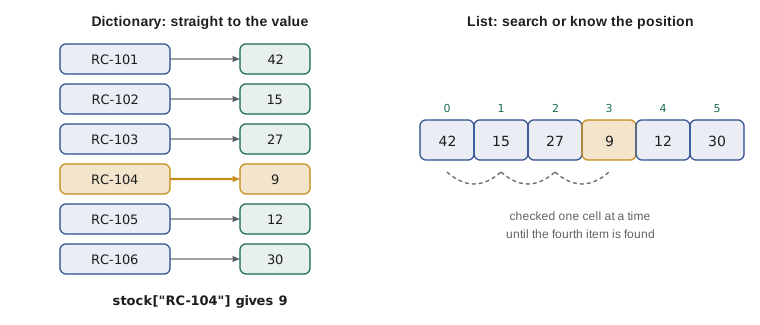
Since Python 3.7, dictionaries remember the order in which keys were added, so printing or looping over one gives the entries in insertion order. That is convenient for reports, but the purpose of a dictionary is lookup by key, not order. The in operator tests whether a key is present; it checks keys, not values.
Looking up a key that does not exist raises a KeyError. When a missing key is a normal possibility, use the get method, which returns None, or a default you choose, instead of failing. get is the safe way to look things up when you are not sure the key is there.
stock = {"RC-101": 42, "RC-104": 9}
print(stock.get("RC-104"))
print(stock.get("RC-999"))
print(stock.get("RC-999", 0))
code = "RC-999"
if code in stock:
    print(code, "has", stock[code], "bags")
else:
print(code, "is not a Ridgeline coffee")9 None 0 RC-999 is not a Ridgeline coffee
To remove an entry, use del d[key], or d.pop(key), which also returns the value. The update method merges another dictionary into this one, adding new keys and overwriting existing ones, which is handy for applying a batch of changes at once.
Looping over dictionaries
A for loop over a dictionary goes through its keys. The methods keys, values and items give views of the keys, the values and the key-value pairs. Looping over items with two loop variables is the most common pattern, because it gives you both parts of each entry at once.
stock = {"RC-101": 42, "RC-102": 15, "RC-103": 27,
         "RC-104": 9, "RC-105": 12, "RC-106": 30}
for code in stock:
    print(code, end=" ")
print()
print("Total bags:", sum(stock.values()))
for code, bags in stock.items():
    if bags < 15:
print(f"{code} is low: {bags} bags")RC-101 RC-102 RC-103 RC-104 RC-105 RC-106 Total bags: 135 RC-104 is low: 9 bags RC-105 is low: 12 bags
To process a dictionary in another order, sort its items. sorted(stock.items()) sorts by key; sorting by value needs a key function that picks out the second element of each pair, written key=lambda pair: pair[1]. lambda creates a tiny unnamed function in place; you saw it in lesson 8's exercise and PYTH-102 explains it fully.
stock = {"RC-101": 42, "RC-102": 15, "RC-103": 27,
         "RC-104": 9, "RC-105": 12, "RC-106": 30}
for code, bags in sorted(stock.items(), key=lambda pair: pair[1]):
    print(code, bags)
print("Fullest shelf:", max(stock, key=stock.get))RC-104 9 RC-105 12 RC-102 15 RC-103 27 RC-106 30 RC-101 42 Fullest shelf: RC-101
Counting with a dictionary
One of the classic uses of a dictionary is counting how often each thing occurs. Start with an empty dictionary; for each item, add 1 to its count, using get with a default of 0 so the first occurrence works. After the loop the dictionary holds every distinct item and its count. Anita uses exactly this to see which drinks sold best in a shift.
shift = ["latte", "drip", "latte", "mocha", "drip", "latte",
         "tea", "latte", "cappuccino", "drip"]
counts = {}
for drink in shift:
    counts[drink] = counts.get(drink, 0) + 1
print(counts)
for drink, n in sorted(counts.items(), key=lambda p: p[1], reverse=True):
print(f"{drink:<12}{'#' * n} {n}"){'latte': 4, 'drip': 3, 'mocha': 1, 'tea': 1, 'cappuccino': 1}
latte #### 4
drip ### 3
mocha # 1
tea # 1
cappuccino # 1The standard library offers a ready-made counting dictionary, collections.Counter, which does the same in one line and adds a most_common method. It is worth knowing, but understanding the get pattern first means you know what Counter does underneath and can adapt the idea, for example to add up sales amounts per drink instead of counting them.
Try it yourself
Bags sold per coffee
sales is a list of (code, bags) tuples, one per online order. Write a function bags_by_code(sales) that returns a dictionary mapping each stock code to the total bags ordered. With the starter data the result is {'RC-101': 5, 'RC-104': 1, 'RC-106': 3}.
Use get with a default of 0 to add each order to the running total for its code.
sales = [("RC-101", 2), ("RC-104", 1), ("RC-101", 3), ("RC-106", 3)]

def bags_by_code(sales):
    totals = {}
    return totals

print(bags_by_code(sales))
Dictionaries of records
A dictionary's values can be lists, tuples or other dictionaries. A dictionary keyed by stock code whose values are themselves dictionaries, one per coffee, is a natural way to hold the whole coffee list: each record has named fields, such as name, price and stock, instead of positions that must be remembered. This nested structure is also exactly what the JSON files of lesson 10 look like.
coffees = {
    "RC-101": {"name": "Sunrise Blend", "price": 18.50, "stock": 42},
    "RC-102": {"name": "Ethiopia Guji", "price": 22.00, "stock": 15},
    "RC-104": {"name": "Sumatra Dark", "price": 20.25, "stock": 9},
}
print(coffees["RC-104"]["name"])
coffees["RC-104"]["stock"] += 30
for code, c in coffees.items():
print(f"{code} {c['name']:<15}{c['stock']:>4} bags {c['price']:>6.2f}")Sumatra Dark RC-101 Sunrise Blend 42 bags 18.50 RC-102 Ethiopia Guji 15 bags 22.00 RC-104 Sumatra Dark 39 bags 20.25
Reading coffees['RC-104']['name'] from left to right: look up RC-104 to get that coffee's record, then look up name in the record. Inside an f-string, the inner key uses single quotes because the f-string itself uses double quotes. Compared with the list of tuples in lesson 8, a dictionary of records costs a little more typing but is much easier to read and extend, because adding a new field, such as origin or roast level, does not shift any positions.
A dictionary comprehension builds a dictionary in one expression, just as a list comprehension builds a list. {code: c['stock'] for code, c in coffees.items()} extracts the stock levels into a simple dictionary, and adding an if clause filters the entries.
coffees = {
    "RC-101": {"name": "Sunrise Blend", "price": 18.50, "stock": 42},
    "RC-104": {"name": "Sumatra Dark", "price": 20.25, "stock": 9},
    "RC-105": {"name": "Decaf Swiss Water", "price": 19.00, "stock": 12},
}
values = {code: round(c["price"] * c["stock"], 2) for code, c in coffees.items()}
print(values)
low = {code: c["name"] for code, c in coffees.items() if c["stock"] < 10}
print(low){'RC-101': 777.0, 'RC-104': 182.25, 'RC-105': 228.0}
{'RC-104': 'Sumatra Dark'}Keys must be immutable values, such as strings, numbers or tuples of them, because a dictionary relies on a key never changing. A list cannot be a key. Values have no restriction at all.
Sets
A set is an unordered collection of unique values, written in curly braces without colons, such as {'latte', 'mocha'}. Adding a value that is already there has no effect, which makes sets the simplest way to remove duplicates: set(items) keeps one of each. Membership tests with in are very fast on sets, as on dictionary keys. The empty set must be written set(), because {} is an empty dictionary.
orders_today = ["RC-101", "RC-104", "RC-101", "RC-106", "RC-104", "RC-101"]
distinct = set(orders_today)
print(len(distinct), "different coffees ordered")
print(sorted(distinct))           # sets have no order, so sort them for display
seen = set()
seen.add("latte")
seen.add("latte")
print(seen)3 different coffees ordered
['RC-101', 'RC-104', 'RC-106']
{'latte'}Sets support the operations of mathematical set theory. The union a | b holds everything in either set; the intersection a & b holds what is in both; the difference a - b holds what is in a but not in b; and the symmetric difference a ^ b holds what is in exactly one of them. These answer real questions in a single expression.
online = {"RC-101", "RC-102", "RC-104", "RC-106"}
cafe = {"RC-101", "RC-103", "RC-104", "RC-105"}
print("Sold anywhere:", sorted(online | cafe))
print("Sold in both:", sorted(online & cafe))
print("Online only:", sorted(online - cafe))
print("In exactly one:", sorted(online ^ cafe))
all_codes = {"RC-101", "RC-102", "RC-103", "RC-104", "RC-105", "RC-106"}
print("Not sold at all:", sorted(all_codes - (online | cafe)))Sold anywhere: ['RC-101', 'RC-102', 'RC-103', 'RC-104', 'RC-105', 'RC-106'] Sold in both: ['RC-101', 'RC-104'] Online only: ['RC-102', 'RC-106'] In exactly one: ['RC-102', 'RC-103', 'RC-105', 'RC-106'] Not sold at all: []
Sets are printed in no particular order, which is why the listing sorts them for display. Because they are unordered, sets have no indexes, so s[0] is an error. When you need uniqueness and fast membership but not order, a set is the right tool; when you need order or duplicates, use a list; when you need to look things up by a key, use a dictionary.
| Need | Use | Example |
|---|---|---|
| Items in order, duplicates allowed | list | Sales in the order they happened |
| A fixed record that should not change | tuple | (code, name, price) |
| Look up a value by a key | dict | Stock level by stock code |
| Unique items, fast membership, set algebra | set | Coffees sold online this week |
Worked problem
Restocking from a roast log
Kai's roast log for the day is a list of (code, bags) tuples. Theo's stock is a dictionary keyed by code. Write the steps to add each batch to the stock, reject any code that is not on the coffee list, and report the new levels.
Show solution
- Loop over the roast log with for code, bags in log.
- Check the key: if code not in stock, print a message naming the unknown code and continue to the next batch.
- Otherwise update: stock[code] += bags.
- Report: loop over sorted(stock.items()) and print each code with its new level.
- Test with a log that includes a typo such as 'RC-10' to make sure the check works.
Answer: Known codes are restocked, the typo is reported and skipped, and the report shows the new levels.
stock = {"RC-101": 42, "RC-102": 15, "RC-103": 27,
         "RC-104": 9, "RC-105": 12, "RC-106": 30}
log = [("RC-104", 30), ("RC-10", 30), ("RC-105", 30)]
for code, bags in log:
    if code not in stock:
        print("Unknown code in roast log:", code)
        continue
    stock[code] += bags
for code, bags in sorted(stock.items()):
print(code, bags)Unknown code in roast log: RC-10 RC-101 42 RC-102 15 RC-103 27 RC-104 39 RC-105 42 RC-106 30
Try it yourself
Coffees sold in both channels
Write a function sold_in_both(online_orders, cafe_orders) that takes two lists of stock codes, which may contain repeats, and returns a sorted list of the codes that appear in both. With the starter data it returns ['RC-101', 'RC-104'].
online_orders = ["RC-101", "RC-104", "RC-101", "RC-106"]
cafe_orders = ["RC-103", "RC-104", "RC-101", "RC-104"]

def sold_in_both(online_orders, cafe_orders):
    return online_orders + cafe_orders

print(sold_in_both(online_orders, cafe_orders))
Common mistakes
MistakeLooking up a key that might be missing with d[key].
InsteadUse d.get(key, default) or check key in d first.
MistakeExpecting in to search the values of a dictionary.
Insteadin checks keys; use value in d.values() to search values.
MistakeWriting {} for an empty set.
Instead{} is an empty dictionary; write set().
MistakeExpecting a set or dictionary to have positions, as in s[0].
InsteadSets have no positions; dictionaries are indexed by key. Sort into a list if you need order.
MistakeUsing a list as a dictionary key.
InsteadKeys must be immutable; use a tuple or a string instead.
MistakeChanging a dictionary's keys while looping over it.
InsteadLoop over list(d.items()) or build a new dictionary.
Summary and key terms
- A dictionary maps unique, immutable keys to values; d[key] looks up, assigns or adds an entry.
- A missing key raises KeyError; get(key, default) and key in d avoid it.
- Loop over keys, values() or items(); sort items with a key function to order a report.
- counts[x] = counts.get(x, 0) + 1 is the standard counting pattern.
- Dictionaries of records give named fields and match the shape of JSON data.
- A set holds unique values; set(items) removes duplicates; | & - ^ give union, intersection, difference and symmetric difference.
- Choose list for order, tuple for fixed records, dict for lookup by key and set for uniqueness.
- dictionary (dict)
- A collection of key-value pairs with fast lookup by key.
- key
- The unique, immutable value used to look up an entry in a dictionary.
- value
- The data stored under a key.
- KeyError
- The error raised when a dictionary lookup uses a missing key.
- items()
- A view of a dictionary's key-value pairs.
- nested dictionary
- A dictionary whose values are themselves dictionaries.
- dictionary comprehension
- An expression that builds a dictionary, such as {k: v for k, v in pairs}.
- set
- An unordered collection of unique values.
- union / intersection
- Set operations giving everything in either set, or only what is in both.
- hashable
- Usable as a dictionary key or set member because the value cannot change.
Practice problems
Work each problem on paper first, then reveal the answer to check.
d = {"a": 1}. What do d.get("b") and d.get("b", 0) return?
Show answer
None and 0.
Write a loop that prints each key and value of prices = {"latte": 5.25, "tea": 3.00}.
Show answer
for drink, price in prices.items(): print(drink, price)
What is len({"latte", "mocha", "latte"})?
Show answer
2, because sets keep one copy of each value.
Given a = {1, 2, 3} and b = {3, 4}, what are a | b, a & b and a - b?
Show answer
{1, 2, 3, 4}, {3} and {1, 2}.
How do you find the key with the largest value in d?
Show answer
max(d, key=d.get)
Why can (2026, 11) be a dictionary key but [2026, 11] cannot?
Show answer
Tuples are immutable and hashable; lists are mutable.
Lesson quiz · 5 questions
Score 60% or more to complete this lesson.
Create a free account to save your progress, take quizzes and earn a certificate.