
ROB-330 · Lesson 1 of 12 · 29 min
Images as data and the robot vision pipeline
A camera is the richest sensor most robots carry. A single 1920 × 1080 color frame holds more than six million numbers, and a camera delivers thirty or more of those frames every second for a few dollars of hardware. Yet the numbers on their own mean nothing to a robot. A pixel value of 187 does not say "edge of a box" or "person approaching". Computer vision is the work of turning arrays of brightness values into the quantities a robot can act on: where an object is, how it is oriented, how far away the floor drops off, whether the gripper actually closed on the part. This course follows that path from raw pixels to metric 3-D answers, and this first lesson sets out what an image actually is, what can go wrong with it, and how a robot's vision pipeline is organized.
The sensors themselves, from rolling-shutter CMOS chips to time-of-flight depth cameras, were covered in ROB-220. Here the starting point is the array the sensor hands to software.
An image is an array of measurements
A digital grayscale image is a two-dimensional array \( I(u, v) \), where u counts columns from the left and v counts rows from the top. Each element, a pixel, stores a number proportional to the light collected by one photosite during the exposure. With 8-bit storage the values run from 0 (black) to 255 (white); machine-vision and scientific cameras often store 10, 12 or 16 bits per pixel, which keeps detail in shadows and highlights that an 8-bit image would crush.
A color image adds a third index for the channel, so it becomes an array of shape height × width × 3. Most color cameras do not measure three colors at every photosite. Instead a Bayer filter mosaic places red, green and blue filters over alternating photosites (twice as many green as red or blue, roughly matching human sensitivity), and a demosaicing algorithm interpolates the missing two values at every pixel. This matters for robotics because demosaicing blurs fine detail slightly and can create false color fringes on sharp edges, which can confuse feature detectors working on high-contrast calibration targets.
It also matters how the numbers relate to light. Most consumer cameras apply a gamma curve, roughly \( V = L^{1/2.2} \), so that stored values are not proportional to the light that arrived. That is good for display but bad for measurement: averaging two gamma-encoded pixels does not give the average brightness. Machine-vision cameras usually offer a linear mode, and algorithms that reason about light, such as photometric stereo or exposure fusion, should use it.
Worked problem
How much data does a camera produce?
A stereo pair of color cameras each outputs 1280 × 800 pixels, 3 channels, 8 bits per channel, at 30 frames per second. What raw data rate must the robot handle?
Show solution
- Bytes per frame per camera: \( 1280 \times 800 \times 3 = 3{,}072{,}000 \) bytes, about 3.07 MB.
- Per camera per second: \( 3.07 \times 30 = 92.2 \) MB/s.
- Two cameras: \( 184 \) MB/s, or about 1.47 Gbit/s.
Answer: About 184 MB/s of raw pixels, more than a 1 Gbit/s Ethernet link can carry. This is why robots compress images, downsample them, process them on a computer next to the camera, or use a faster link such as USB 3 or 10 GbE.
Color spaces
RGB describes color by how much red, green and blue light is present, which suits sensors and screens but not reasoning. Brightness and color are tangled together in RGB: the same red box gives very different RGB triples in sun and in shadow. Other color spaces separate them.
- HSV (hue, saturation, value) puts the color's identity in a single hue angle. Thresholding hue is a classic, cheap way to find a brightly colored object, such as an orange ball or a colored marker, under changing light.
- YCbCr and YUV separate luma (brightness, Y) from two chroma channels. Video compression and many camera interfaces use them, and most feature detectors work on luma alone.
- CIE L*a*b* is designed so that equal distances correspond roughly to equal perceived differences, which helps when comparing colors, for example when sorting parts by shade.
For most geometric tasks in this course, color is discarded and the image is converted to grayscale with a weighted sum such as \( Y = 0.299R + 0.587G + 0.114B \). Color is still valuable for segmentation and recognition, which learned models in lessons 9 and 10 exploit automatically.
Histograms, contrast and thresholds
An image histogram counts how many pixels fall at each brightness value. It shows at a glance whether an image is underexposed (values bunched near 0), overexposed (bunched near 255 with a spike at saturation) or low in contrast (a narrow hump). Saturated pixels are lost information: once a photosite fills, every brighter surface reads 255, and edges and texture in that region disappear.
Histograms also drive simple segmentation. If a dark part sits on a bright conveyor, the histogram has two humps, and a threshold between them separates part from background. Otsu's method picks that threshold automatically by choosing the value that maximizes the between-class variance of the two groups. Histogram equalization stretches the values so they spread over the full range, which can help a human see detail but changes the image in ways that may hurt algorithms that assume consistent brightness.
import numpy as np
rng = np.random.default_rng(1)

# synthetic 120 x 160 image: bright conveyor (about 190) with a dark part (about 60)
img = rng.normal(190, 12, (120, 160))
img[40:80, 50:110] = rng.normal(60, 10, (40, 60))
img = np.clip(img, 0, 255).astype(np.uint8)

hist = np.bincount(img.ravel(), minlength=256)
p = hist / hist.sum()
levels = np.arange(256)

# Otsu: choose t to maximize between-class variance
best_t, best_var = 0, -1.0
for t in range(1, 255):
    w0, w1 = p[:t].sum(), p[t:].sum()
    if w0 == 0 or w1 == 0:
        continue
    m0 = (levels[:t] * p[:t]).sum() / w0
    m1 = (levels[t:] * p[t:]).sum() / w1
    var_b = w0 * w1 * (m0 - m1) ** 2
    if var_b > best_var:
        best_t, best_var = t, var_b

mask = img < best_t
print("Otsu threshold:", best_t)
print("pixels classed as part:", int(mask.sum()), "of", img.size)
print("true part area:", 40 * 60)Otsu threshold: 126 pixels classed as part: 2400 of 19200 true part area: 2400
Noise and what causes it
Every pixel value is a noisy measurement. Three sources dominate.
- Shot noise comes from the random arrival of photons. If a photosite collects N photons on average, the count varies with standard deviation \( \sqrt{N} \), so the signal-to-noise ratio is \( \sqrt{N} \). Doubling the light improves SNR by only \( \sqrt{2} \). Dim scenes and short exposures are noisy for this fundamental reason.
- Read noise is added by the sensor electronics each time a pixel is read, roughly constant per pixel, and dominates in very dark images.
- Fixed-pattern noise and hot pixels are repeatable differences between photosites. Because they repeat, they can be measured with dark frames and subtracted.
Quantization adds a further small error: an 8-bit value rounds the true brightness to the nearest of 256 levels, which behaves like uniform noise with standard deviation of about 0.29 levels. Motion blur is not noise but has a similar effect on detail: an object moving at v pixels per second during exposure t smears over \( vt \) pixels.
Worked problem
Shot noise and exposure
In a dim warehouse aisle a camera pixel collects about 400 photoelectrons in a 10 ms exposure. What is the shot-noise SNR? If the exposure is cut to 2.5 ms to reduce motion blur, what happens?
Show solution
- SNR at 10 ms: \( \sqrt{400} = 20 \).
- At 2.5 ms the pixel collects a quarter as much light: 100 electrons.
- SNR at 2.5 ms: \( \sqrt{100} = 10 \).
Answer: Quartering the exposure halves the SNR from 20 to 10. Cutting blur costs noise; the alternatives are more light, a faster lens (lower f-number) or a larger sensor.
Worked problem
Motion blur budget
A mobile robot drives past a shelf label at 1.5 m/s. At the label's distance, one pixel spans 1.2 mm of the scene. What is the longest exposure that keeps blur under 2 pixels?
Show solution
- Speed in pixels per second: \( 1500 \text{ mm/s} \div 1.2 \text{ mm/px} = 1250 \) px/s.
- Blur of 2 px requires \( t \le 2/1250 = 1.6 \) ms.
Answer: The exposure must be 1.6 ms or shorter, which in a dim aisle may require extra lighting or accepting more noise.
The robot vision pipeline
Whatever the application, a robot's vision system tends to follow the same stages, each building on the last.
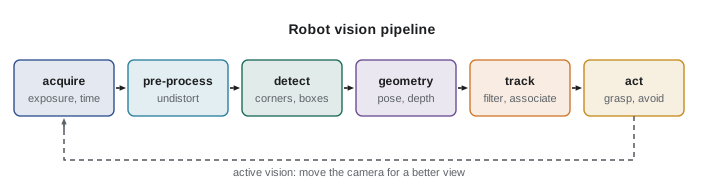
- Acquire: capture frames with controlled exposure, synchronized across cameras, and timestamped with the robot's clock so they can be fused with other sensors.
- Pre-process: remove lens distortion, rectify stereo pairs, convert color, and perhaps denoise or downsample.
- Detect: find features (corners, edges), fiducial markers or whole objects (bounding boxes, masks).
- Estimate geometry: turn image measurements into metric 3-D quantities using a calibrated camera model: object poses, depth, the camera's own motion.
- Track: associate detections over time and filter them, as covered in ROB-310, to smooth noise and bridge brief occlusions.
- Act: hand results to planning and control. Increasingly the loop runs the other way too: active vision moves the camera or robot to get a better view.
Two cross-cutting requirements run through every stage. The first is latency: a pose estimate that arrives 200 ms late describes where the object was, not where it is, and ROB-320 showed how to budget for that. The second is uncertainty: every output should carry an estimate of how wrong it might be, so later stages know how much to trust it.
Cameras, people and privacy
Robot cameras inevitably see people, and images of identifiable people are personal information. A warehouse robot that records aisle video, a delivery robot on a sidewalk and a cobot cell with a camera watching the operator all collect it. Good practice is the same everywhere: collect only what the task needs, process on the robot where possible, blur or discard faces that are not needed, keep recordings only as long as necessary, tell people cameras are present, and secure stored images.
In the US there is no general federal privacy law for camera data, so the rules come from the FTC and the states. The FTC treats unfair or deceptive data practices, including misusing facial recognition, as violations of the FTC Act, and in 2023 banned a retailer from using facial recognition for five years after finding it had deployed the technology unfairly. Illinois's Biometric Information Privacy Act (BIPA) requires written notice and written consent before collecting face geometry or other biometric identifiers and gives individuals a private right to sue, which has produced very large settlements. Texas's CUBI law and Washington's biometric statute impose similar consent duties but are enforced by the state attorney general. State privacy laws such as California's CCPA treat biometric data as sensitive information. A robot that merely detects that a person is present, without identifying them, raises far fewer issues than one that recognizes faces.
Common mistakes
MistakeAveraging or blending gamma-encoded pixel values as if they were proportional to light
InsteadUse a linear camera mode, or undo the gamma curve, before doing photometric calculations.
MistakeFixing motion blur by shortening exposure without checking noise
InsteadRemember that SNR falls with the square root of the light collected; add light or a faster lens instead.
MistakeThresholding RGB values to find a colored object under changing light
InsteadThreshold hue in HSV, or use a learned detector, so brightness changes matter less.
MistakeTreating saturated pixels as real measurements
InsteadDetect values at the maximum and treat them as missing data.
MistakeRecording and storing all camera video by default
InsteadCollect only what the task needs, blur faces, limit retention and follow privacy law.
Summary and key terms
- A digital image is an array of noisy light measurements, usually 8 to 16 bits per pixel, with color from a Bayer mosaic and demosaicing.
- Gamma-encoded values are not proportional to light; use linear data for photometric reasoning.
- HSV, YCbCr and Lab separate brightness from color; most geometry works on grayscale luma.
- Histograms reveal exposure problems, and Otsu's method picks a threshold between two classes automatically.
- Shot noise gives SNR of \( \sqrt{N} \), so shortening exposure to reduce blur costs noise.
- Robot vision pipelines acquire, pre-process, detect, estimate geometry, track and act, with latency and uncertainty tracked throughout.
- Images of people are personal information; minimize collection and follow Canadian and US privacy and biometric rules.
- Pixel
- One element of an image array, storing the light measured at one location.
- Bayer mosaic
- A pattern of red, green and blue filters over a sensor's photosites.
- Demosaicing
- Interpolating full color at each pixel from a Bayer mosaic.
- Gamma
- A non-linear encoding that makes stored values not proportional to light.
- HSV
- A color space of hue, saturation and value.
- Histogram
- A count of pixels at each brightness level.
- Otsu's method
- Automatic threshold selection by maximizing between-class variance.
- Shot noise
- Random variation from the discrete arrival of photons.
- Saturation
- A pixel reaching its maximum value, losing all detail above it.
- Active vision
- Moving the camera or robot to obtain better images for a task.
Practice problems
Work each problem on paper first, then reveal the answer to check.
How many bytes is one 640 × 480 grayscale 8-bit frame?
Show answer
307,200 bytes.
A pixel collects 900 photons. What is its shot-noise SNR?
Show answer
30.
Which color space puts color identity in a single angle?
Show answer
HSV (hue).
What does a spike at 255 in a histogram indicate?
Show answer
Saturated, overexposed pixels.
Name the threshold method that maximizes between-class variance.
Show answer
Otsu's method.
An object moves at 500 px/s. What exposure gives 1 px of blur?
Show answer
2 ms.
Why do Bayer cameras produce color fringes on sharp edges?
Show answer
Demosaicing interpolates missing color values across the edge.
Which pipeline stage turns pixel measurements into metric 3-D quantities?
Show answer
Geometry estimation, using a calibrated camera model.
What is the standard deviation of 8-bit quantization error, roughly?
Show answer
About 0.29 gray levels.
Which US state biometric law gives individuals a private right to sue?
Show answer
Illinois's BIPA.
Lesson quiz · 5 questions
Score 60% or more to complete this lesson.
Create a free account to save your progress, take quizzes and earn a certificate.