
SLS-120 · Lesson 8 of 12 · 20 min
Video calls and virtual selling
▶ Video coming soon A video version of this lesson is on the way.
Maya's first video meeting with the facilities team at Prairie Valley School District went wrong in small ways that added up. Her laptop camera looked up at her from the desk, so the four people on the call saw mostly her ceiling. The window behind her turned her into a silhouette. Twice she started to share her screen and showed her email inbox instead of the slides. And because she was watching her own notes rather than the camera, the facilities manager later told Darnell that Maya had seemed 'a bit distracted'. None of it was about the product. All of it affected how the buyers felt about the conversation. 'Video is a stage,' Darnell told her afterwards. 'You don't have to be a performer, but you do have to set the stage.'
Video calls became a standard part of selling during the COVID-19 pandemic, when most in-person sales meetings stopped, and they have stayed. Many business buyers now prefer video for early conversations and routine follow-ups, keeping in-person meetings for major decisions and site visits. Retailers also use video for virtual consultations, for example to walk a customer through a kitchen layout or show a product in detail. This lesson covers how to set up for video, how to run a video sales conversation, how to share a screen well and how to keep people engaged.
What video changes
Video restores some of the visual information the phone loses, but not all of it. Participants usually see only each other's head and shoulders, so posture and gestures below the chest disappear. Eye contact is distorted, because looking at someone's face on the screen means not looking at the camera. Small delays in sound and video make natural turn-taking harder, so people talk over each other or leave awkward gaps. And attention is fragile: a buyer on a video call is one click away from their email.
Researchers have also studied what has been called video call fatigue. A 2021 article by Jeremy Bailenson of Stanford University proposed several reasons video calls can be more tiring than in-person meetings: prolonged close-up eye contact, seeing one's own face constantly, reduced mobility and the extra effort of sending and reading nonverbal cues through a screen. Later surveys found that longer and more frequent calls without breaks were associated with more fatigue. For sellers, the practical point is to keep video meetings focused, let people turn off self-view, and avoid booking long calls back to back.
Setting up
A good setup takes a few minutes once and then becomes routine. Darnell gave the clinic a checklist.
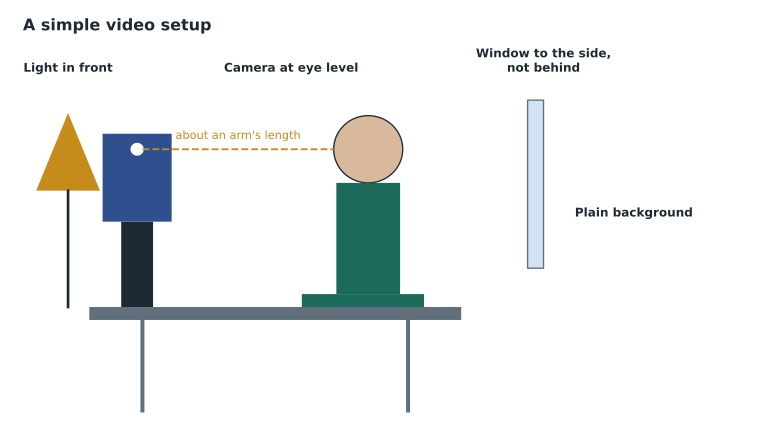
| Item | What to aim for | Common problem |
|---|---|---|
| Camera height | Lens at or slightly above eye level | Laptop on the desk looking up at the chin |
| Distance | Head and shoulders in frame, about an arm's length away | Face filling the screen, or a tiny figure in a large room |
| Light | Soft light in front of you | A bright window behind you, turning you into a silhouette |
| Background | Tidy and plain, or a simple branded background | Clutter, people walking past, a distracting virtual background |
| Sound | A headset or good microphone; quiet room | Laptop microphone picking up echo and typing |
| Connection | A wired or strong wireless connection | Frozen video at the key moment |
| Screen | Only the windows you plan to share open | Email and chat notifications popping up |
Dress for video as for an in-person meeting with the same buyer. Solid colors usually look better on camera than fine stripes or busy patterns, which can shimmer.
Looking at the camera
The hardest habit to learn on video is looking into the camera when speaking. On screen, eye contact happens when the speaker looks at the lens, not at the other person's face. Most people naturally look at the face, so the other person sees them looking slightly down. Sellers can help themselves by placing the video window of the person they are talking to just below the camera, by looking at the lens when making an important point or asking a question, and by looking at the screen when listening, which is when the buyer's face matters most.
Running a video sales conversation
The arc of a sales conversation is the same on video, but some parts need more deliberate handling.
Arrive early. Join a few minutes before the start to check sound, video and the materials you will share. If the buyer joins early, the extra minutes are a chance for natural small talk.
Open with a clear agenda. Video conversations drift more easily than in-person ones. State the purpose and proposed agenda, check how much time everyone has and ask whether anything should be added. If several people from the buyer's side are on the call, ask each to introduce themselves and say what they hope to get from the meeting. This gives everyone a voice early and tells the seller who cares about what.
Manage turn-taking. Because of audio delays, pauses on video need to be slightly longer than in person, and a seller should ask questions of specific people by name when the group is larger than two: 'Linda, how would this work for the people booking rooms?' Otherwise, silence follows while everyone waits for someone else.
Use the chat and reactions. Many buyers will type a question in the chat rather than interrupt. Glance at the chat regularly and respond to questions out loud so everyone hears the answer.
Check in more often. Without full body language, it is harder to tell when someone has lost interest or disagrees. Every few minutes, especially after a long explanation, pause and ask an open question: 'What questions does that raise for you?'
End with a recap and next steps. As with the phone, say what was agreed and what happens next, and confirm it in writing afterwards.
Sharing your screen
Screen sharing lets the seller show slides, documents, a product demonstration or a booking calendar. Done well, it focuses the conversation. Done badly, it exposes private information or leaves the buyer staring at a slide while the seller talks for ten minutes.
| Before the call | During the call | After sharing |
|---|---|---|
| Close email, chat and personal tabs | Share a single window, not the whole desktop, when possible | Stop sharing so faces return to the screen |
| Turn on do-not-disturb to block notifications | Say what you are showing and why | Ask what the buyer thinks of what they saw |
| Increase the text size so it is readable | Pause every few slides for questions | Send the material afterwards if useful |
| Rehearse the click path for any demonstration | Keep a slide to a few seconds of reading | Note any questions for follow-up |
Sharing a screen also means the seller can no longer easily see the buyers' faces. Darnell suggests sharing for short stretches, stopping to return to the gallery view of faces, and asking a question before sharing the next thing. A demonstration should usually start with the buyer's own situation: 'You mentioned that bookings come in by email. Let me show you what that would look like for the receptionist.' Product demonstrations are covered in more depth in SLS-212 Sales Presentations, Demos and Proposals.
Worked problem
Planning a 30-minute video meeting
Maya is planning a 30-minute follow-up video meeting with three people from Prairie Valley. She wants to spend time on introductions, a recap, a short demonstration, questions and next steps. She also wants the buyers to be speaking for at least half of the meeting. How might she plan the time?
Show solution
- Introductions and agenda, with each person saying what they want from the meeting: 4 minutes, mostly the buyers talking.
- Recap of the first meeting and a check that nothing has changed: 4 minutes, half Maya and half the buyers.
- A short demonstration of booking a room, in two parts with a pause between: 8 minutes, mostly Maya.
- Questions and discussion: 10 minutes, mostly the buyers.
- Next steps and close: 4 minutes, shared.
- \[4 + 4 + 8 + 10 + 4 = 30 \text{ minutes}\]
- Estimated buyer talking time: about 3 + 2 + 1 + 8 + 2 = 16 minutes, slightly more than half.
Answer: A plan like this keeps the demonstration short and leaves most of the meeting for the buyers. Maya also sets a reminder to stop sharing after each part of the demonstration.
Recording, privacy and security
Video platforms make recording easy, and many offer automatic transcripts and AI-generated summaries. The rules from lesson 2 on recording apply, and video adds more personal information, such as faces and home settings. Sellers should always tell participants before recording, use the platform's recording notice, respect a request not to record, and follow their company's rules on where recordings and transcripts are stored and how long they are kept. AI meeting assistants that join calls automatically should be announced too. A buyer who discovers an unannounced AI note-taker in a meeting is unlikely to trust the seller again.
Security also matters. Sellers should use their company's approved platform, avoid sharing confidential customer documents with people who were not invited, and be careful about what is visible in the background, such as a whiteboard with another customer's pricing.
Virtual selling in retail
Juniper & Pine began offering virtual consultations in 2025 for customers who want to see furniture or appliances before visiting the store, or who live far from the city. Aiden ran his first one in October 2026, using a tablet on a small stand to walk a customer through three dining tables. Bev's tips for him reflected the same principles: start by asking about the customer's room and how they use it, show products from the angles the customer cares about, hold a tape measure in view to show dimensions, describe what the camera cannot show, such as the feel of the wood, and offer to hold the item while the customer decides.
Virtual retail consultations also raise expectations. A customer who sees a table on video and then finds it looks different at home will be disappointed, so associates should be honest about color and finish differences on screen and explain the return policy clearly.
When to use video, phone or a visit
Video is not always the right channel. Sellers choose between video, phone and in-person meetings based on what the conversation needs to achieve and what the buyer prefers.
| Channel | Works well for | Less suitable for |
|---|---|---|
| Phone | Short follow-ups, quick questions, first contact, buyers on the move | Showing products, complex discussions with several people |
| Video | Discovery with several people, demonstrations, reviewing documents together | Very short check-ins, buyers with poor connections |
| In person | Site visits, major decisions, building a new relationship, hands-on products | Routine updates where travel time is not justified |
Asking the buyer is usually the simplest approach: 'Would a quick video call work, or would you rather I came by to see the room?' For Prairie Valley, Maya used video for the first two conversations and then visited two schools in person to see the meeting rooms, which revealed that the projector mounts were too old for the screens she had planned to propose.
After any video meeting, Maya now spends two minutes on a short self-check before sending the recap: Did I look at the camera when it mattered? Did everyone speak? Did I stop sharing between sections? Did we agree a next step? The check takes almost no time, and over the fall it removed most of the small problems that had made her first Prairie Valley call feel distracted.
Darnell adds one more habit for group calls: if someone has been silent for most of the meeting, ask them directly but gently before the end. 'Tom, we haven't heard from finance yet. Is there anything you'd want to see before this goes further?' The quietest person on a video call is often the one with the most important concern.
Common mistakes
MistakeA video call is just a phone call with pictures.
InsteadVideo needs a deliberate setup, a clear agenda, managed turn-taking and frequent check-ins.
MistakeLooking at the other person's face on screen shows eye contact.
InsteadEye contact on video means looking at the camera lens, especially when making an important point.
MistakeShare your whole desktop so nothing is missed.
InsteadShare a single window, close notifications and stop sharing between sections to see faces.
MistakeAI note-takers and recordings can run quietly in the background.
InsteadTell participants before recording or using AI note-takers, and respect requests not to.
MistakeA product looks the same on video as in person.
InsteadDescribe what the camera cannot show and be honest about color and finish differences.
Summary and key terms
- Video restores some visual information but distorts eye contact, complicates turn-taking and makes attention fragile.
- Video call fatigue is real; keep meetings focused, allow self-view to be hidden and avoid long calls back to back.
- Set up with the camera at eye level, light in front, a tidy background, good sound and a clean screen.
- Run the conversation with an early start, a clear agenda, named questions, chat checks, frequent check-ins and a recap.
- Share screens briefly and purposefully, then return to faces.
- Announce recordings and AI note-takers, protect confidential information, and be honest about what video cannot show.
- Video call fatigue
- Tiredness associated with frequent or long video meetings, linked to close-up eye contact, self-view and reduced movement.
- Gallery view
- A video layout that shows all participants' faces at once.
- Screen sharing
- Showing a window or screen to other participants during a call.
- Virtual consultation
- A video appointment in which a retail associate shows products to a customer remotely.
Practice problems
Work each problem on paper first, then reveal the answer to check.
Name three items on Darnell's video setup checklist.
Show answer
For example: camera at eye level, light in front, tidy background, good sound, clean screen.
Why should a seller ask questions of specific people by name on a group video call?
Show answer
Because audio delays and uncertainty about who should answer often lead to silence.
In Maya's plan, the segments are 4, 4, 8, 10 and 4 minutes. What is the total?
Show answer
30 minutes.
What should a seller do before using an AI note-taker on a call?
Show answer
Tell the participants and respect any request not to use it.
Lesson quiz · 5 questions
Score 60% or more to complete this lesson.
Create a free account to save your progress, take quizzes and earn a certificate.