
CINE-310 · Lesson 12 of 12 · 29 min
Deliverables, quality control and the capstone grade
A grade is only finished when it has been delivered correctly to every platform that will show it. A single feature may need a theatrical Digital Cinema Package, an HDR master for streaming, an SDR master for broadcast and airlines, archival masters, and textless versions for international distribution, each with its own technical specification. Errors such as illegal levels, wrong colour space tags, mismatched versions or missing frames can cause rejection by a distributor or broadcaster, or, worse, reach audiences. This lesson covers the deliverables a colourist produces, legal levels and gamut, file formats and metadata, quality control, archiving, and finishes with a capstone project that brings together the skills of the course.
The deliverables list
Every distribution agreement includes a deliverables schedule listing the masters required. Colourists are responsible for the picture elements, working with the post supervisor, online editor and mastering facility. A typical list for a feature with streaming and theatrical release might include the following.
| Deliverable | Typical specification | Notes |
|---|---|---|
| DCP (theatrical) | JPEG 2000, XYZ, 48 nits, P3 intent | Created from a DCDM or graded P3 master |
| HDR master | IMF or ProRes 4444 XQ, PQ, P3-D65 in Rec.2020, 1,000 nits | With Dolby Vision metadata if required |
| SDR master | Rec.709, BT.1886, 100 nits | Derived by trim pass |
| Textless elements | Shots without titles or subtitles | For international versions |
| Archival master | Uncompressed or lossless, wide gamut | Often ACES (ACES2065-1) EXR |
| Trailers and promos | As per marketing specs | Often graded separately |
| Stills and key art | High-resolution frames | Graded to match the film |
In Canada, productions financed through Telefilm Canada, the Canada Media Fund or provincial agencies, and those made for CBC/Radio-Canada, Bell Media or Corus, follow the funder's or broadcaster's delivery requirements, which typically specify broadcast masters, closed captioning and described video, and deposit copies; broadcast picture must also meet the broadcaster's technical specification for legal levels and loudness.
Legal levels
Video signals have defined legal ranges. In 10-bit narrow-range (or "video" or "legal") encoding, used by most broadcast and many mastering formats, black is at code value 64 and white at 940 for luma, with chroma centred at 512 and ranging from 64 to 960. Values outside these ranges, sometimes called super-black and super-white, may be clipped or rejected by broadcasters. Full-range (data) encoding uses 0 to 1,023. A major source of errors is confusion between the two: a full-range file interpreted as narrow-range looks crushed and clipped, and a narrow-range file interpreted as full-range looks washed out with grey blacks.
Worked problem
Converting code values
A 10-bit narrow-range file has a pixel at luma code 502. What normalized signal E does it represent? What would the same normalized value be in full range (0 to 1,023)?
Show solution
- E = (502 − 64) ÷ 876 = 438 ÷ 876 = 0.500.
- In full range: D = 0.500 × 1,023 ≈ 512.
- If this narrow-range file were misread as full range, code 502 would be read as 502 ÷ 1,023 ≈ 0.491, and black at 64 would be read as about 0.063 instead of 0, which lifts the blacks to a visible grey.
Answer: E = 0.500, equivalent to code 512 in full range; misinterpreting ranges makes blacks grey or crushed.
Gamut and broadcast safety
Besides luminance, deliverables must keep colours within the target gamut. Wide-gamut grades converted to Rec.709 may contain colours that cannot be represented, producing negative RGB values or clipping. Colour management tools apply gamut mapping or compression to bring out-of-gamut colours smoothly inside the target; the ACES Reference Gamut Compression and similar tools in Resolve and Baselight are commonly used, especially for saturated lights such as LEDs, neon and police lights. Broadcasters may also limit composite gamut or chroma excursions, and QC tools flag any violations. Colourists check gamut with scopes, gamut warnings and false-colour overlays before rendering deliverables.
File formats and metadata
Mastering formats include image sequences, such as DPX and OpenEXR; mezzanine codecs, such as Apple ProRes 4444 XQ and 422 HQ and Avid DNxHR; and packaging formats, such as IMF (Interoperable Master Format) for streaming and DCP for cinema. IMF packages carry picture, audio, subtitles and metadata as separate tracks with a composition playlist, so that versions can be assembled without duplicating media. Correct metadata is essential: colour primaries, transfer function and matrix coefficients tags (for example, Rec.709 / BT.1886 / Rec.709 for SDR, or Rec.2020 / PQ / Rec.2020 for HDR), mastering display information (SMPTE ST 2086) and content light levels (MaxCLL and MaxFALL) for HDR10, and Dolby Vision XML for dynamic metadata. A file with the right pixels and the wrong tags will display incorrectly.
Worked problem
MaxCLL and MaxFALL
An HDR master's brightest pixel is 950 nits. The frame with the brightest average has an average light level of 230 nits. What are the MaxCLL and MaxFALL values, and what do they tell a display?
Show solution
- MaxCLL (maximum content light level) = 950 nits, the brightest pixel in the programme.
- MaxFALL (maximum frame-average light level) = 230 nits, the highest frame average.
- Displays use these to plan tone mapping: a 600-nit television knows it must compress highlights up to 950 nits, and that frame averages will not exceed 230 nits.
Answer: MaxCLL 950 and MaxFALL 230, which help displays tone-map the programme appropriately.
Quality control
Quality control (QC) is the systematic inspection of deliverables for technical and visual faults. Automated QC software, such as Telestream Vidchecker, Interra Baton or Venera Pulsar, checks levels, gamut, frame rates, metadata, dropped frames, black frames, freeze frames and compression artefacts. Manual QC, often by a dedicated QC operator watching the whole programme on a calibrated display, catches visual issues such as dead pixels, digital hits, matte lines, banding, flicker, focus problems, continuity errors in the grade and wrong VFX versions. Streaming platforms and broadcasters have their own QC processes and will reject or return deliverables that fail. Netflix, for example, publishes detailed delivery specifications and requires specific checks for HDR and IMF deliverables.
| QC check | Typical fault | Who catches it |
|---|---|---|
| Levels | Super-black or super-white, clipped highlights | Automated and colourist |
| Gamut | Out-of-gamut LEDs or neon | Automated and scopes |
| Metadata | Wrong transfer or colour tags | Automated |
| Banding | Steps in skies and gradients | Manual review |
| Grade continuity | Shot that jumps within a scene | Manual review and colourist |
| Wrong version | Temp VFX or old edit | Manual review against lists |
| Digital hits | Corrupt frames or blocks | Automated and manual |
Banding and bit depth
Banding, visible steps in smooth gradients, is one of the most common visual faults in deliverables. It arises when gradients are quantized with too few code values, when heavy grading stretches a limited range, or when compression removes fine variation. A 10-bit file has four times as many code values per channel as an 8-bit file, so gradients are smoother. Colourists reduce banding by grading from high-bit-depth sources, avoiding large stretches of compressed material, rendering masters at 10 bits or more, and adding a little grain or dither, which breaks up steps. Banding that appears only after streaming compression can sometimes be reduced by slightly more texture in the master.
Worked problem
Steps in a sky gradient
A sky gradient spans from 0.55 to 0.65 of the signal range across 1,920 pixels. How many distinct code values are available across the gradient in 8-bit full range (0–255) and in 10-bit full range (0–1,023), and how wide is each band in pixels?
Show solution
- 8-bit: 0.10 × 255 ≈ 25.5, so about 26 values; 1,920 ÷ 26 ≈ 74 pixels per band.
- 10-bit: 0.10 × 1,023 ≈ 102 values; 1,920 ÷ 102 ≈ 19 pixels per band.
Answer: About 26 bands of 74 pixels in 8-bit and about 102 bands of 19 pixels in 10-bit, so 10-bit gradients are four times finer and much less likely to show banding.
Archiving
Finished films are archived so they can be remastered for future formats. A good archive includes the graded master in a high-quality, wide-gamut, scene-referred form, such as an ACES2065-1 EXR sequence; ungraded camera originals and VFX finals; the grading project, LUTs, CDLs and Dolby Vision metadata; edit decision lists and change lists; and documentation of the colour pipeline. Archives are stored on LTO tape or similar long-term media in multiple locations, and periodically checked and migrated. Films graded today may be remastered decades from now for displays that do not yet exist; a well-documented archive makes it possible to honour the original intent.
Capstone: grading a short scene
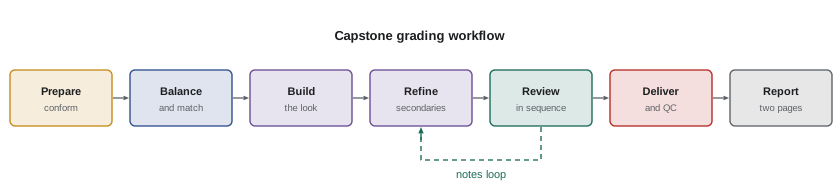
The capstone brings together the skills of the course. You will grade a short scene of 15 to 30 shots, using provided footage or your own, and deliver an HDR or SDR master with a written grading report. The project is assessed on technical correctness, consistency, creative intent and professional communication.
- Prepare: set up a colour-managed project, conform the timeline from an EDL or XML, and check it against a reference movie.
- Balance and match: choose a hero shot, balance it, and match every shot using scopes, recording key values.
- Build a look: develop a scene look from references, applied at group or timeline level, with skin protected.
- Refine: use secondaries subtly to relight, direct the eye and fix problems.
- Review: watch in sequence, take notes as if from a director, and address them with relative changes.
- Deliver: render a master with correct levels, tags and metadata, check it with scopes and a QC checklist, and create a trim for a second target if possible.
- Report: write a two-page report describing intent, structure, key decisions with scope values, problems and solutions.
| Criterion | Evidence | Weight |
|---|---|---|
| Technical correctness | Levels, tags, gamut and QC checklist | 25 % |
| Consistency | Shots match within the scene; skin consistent | 25 % |
| Creative intent | Look supports the story and references | 25 % |
| Craft of secondaries | Subtle, stable, no artefacts | 10 % |
| Report and communication | Clear intent, structure and decisions | 15 % |
Rendering deliverables
Rendering deliverables is a careful, checklist-driven process. For each master, the colourist or finishing editor confirms the timeline version, output resolution and frame rate, colour space and transfer function, data or video range, codec and bit depth, file naming convention, handles or no handles, and whether titles, subtitles and textless sections are included. Render settings are saved as presets to avoid errors on later versions. After rendering, the output is reimported or played back on the reference display and checked with scopes, comparing a few frames against the grading timeline to confirm that what was rendered matches what was approved. Small mistakes at this stage, such as the wrong output transform on one deliverable, are easy to make and expensive to discover after delivery.
Versions and localization
International distribution multiplies deliverables. Different territories may need different title sequences, censored or edited versions, local credits and alternate languages, all of which must match the graded master. Textless backgrounds let distributors add local titles without regrading. Airline and broadcast versions may need edits for content and running time. Each version should be derived from the locked grade rather than regraded, and tracked carefully so that a later change to the master can be carried through every version. IMF packages make this easier by allowing versions to share the same graded picture and differ only in specific segments.
After delivery
Delivery is not quite the end. Distributors and platforms may return QC reports asking for fixes, which the colourist addresses with the same care as the main grade. Marketing teams may need graded stills, trailers and promotional clips that match the film. Festivals may request DCPs on short notice. And years later, the film may return for a remaster in a new format, when a clear archive and well-documented grade let a new colourist honour the original intent. Keeping good records, and a professional relationship with the production team, means the colourist is often the first person called when that happens.
Reflecting on the craft
Across this course you have moved from how vision works to how deliverables are checked. The common thread is that grading combines precise technical control with judgement about how images make people feel. Scopes, maths and standards keep the work honest and repeatable; perception, story and collaboration give it purpose. The capstone is an opportunity to practise both together, and the grading report is where you show not only what you did but why.
Delivery checklist
- Confirm the deliverables schedule and the latest technical specifications from each recipient.
- Lock the timeline version and verify it against the final reference movie.
- Set output colour space, transfer function, range, codec, bit depth and resolution for each master.
- Check levels and gamut with scopes and render a short test before the full render.
- Verify metadata tags, HDR mastering information and dynamic metadata.
- Run automated QC and watch every master in full.
- Document versions, settings and QC results, and archive the project.
Common mistakes
MistakeConfusing narrow-range and full-range files.
InsteadCheck range settings at render and on import.
MistakeIgnoring out-of-gamut LEDs and neon.
InsteadUse gamut compression and check with scopes.
MistakeCorrect pixels with wrong colour tags.
InsteadVerify primaries, transfer and matrix metadata.
MistakeSkipping manual QC.
InsteadWatch the whole programme on a calibrated display.
MistakeArchiving only the display master.
InsteadArchive a wide-gamut master, originals, project and metadata.
Summary and key terms
- Deliverables schedules list every picture master required.
- Narrow-range 10-bit luma runs from 64 to 940.
- Gamut compression brings saturated colours into the target.
- Formats include DPX, EXR, ProRes, IMF and DCP; tags and metadata must be right.
- MaxCLL and MaxFALL describe HDR brightness for displays.
- QC combines automated checks and manual review; banding is a common fault.
- Archives keep wide-gamut masters, originals and pipeline records for the future.
- Deliverables schedule
- Contractual list of required masters.
- DCP
- Digital Cinema Package for theatrical projection.
- IMF
- Interoperable Master Format for component deliverables.
- Narrow range
- Legal video range, 64–940 for 10-bit luma.
- Gamut compression
- Smoothly bringing out-of-gamut colours inside.
- MaxCLL
- Brightest pixel level in a programme.
- MaxFALL
- Highest frame-average light level.
- Quality control
- Inspection of deliverables for faults.
- Banding
- Visible steps in smooth gradients.
- Archival master
- High-quality master stored for the future.
Practice problems
Work each problem on paper first, then reveal the answer to check.
What is the 10-bit narrow-range luma range?
Show answer
64 to 940.
Narrow-range code 940 equals what E?
Show answer
1.0.
What happens if narrow range is read as full range?
Show answer
Blacks look grey and the image washed out.
Name a tool for out-of-gamut colours.
Show answer
ACES Reference Gamut Compression.
What does IMF stand for?
Show answer
Interoperable Master Format.
What does MaxFALL describe?
Show answer
Highest frame-average light level.
Name two automated QC checks.
Show answer
Levels and metadata.
How many times more values does 10-bit have than 8-bit?
Show answer
Four.
What reduces visible banding?
Show answer
Higher bit depth and a little grain or dither.
What format suits a scene-referred archive?
Show answer
ACES2065-1 EXR.
Lesson quiz · 5 questions
Score 60% or more to complete this lesson.
Create a free account to save your progress, take quizzes and earn a certificate.