
CINE-310 · Lesson 5 of 12 · 28 min
Secondary correction: qualifiers, windows, tracking and keys
Primary corrections act on the whole frame. Secondary corrections act on part of it: a face, the sky, a costume, the background behind an actor, a distracting bright object at the edge of frame. Secondaries let the colourist direct the eye, fix problems the set could not, and shape light after the fact. They are also where grades go wrong most visibly, with edges that buzz, keys that chatter and faces that glow unnaturally. This lesson covers how secondaries isolate areas, using colour and luminance qualifiers, power windows and shapes, tracking, mattes from external sources, and how to combine and refine them, along with the craft of using secondaries subtly.
Two ways to isolate
There are two fundamental ways to select part of an image. A qualifier, or key, selects pixels by their values: hue, saturation, luminance, or a combination. It follows the content automatically wherever it moves, but it selects everything with similar values, wanted or not. A window, or shape, selects pixels by position: a circle, rectangle, polygon or freehand curve drawn on the frame. It selects exactly where you draw, but it does not follow the content unless tracked or animated. Most real secondaries combine both: a window restricts a qualifier to one part of the frame, so that selecting skin does not also select a beige wall behind the actor.
| Method | Selects by | Strengths | Weaknesses |
|---|---|---|---|
| HSL qualifier | Hue, saturation, luminance | Follows content; organic edges | Selects similar colours elsewhere; noise |
| Luma qualifier | Brightness only | Isolate highlights or shadows | No colour discrimination |
| 3D / RGB qualifier | Colour volume sampled from strokes | Precise on difficult colours | Can be fragile with grain |
| Window / shape | Position | Exact, clean area | Must be tracked or animated |
| External matte | Alpha from VFX or AI | Accurate object isolation | Depends on supplier or processing |
HSL qualifiers
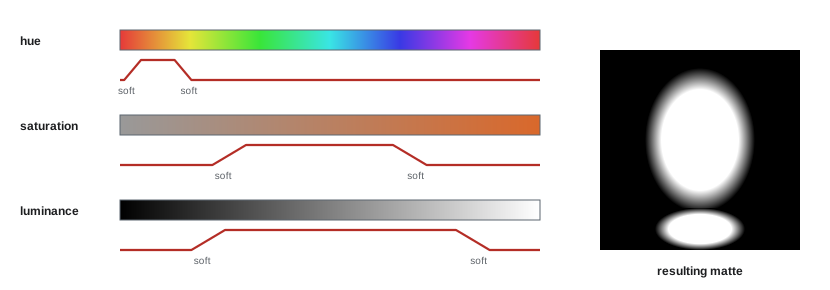
An HSL qualifier selects pixels that fall within ranges of hue, saturation and luminance. The colourist samples the target with an eyedropper, then refines each range: widening the hue range to include more of the target, narrowing saturation to exclude grey areas, and limiting luminance to exclude highlights or shadows. Each range has a softness setting that feathers the selection, so that pixels near the edge of the range are partly selected. Viewing the key as a black-and-white matte or with the unselected area greyed out (a highlight mode) is essential: the matte shows exactly what is selected, including stray pixels and holes. A clean qualifier often uses fewer channels than expected: selecting a blue sky by hue and saturation, with luminance disabled, avoids gaps where clouds change brightness.
Refining the matte
Raw qualifiers are rarely clean. Grain, noise, compression and motion blur cause pixels to flicker in and out of the selection, which shows on playback as buzzing or chattering edges. Grading systems provide matte refinement tools:
- Denoise or pre-blur the key source, so that grain does not break up the selection.
- Clean black and clean white, which push nearly unselected pixels fully out and nearly selected pixels fully in, removing speckle and holes.
- Shrink or grow the matte, to pull the edge in or out.
- Blur the matte, to soften the transition.
- Morphological operations such as open and close, to remove small specks or fill small holes.
The goal is a matte that is stable over time, not perfect on a still frame. A slightly soft matte that does not flicker is far better than a precise matte that chatters. Always play the shot back with the matte visible before applying corrections.
Windows and shapes
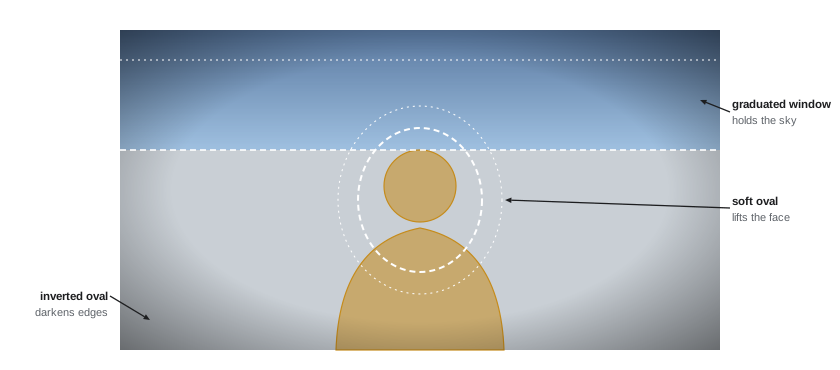
Windows, sometimes called power windows after the DaVinci feature, are geometric shapes that isolate a region. Circular and linear windows are the workhorses: a soft oval around a face to brighten it; a linear gradient across the sky to darken it; a large soft oval inverted to darken the edges of the frame as a vignette. Polygon and Bézier shapes isolate irregular areas such as a doorway, a window or a building. Windows have softness controls, sometimes separately inside and outside the edge, and should usually be much softer than beginners expect: a light fall-off that looks natural spans a large part of the frame. Hard-edged windows read as artificial unless they follow a real edge, like a window frame.
Relighting with windows
A common use of windows is to reshape the light after shooting: brightening a face that fell slightly out of the key light, adding a gentle pool of light on a table, darkening a bright wall that competes with the actor, or adding a gradient to suggest light falling off across a room. The trick is to follow the logic of the scene's light. A brightened area should be consistent with a source in the frame or implied off-screen; a darkened area should feel like natural fall-off or shadow. Relighting changes are best made in log or scene-referred space with offset or exposure-like controls, so that the brightened area keeps a natural contrast and colour relationship.
Worked problem
Brightening a face with a window
An actor's face reads 0.40 in ACEScct, while the target from the hero shot is 0.43. The colourist adds a soft oval and wants to lift the face by exposure inside it. ACEScct is about 0.057 per stop. How much exposure, in stops and printer points, should be applied inside the window, and what happens at the soft edge?
Show solution
- Difference: 0.43 − 0.40 = 0.03.
- Stops: 0.03 ÷ 0.057 ≈ 0.53 stop.
- Printer points: 0.53 × 12 ≈ 6 points.
- In the softness zone the correction blends: a pixel at 50 % matte receives about half the lift, roughly 3 points.
Answer: About half a stop, or 6 printer points, inside the oval, fading smoothly to zero across the soft edge.
Tracking
Windows must follow moving subjects and camera moves. Grading systems include point and planar trackers that analyse the shot and animate the window's position, scale, rotation and sometimes perspective. Point trackers follow many small features and average their motion; planar trackers follow a flat surface and handle perspective changes well. Tracking works best on high-contrast detail and fails when the subject is obscured, motion blurred or leaves the frame. Colourists often track a window on a face, inspect the result, and correct problem frames with keyframes. Some systems can also track a shape to a face or object using machine-learning segmentation. A tracked window that drifts even slightly, so that a glow slides off a cheek, is very noticeable, so tracking always needs checking at full speed.
Keys from other sources
Secondaries can also use mattes from outside the qualifier and window tools. Visual effects vendors often deliver alpha channels or holdout mattes with their shots, isolating a sky replacement, a set extension or a character. Grading systems can import these as external mattes. Modern grading systems also include machine-learning tools that generate mattes automatically: DaVinci Resolve's Magic Mask and Baselight's Face Track and similar features can isolate people, faces or features such as skin, eyes or clothing. These tools save time, especially on complex moving subjects, but need checking for edge quality and stability like any other key. Depth maps, generated either by the camera, by software estimation or by VFX, allow corrections based on distance from the camera, such as adding atmospheric haze to the background.
Combining and limiting secondaries
Selections can be combined mathematically: add two mattes together (union), subtract one from another, or keep only the overlap (intersection). A typical example is a skin qualifier intersected with a face window, so that the correction affects only the actor's skin and not a similarly coloured wall. Mattes can also be inverted to correct everything except the selection, such as desaturating the background while keeping the subject. Combining many secondaries on a shot raises the risk of conflicts and artefacts, so colourists keep each secondary focused on one job and label it clearly in the node or layer structure (Lesson 6).
Multiplying matte values, which range from 0 to 1, gives the intersection: a pixel is fully selected only if both mattes select it fully, and partly selected wherever either is soft.
Worked problem
Combining two mattes
At a pixel on the edge of an actor's cheek, the skin qualifier has a value of 0.80 and the face window, near its soft edge, has a value of 0.50. The correction inside the combined matte is a lift of 4 printer points. What matte value and lift does the pixel receive?
Show solution
- Combined matte: 0.80 × 0.50 = 0.40.
- Applied lift: 0.40 × 4 = 1.6 printer points.
Answer: The pixel is 40 % selected and receives about 1.6 points of lift, so the correction tapers smoothly at the edge of both mattes.
The craft of subtlety
Secondaries should rarely be noticed. Viewers sense unnatural glows, haloes around actors, colour that changes as a subject moves, or skin that looks pasted on. Good practice includes keeping corrections inside secondaries small, ideally less than a stop of exposure or a few points of colour; using soft edges and following natural light; avoiding large saturation changes inside qualifiers, which emphasize matte edges; and checking every secondary in playback, at full resolution and on the reference display. A useful test is to toggle the secondary on and off while watching the whole frame rather than the selected area: if the overall image improves without drawing attention to the selection, the secondary is working.
| Artefact | Cause | Prevention |
|---|---|---|
| Chattering edge | Noise and grain in the key | Pre-blur, clean black and white, softer ranges |
| Halo around subject | Window too large or hard | Shrink and soften, follow edges |
| Sliding glow | Tracker drift | Check track, keyframe corrections |
| Colour bleeding into background | Qualifier too wide | Intersect with a window |
| Posterized skin | Large correction in 8-bit or compressed footage | Smaller corrections, higher-quality source |
Choosing between a qualifier and a window
Deciding which isolation method to use is a practical judgement. If the target has a distinctive colour and moves around the frame, such as a red car or a blue sky with moving clouds, a qualifier is usually quickest. If the target is defined by geography rather than colour, such as the left side of a room or the area around a lamp, a window is better. If the target shares its colour with surrounding areas, such as a face against a wooden wall, combine the two. And if the target is complex and moving, such as a person walking through a crowd, an AI mask or VFX matte may save hours of tracking and rotoscoping. Many colourists start with the simplest method that could work and add complexity only when it fails.
Common secondary tasks
The table below lists secondaries that appear in almost every feature grade, with a typical approach for each.
| Task | Typical method | Typical correction |
|---|---|---|
| Lift a face | Soft oval, tracked | Up to half a stop of offset |
| Darken a bright sky | Linear window or sky qualifier | Lower exposure, roll off highlights |
| Reduce a distracting colour | Hue qualifier on the object | Desaturate or shift hue slightly |
| Vignette | Large inverted oval | Gentle exposure reduction at edges |
| Fix a coloured spill | Qualifier plus window | Neutralize the spill hue |
| Separate subject from background | Inverted subject mask | Lower background brightness or saturation |
Secondaries and continuity
Secondaries must be matched across a scene like primaries. If a face is lifted with a window in the close-up, the same face in the medium shot may need a similar lift, or the cut will show the face suddenly brightening. Colourists often copy secondary nodes between shots and adjust only the window position and track, keeping the correction itself identical. Shared or grouped secondaries, such as a sky correction applied to all exteriors in a scene, keep the result consistent and make later changes faster. When notes ask for a secondary to be changed, the colourist must remember to ripple the change to every shot that uses it.
Secondaries in HDR
High dynamic range makes secondaries more visible. Matte edges that were hidden in a compressed SDR highlight become obvious when that highlight is displayed at several hundred nits, and soft windows that darkened a bright sky can show as a visible gradient. In HDR, colourists typically use even softer edges, keep corrections in the highlights especially restrained, and review every secondary on the HDR display before trimming for SDR. A secondary that works in HDR almost always works in the SDR trim, but the reverse is not true.
Common mistakes
MistakeJudging a qualifier on a still frame.
InsteadPlay it back with the matte visible.
MistakeHard-edged windows in open areas.
InsteadUse generous softness that follows natural light.
MistakeLarge changes inside secondaries.
InsteadKeep secondary corrections small and subtle.
MistakeQualifying skin across the whole frame.
InsteadIntersect the qualifier with a window.
MistakeTrusting automatic tracking or AI masks unchecked.
InsteadInspect at full speed and fix with keyframes.
Summary and key terms
- Qualifiers select by value; windows select by position.
- HSL qualifiers use hue, saturation and luminance ranges with softness.
- Matte refinement creates stable keys that do not chatter.
- Soft windows relight, vignette and direct the eye.
- Trackers make windows follow movement.
- External, AI and depth mattes extend secondaries.
- Mattes combine by multiplication; secondaries should be subtle.
- Secondary correction
- Correction applied to part of the image.
- Qualifier
- Selection by hue, saturation or luminance.
- Matte
- Greyscale image defining a selection.
- Power window
- Geometric shape isolating a region.
- Softness
- Feathering at the edge of a selection.
- Clean black and white
- Matte controls removing speckle and holes.
- Point tracker
- Tracker following many small features.
- Planar tracker
- Tracker following a flat surface.
- External matte
- Alpha channel imported from another source.
- Intersection
- Combination keeping only the overlap.
Practice problems
Work each problem on paper first, then reveal the answer to check.
What is the difference between a qualifier and a window?
Show answer
Value versus position.
Why disable luminance when keying a sky?
Show answer
To avoid holes where clouds change brightness.
What causes chattering edges?
Show answer
Noise and grain in the key.
Name two matte refinement tools.
Show answer
Pre-blur and clean black/white.
What is an inverted oval commonly used for?
Show answer
A vignette darkening the edges.
Which tracker suits flat surfaces?
Show answer
Planar tracker.
How do you combine a skin key with a face window?
Show answer
Intersect them (multiply mattes).
Qualifier 0.6 and window 0.5 give what matte?
Show answer
0.30.
Name one AI masking tool.
Show answer
Magic Mask in Resolve.
How do you test a secondary?
Show answer
Toggle it while watching the whole frame in playback.
Lesson quiz · 5 questions
Score 60% or more to complete this lesson.
Create a free account to save your progress, take quizzes and earn a certificate.