
CRE-120 · Lesson 3 of 12 · 25 min
Captions and calls to action
A caption is the text that accompanies a photo, video or carousel. Some creators treat it as an afterthought, typing a few words and a string of hashtags. Others use captions to tell the story behind an image, add context and value, show personality, start conversations and guide followers to the next step. On platforms like Instagram, LinkedIn and Facebook, a strong caption can turn a good image into a post people save and share. This lesson covers the jobs a caption can do, caption structures, length and formatting, emoji and hashtags, and how to write calls to action that people actually follow.
What a caption can do
Depending on the post, a caption can:
- Hook: give a reason to stop and tap "more", reinforcing the image or video.
- Contextualize: explain what the viewer is seeing, where, when and why it matters.
- Teach: add tips, steps or information that the visual cannot carry alone.
- Tell a story: share the experience, struggle or lesson behind the image.
- Express voice: show the creator's personality and values.
- Prompt engagement: ask a question or invite people to share their experience.
- Direct action: point to a link, product, newsletter, event or next video.
- Support search and accessibility: include descriptive keywords and, where alt text is not available, describe the image (Lesson 11).
Not every caption does all of these. A striking landscape may need only a short line of context; an educational carousel may need a summary and a question; a personal milestone may call for a longer story.
Caption structures
Useful structures include:
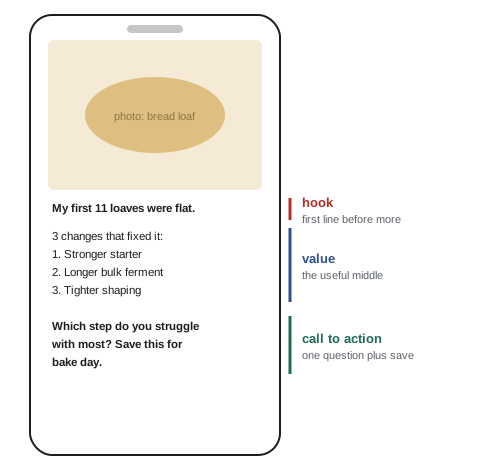
- Hook, value, call to action: an opening line that earns the tap, the useful or interesting content, and a closing invitation.
- Problem, agitation, solution (PAS): name a problem, explain why it hurts, present the solution. Common in copywriting; effective when the problem is real and the solution genuine.
- Before, after, bridge: describe the situation before, the improved situation after, and how to get from one to the other.
- Story arc: a moment of tension, what happened, what changed and the lesson.
- Micro-tutorial: a short numbered list of steps or tips that complements the visual.
The first line matters most, because most platforms show only one or two lines before truncating. It should work on its own as a hook rather than repeat what the image already shows.
Length and formatting
Caption length varies by platform, purpose and audience. Short captions suit striking visuals, humour and fast-moving feeds. Longer captions, of 100 to 300 words or more, suit storytelling, education and platforms where people come to read, such as LinkedIn and Instagram carousels; some creators have built audiences on long, thoughtful captions. What matters is that every sentence earns its place. Formatting makes longer captions readable on phones:
- Short paragraphs of one to three sentences, separated by line breaks.
- Lists for steps or tips, using numbers or simple symbols.
- Front-loaded first lines and a clear final line.
- Restraint with emphasis: platforms rarely support bold or italics natively, and Unicode "fancy fonts" used to fake them are read badly or not at all by screen readers, so avoid them.
Platform limits change, but at the time of writing Instagram captions allow up to 2,200 characters, LinkedIn posts 3,000 characters and X posts 280 characters for standard accounts.
| Caption type | Typical length | Best for |
|---|---|---|
| One-liner | Under 15 words | Striking visuals, humour, simple updates |
| Short context | 20–60 words | Explaining an image, quick tips |
| Micro-tutorial | 60–150 words | Steps, checklists, carousel summaries |
| Story caption | 150–300+ words | Personal stories, lessons, behind the scenes |
Emoji and hashtags
Emoji add tone, personality and visual structure, but too many make text hard to read and can confuse meaning, since emoji are interpreted differently across cultures and age groups. Screen readers read emoji names aloud, so a line of ten emoji becomes a long string of words for a blind user. Use them sparingly and purposefully, such as one at the end of a sentence or as list markers, rather than replacing words.
Hashtags help categorize content and, on some platforms, aid discovery, though their influence on reach has declined as recommendation systems rely more on content understanding and engagement. Practical guidance: use a small number of relevant, specific hashtags rather than many generic ones; mix niche and broader tags; check that a hashtag means what you think and is not associated with unrelated or inappropriate content; and write multi-word hashtags in camel case (#SmallBusinessTips rather than #smallbusinesstips), which makes them readable for everyone and lets screen readers pronounce the words. Placing hashtags at the end of the caption keeps the text clean.
Calls to action
A call to action (CTA) asks the reader to do something specific. Effective CTAs are clear (one action, stated plainly), relevant (they follow naturally from the content), low effort (easy to do now), and beneficial to the reader as well as the creator. Examples:
- Engagement: "Which of these would you try first? Tell me in the comments." Specific questions get more replies than "Thoughts?".
- Save and share: "Save this for your next trip" or "Send this to the friend who always overpacks."
- Follow: "Follow for a new 10-minute recipe every Tuesday", stating what the follower will get.
- Click: "Full guide and printable checklist at the link in bio."
- Subscribe or join: "Join 12,000 teachers getting one classroom idea every Friday."
Asking for too many actions at once dilutes all of them, so choose the one that matters most for each post. Platforms discourage "engagement bait", such as "comment YES if you agree" or "tag 5 friends", and may reduce the reach of posts that use it, so questions should be genuine. Over time, consistent CTAs train the audience in how to interact with a creator.
Worked problem
Improving a call to action
A travel creator ends a carousel about packing light with "Let me know what you think and follow me and check out my blog and share this!" Rewrite the CTA.
Show solution
- Identify the goal for this post: saves, because packing lists are reference content people return to.
- Choose one primary action: save.
- Make it beneficial and specific: tie it to the reader's next trip.
- Add a genuine, easy engagement question as a secondary option.
- Rewrite: "Save this for your next trip. What is the one item you never travel without?"
Answer: One clear, useful action plus a genuine question: "Save this for your next trip. What is the one item you never travel without?"
Captions for different content types
Captions adapt to content. For educational carousels, the caption summarizes the key point and invites a save. For behind-the-scenes posts, it tells the story and shows personality. For product or sponsored posts, it explains honestly why the creator uses or recommends the product and includes the required disclosure at the start, not buried among hashtags (CRE-320). For short videos, captions on platforms like TikTok are short and searchable, often naming the topic in plain words so the platform and viewers understand what the video is about. For community posts, captions ask questions that invite real responses.
Writing captions efficiently
Creators who post often need a system. Common practices include drafting captions in batches alongside a content calendar, keeping templates for recurring formats (weekly tips, Q&A, product reviews) while varying the wording, maintaining saved hashtag sets for different topics, and writing in a notes app or scheduling tool rather than in the posting interface, where a mis-tap can publish an unfinished draft. Reading captions aloud before posting catches typos, awkward phrasing and missing words.
Captions for different post types
Different posts call for different caption approaches. An educational post benefits from a hook that names the problem, a short explanation or list of steps, and a call to save or share. A story post works best with an opening that drops the reader into a moment, a few short paragraphs that build tension, and a reflection or question at the end. A behind-the-scenes post can be short and casual, inviting comments about the process. A promotional post needs a clear benefit, an honest description of what is offered, any required disclosure at the start, and one specific action such as "tap the link in my bio to join the waitlist". A community post, such as a question or poll, should be short and easy to answer. Matching the caption to the post type helps readers understand quickly what kind of content they are looking at and what is expected of them.
How long should a caption be?
There is no single ideal caption length. Short captions suit posts where the image or video carries the message, entertainment content and quick updates. Long captions, sometimes several hundred words, can perform very well when they deliver real value, such as a detailed tutorial, a personal story or an opinion, because they increase time spent on the post and give readers a reason to save it. The deciding factor is whether every line earns its place. A long caption that rambles loses readers; a long caption that is structured, skimmable and useful keeps them. Platform limits also matter: Instagram allows up to 2,200 characters, TikTok has expanded caption limits to several thousand characters, and X limits standard posts to 280 characters for most accounts.
Writing calls to action that feel natural
Calls to action work best when they follow naturally from the content. After a useful tip, "save this for your next trip" makes sense; after a personal story, "have you ever felt like this?" invites genuine replies; after a product demonstration, "the link is in my bio if you want to try it" is a helpful pointer. Calls to action feel pushy when they are unrelated to the content, repeated in every post regardless of context, or phrased as demands. Specific, low-effort actions get more response than vague or demanding ones: "comment your city and I will recommend a cafe" is easier than "tell me everything about your travel plans". Testing different calls to action and watching the response helps creators learn what their audience is willing to do.
Engagement bait and platform rules
Some calls to action cross into engagement bait: asking people to like, comment, share or tag friends purely to boost reach, such as "comment YES if you agree" or "tag 10 friends to win". Several platforms, including Meta's apps, have stated that they reduce the distribution of posts that use engagement bait, and contests that require tagging or sharing may breach platform promotion rules or contest laws. Genuine questions that invite meaningful replies are different from bait because the creator actually wants and reads the answers. The test is whether the request serves the audience and the conversation, or only the algorithm.
Editing captions in practice
A practical caption edit starts with the first line: does it stand alone as a hook before the "more" link? Then check the structure: are paragraphs short, with white space between them? Remove repeated points, filler words and unnecessary qualifiers. Check that the call to action is single, specific and placed where readers will see it. Review hashtags and mentions, moving them to the end and keeping only relevant ones. Add or check alt text for the image. Finally, preview the post on a phone, checking where truncation falls and whether emoji and line breaks display as intended, because some apps strip blank lines or show emoji differently across devices.
Captions in other languages
Creators with international audiences sometimes add captions in two languages, or translate key lines. Writing the main language first, then a shorter translated summary, keeps captions readable. Machine translation is a useful starting point but often misses idioms, humour and tone, so a fluent reader should check important captions. Platforms increasingly offer automatic translation of captions for viewers, which makes clear, simple sentences in the original language even more valuable, because they translate more accurately than slang, puns and long sentences.
Common mistakes
MistakeRepeating in the first line what the image already shows.
InsteadUse the first line to add a reason to read on.
MistakeAsking for several actions at once.
InsteadChoose one primary call to action.
MistakeUsing engagement bait like "comment YES".
InsteadAsk genuine, specific questions.
MistakeWriting hashtags in lowercase run-together words.
InsteadUse camel case for readability and screen readers.
MistakeHiding sponsorship disclosures among hashtags.
InsteadDisclose clearly at the start.
Summary and key terms
- Captions can hook, contextualize, teach, tell stories and direct action.
- Structures include hook–value–CTA, PAS, before–after–bridge and story arcs.
- The first line must work on its own before the truncation.
- Length should fit the purpose; formatting keeps long captions readable.
- Use emoji sparingly and hashtags selectively, in camel case.
- Good CTAs are clear, relevant, low effort and beneficial.
- Disclose sponsorships clearly and early.
- Caption
- Text accompanying an image or video.
- Call to action
- A specific request for the reader to act.
- PAS
- Problem, agitation, solution structure.
- Before–after–bridge
- Structure contrasting states and the path between.
- Truncation
- Cutting off text in the feed.
- Camel case
- Capitalizing each word in a multi-word hashtag.
- Engagement bait
- Manipulative prompts for interactions.
- Hashtag set
- Saved group of relevant hashtags.
- Micro-tutorial
- Short step-by-step caption.
- Disclosure
- Statement that content is sponsored or paid.
Practice problems
Work each problem on paper first, then reveal the answer to check.
Name four jobs a caption can do.
Show answer
Hook, contextualize, teach, tell a story, prompt engagement, direct action.
What is PAS?
Show answer
Problem, agitation, solution.
Why does the first caption line matter most?
Show answer
Only one or two lines show before truncation.
Why avoid Unicode fancy fonts?
Show answer
Screen readers handle them poorly.
Rewrite #mentalhealthtips in camel case.
Show answer
#MentalHealthTips.
Why use emoji sparingly?
Show answer
They clutter text, vary in meaning and are read aloud by screen readers.
What makes a CTA effective?
Show answer
Clear, relevant, low effort, beneficial.
Give a specific engagement question.
Show answer
For example, "Which of these would you try first?"
Where should a sponsorship disclosure go?
Show answer
Clearly at the start of the caption.
Why draft captions outside the posting app?
Show answer
To avoid accidental publishing and allow editing.
Lesson quiz · 5 questions
Score 60% or more to complete this lesson.
Create a free account to save your progress, take quizzes and earn a certificate.