
CRE-120 · Lesson 4 of 12 · 25 min
Scripting short-form video
Short-form vertical video on TikTok, Instagram Reels, YouTube Shorts and similar platforms rewards tight, deliberate writing. A 30-second video holds roughly 75 to 90 spoken words, so every word must count, and viewers decide in the first second or two whether to keep watching. Many creators improvise short videos, but scripting, even as a few bullet points, consistently improves hooks, pacing and payoff, and reduces filming time and retakes. This lesson covers the structure of short videos, writing spoken scripts, on-screen text, pacing for retention, common short-form formats, and how to write scripts that are easy to film and edit.
The structure of a short video
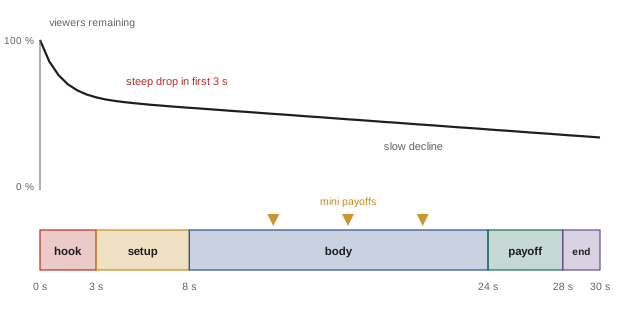
Most effective short videos follow a compact structure:
- Hook (0 to 3 seconds): a visual, line or text that makes the viewer stop, often stating the promise or opening a question.
- Setup or context (3 to 8 seconds): just enough background for the payoff to make sense.
- Body (the middle): the steps, story beats, examples or reveals, delivered quickly with no filler.
- Payoff: the result, answer, punchline or transformation the hook promised.
- Ending: a short call to action, a loop back to the beginning, or a cliffhanger leading to the next part.
Because viewers can swipe away at any moment, the payoff should come as early as the content allows, and the body should contain small rewards along the way: a surprising fact, a visual change, a quick laugh. A useful rule is that a viewer should get something every few seconds.
Words per second
Speaking pace determines how much can fit. Conversational speech runs at about 130 to 160 words per minute, roughly 2.2 to 2.7 words per second; energetic short-form creators often speak faster, around 3 words per second, while instructional content benefits from a slightly slower pace with pauses. Estimating script length keeps videos on target:
Worked problem
Fitting a script to length
A creator writes a 140-word script for a video meant to last 35 seconds. At 2.5 words per second, how long will it run, and how many words should be cut?
Show solution
- Duration at 2.5 words per second: 140 / 2.5 = 56 seconds.
- Target length 35 seconds allows 35 × 2.5 = 87.5, about 88 words.
- Cut about 140 − 88 = 52 words, more than a third of the script.
- Remove the warm-up, combine steps, and move details to the caption or a follow-up video.
- Read aloud with a timer to confirm.
Answer: About 56 seconds; cut roughly 52 words to reach 35 seconds.
Writing for the ear
Scripts are spoken, not read, so they must sound natural. Guidelines:
- Short sentences and simple structures, one idea per sentence.
- Everyday words and contractions; avoid phrases you would never say aloud.
- Direct address: "you" and "I".
- Signposting: "First", "Here is the trick", "But here is what nobody tells you", which help listeners follow.
- Rhythm and emphasis: vary sentence length, and mark words to stress or places to pause.
- Repetition of the key idea, which helps listeners who cannot reread.
Reading the script aloud, ideally recording it, reveals awkward phrasing, tongue-twisters and sentences that run out of breath. Many creators write scripts in a two-column format, with what is said on one side and what is shown on the other, so the visual plan develops alongside the words.
| Time | Spoken | On screen |
|---|---|---|
| 0–2 s | Your banana bread is dry because of one mistake. | Close-up of a crumbly slice. Text: "Dry banana bread?" |
| 2–6 s | It is not the bananas. It is how you measure the flour. | Scooping flour straight from the bag. |
| 6–14 s | Scooping packs in up to 30 % extra. Spoon it in and level it off instead. | Side-by-side cups; text: "Scoop: 160 g / Spoon: 125 g" |
| 14–22 s | Or weigh it: 250 grams for this recipe. | Kitchen scale reading 250 g. |
| 22–28 s | Same recipe, same oven. Look at the difference. | Split screen of two loaves, moist versus dry. |
| 28–30 s | Follow for one baking fix every week. | Text: "One fix every Friday." |
On-screen text
On-screen text serves viewers watching without sound, which is a large share of mobile viewing, reinforces the spoken hook, and highlights key numbers and steps. Effective on-screen text is short (a few words per screen), large and high in contrast, positioned within the platform's safe zone so that interface elements such as captions, buttons and profile names do not cover it, and timed to stay on screen long enough to read, roughly a quarter to a third of a second per word plus time to notice it. Auto-generated captions of the spoken words should also be enabled and checked for errors, because they serve deaf and hard-of-hearing viewers and anyone watching silently (Lesson 11). The text hook in the first frame is often the most important text in the video.
Pacing and editing for retention
Short-form pacing is fast, but not frantic. Techniques include cutting pauses and filler words ("um", "so", "basically"); changing the shot, angle or framing every few seconds; using pattern interrupts, such as a sudden zoom, sound effect or change of location, to renew attention; matching edits to the rhythm of speech or music; and showing rather than describing whenever possible. The script supports this by being written in short beats, each of which can be a separate shot. Retention analytics show where viewers leave; a drop at a specific moment often points to a slow line, a confusing transition or a visual lull that can be fixed in the next video.
Common short-form formats
Formats give structure and help audiences know what to expect:
- Tutorial or tip: one specific how-to in under a minute.
- Myth versus fact: state a common belief, then correct it with evidence.
- Listicle: three to five quick items, each a beat.
- Storytime: a compressed personal story with a clear twist or lesson.
- Before and after or transformation: show the start, the process, the result.
- Day in the life or process: a sequence of moments with voiceover or text.
- Reaction or stitch: responding to another video, adding expertise or humour, with credit and within platform rules.
- Series: numbered parts on a theme ("Part 3 of fixing my 1970s kitchen"), which encourages follows.
Recurring formats are efficient to script because the structure stays the same while the content changes.
Loops, endings and series
Short video platforms often loop videos automatically. Some creators write scripts whose last line flows naturally into the first, so viewers who keep watching see a seamless loop, which increases watch time. Others end with a clear CTA, a question that invites comments, or a teaser for the next part of a series. Long sign-offs and repeated requests to like and subscribe at the end waste seconds when viewers are deciding whether to keep scrolling. If a CTA is used, it should be short and specific.
Writing scripts that are easy to film
A script is also a production plan. Writing with filming in mind saves time: keep locations and outfits consistent, group shots that use the same setup, write lines short enough to deliver in one take, include the shot list in the second column, and note props and on-screen text. For talking-head videos, many creators use a teleprompter app on their phone, which works best with short lines and conversational phrasing. Batch-scripting several videos at once, then filming them in one session, is a common workflow for consistent posting.
Common short-form structures
Several structures recur in successful short videos because they deliver a payoff quickly:
- Problem, solution, result: name a problem the viewer has, show the fix, and show the result.
- List: "three mistakes", "five tools", each delivered in a few seconds with a visual change.
- Before and after: show the transformation, then how it happened, or show the end result first and rewind.
- Myth versus fact: state a common belief, then correct it with evidence.
- Storytime: a compressed story with a hook, a twist and a resolution.
- Point of view and skits: short scenes dramatizing a relatable situation.
- Reaction and commentary: responding to another piece of content, a trend or a news item, adding your own perspective.
Choosing a structure before writing makes scripting faster and helps viewers recognize quickly what they are watching. Many creators develop recurring series built on one structure, which audiences come to expect and seek out.
Writing for the ear
Scripts are written to be spoken, which changes how they should be written. Spoken language uses shorter sentences, contractions, simple words and repetition of key points. Sentences that look fine on paper can be hard to say, with tongue-twisting combinations or clauses that leave the speaker breathless. Reading scripts aloud while drafting catches these problems. Writing in the creator's natural speaking style, including phrases they actually use, makes delivery sound authentic rather than read. Some creators prefer bullet-point outlines to full scripts so they can speak more naturally; others script every word for tight timing. A common compromise is to script the hook and the ending word for word and outline the middle.
Pacing and pattern interrupts
Short-form viewers can scroll away at any moment, so scripts are paced to renew attention every few seconds. Techniques include changing the shot, angle or location; adding on-screen text, graphics or zooms; shifting tone or volume; introducing a new point or a surprise; and cutting pauses and filler words in the edit. These changes, sometimes called pattern interrupts, prevent the video from feeling static. Scripts can mark them explicitly in the visual column. Pacing must still suit the content: a calming routine or a careful demonstration needs breathing room, and constant cuts can feel frantic and tiring.
Loops, endings and rewatches
The ending of a short video affects both satisfaction and metrics. A strong ending delivers the promised payoff, then stops; lingering after the payoff loses viewers before the end. Some creators design loops, where the last line flows naturally into the first, encouraging viewers to watch again, which can raise average watch time. Others end with a question or a cliffhanger leading to a second part, or a short call to action such as "follow for part two". Endings that feel abrupt or that cut off the payoff frustrate viewers. Testing different ending styles and watching retention near the end of the video shows what works for a given audience.
Captions, on-screen text and accessibility in short video
Many viewers watch short videos without sound, and burned-in or automatic captions make the script readable as well as audible. On-screen text should be large, high-contrast and placed within the safe zone, away from the platform interface at the bottom and right edges, where buttons, captions and usernames appear. Keeping on-screen text short, a few words per screen, allows viewers to read it while watching. Captions should be checked for accuracy, especially names and technical terms, because automatic transcription makes mistakes. Lesson 11 covers caption accessibility in more detail.
From script to shoot
A finished script becomes a shooting plan. Creators list the shots needed, the props and locations, and any B-roll or screen recordings, then group shots by location to save time. Recording the hook several times with different deliveries gives options in the edit. Keeping the script visible on a phone or teleprompter app helps, although memorizing short scripts usually produces more natural delivery. After shooting, editing often reveals that some lines can be cut entirely because the visuals already make the point, which is a sign the script and visuals are working together.
A worked timing check
Suppose a creator wants a 45-second tutorial and speaks at about 2.6 words per second. The script can hold roughly 2.6 × 45, or about 117 words, including the hook and ending. If the hook takes 12 words and the call to action 10, about 95 words remain for the steps. With four steps, each gets around 24 words, roughly nine seconds, which is enough for one clear instruction and one tip. Planning the word budget this way before drafting prevents scripts that run long and have to be rushed or cut awkwardly in the edit. Recording a quick test read with a phone timer confirms the estimate, because pauses, demonstrations and emphasis often add a few seconds.
Common mistakes
MistakeImprovising long, wandering intros.
InsteadScript a hook that delivers the promise in seconds.
MistakeWriting more words than fit the target length.
InsteadEstimate duration from words per second and cut.
MistakePlacing text where the platform interface covers it.
InsteadKeep text within the safe zone.
MistakeEnding with a long sign-off.
InsteadEnd with a short CTA, loop or cliffhanger.
MistakeRelying on sound alone.
InsteadAdd on-screen text and checked captions.
Summary and key terms
- Short videos follow hook, setup, body, payoff and ending.
- A 30-second video holds roughly 75–90 spoken words.
- Write for the ear: short sentences, contractions, direct address, signposts.
- Two-column scripts plan words and visuals together.
- On-screen text must be short, readable, timed and within safe zones.
- Pacing techniques and retention analytics keep viewers watching.
- Recurring formats and series make scripting efficient.
- Short-form video
- Vertical videos typically under three minutes.
- Payoff
- The result or answer the hook promised.
- Words per second
- Speaking rate used to estimate duration.
- Two-column script
- Script pairing spoken words with visuals.
- On-screen text
- Words displayed in the video frame.
- Safe zone
- Area not covered by platform interface elements.
- Pattern interrupt
- A change that renews attention.
- Retention curve
- Share of viewers still watching over time.
- Loop
- Ending that flows back into the beginning.
- Stitch
- Responding to part of another video.
Practice problems
Work each problem on paper first, then reveal the answer to check.
Name the five parts of a short video.
Show answer
Hook, setup, body, payoff, ending.
How many words fit 30 seconds at 2.5 words per second?
Show answer
75.
How long is a 120-word script at 3 words per second?
Show answer
40 seconds.
Why use signposting?
Show answer
It helps listeners follow spoken content.
What does a two-column script contain?
Show answer
Spoken words and what is shown.
Why add on-screen text?
Show answer
Many viewers watch without sound.
What is a safe zone?
Show answer
Area not covered by platform interface.
Name two pacing techniques.
Show answer
Cutting filler, shot changes, pattern interrupts.
What does a sharp retention drop suggest?
Show answer
A slow, confusing or dull moment there.
Why script in batches?
Show answer
To film efficiently and post consistently.
Lesson quiz · 5 questions
Score 60% or more to complete this lesson.
Create a free account to save your progress, take quizzes and earn a certificate.