
CRE-211 · Lesson 7 of 12 · 25 min
B-roll and visual storytelling
Long-form video is a visual medium, yet many long videos are little more than a person talking. Talking heads build connection and trust, but minutes of the same shot tire viewers, and many ideas are easier to understand when shown rather than described. Visual storytelling uses B-roll, demonstrations, graphics, archival material and screen recordings to illustrate, explain and enrich the narration. This lesson covers the principle of show, don't tell, kinds of B-roll, planning a coverage list, shooting B-roll that cuts well, demonstrations and experiments on camera, graphics, maps and animation, archival and stock material, screen recordings and visual explanations, and balancing visuals with the talking head.
Show, don't tell
A sentence like "the old bridge was badly corroded" is far more powerful when viewers see close-ups of rust flaking from steel beams. Visual storytelling follows the principle of showing what you can and telling only what you must. Ask, for every line of the script or outline: what could the viewer see here that would make this clearer, more vivid or more convincing? Visuals provide evidence, demonstrate processes, create mood, convey scale and give the viewer's eyes something new to engage with while the narration continues. They also give editors the flexibility to cut narration freely, hiding jump cuts behind B-roll (Lesson 8). Long-form channels known for high production value often have something new on screen every few seconds, but even simple channels benefit from well-chosen visuals at key moments.
Kinds of B-roll
B-roll is any footage that supports the main A-roll of talking to camera or interviews. Kinds include:
- Illustrative B-roll: footage of what is being discussed, such as a product, place, person, object or activity.
- Process B-roll: hands performing steps, tools in use, ingredients being prepared, code being typed.
- Establishing shots: wide views of locations that orient viewers, such as building exteriors, cityscapes or landscapes.
- Detail shots: close-ups of textures, labels, components and small actions.
- Atmospheric or mood B-roll: shots that set a tone, such as rain on a window, a busy street or steam from a cup.
- Reaction and personal B-roll: the creator walking, thinking, looking at something, or reacting, used in vlogs and documentaries.
- Archival and third-party footage: historical film, news footage, photographs and documents (discussed below).
- Screen recordings and captures: software, websites, games and data.
| Narration | Possible B-roll |
|---|---|
| The city grew rapidly after the railway arrived. | Archival photos of the station, maps of growth, old street scenes |
| This grinder is surprisingly heavy. | Close-up of lifting it, a kitchen scale reading |
| I tested each charger for a week. | Time-lapse of the charging setup, close-ups of meters, a calendar |
| The process takes patience. | Slow, detailed shots of hands working, a clock, the result emerging |
Planning a coverage list
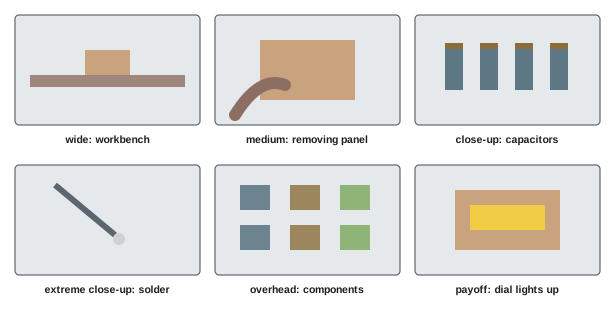
From the outline and script, create a B-roll coverage list for each segment: the shots needed to illustrate each point, where and how they will be captured, and any props, permissions or locations needed. Group shots by location and setup for efficient filming. Plan for variety in shot size and angle: a wide establishing shot, medium shots of activity, close-ups of details and unusual angles (the five-shot approach from CRE-130 Lesson 7). Add shots that may not be strictly necessary but give the editor options, such as extra details, cutaways and transitions. A coverage list prevents the common problem of reaching the edit and discovering that a key point has no visuals.
Shooting B-roll that cuts well
B-roll is most useful when it gives the editor clean, flexible material. Good practice includes holding each shot steady for at least five to ten seconds, longer for slow movements; starting and ending camera movements with a still moment; filming movement within the frame, such as hands working or people passing, which feels more alive than static objects; shooting the same action from several angles and sizes; matching the look, white balance and frame rate of the A-roll, or deliberately choosing a different look for archive-style or dream sequences; capturing natural sound with B-roll, which adds texture in the edit; and shooting slightly more than needed. Slow-motion B-roll at higher frame rates gives editors more options, as long as the project frame rate is planned (CRE-130).
Demonstrations and experiments on camera
Many of the most engaging long-form videos include demonstrations, tests and experiments: products tested to failure, recipes compared, methods timed, science demonstrated. Demonstrations provide evidence and suspense: viewers want to see what happens. Plan them carefully: define what is being tested and how it will be measured, control variables so that comparisons are fair, film with several cameras or angles so that the key moment is captured, include on-screen measurements and timers where relevant, and repeat tests if results might be flukes. Honesty is essential: show results as they happened, including failures, and explain the limits of your test. Safety comes first for anything involving heat, electricity, chemicals, heights or vehicles.
Graphics, maps and animation
Graphics make abstract ideas visible: charts of data, timelines, maps showing routes or locations, diagrams of how things work, annotated screenshots and animated explanations. Effective graphics are simple, legible on small screens and televisions, consistent in style with the channel, and timed to the narration, appearing as the point is made and staying long enough to understand. Tools range from slide software and Canva to motion graphics applications such as Adobe After Effects, Apple Motion, DaVinci Resolve Fusion and animation tools. Map tools and plug-ins can animate routes and zooms. Data visualizations must be honest: start axes at zero for bar charts, label units, cite sources and avoid exaggerating differences. Graphics take time, so plan them early and build reusable templates for titles, lower thirds and common chart types.
Archival and stock material
Historical, news and documentary videos often depend on archival material: old photographs, film, newspaper clippings, documents and recordings. Sources include national and provincial or state archives, libraries, museums, news agencies, university collections and online archives, some offering public domain or openly licensed material and others charging licence fees. Stock footage libraries offer professionally shot clips of places, activities and objects, licensed for a fee or by subscription. For every item, record the source, licence terms and any required credit in a rights log (Lesson 2), and check whether the licence covers monetized online video. Using film or television clips under fair dealing or fair use requires a genuine purpose such as criticism, review or commentary, limited excerpts and attribution, and may still trigger automated copyright claims.
Worked problem
Budgeting visuals for a history video
A 20-minute history video needs about 160 visual shots beyond the A-roll. The creator can film 40 locations and objects, create 30 graphics and maps, and find 50 public domain archival images. The remaining shots must come from a stock library at 60 dollars per clip or a subscription costing 30 dollars per month. What is the cheapest approach?
Show solution
- Shots covered without purchase: 40 + 30 + 50 = 120.
- Remaining shots: 160 − 120 = 40.
- Per-clip cost: 40 × 60 = 2,400 dollars.
- Subscription for one month: 30 dollars, if the library has suitable clips and its licence covers monetized video.
Answer: A one-month stock subscription at about 30 dollars, after checking licence terms, is far cheaper than 2,400 dollars in per-clip licences.
Screen recordings and visual explanations
For tutorials and software content, screen recordings are the primary visuals, and their clarity determines whether viewers can follow. Zoom in on the relevant area of the screen in the edit, so that small interface elements are readable on phones; highlight clicks and cursor movements; cut out waiting time, such as loading or rendering; use callouts, arrows and text labels to direct attention; and narrate what you are doing and why, not only what is on screen. For explanations of concepts, simple visual metaphors, whiteboard drawings, physical models and props can be more memorable than complex animation.
Balancing visuals and the talking head
Visuals should serve the story, not overwhelm it. The creator's face builds connection, conveys emotion and humour, and is often the reason viewers subscribe, so most long-form videos alternate between talking head and visuals rather than replacing one with the other. Use the talking head for opinions, stories, personality and emotional moments; use B-roll and graphics for evidence, process, scale and information. Avoid "wallpaper" B-roll that is only loosely related to the narration, which feels generic, and avoid cutting away constantly from a strong performance. A useful guide is to ask whether each visual adds information, emotion or clarity; if not, the talking head may be the better choice.
Visual metaphors and props
Abstract ideas can be made concrete with visual metaphors and props. A creator explaining compound interest might stack coins that grow taller each year; a video about the scale of the solar system might use fruit placed along a football field; a video about data privacy might use a glass house. Physical props on a desk, models built from household materials, whiteboard drawings and simple demonstrations can be more memorable than polished animation, and they are often cheaper. The key is that the metaphor is accurate: a misleading comparison can create misunderstanding that is hard to correct.
Visual style and consistency
A channel's visual style, the look of its B-roll, graphics, colour grade and typography, becomes recognizable over time. Defining a style guide early, covering fonts, colours, graphic layouts, transitions, lower thirds, map styles and grading, keeps videos consistent and speeds production, especially when working with editors and designers. Consistency does not mean every video looks identical; it means viewers recognize the channel's care and identity across different subjects.
Planning visuals for different budgets
Visual storytelling scales with resources. A low-budget approach might rely on the creator's own B-roll, screen recordings, free public domain archives, simple graphics made in presentation software, and props. A mid-budget approach adds stock subscriptions, licensed music, a motion graphics template library and occasional travel. A high-budget approach may include original animation, licensed archival footage, aerial filming, multiple locations and a dedicated motion designer. Many successful channels began with low-budget visuals and invested as revenue grew; creativity in choosing what to show often matters more than the cost of showing it.
Accessibility of visuals
Visual information must be accessible to viewers who cannot see it clearly, including blind and low-vision viewers and those listening without watching. Narrate key visual information, such as what a chart shows, rather than saying only "as you can see here"; ensure on-screen text is large and high in contrast; avoid relying on colour alone to distinguish chart elements; and avoid rapid flashing effects, which can trigger seizures. Accessible visuals also help every viewer understand faster.
B-roll libraries
Over time, creators build up libraries of their own B-roll: shots of their workspace, city, products, hands at work, establishing views and seasonal scenes. Organizing this footage with clear folders and keywords makes it reusable across many videos, saving filming time. Some creators dedicate occasional filming days purely to capturing B-roll for future use. Be careful not to overuse the same shots, which regular viewers will notice, and keep the library backed up like any other footage.
Shooting interviews for B-roll
In interview-based videos, B-roll of the interviewee doing what they talk about, such as working, walking through a location, or handling objects, adds authenticity and visual interest. Plan time for this before or after the interview, explaining to the interviewee what you need. Capture details such as hands, tools, photographs and documents, as well as wider shots of the person in their environment. These shots let the editor cover cuts in the interview and illustrate the story with real images rather than generic stock footage.
Common mistakes
MistakeMinutes of the same talking-head shot.
InsteadShow what you can with B-roll and graphics.
MistakeReaching the edit with no visuals for key points.
InsteadPlan a coverage list from the outline.
MistakeShort, shaky B-roll clips.
InsteadHold steady shots for five to ten seconds or more.
MistakeMisleading charts.
InsteadUse honest axes, labels and sources.
MistakeGeneric wallpaper footage.
InsteadChoose visuals that add information or emotion.
Summary and key terms
- Show what you can and tell only what you must.
- B-roll includes illustrative, process, establishing, detail, mood and archival footage.
- Coverage lists ensure every point has visuals.
- Steady, varied B-roll with movement and natural sound cuts well.
- Demonstrations provide evidence and suspense when planned and honest.
- Graphics, maps and animation clarify abstract ideas.
- Balance visuals with the talking head and track rights for third-party material.
- A-roll
- Main footage of talking to camera or interviews.
- B-roll
- Supporting footage illustrating the narration.
- Coverage list
- Plan of shots needed for each segment.
- Establishing shot
- Wide shot orienting viewers to a location.
- Cutaway
- Shot that cuts away from the main action.
- Lower third
- Graphic in the lower part of the frame, often a name.
- Archival footage
- Historical film, photographs and documents.
- Stock footage
- Licensed clips from a library.
- Callout
- Graphic pointing out part of the image.
- Wallpaper B-roll
- Generic footage loosely related to narration.
Practice problems
Work each problem on paper first, then reveal the answer to check.
What does show, don't tell mean?
Show answer
Use visuals for what can be seen, narration for the rest.
Name four kinds of B-roll.
Show answer
Illustrative, process, establishing, detail, mood, personal, archival, screen.
Why make a coverage list?
Show answer
To ensure every point has visuals.
How long should B-roll shots be held?
Show answer
At least five to ten seconds.
Why film movement within the frame?
Show answer
It feels more alive than static shots.
What makes a demonstration fair?
Show answer
Defined measures, controlled variables, repeats, honest results.
Name two rules for honest charts.
Show answer
Zero-based bar axes, labelled units, cited sources.
Name three archival sources.
Show answer
Archives, libraries, museums, news agencies, universities.
How can screen recordings be made readable?
Show answer
Zoom, highlight clicks, callouts, cut waiting.
When is the talking head better than B-roll?
Show answer
For opinions, stories, personality and emotion.
Lesson quiz · 5 questions
Score 60% or more to complete this lesson.
Create a free account to save your progress, take quizzes and earn a certificate.