
FILM-220 · Lesson 3 of 12 · 30 min
Cuts, transitions and timecode
Most edits in most films are straight cuts: one frame of shot A, then the first frame of shot B, with nothing in between. Yet within that simple act there is a large vocabulary. A cut can match two shapes, leap across time, slam two worlds together or slide unnoticed behind a movement. Beyond the cut lie the optical transitions: dissolves, fades, wipes and more, each with its own meaning for audiences. This lesson builds that vocabulary and then grounds it in the measurement every editor uses to describe and communicate edits: frames and timecode, including the drop-frame system used for 29.97 fps video. By the end you should be able to name the transition in a sequence, explain why it was chosen, and calculate exactly how long it lasts and how much extra media it needs.
The straight cut and its varieties
A straight cut, also called a hard cut, is an instant change from one shot to the next. Because it takes no time, it is the most neutral transition and the one audiences notice least. Within the family of cuts, editors distinguish several kinds by what they connect.
| Cut | What it connects | Typical effect |
|---|---|---|
| Match on action | A movement begun in one shot and finished in the next | Hides the cut inside motion |
| Graphic match | Similar shapes, colours or compositions in two shots | Links two ideas or times visually |
| Cutaway | The main action and a related detail or onlooker | Adds information, covers a gap |
| Insert | A close detail within the same space | Shows something the audience must notice |
| Jump cut | Two moments of the same shot with time removed | Visible compression, restlessness |
| Smash cut | A sudden, loud or contrasting change | Shock or comedy |
| Match cut on sound | A sound that bridges two scenes | Links scenes through audio |
| Cross-cut | Two lines of action in different places | Suggests simultaneity and builds tension |
A famous graphic match from a well-known science-fiction film cuts from a bone thrown into the air by a prehistoric ancestor to an orbiting spacecraft of similar shape, leaping millions of years in one cut. The edit works because the shapes rhyme and because the idea, from first tool to advanced technology, is carried by the juxtaposition. That is a graphic match working at the level of theme as well as composition.
Motivated cuts
A motivated cut has a reason inside the scene: a character looks off screen and we cut to what they see, a door opens and we cut to who enters, a line of dialogue raises a question and we cut to the person who will answer. Motivated cuts feel natural because the audience already wants the new view. Unmotivated cuts can work too, but they draw attention and need a purpose such as surprise. When a cut feels arbitrary in a rough cut, ask what motivates it. If nothing does, look for a look, a sound or a movement that can.
- Look motivation: a character's eyeline leads to the next shot.
- Sound motivation: an off-screen sound makes the audience want to see its source.
- Movement motivation: action begun in one shot invites completion in the next.
- Story motivation: the audience needs a new piece of information now.
Optical transitions and what they mean
Optical transitions were once made in a laboratory with an optical printer, which is why they are called opticals. Today an editing system renders them instantly, which makes them easy to overuse. Each carries conventional meanings that audiences learned over decades.
| Transition | Description | Conventional meaning |
|---|---|---|
| Dissolve | Outgoing shot fades out while incoming fades in, overlapping | Time passing, a soft link, memory |
| Fade out and fade in | Picture goes to black, then comes up from black | End of a section, a larger time jump |
| Fade to white | Picture brightens to white | Dream, death, revelation, flashback |
| Wipe | A moving edge replaces one shot with another | Playful or retro tone, change of place |
| Iris | A circle closes or opens on the frame | Silent-era style, storybook tone |
| Dip to colour | Brief dip through a colour between shots | Stylized emphasis |
A dissolve says that the two shots belong together but are separated by time or by thought. A cut, by contrast, says now and next. Using a dissolve inside a continuous dialogue scene usually feels wrong because it implies time has passed. Many experienced editors use dissolves sparingly so that each one keeps its meaning.
Handles and transition maths
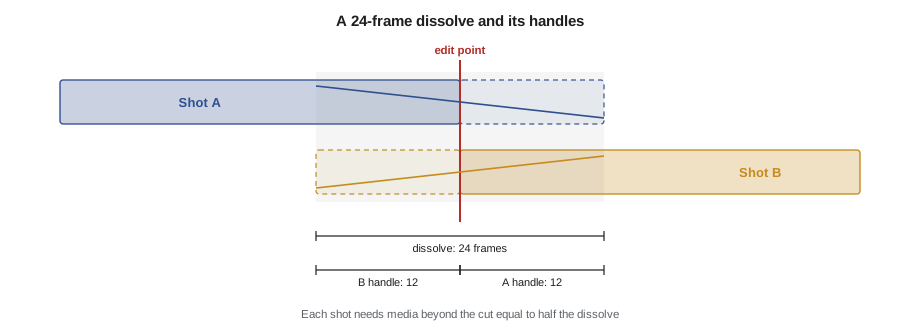
A transition needs media that is not visible in the straight-cut version. For a dissolve centred on the edit point, the outgoing shot must continue past the cut and the incoming shot must begin before the cut. These extra frames are called handles. If the media does not exist, because the camera cut or the clip was trimmed in the selects, the editing system will refuse or will freeze a frame. Handles also matter when sending material to colour, sound or visual effects, because those departments need room to adjust; lesson 11 covers turnover handles.
Worked problem
Handles for a dissolve
You add a 1.5-second dissolve, centred on the cut, in a 24 fps project. How many frames of handle does each shot need beyond the edit point?
Show solution
- Dissolve length in frames: \( 1.5 \times 24 = 36 \) frames.
- Centred on the cut, half sits on each side: \( 36 / 2 = 18 \) frames.
- The outgoing shot needs 18 frames after its cut point; the incoming shot needs 18 frames before its cut point.
Answer: 18 frames of handle on each shot. If either shot has fewer, shift the dissolve to start or end at the cut, or shorten it.
Frames and timecode
Timecode labels every frame with a time address in the form hours:minutes:seconds:frames, written HH:MM:SS:FF. At 24 fps the frames field counts 00 to 23; at 25 fps, 00 to 24; at 30 or 29.97 fps, 00 to 29. Timecode lets editors, assistants, sound editors and colourists refer to exactly the same frame. Duration arithmetic is done in frames and converted back.
Worked problem
Duration between two timecodes at 24 fps
A shot runs from 01:02:10:12 to 01:02:14:06 in a 24 fps project (out point exclusive). How long is it?
Show solution
- Convert both to frames within the minute: \( 10 \times 24 + 12 = 252 \) and \( 14 \times 24 + 6 = 342 \).
- Subtract: \( 342 - 252 = 90 \) frames.
- Convert back: \( 90 / 24 = 3 \) seconds with 18 frames left over.
Answer: 90 frames, or 3 seconds 18 frames, written 00:00:03:18.
Worked problem
Adding durations at 25 fps
In a 25 fps project, three shots run 00:00:04:20, 00:00:02:15 and 00:00:06:12. What is the total?
Show solution
- Convert to frames: \( 4 \times 25 + 20 = 120 \); \( 2 \times 25 + 15 = 65 \); \( 6 \times 25 + 12 = 162 \).
- Sum: \( 120 + 65 + 162 = 347 \) frames.
- Convert: \( 347 / 25 = 13 \) seconds remainder 22 frames.
Answer: 00:00:13:22. A common mistake is to add the frame fields as if they were hundredths, which would give the wrong answer.
Why 29.97 needs drop-frame timecode
North American broadcast video runs at about 29.97 frames per second, more precisely 30000/1001, a legacy of colour television standards. If you count it with ordinary 30-frame timecode, called non-drop-frame, the timecode runs slower than the clock. After one hour of real time, non-drop timecode reads about 00:59:56:12, around 3.6 seconds short. For broadcast, where a programme slot must fit the clock exactly, that error matters.
Drop-frame timecode fixes the drift by skipping frame numbers, not frames. It skips the labels 00 and 01 at the start of every minute, except every tenth minute. No picture is lost; only the numbering jumps. Drop-frame timecode is written with a semicolon before the frames field, as in 01:00:00;00, while non-drop uses colons throughout.
Worked problem
Frame count in ten minutes of drop-frame
How many frames are there in ten minutes of 29.97 fps video, and how does drop-frame numbering account for them?
Show solution
- Real frames: \( 600 \times 29.97 = 17\,982 \) frames.
- Non-drop labels for ten minutes: \( 600 \times 30 = 18\,000 \).
- Drop-frame skips 2 labels in each of 9 minutes out of every 10: \( 9 \times 2 = 18 \) labels skipped.
- \( 18\,000 - 18 = 17\,982 \), matching the real frame count.
Answer: 17,982 frames. Over a full hour drop-frame skips \( 6 \times 18 = 108 \) labels, so one hour of drop-frame timecode contains 107,892 frames and stays aligned with clock time to within a fraction of a frame.
| Rate | Frames field | Timecode mode | Where used |
|---|---|---|---|
| 23.976 | 00 to 23 | Non-drop (counted as 24) | Film-style projects for North American video |
| 24 | 00 to 23 | Non-drop | Cinema, DCP mastering |
| 25 | 00 to 24 | Non-drop | PAL regions, much of Europe |
| 29.97 | 00 to 29 | Drop-frame or non-drop | North American broadcast |
| 59.94 | 00 to 59 | Drop-frame or non-drop | High-frame-rate broadcast, sports |
Note that 23.976 timecode is always counted as non-drop 24. Over an hour it drifts from the clock by the same 0.1 per cent, so programme durations at 23.976 must be checked against real time when delivering to broadcasters. Lesson 11 shows how this affects delivery specifications.
Canadian broadcasters follow the North American 29.97 standard, so drop-frame timecode is normal for broadcast deliverables in Canada, and delivery specifications from networks usually state which timecode mode they require.
Choosing transitions with restraint
Because opticals are easy to add, rough cuts sometimes accumulate dissolves to hide awkward cuts. This rarely works. A dissolve over a bad cut is usually a slow bad cut. Better fixes include choosing a different take, trimming the outgoing shot, adding a cutaway or using sound to bridge the change. Reserve dissolves and fades for moments where their meaning helps the story.
- Ask what the transition says about time and connection before using it.
- Keep the meaning of each transition consistent throughout a film.
- Check that handles exist before committing to long transitions.
- Watch transitions on the final display size; long dissolves can feel muddy on large screens.
- Use sound to soften a cut before reaching for a dissolve.
Transitions as punctuation
A helpful way to think about transitions is as punctuation. A straight cut is like a comma or a full stop within a paragraph: it moves the reader on without comment. A dissolve is like a paragraph break: it signals a shift while keeping a connection. A fade to black is like the end of a chapter. Just as a writer who uses too many exclamation marks weakens them, an editor who uses too many dissolves or flashy wipes weakens their effect. Consistency matters too: if a film uses fades only between days, the audience quickly learns that a fade means the next morning, and that learned meaning becomes a tool the editor can rely on.
Common mistakes
MistakeAdding timecode frame fields like decimals
InsteadConvert to total frames, add or subtract, then convert back using the project frame rate
MistakeThinking drop-frame timecode removes picture frames
InsteadDrop-frame skips frame numbers only; every frame of picture remains
MistakeUsing dissolves inside continuous scenes
InsteadUse straight cuts for continuous time and keep dissolves for time passing or soft links
MistakeForgetting handles for transitions
InsteadCheck that each shot has media beyond the cut equal to half a centred transition
MistakeHiding weak cuts with transitions
InsteadFix the cut with take choice, trimming, cutaways or sound
Summary and key terms
- Straight cuts are the most common and least noticeable transition.
- Kinds of cut include match on action, graphic match, cutaway, insert, jump cut, smash cut and cross-cut.
- Motivated cuts follow a look, sound, movement or story need.
- Dissolves, fades, wipes and irises carry conventional meanings about time and tone.
- Centred transitions need handles of half their length on each shot.
- Timecode arithmetic converts to frames, calculates, then converts back.
- Drop-frame timecode skips labels 00 and 01 each minute except every tenth minute to match clock time at 29.97 fps.
- Straight cut
- An instant change from one shot to the next
- Graphic match
- A cut linking similar shapes or compositions
- Cutaway
- A shot of related action away from the main subject
- Smash cut
- An abrupt, contrasting cut for shock or comedy
- Dissolve
- A transition where one shot fades out as the next fades in
- Handle
- Extra media beyond an edit point used for transitions and adjustments
- Timecode
- A frame address in hours, minutes, seconds and frames
- Drop-frame timecode
- 29.97 fps timecode that skips some frame labels to match clock time
- Non-drop-frame timecode
- Timecode that counts every frame label in sequence
- Motivated cut
- A cut prompted by a look, sound, movement or story need
Practice problems
Work each problem on paper first, then reveal the answer to check.
Convert 00:00:05:12 at 24 fps to frames.
Show answer
\( 5 \times 24 + 12 = 132 \) frames.
A 2-second centred dissolve at 25 fps needs how many handle frames per shot?
Show answer
50 frames total, so 25 frames per shot.
What is the duration from 10:00:20:05 to 10:00:23:00 at 24 fps?
Show answer
\( 3 \times 24 + 0 - 5 = 67 \) frames, or 00:00:02:19.
Which labels does drop-frame skip?
Show answer
00 and 01 at the start of each minute, except minutes divisible by ten.
How many frames are in one hour of drop-frame 29.97 video?
Show answer
107,892 frames.
How far does non-drop 29.97 timecode drift from the clock in an hour?
Show answer
About 3.6 seconds.
What does a fade to black usually signal?
Show answer
The end of a section or a larger jump in time.
Name the cut that joins similar shapes in two shots.
Show answer
A graphic match.
Add 00:00:01:20 and 00:00:02:10 at 24 fps.
Show answer
44 + 58 = 102 frames, or 00:00:04:06.
What separator marks drop-frame timecode?
Show answer
A semicolon before the frames field.
Lesson quiz · 5 questions
Score 60% or more to complete this lesson.
Create a free account to save your progress, take quizzes and earn a certificate.