
FILM-220 · Lesson 6 of 12 · 28 min
Editing dialogue scenes
Dialogue scenes make up a large share of most dramas, comedies and series, and they are where editors shape performance most directly. The editor chooses which reading of each line survives, whose face we watch while it is spoken, how long the pause lasts before the answer, and whether a line is heard at all. Two editors given the same coverage can produce scenes that feel entirely different: one cold and tense, the other warm and funny. This lesson covers the core techniques: choosing and combining performances, split edits, reaction shots, overlaps, cutting for subtext and comedy timing, and the practical issues of sound continuity that keep a constructed conversation sounding real.
Whose scene is it?
Before cutting a dialogue scene, ask whose scene it is. Usually one character has the most at stake, changes the most or holds the audience's sympathy. That character's point of view shapes coverage choices: you may stay on them during the other character's lines, so the audience reads the scene through their reactions. A scene can also shift point of view mid-way, for example when the listener becomes the one with power. Identifying the point of view gives you a principle for hundreds of small choices.
- Stay on the character whose reaction matters most, even when they are not speaking.
- Use the other character's close-up for lines that change the situation.
- Mark the turn in a scene, where power or knowledge shifts, and consider changing visual emphasis there.
- Save the tightest framings for the moments that carry the most weight.
Choosing performances
Actors rarely deliver identical takes. One take may have the best opening, another the best middle, a third the best final line. The editor reviews every reading and selects the moments that build the strongest overall performance. Many editors make selects reels, sequences that string together every reading of a key line, so they can compare them back to back. Others keep notes in a simple grid.
| Take | Delivery | Technical | Usable? |
|---|---|---|---|
| 12A-1 | Rushed, flat | Good focus | Backup |
| 12A-3 | Strong, slight stumble on last word | Good | Yes, trim the stumble |
| 12B-2 | Very emotional, maybe too much | Soft focus at start | Possible for climax |
| 12C-4 | Quiet, restrained | Good | Yes, good for an understated version |
Worked problem
Estimating review time for dialogue coverage
A dialogue scene has 6 setups with 5 takes each. Each take runs about 2 minutes 30 seconds. If the editor watches every take once at full speed and spends an extra 50 per cent of that time on notes, how long does the review take?
Show solution
- Number of takes: \( 6 \times 5 = 30 \).
- Viewing time: \( 30 \times 2.5 = 75 \) minutes.
- Notes: \( 75 \times 0.5 = 37.5 \) minutes.
- Total: \( 75 + 37.5 = 112.5 \) minutes, nearly 2 hours.
Answer: Nearly 2 hours before any cutting starts, for a scene that may run 2 minutes on screen. This is why schedules allow several days of editing per day of shooting on many features.
Building composite performances
Sometimes no single reading of a line is right. The editor can combine audio from different takes within one line, using the first half of one reading and the second half of another, as long as the joins are hidden. This is common practice in fiction editing and is part of shaping performance. The picture must still work: if the speaker is on camera, the lip movements must match the audio, so composite lines are easiest when the speaker is off camera or seen from behind. When the composite must play on camera, editors look for takes with similar timing and may adjust by a frame or two.
- Join takes on hard consonants or breaths, where cuts are easiest to hide.
- Match the mic perspective and room tone between the two takes.
- Check the pitch and energy of the voice so the join does not jump.
- Keep the actor's intent intact; a composite should serve the performance, not invent a new one.
In documentary, combining words from different moments to create a sentence the speaker never said raises serious ethical problems; lesson 8 addresses this.
Split edits: J-cuts and L-cuts
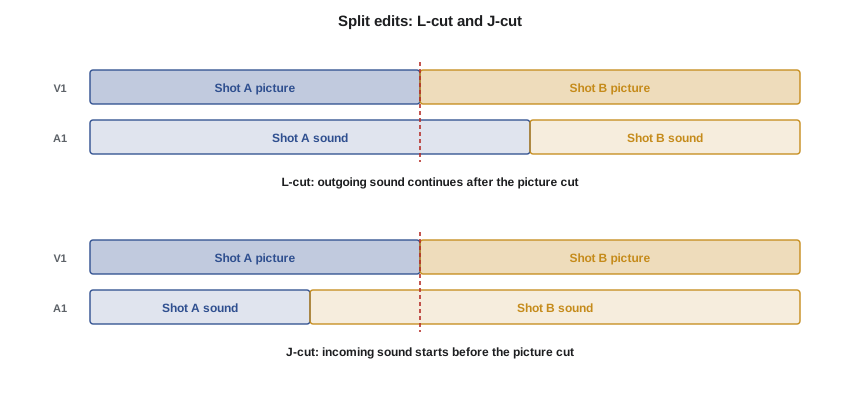
A straight cut changes picture and sound at the same frame. A split edit changes them at different frames. In an L-cut, the picture cuts first and the outgoing sound continues under the incoming shot; on a timeline the audio extends below the next shot, forming an L shape. In a J-cut, the incoming sound starts before the picture cut, so we hear the next shot before we see it; the audio reaches back under the outgoing shot, forming a J. Split edits make conversations feel fluid because in real life we do not snap our eyes to each speaker the instant they begin.
Worked problem
Timing an L-cut
Character A finishes a line at 00:01:05:10. You want to cut to B's reaction while A's last three words are still playing, which take about 18 frames. At 24 fps, where should the picture cut be, and where does A's audio end?
Show solution
- A's audio ends at 00:01:05:10.
- Cut the picture 18 frames earlier: 05:10 minus 18 frames is 04:16 (since 10 minus 18 needs a borrow: 34 minus 18 = 16 in the previous second).
- Picture cut at 00:01:04:16; audio from A continues to 00:01:05:10 under B's reaction.
Answer: Picture cut at 00:01:04:16, A's audio ends at 00:01:05:10. The audience sees B absorb the words as they are said, which often strengthens the moment.
J-cuts are especially useful at scene transitions. Hearing a sound from the next scene, such as a train whistle or a voice, before we see it draws the audience forward and smooths the change of location. Lesson 9 returns to sound bridges.
The power of reaction shots
A dialogue scene cut only on the speaker is often called ping-pong editing: picture follows audio back and forth, and the result feels mechanical. Reaction shots break this pattern and often carry the real drama. Watching the listener hear bad news, hide a lie or fight back tears tells the audience what the words mean. Reaction shots also give the editor control of timing, since the length of a pause can be adjusted on the listener's face without disturbing the speaker's lip sync.
- Use reactions to show subtext, the meaning beneath the words.
- Use reactions to control the timing of pauses.
- Use reactions to hide composite lines or trims within a speech.
- Avoid reactions that undercut a line the audience needs to watch the speaker deliver.
Overlaps and pace
Real conversations overlap: people interrupt, finish each other's sentences and talk over one another. On set, actors are often asked not to overlap in coverage so that each line is recorded cleanly and the editor has control. The editor then creates overlaps by sliding audio so that lines begin before the previous line has finished. This tightens pace and adds realism, but requires clean audio for each speaker, ideally recorded on separate microphones.
Worked problem
Tightening a scene with overlaps
A 2-minute 40-second scene has 22 line exchanges, each with an average gap of 20 frames before the response, at 24 fps. If you close each gap to 6 frames, how much shorter is the scene?
Show solution
- Frames saved per exchange: \( 20 - 6 = 14 \).
- Total frames saved: \( 22 \times 14 = 308 \) frames.
- Seconds saved: \( 308 / 24 \approx 12.8 \) seconds.
- New length: \( 160 - 12.8 \approx 147 \) seconds, about 2 minutes 27 seconds.
Answer: About 13 seconds shorter, an 8 per cent reduction without losing a word. Trimming gaps is often the first step in tightening, but keep longer pauses where they carry meaning.
Cutting for comedy and subtext
Comedy depends on precise timing. A reaction shot held one beat can make a joke land; held three beats it can create an awkward laugh; cut too soon it can kill the laugh entirely. Editors of comedy often test cuts with audiences because laughter reveals timing in a way that private viewing cannot. In drama, subtext matters more. A line like "I'm fine" can mean the opposite, and the editor reveals that through a reaction, a pause, or a cut to an object that contradicts the words.
- Let a joke's set-up breathe so the audience is ready for the punchline.
- Cut to a reaction just after a punchline, not during it.
- Leave space for laughter if the film will play to audiences; laughter can cover the next line.
- In drama, look for where words and feelings diverge, and show the feeling.
Sound continuity in dialogue scenes
Because dialogue scenes are built from many takes recorded at different moments, the background sound often changes from shot to shot: an air conditioner switches on, traffic passes, the microphone moves. Editors smooth these changes with room tone, a recording of the location with no one speaking, laid under the dialogue to fill gaps and even out backgrounds. Picture editors do not need to finish the sound, but a rough dialogue balance makes the cut far easier to judge and to screen. Lines that are unusable because of noise may need to be re-recorded later in automated dialogue replacement, known as ADR; the editor flags these as the cut develops.
- Add room tone under cuts where the background jumps.
- Use short audio crossfades of a few frames at dialogue edits to avoid clicks.
- Keep a list of lines that may need ADR, with timecodes and reasons.
- Record wild lines on set when possible, lines spoken without picture for later use.
Telephone calls, texts and screens
Modern dialogue scenes often involve phones, video calls and text messages, which raise their own editing questions. For a phone call, the editor decides whether to show both ends or stay with one character and hear the other through the phone. Staying with one side keeps the audience in that character's experience and can create suspense about the other person's reaction. Text messages are often shown as on-screen graphics rather than inserts of a phone screen, which avoids long reading pauses and keeps the actor's face in view. Whatever the approach, consistency within the film matters, and graphics for messages must be designed early so the editor can time scenes accurately with temporary versions.
Cutting scenes with more than two people
Group scenes, such as dinners or meetings, multiply the coverage and the choices. The editor must keep the geography clear, often returning to a wider shot to re-establish who sits where, and must decide whose reactions matter at each moment. A useful approach is to identify the two or three characters who drive the scene and treat the others as a chorus whose reactions punctuate key lines. Overlapping dialogue is common in group scenes, so separate microphone tracks for each actor give the editor much more control.
Common mistakes
MistakeCutting only on the speaker
InsteadUse reaction shots to carry subtext and control timing
MistakeTaking each line from the same take for simplicity
InsteadCompare every reading and combine the best moments when needed
MistakeKeeping every gap between lines
InsteadClose gaps to tighten pace, keeping pauses that carry meaning
MistakeUsing split edits at random
InsteadUse L-cuts to show reactions and J-cuts to draw the audience forward
MistakeIgnoring background changes between takes
InsteadFill with room tone and short crossfades so the scene sounds continuous
Summary and key terms
- Identify whose scene it is to guide coverage choices.
- Review every take and build the strongest performance, sometimes from composites.
- L-cuts carry outgoing sound under the next shot; J-cuts bring incoming sound in early.
- Reaction shots carry subtext, control pauses and hide trims.
- Overlaps created in the edit tighten pace and add realism.
- Comedy depends on frame-accurate timing; drama depends on subtext.
- Room tone and short crossfades keep constructed dialogue sounding continuous.
- Point of view
- The character through whom a scene is experienced
- Selects reel
- A sequence collecting every reading of a line or moment
- Composite performance
- A reading built from parts of different takes
- Split edit
- A cut where picture and sound change at different frames
- L-cut
- Outgoing sound continues after the picture cut
- J-cut
- Incoming sound starts before the picture cut
- Reaction shot
- A shot of a listener responding to what is said
- Ping-pong editing
- Cutting mechanically to each speaker as they talk
- Room tone
- A recording of a location's background sound with no dialogue
- ADR
- Automated dialogue replacement, re-recording lines after the shoot
Practice problems
Work each problem on paper first, then reveal the answer to check.
Audio ends at 00:00:20:05 at 24 fps; you want an 11-frame L-cut. Where is the picture cut?
Show answer
00:00:19:18.
Twenty gaps of 16 frames are reduced to 4 frames at 24 fps. How much time is saved?
Show answer
240 frames, which is 10 seconds.
What is ping-pong editing?
Show answer
Cutting to each speaker as they talk, without reactions.
What does a J-cut do?
Show answer
Lets incoming sound start before the picture cut.
Why join composite lines on hard consonants?
Show answer
Sharp sounds hide the join better than vowels.
Eight setups, four takes, 3 minutes each: total viewing time?
Show answer
32 takes times 3 minutes is 96 minutes.
What is room tone used for?
Show answer
Filling gaps and evening out background sound between takes.
When should a reaction cut come in comedy?
Show answer
Usually just after the punchline, not during it.
Why ask actors not to overlap in coverage?
Show answer
So each line is clean and the editor can control overlaps.
What are wild lines?
Show answer
Lines recorded on set without picture for later use.
Lesson quiz · 5 questions
Score 60% or more to complete this lesson.
Create a free account to save your progress, take quizzes and earn a certificate.