
ITIL-120 · Lesson 8 of 12 · 30 min
Optimize and automate
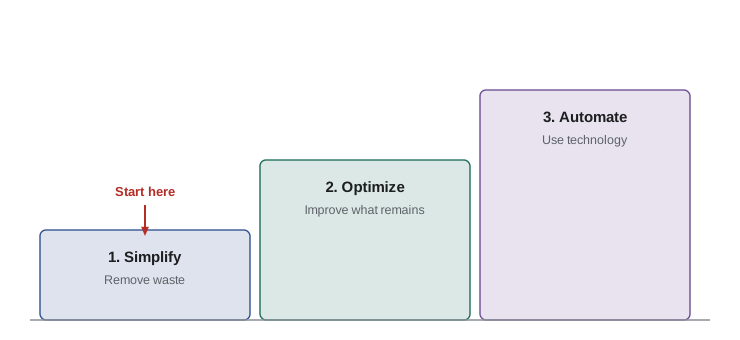
Every organization has limited resources: people, money, time and technology. The seventh guiding principle asks organizations to make the most of them. It has two parts that must be taken in order. First, optimize: make work as effective and useful as it needs to be. Then, automate: use technology to perform work that is frequent, repetitive and well understood, freeing people for work that needs human judgment. Automating before optimizing simply makes poor work happen faster. This lesson explains how to optimize, how to decide what to automate, how to estimate the value of automation, and what risks and human factors to keep in mind.
What the principle asks
Optimize and automate means: resources of all types, particularly human resources, should be used to their best effect. Eliminate anything that is truly wasteful and use technology to achieve whatever it is capable of. Human intervention should only happen where it really contributes value.
Applying the principle involves:
- Simplify and optimize before automating: understand and improve the work first.
- Define your metrics: decide how success will be measured before starting, linked to outcomes.
- Use the other guiding principles when applying this one: start where you are, progress iteratively, keep it simple, and so on.
- Recognize that automation is not always the answer; sometimes the best optimization is a simpler process or better skills.
Optimization
Optimization means making something as effective and useful as it needs to be. Note the words "as it needs to be": optimization is not perfection. Making a process twice as fast is pointless if consumers would not notice the difference and the effort could be better spent elsewhere. Optimization should be directed by value (lesson 2).
ITIL describes a typical path to optimization:
- Understand and agree the context: the organization's vision and objectives, and how the work in question supports them.
- Assess the current state of the work to be optimized (lesson 3).
- Agree what the future state and priorities should be, focusing on simplification and value.
- Ensure the optimization has the appropriate level of stakeholder engagement and commitment.
- Execute the improvements in an iterative way (lesson 4).
- Continually monitor the impact of optimization, to identify further opportunities to improve.
Deciding what to automate
Good candidates for automation share several features. The work is frequent, so savings accumulate. It is repetitive and rule-based, so it can be described precisely. It is stable, so the automation will not need constant rework. And errors in manual work are costly or common, so automation improves quality as well as speed.
| Feature | Good automation candidate | Poor automation candidate |
|---|---|---|
| Frequency | Hundreds of times a month | A few times a year |
| Rules | Clear, rule-based decisions | Requires judgment or empathy |
| Stability | Process rarely changes | Process changes often |
| Error impact | Manual errors are common or costly | Errors are rare and harmless |
| Data | Inputs are structured and reliable | Inputs are unstructured or inconsistent |
Typical service management examples include password resets, account provisioning for new staff, routing incidents by category, deploying standard changes through a pipeline, running health checks, gathering diagnostic data when an alert fires and producing routine reports. Work that involves negotiation, complex judgment, empathy with an upset user or novel problems is usually better left to people, perhaps supported by tools.
Estimating the value of automation
Automation costs money to build and maintain, so its value should be estimated before starting. A simple calculation compares the time saved with the cost of building and running the automation.
Worked problem
Payback on password reset automation
A service desk handles 2,500 password reset calls a month, each taking 6 minutes of agent time at a loaded cost of $42 per hour. A self-service reset tool costs $30,000 to implement and $500 a month to run. If 80 % of resets move to self-service, how long until the tool pays for itself?
Show solution
- Resets moved to self-service: 80 % × 2,500 = 2,000 a month.
- Agent time saved: 2,000 × 6 minutes = 12,000 minutes, or 200 hours a month.
- Monthly saving: 200 × $42 = $8,400; net of running cost: $8,400 − $500 = $7,900.
- Payback: $30,000 ÷ $7,900 ≈ 3.8 months.
Answer: The tool pays for itself in about four months, and users also get resets at any hour without waiting.
The general formula is \( \text{payback period} = \dfrac{\text{implementation cost}}{\text{monthly saving} - \text{monthly running cost}} \).
Worked problem
When automation does not pay
A team considers automating a quarterly report that takes 6 hours to produce manually at $55 per hour. Automation would cost $12,000 to build and $150 a month to maintain. Calculate the annual saving and the payback period.
Show solution
- Manual cost: 4 reports × 6 hours × $55 = $1,320 a year.
- Maintenance cost: 12 × $150 = $1,800 a year.
- Annual net saving: $1,320 − $1,800 = −$480; the automation costs more to run than the manual work.
- There is no payback period: the automation never recovers its cost.
Answer: Automating this report loses money every year. Better options are simplifying the report or asking whether it is needed at all (lesson 7).
Optimizing people's time
The principle says human intervention should happen only where it really contributes value. This is sometimes misread as "replace people with machines". The intent is the opposite: free people from repetitive, low-value work so they can do work that needs human skills, such as solving novel problems, improving services, building relationships and helping consumers with difficult situations. Organizations that use automation only to cut headcount often lose the knowledge and goodwill needed to improve further.
Worked problem
Redeploying time saved
Automating account provisioning saves a team of five about 60 hours a month. The team decides to spend half of that time on improving knowledge articles, which is expected to raise first-contact resolution at the service desk from 65 % to 70 % on 9,000 contacts a month. Each contact not resolved first time costs about 20 minutes of extra effort. Estimate the monthly effort saved from the knowledge work.
Show solution
- Contacts resolved first time before: 65 % × 9,000 = 5,850; after: 70 % × 9,000 = 6,300.
- Additional first-contact resolutions: 450 a month.
- Effort saved: 450 × 20 minutes = 9,000 minutes, or 150 hours a month.
- Investing 30 hours of freed time creates about 150 hours of savings elsewhere, a fivefold return.
Answer: The 30 hours redeployed to knowledge work save about 150 hours a month at the service desk, showing the value of using freed time for improvement.
Risks of automation
Automation has risks that should be managed:
- Automating a flawed process makes errors happen faster and at larger scale.
- Automated systems can fail silently, so monitoring is essential.
- Skills can fade when people no longer do a task manually, making recovery harder when automation fails.
- Automation can embed bias or outdated rules that nobody reviews, a concern that grows with AI.
- Dependencies on tools and suppliers increase, linking to holistic thinking (lesson 6).
Good practice includes keeping documentation of what automated processes do, monitoring their results, reviewing rules regularly and keeping manual fallback procedures for critical work.
Automation and AI
Modern automation increasingly uses artificial intelligence, for example to classify incidents, suggest knowledge articles or predict failures. ITIL (Version 5) keeps optimize and automate as a principle but adds guidance that AI use should be subject to appropriate governance, ethical and compliance controls. That means AI-based automation needs clear ownership, transparency about how decisions are made, monitoring for errors and bias, and human oversight proportionate to the impact of its decisions. ITIL-150 covers AI governance in depth.
Links to DevOps and other principles
DevOps relies heavily on this principle, using automated build, test and deployment pipelines to deliver changes quickly and reliably, and automated monitoring to give rapid feedback (lesson 4). Lean contributes the idea of removing waste before automating. And the principle depends on keep it simple and practical (lesson 7), since simple processes are much easier and cheaper to automate, and on focus on value, which decides what is worth optimizing in the first place.
Optimizing before automating: a worked case
The order of simplify, optimize and automate is easiest to understand through an example. Consider an account provisioning process for new employees. Before any change, a request passes through seven steps: the hiring manager emails HR, HR fills in a form, the form is printed and signed, scanned and emailed to IT, IT re-keys the details into the ticketing tool, a technician creates accounts in four separate systems, and a confirmation email is sent to the manager. Errors from re-keying cause about one request in eight to need correction.
Simplifying removes the printing, signing and scanning, which add no value, and replaces the email chain with a single online form that HR submits directly. Optimizing standardizes the access each role needs, so technicians no longer have to ask managers what to grant, and adds validation to the form so incomplete requests cannot be submitted. Only then does automation make sense: the form triggers account creation in all four systems using the standard role profiles, and a confirmation is sent automatically.
Worked problem
Measuring the three stages
The provisioning process above handles 120 new employees a month. Before any change, each request takes 95 minutes of staff effort and 12.5 % need a 30-minute correction. Simplifying cuts effort to 60 minutes and corrections to 5 %. Optimizing cuts effort to 40 minutes and corrections to 2 %. Automating cuts effort to 10 minutes with corrections at 1 %. Calculate monthly staff hours at each stage.
Show solution
- Before: 120 × 95 = 11,400 minutes, plus 15 corrections × 30 = 450 minutes; total 11,850 minutes, or 197.5 hours.
- After simplifying: 120 × 60 = 7,200, plus 6 × 30 = 180; total 7,380 minutes, or 123 hours.
- After optimizing: 120 × 40 = 4,800, plus 2.4 × 30 = 72; total 4,872 minutes, or about 81 hours.
- After automating: 120 × 10 = 1,200, plus 1.2 × 30 = 36; total 1,236 minutes, or about 21 hours.
Answer: Monthly effort falls from about 198 hours to 123, then 81, then 21. Simplifying and optimizing deliver over half the total saving before any automation is built, and they make the automation simpler and more reliable.
Had the organization automated the original seven-step process, it would have built automation around printing, scanning and re-keying, carried forward the error rate and spent far more on a fragile solution. This is why ITIL insists on the order.
Optimizing beyond technology
Optimization is not always about tools. Sometimes the best optimization is better skills, clearer roles or improved scheduling. A service desk that staffs evenly across the day while most calls arrive in the morning can cut waiting times simply by matching staff rosters to demand. A team whose members each know only one system can reduce delays by cross-training. Such optimizations are often cheaper than technology and can be implemented quickly, in keeping with progress iteratively with feedback.
Key point to remember
Automation multiplies whatever it is applied to. Applied to a simple, well-designed process, it multiplies value; applied to a wasteful one, it multiplies waste. Simplify, then optimize, then automate, and keep people in the loop where their judgment adds value.
Common mistakes
MistakeAutomating a process before simplifying and optimizing it.
InsteadSimplify and optimize first, then automate what remains.
MistakeAutomating rare, judgment-heavy work.
InsteadAutomate frequent, repetitive, rule-based and stable work.
MistakeIgnoring running and maintenance costs when estimating savings.
InsteadInclude implementation, running and maintenance costs in payback calculations.
MistakeTreating automation purely as a way to cut staff.
InsteadRedeploy freed time to work that needs human skills, such as improvement.
MistakeAssuming automated processes need no oversight.
InsteadMonitor results, review rules and keep manual fallbacks for critical work.
Summary and key terms
- Use resources, especially people, to their best effect; human intervention should add value.
- Optimize before automating, and simplify before optimizing.
- Optimization makes work as effective as it needs to be, directed by value.
- Good automation candidates are frequent, repetitive, rule-based, stable and error-prone when manual.
- Estimate payback by comparing implementation cost with net monthly savings.
- Use freed time for improvement and human-centred work rather than only cutting cost.
- Automation and AI need monitoring, review, fallbacks and governance.
- Optimization
- Making something as effective and useful as it needs to be.
- Automation
- Using technology to perform a step or series of steps correctly and consistently with limited or no human intervention.
- Payback period
- The time taken for savings to recover the cost of an investment.
- Loaded cost
- The full cost of an employee's time, including salary, benefits and overheads.
- Self-service
- Allowing consumers to complete tasks themselves without contacting staff.
- Fallback procedure
- A manual way to perform work if automation fails.
- Pipeline
- An automated sequence that builds, tests and deploys changes.
- First-contact resolution
- The share of contacts resolved during the first interaction.
- Silent failure
- A failure that occurs without generating an alert or visible symptom.
- Human oversight
- Review and control of automated decisions by people.
Practice problems
Work each problem on paper first, then reveal the answer to check.
What is the correct order: automate, simplify, optimize?
Show answer
Simplify, optimize, then automate.
What does "as effective as it needs to be" mean?
Show answer
Optimization is guided by value, not perfection.
List four features of a good automation candidate.
Show answer
Frequent, repetitive and rule-based, stable, and costly or error-prone when manual.
Implementation $20,000; net monthly saving $5,000. Payback?
Show answer
4 months.
Why include maintenance costs in automation decisions?
Show answer
Running costs can exceed savings for infrequent work.
Give two risks of automation.
Show answer
Errors at scale from flawed processes; silent failures.
What does Version 5 add about AI and automation?
Show answer
AI use should be subject to governance, ethical and compliance controls.
Why keep manual fallbacks?
Show answer
So critical work can continue if automation fails, and skills are not lost.
What should freed time be used for?
Show answer
Work needing human skills, such as improvement and complex problem solving.
Which practice relies on automated pipelines and monitoring?
Show answer
DevOps.
Lesson quiz · 5 questions
Score 60% or more to complete this lesson.
Create a free account to save your progress, take quizzes and earn a certificate.